
1. บทนำ
The WatchGuard Firebox T185 is a high-performance tabletop firewall designed to provide enterprise-grade security for branch offices and retail environments. This device handles demanding traffic loads and offers flexible connectivity options, including SFP+ fiber, 2.5Gb, and 1Gb Ethernet ports. It integrates advanced threat protection, VPN support, and SD-WAN capabilities to ensure secure and efficient network operations.
2. ข้อมูลด้านความปลอดภัย
- อ่านคำแนะนำทั้งหมดก่อนใช้งานอุปกรณ์
- ตรวจสอบให้แน่ใจว่ามีการต่อสายดินอย่างเหมาะสมเพื่อป้องกันไฟฟ้าช็อต
- อย่าให้อุปกรณ์สัมผัสกับความชื้นหรืออุณหภูมิที่สูงเกินไป
- ใช้เฉพาะแหล่งจ่ายไฟที่ให้มาพร้อมกับอุปกรณ์เท่านั้น
- อย่าเปิดอุปกรณ์casinก. ส่งต่อการบริการไปยังบุคลากรที่มีคุณสมบัติ
- Secure the device physically using the Kensington Lock slot to prevent theft.
3. เนื้อหาบรรจุภัณฑ์
ตรวจสอบว่ามีรายการทั้งหมดอยู่ในแพ็คเกจ:
- WatchGuard Firebox T185 Appliance
- อะแดปเตอร์แปลงไฟ
- สายเคเบิลอีเทอร์เน็ต
- คู่มือเริ่มต้นอย่างรวดเร็ว
4. ทางกายภาพมากกว่าview
Familiarize yourself with the ports, indicators, and features of your Firebox T185.

This image displays the WatchGuard Firebox T185, highlighting its front and rear panels. The front panel features LED indicators for status and mode. The rear panel includes a DC power input, two USB 3.2 ports, one O/WAN 1/LAN port, four 1 Gbps LAN ports (ports 2-5), two 2.5 Gbps PoE ports (ports 6-7), one 10 Gbps SFP+ port, a reset button, and a power switch. A Kensington lock slot is also visible.

The WatchGuard Firebox T185 is shown held in a hand, illustrating its compact tabletop form factor suitable for various environments.

รายละเอียด view of the rear panel of the Firebox T185, showing the power input, USB ports, 1GbE LAN ports, 2.5GbE PoE ports, and the SFP+ port.
ไฟ LED แสดงสถานะ
ไฟ LED ที่แผงด้านหน้าให้ข้อมูลสถานะ:
- ไฟ LED แสดงสถานะ: แสดงสถานะการทำงานของอุปกรณ์
- Attn LED: Alerts to system warnings or errors.
- โหมด LED: แสดงโหมดการทำงานปัจจุบัน
- ไฟ LED พอร์ต: ระบุสถานะการเชื่อมต่อและกิจกรรมสำหรับพอร์ตเครือข่ายแต่ละพอร์ต
5. การตั้งค่าเริ่มต้น
- แกะอุปกรณ์ออกจากกล่อง: Carefully remove the Firebox T185 and all accessories from the packaging.
- เชื่อมต่อสายเคเบิลเครือข่าย:
- Connect your internet source (modem or upstream router) to the O/WAN 1/LAN ท่าเรือ.
- เชื่อมต่ออุปกรณ์เครือข่ายภายในของคุณ (สวิตช์ คอมพิวเตอร์) เข้ากับ... พอร์ต LAN (2-5). For higher speeds, use the 2.5 Gbps PoE ports (6-7) หรือว่า พอร์ต SFP+ ตามความจำเป็น.
- เชื่อมต่อพลังงาน: Plug the power adapter into the device's power input and then into a power outlet. Turn on the power switch.
- เปิดเครื่อง: The device will power on automatically. Observe the LED indicators for boot-up status.
- การกำหนดค่าเริ่มต้น: เข้าถึงอุปกรณ์ได้ web interface or use WatchGuard Cloud for initial configuration. Refer to the Quick Start Guide for default IP addresses and login credentials.
วิดีโอนี้นำเสนอผลิตภัณฑ์มากกว่าview of the WatchGuard Firebox T185, demonstrating its features and potential deployment scenarios. It highlights the device's physical aspects and connectivity options.
6. คู่มือการใช้งาน
Once configured, the Firebox T185 operates continuously to protect your network. Management is typically performed through the WatchGuard Cloud platform or a local web อินเทอร์เฟซ
- การติดตาม: Regularly check the device status through the WatchGuard Cloud dashboard or local interface for alerts and performance metrics.
- อัพเดตเฟิร์มแวร์: Keep the device firmware updated to ensure the latest security patches and features. Follow WatchGuard's official update procedures.
- การเชื่อมต่อ VPN: Utilize the VPN features for secure remote access or site-to-site connectivity as configured.
- SD-WAN: Leverage SD-WAN capabilities for optimized traffic routing and network resilience.
7. การบำรุงรักษา
- การทำความสะอาดปกติ: รักษาอุปกรณ์ให้ปราศจากฝุ่น ใช้ผ้าแห้งนุ่มๆ เช็ดทำความสะอาดภายนอก ห้ามใช้น้ำยาทำความสะอาด
- การระบายอากาศ : Ensure adequate airflow around the device to prevent overheating. Do not block ventilation openings.
- การจัดการเฟิร์มแวร์: Periodically check for and apply firmware updates as recommended by WatchGuard.
- การสำรองข้อมูลการกำหนดค่า: Regularly back up your device configuration to prevent data loss in case of an issue.
8 การแก้ไขปัญหา
- ไม่มีไฟฟ้า:
- Check the power cable connection and ensure the power outlet is functional. Verify the power switch is in the 'On' position.
- ไม่มีการเชื่อมต่อเครือข่าย:
- Verify all Ethernet cables are securely connected. Check the status of the port LEDs. Ensure your internet service is active. Review network configuration settings.
- ประสิทธิภาพการทำงานช้า:
- Check network traffic and resource utilization through the management interface. Ensure firmware is up-to-date. Consider reviewing security policies for potential bottlenecks.
- อุปกรณ์ร้อนเกินไป:
- Ensure the device is placed in a well-ventilated area. Clear any dust from the ventilation openings.
9. ข้อมูลจำเพาะทางเทคนิค
| คุณสมบัติ | ค่า |
|---|---|
| IPS Throughput (full scan) | 2.40 กิกะบิตต่อวินาที |
| Firewall Throughput (IMIX) | 7.90 กิกะบิตต่อวินาที |
| VPN Throughput (IMIX) | 1.14 กิกะบิตต่อวินาที |
| HTTPS (IPS enabled, full scan) | 1.00 กิกะบิตต่อวินาที |
| อินเทอร์เฟซเครือข่าย | 4 x 1 GbE, 4 x 2.5 GbE, 1 x SFP/SFP+ |
| อินเทอร์เฟซ I/O | 1 Serial/2 USB-A 3.2 |
| ชื่อรุ่น | วอทช์การ์ด ไฟร์บ็อกซ์ T185 |
| คุณสมบัติพิเศษ | UTM, VPN Support, Integrated SD-WAN |
| การใช้ที่แนะนำ | ธุรกิจ |
| เทคโนโลยีการเชื่อมต่อ | อีเธอร์เน็ต, SFP+ |
| น้ำหนักสินค้า | 6.8 ปอนด์ |
| ระบบปฏิบัติการ | ไฟร์แวร์ |
| Data Transfer Rate (UTM) | 1830 เมกะบิตต่อวินาที |
| อัตราการถ่ายโอนข้อมูลต้นทางสูงสุด | 1830 เมกะบิตต่อวินาที |
| แบนด์วิดท์พอร์ต LAN | 2500 เมกะบิตต่อวินาที |
| Modem Compatible | เลขที่ |
| ความครอบคลุม | Software and emergency support |
| ยูพีซี | 654522437150 |
| ผู้ผลิต | วอทช์การ์ด |
| หมายเลขชิ้นส่วนของผู้ผลิต | WGT185000+WGT1850063 |

This image displays a table detailing key performance specifications for the WatchGuard Firebox T185, including IPS, Firewall, VPN, and HTTPS throughputs, as well as network and I/O interfaces.
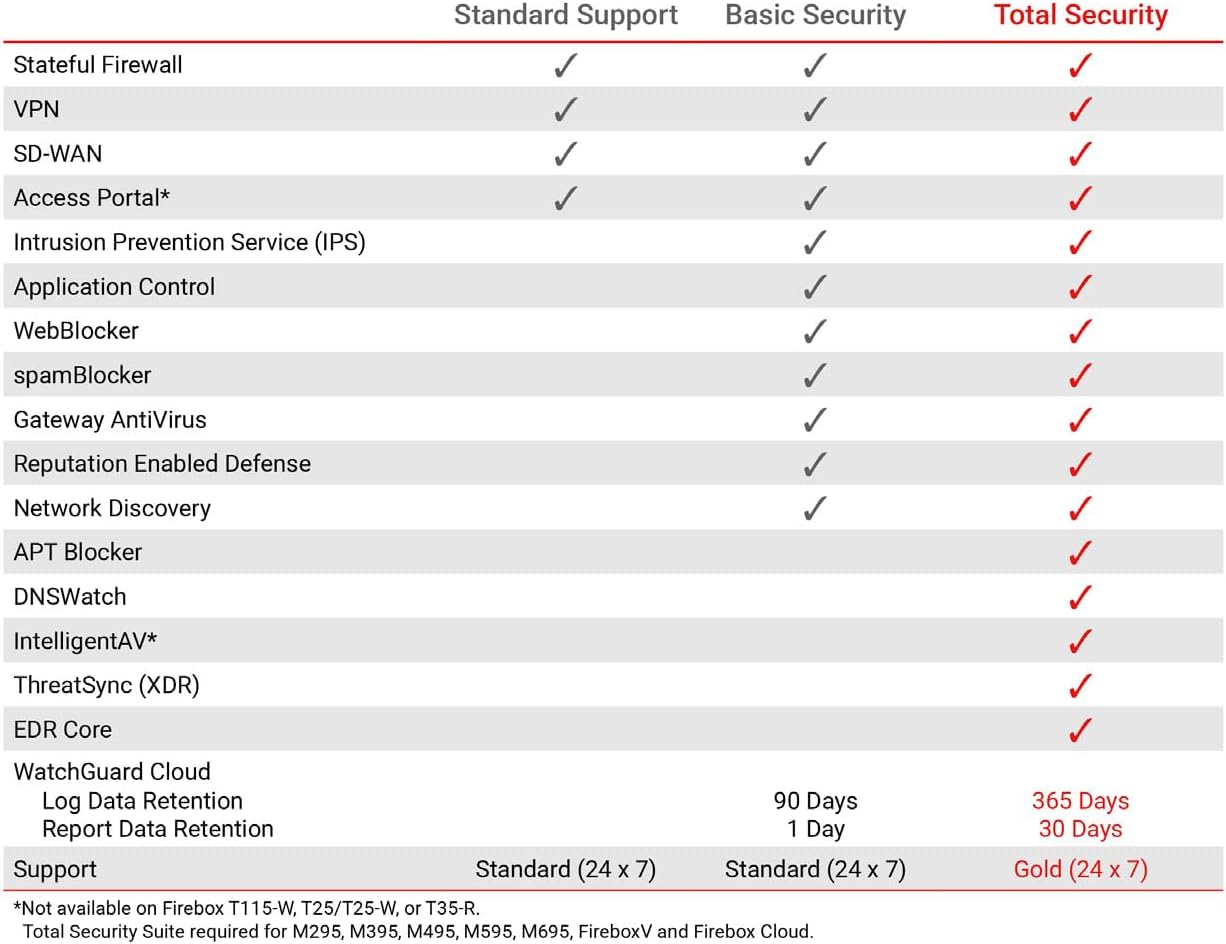
This table compares the security features included with Standard Support, Basic Security Suite, and Total Security Suite for the WatchGuard Firebox T185, showing which features are enabled for each option.
10. การรับประกันและการสนับสนุน
The WatchGuard Firebox T185 comes with a 3-year Standard Support license (WGT185003).
- การสนับสนุนมาตรฐาน: Provides software updates and 24x7 emergency technical assistance, along with business-hours support for routine inquiries.
- แผนการคุ้มครอง: Additional protection plans may be available, such as a 4-Year Protection Plan or a Complete Protect monthly plan. Refer to your purchase documentation for details.
- การสนับสนุนผู้ผลิต: หากต้องการความช่วยเหลือเพิ่มเติม โปรดไปที่เว็บไซต์อย่างเป็นทางการ WatchGuard support webเว็บไซต์ หรือติดต่อฝ่ายบริการลูกค้า