
1. บทนำ
Thank you for choosing the KTC H32S5 31.5-inch QHD Curved Gaming Monitor. This manual provides essential information for setting up, operating, and maintaining your monitor to ensure optimal performance and longevity. Please read this manual thoroughly before using the product.
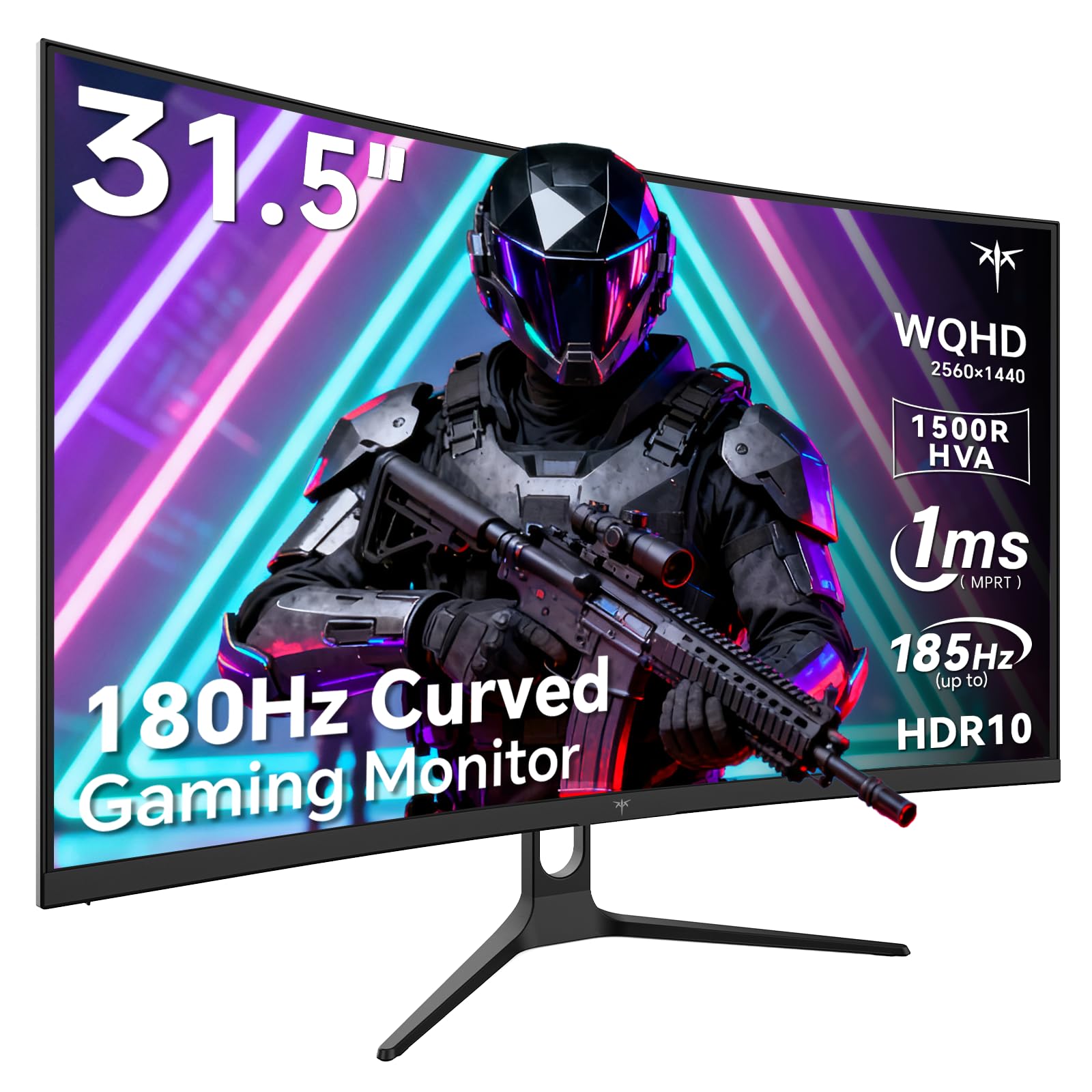
Image 1: KTC H32S5 31.5-inch QHD Curved Gaming Monitor.
2. เนื้อหาบรรจุภัณฑ์
ตรวจสอบว่ามีรายการทั้งหมดอยู่ในแพ็คเกจ:
- 31.5" 2K Curved Monitor x1
- Monitor Stand x1
- คู่มือเริ่มต้นใช้งานฉบับย่อ (QSG) x1
- สาย DPx1
- อะแดปเตอร์แปลงไฟ x1
3. การตั้งค่าจอภาพ
3.1 การติดตั้งขาตั้ง
Carefully attach the monitor stand to the back of the monitor following the instructions in the Quick Start Guide. Ensure all screws are tightened securely.
3.2 การติดตั้งแบบติดผนัง VESA
The monitor supports VESA 100mm x 100mm mounting. If you prefer to wall-mount the monitor, remove the stand and attach a compatible VESA mount (not included) to the designated holes on the back of the monitor. Ensure the wall mount can support the monitor's weight (approximately 16.87 pounds).

ภาพที่ 2: ด้านหลัง view of the monitor showing connectivity ports and VESA mount area.
3.3 การเชื่อมต่อกับอุปกรณ์
Connect your devices using the available ports:
- DisplayPort 1.4 (x2): For connecting to PCs and other devices supporting up to 185Hz refresh rate.
- สาย HDMI 2.0 (2 เส้น): For connecting to gaming consoles, laptops, and desktops supporting up to 144Hz refresh rate.
- พอร์ต USB2.0 (x2): For connecting peripherals (upgrade only).
- แจ็คหูฟัง: สำหรับเอาต์พุตเสียง
- อินพุตไฟ DC: เชื่อมต่ออะแดปเตอร์ไฟฟ้าที่ให้มา
3.4 การเปิดเครื่องครั้งแรก
After connecting all necessary cables, press the power button to turn on the monitor. The monitor will automatically detect the input signal. If no signal is detected, ensure your device is powered on and the correct input source is selected on the monitor.
4. คู่มือการใช้งาน
4.1 เมนูการแสดงผลบนหน้าจอ (OSD)
The OSD menu allows you to adjust various monitor settings. Refer to the Quick Start Guide for detailed instructions on navigating the OSD menu using the monitor's control buttons.
4.2 การตั้งค่าการแสดงผล
- ปณิธาน: The monitor features WQHD (2560 x 1440) resolution for sharp and detailed images.
- อัตราการรีเฟรช: Enjoy a smooth visual experience with a 180Hz refresh rate, overclockable to 185Hz via DisplayPort.
- เวลาตอบสนอง: A 1ms MPRT response time minimizes motion blur, ideal for fast-paced gaming.
- การซิงโครไนซ์แบบปรับได้: Adaptive FreeSync technology eliminates screen tearing and stuttering for fluid gameplay.
- ช่วงสี: Experience vivid and realistic colors with 99% sRGB color gamut coverage, 126% sRGB color volume, and a 5000:1 contrast ratio. HDR10 support provides enhanced contrast and a wider color palette.
- การดูแลดวงตา: Features like Low Blue Light and Flicker-Free technology help reduce eye strain during extended use.

Image 3: Visual representation of the monitor's high refresh rate for smoother gaming.

Image 4: Demonstration of Adaptive Sync technology eliminating screen tearing.

Image 5: Illustration of the 1500R curved display for an immersive viewการสร้างประสบการณ์
4.3 GamePlus Mode
Activate GamePlus mode for in-game enhancements such as a customizable crosshair, on-screen timer, and display modes optimized for FPS (First-Person Shooter) and RTS (Real-Time Strategy) games.

ภาพที่ 6: จบแล้วview of GamePlus features including Crosshair, Timer, FPS, and RTS modes.
5. การบำรุงรักษา
To ensure the longevity and optimal performance of your KTC H32S5 monitor, follow these maintenance guidelines:
- การทำความสะอาดหน้าจอ: เช็ดหน้าจอเบาๆ ด้วยผ้านุ่มที่ไม่เป็นขุย สำหรับรอยฝังแน่น ให้เช็ดเบาๆampen the cloth with water or a mild, non-abrasive screen cleaner. Avoid using alcohol, ammonia, or abrasive cleaners.
- การทำความสะอาดภายนอก: ใช้ผ้าแห้งนุ่มๆ เช็ดทำความสะอาดจอภาพasing.
- การจัดการ: Avoid touching the screen directly with your fingers or sharp objects. Do not place heavy objects on the monitor.
- การระบายอากาศ : ตรวจสอบให้แน่ใจว่ามีการระบายอากาศที่เพียงพอรอบๆ จอภาพเพื่อป้องกันความร้อนสูงเกินไป อย่าปิดกั้นช่องระบายอากาศ
- หมดแรง: ควรปิดจอภาพและถอดปลั๊กออกจากเต้าเสียบไฟทุกครั้งก่อนทำความสะอาด หรือหากจะไม่ใช้งานเป็นเวลานาน
6 การแก้ไขปัญหา
If you encounter any issues with your monitor, refer to the following common troubleshooting steps:
- ไม่มีจอแสดงผล/หน้าจอสีดำ:
- ตรวจสอบให้แน่ใจว่าสายไฟเชื่อมต่อกับจอภาพและเต้าเสียบไฟอย่างแน่นหนา
- ตรวจสอบให้แน่ใจว่าสายวิดีโอ (DP หรือ HDMI) เชื่อมต่อกับจอภาพและคอมพิวเตอร์/อุปกรณ์ของคุณอย่างแน่นหนาแล้ว
- ตรวจสอบว่าได้เลือกแหล่งสัญญาณเข้าที่ถูกต้องบนจอภาพผ่านเมนู OSD แล้วหรือไม่
- รีสตาร์ทคอมพิวเตอร์/อุปกรณ์ของคุณ
- ภาพสั่นไหวหรือบิดเบี้ยว:
- Check the video cable for any damage or loose connections. Try a different cable if available.
- ปรับอัตราการรีเฟรชในการตั้งค่าการแสดงผลของคอมพิวเตอร์ของคุณ
- Ensure Adaptive Sync is enabled in both the monitor's OSD and your graphics card settings.
- ปัญหาสี:
- รีเซ็ตการตั้งค่าสีของจอภาพกลับไปเป็นค่าเริ่มต้นจากโรงงานผ่านเมนู OSD
- Adjust color temperature or gamma settings in the OSD.
- ไม่มีเสียง:
- Ensure headphones are properly connected to the headphone jack.
- Check audio settings on your connected device and the monitor's OSD.
หากปัญหายังคงอยู่หลังจากลองทำตามขั้นตอนเหล่านี้แล้ว โปรดติดต่อฝ่ายบริการลูกค้า
7. ข้อมูลจำเพาะผลิตภัณฑ์
| คุณสมบัติ | ข้อมูลจำเพาะ |
|---|---|
| ยี่ห้อ | เคทีซี |
| หมายเลขรุ่น | H32S5 |
| ขนาดหน้าจอ | 31.5 นิ้ว |
| ปณิธาน | 2560 x 1440 พิกเซล (QHD จอไวด์สกรีน 1440p) |
| อัตราส่วนภาพ | 16:9 น. |
| ความโค้ง | 1500อาร์ |
| อัตราการรีเฟรช | 180Hz (up to 185Hz via DP) |
| เวลาตอบสนอง | MPRT 1 มิลลิวินาที |
| ประเภทแผง | เอชวีเอ |
| ช่วงสี | 99% sRGB coverage, 126% sRGB volume |
| อัตราส่วนคอนทราสต์ | 5000:1 น. |
| ความสว่างของภาพ | 300 แคนเดลา |
| รองรับ HDR | HDR10 |
| การเชื่อมต่อ | DisplayPort 1.4 x2, HDMI 2.0 x2, USB 2.0 x2 |
| เสียง | แจ็คหูฟัง |
| ความสามารถในการปรับเปลี่ยนได้ | Tilt adjustment (-5° to 20°) |
| แท่นยึด VESA | 100มม. x 100มม. |
| ขนาดสินค้า | 5.8 x 27.9 x 20.4 นิ้ว |
| น้ำหนักสินค้า | 16.87 ปอนด์ |
| เล่มที่tage | 19 โวลต์ (กระแสตรง) |
8. ข้อมูลการรับประกัน
This product is subject to a 30-day return/replacement policy. For detailed warranty terms and conditions, please refer to the documentation provided with your purchase or contact the seller directly.
9. การสนับสนุนลูกค้า
For any questions, technical assistance, or support regarding your KTC H32S5 monitor, please contact the seller, KTC-Official, through the Amazon messaging system. They are available to assist you with product inquiries and troubleshooting.
คุณยังสามารถเยี่ยมชม ร้าน KTC บน Amazon สำหรับข้อมูลและผลิตภัณฑ์เพิ่มเติม
10. วิดีโอผลิตภัณฑ์อย่างเป็นทางการ
Watch this official product video from KTC-Official for a closer look at the KTC 32 Inch 2K 180Hz Curved Gaming Monitor.