การแนะนำ
This manual provides essential instructions for the safe operation, setup, and maintenance of your Generic E99 Pro Foldable Drone. Please read this manual thoroughly before operating the drone to ensure proper function and to prevent damage or injury.
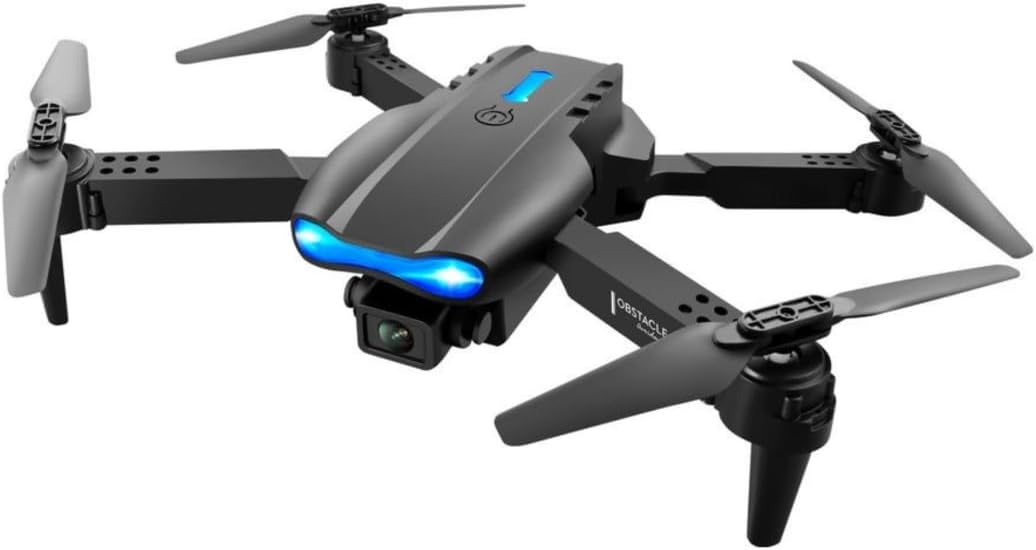
Image: The E99 Pro drone, its remote control, and a carrying case, illustrating the complete product package.
แนวทางปฏิบัติเพื่อความปลอดภัย
- คำแนะนำด้านอายุ: This drone is intended for users aged 14 and up. It is not a toy for children under 14.
- สภาพแวดล้อมการบิน: ควรใช้งานโดรนในพื้นที่โล่ง ห่างจากผู้คน สัตว์ อาคาร และสายไฟ หลีกเลี่ยงการบินในสภาพลมแรงหรือสภาพอากาศเลวร้าย
- การตรวจสอบก่อนบิน: Always ensure propellers are securely attached, batteries are fully charged, and the drone is calibrated before each flight.
- ความปลอดภัยของแบตเตอรี่: Use only approved chargers and batteries. Do not overcharge or puncture batteries. Discontinue use if batteries show signs of damage or swelling.
- เคารพความเป็นส่วนตัว: Be mindful of privacy laws when using the camera features.
- หยุดฉุกเฉิน: Familiarize yourself with the emergency stop procedure for immediate shutdown if necessary.
สินค้าเกินview
เนื้อหาแพ็คเกจ
- โดรนพับได้ E99 Pro
- รีโมทคอนโทรล
- Rechargeable Drone Batteries (Quantity may vary, typically 1-2)
- สายชาร์จ USB
- ใบพัดสำรอง
- ไขควง
- คู่มือการใช้งาน
- กระเป๋าใส่อุปกรณ์
ส่วนประกอบโดรน

ภาพ: ระเบิด view or detailed shot of the E99 Pro drone, highlighting key components such as propellers, motors, camera, and landing gear.
- ใบพัด: ใบพัดหลักสี่ใบสำหรับสร้างแรงยกและแรงขับเคลื่อน
- มอเตอร์: Four motors driving the propellers.
- Dual 4K HD Cameras: Front and bottom cameras for photo and video capture.
- ช่องใส่แบตเตอรี่: Located on the drone's underside.
- ไฟ LED แสดงสถานะ: For status and orientation.
- แขนพับได้: เพื่อการจัดเก็บและขนส่งแบบกะทัดรัด
การตั้งค่า
1. กางโดรนออก
Gently unfold the drone arms until they lock into position. Ensure all four arms are fully extended before flight.
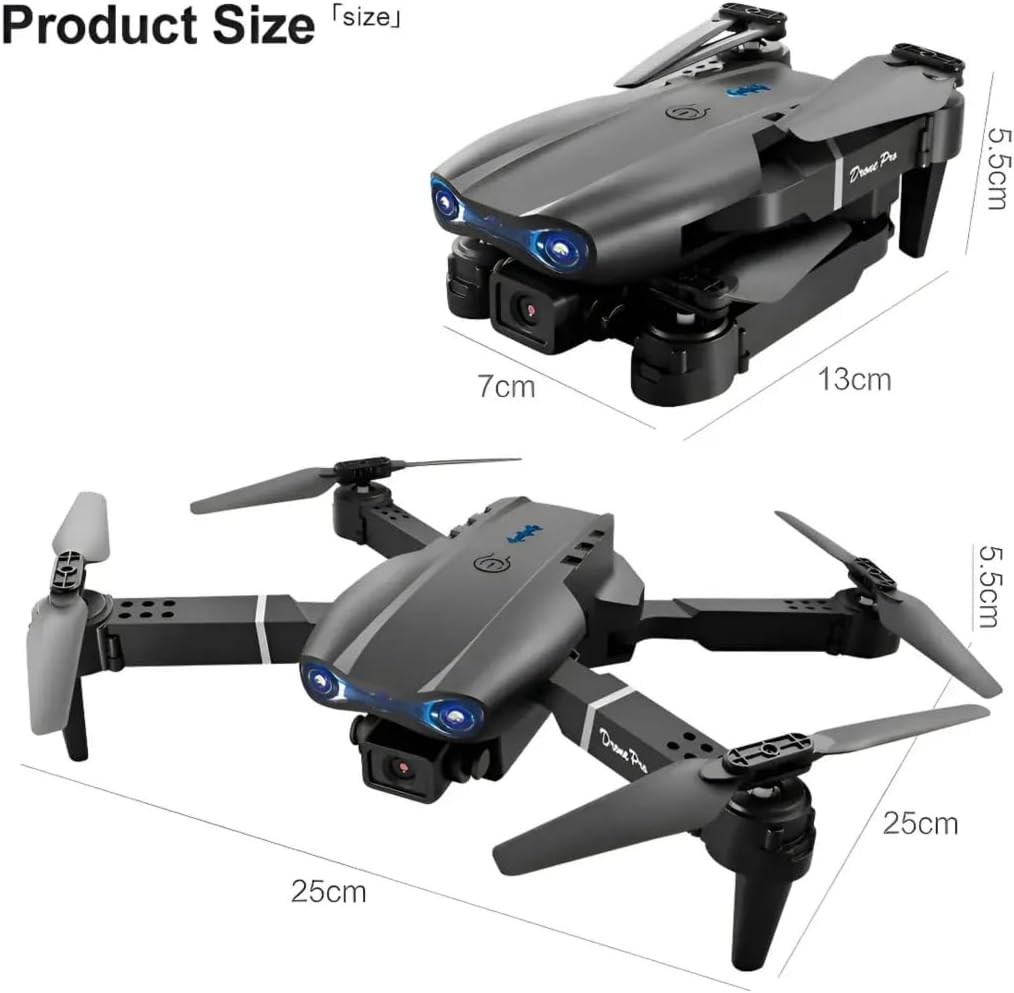
Image: The E99 Pro drone shown in both its folded and unfolded configurations, with dimensions indicating its compact size for storage and its operational size.
2. การติดตั้งและการชาร์จแบตเตอรี่
เสียงหึ่งๆแบตเตอรี่: Insert the fully charged drone battery into the battery compartment on the drone's rear. Ensure it clicks into place securely. Connect the battery to the drone's power port if it's not integrated.
แบตเตอรี่ควบคุมระยะไกล: Open the battery cover on the back of the remote control and insert 3 AA batteries (not included) according to the polarity indicators. Close the cover.
การชาร์จ: Use the provided USB charging cable to charge the drone battery. Connect the cable to a USB power adapter (5V/1A recommended). The indicator light on the battery or charger will show charging status (e.g., red for charging, green for fully charged).
3. Propeller Installation (If Required)
If propellers are not pre-installed, attach them according to the markings (A and B) on the propellers and motor shafts. Ensure they are tightened securely but not overtightened. Refer to the diagram for correct orientation.
4. การควบคุมระยะไกลview

Image: A detailed diagram of the E99 Pro drone's remote control, with labels pointing to the throttle lever, steering rod, one-key up/landing, headless mode/return home, 3D roll, fine-tuning buttons, and power switch.
- คันเร่ง (จอยสติ๊กซ้าย): ควบคุมระดับความสูง (ขึ้น/ลง) และการหมุน (ซ้าย/ขวา)
- Steering Rod (Right Joystick): ควบคุมการเคลื่อนที่ไปข้างหน้า/ข้างหลัง และ ซ้าย/ขวา
- One-Key Up/Landing: เริ่มการขึ้นหรือลงจอดโดยอัตโนมัติ
- Headless Mode/Return Home: Activates headless mode (short press) or initiates return to home (long press).
- 3D Roll: Executes a 360° flip.
- ปุ่มปรับแต่งละเอียด: Adjust drone drift (forward/backward, left/right).
- สวิตช์ไฟ: เปิด/ปิดรีโมทคอนโทรล
- สวิตช์ความเร็ว: Toggles between 3 speed modes.
5. การดาวน์โหลดแอปและการเชื่อมต่อ
Download the dedicated drone control app (refer to the packaging or a QR code in the box for the specific app name) from your smartphone's app store. Turn on the drone and your phone's Wi-Fi. Connect to the drone's Wi-Fi network (usually named "E99 Pro" or similar). Open the app to view the FPV feed and access advanced controls.
คำแนะนำการใช้งาน
1. การจับคู่และการปรับเทียบ
- วางโดรนไว้บนพื้นผิวเรียบ
- เปิดโดรน จากนั้นเปิดรีโมทคอนโทรล
- Push the left joystick (throttle) all the way up, then all the way down. The remote will beep, and the drone lights will stop flashing, indicating successful pairing.
- To calibrate the gyroscope, push both joysticks down and to the right simultaneously. The drone lights will flash rapidly and then become solid, indicating calibration is complete.
2. การขึ้นและลงจอด
- ขึ้นบินด้วยปุ่มเดียว: After pairing and calibration, press the "One-Key Up/Landing" button. The drone will automatically ascend to a stable height.
- การบินขึ้นด้วยมือ: Push both joysticks down and outwards to start the motors. Then, slowly push the left joystick (throttle) up to ascend.
- การลงจอดด้วยปุ่มเดียว: Press the "One-Key Up/Landing" button again. The drone will automatically descend and land.
- การลงจอดด้วยตนเอง: Slowly pull the left joystick (throttle) down until the drone lands. Once landed, pull the left joystick all the way down and hold for a few seconds to stop the motors.
3. การควบคุมการบิน
- ขึ้น/ลง: เลื่อนจอยสติ๊กด้านซ้ายขึ้น/ลง
- เลี้ยวซ้าย/ขวา: ดันจอยสติ๊กซ้ายไปทางซ้าย/ขวา
- Fly Forward/Backward: ดันจอยสติ๊กด้านขวาขึ้น/ลง
- บินซ้าย/ขวา (ด้านข้าง): ดันจอยสติ๊กขวาไปทางซ้าย/ขวา
4. ฟังก์ชั่นพิเศษ
- โหมดความเร็ว: Press the speed switch button on the remote to cycle through 3 different speed settings (low, medium, high).
- โหมดไม่มีหัว: Short press the "Headless Mode/Return Home" button. In headless mode, the drone's orientation is relative to the pilot, regardless of its front direction. Press again to exit.
- การพลิกตัว 360°: Press the "3D Roll" button, then push the right joystick in any direction to perform a flip. Ensure sufficient altitude (at least 2-3 meters) before attempting.
- ความต้านทานลม: The drone is designed with upgraded motors for stable flight in light wind conditions. Avoid flying in strong winds.

Image: The E99 Pro drone flying outdoors, with graphic elements suggesting its wind-resistant capabilities, demonstrating stable flight.
5. การทำงานของกล้อง

ภาพ: ภาพระยะใกล้ view of the E99 Pro drone's dual 4K HD camera system, illustrating features such as dual camera switch, 90-degree adjustment, and 120-degree wide-angle lens.
- Dual 4K HD Cameras: The drone features both a front and a bottom camera. Switch between cameras via the dedicated button on the remote or within the app.
- วิดีโอ FPV ถ่ายทอดสด: Connect your smartphone to the drone's Wi-Fi network and open the app to view การถ่ายทอดสดวิดีโอแบบเรียลไทม์
- ถ่ายภาพ/วิดีโอ: Use the dedicated buttons on the remote or within the app to take photos or start/stop video recording.
- การปรับกล้อง: The camera offers 90° adjustment for varied shooting angles and a 120° wide-angle view. Adjustments are typically made manually before flight or digitally via the app.
การซ่อมบำรุง
- การดูแลแบตเตอรี่ Always fully charge batteries before use. Do not store batteries fully charged or completely depleted for extended periods. Store in a cool, dry place.
- การทำความสะอาด: ใช้ผ้าแห้งเนื้อนุ่มเช็ดทำความสะอาดตัวโดรนและเลนส์กล้อง หลีกเลี่ยงการใช้สารเคมีรุนแรง
- การเปลี่ยนใบพัด: If a propeller is damaged, replace it with a spare propeller of the correct type (A or B). Use the provided screwdriver to remove and install. Ensure the new propeller is securely fastened.
- พื้นที่จัดเก็บ: When not in use, fold the drone and store it in its carrying case to protect it from dust and damage.
การแก้ไขปัญหา
| ปัญหา | สาเหตุที่เป็นไปได้ | สารละลาย |
|---|---|---|
| โดรนไม่ตอบสนองต่อรีโมท | Not paired, low remote battery, drone battery low. | Re-pair drone and remote. Replace remote batteries. Charge drone battery. |
| โดรนลอยไปมาระหว่างบิน | Not calibrated, wind interference, uneven surface at takeoff. | Re-calibrate on a flat surface. Use fine-tuning buttons. Avoid windy conditions. |
| Camera feed is not visible in app. | Not connected to drone's Wi-Fi, app not open, drone camera not active. | Ensure phone is connected to drone's Wi-Fi. Open the app. Check drone power. |
| Drone motors do not start. | Not paired, low battery, motors locked. | Re-pair. Charge battery. Perform manual takeoff sequence (joysticks down and outwards). |
| เวลาบินสั้น | แบตเตอรี่ชาร์จไม่เต็ม แบตเตอรี่เก่า บินด้วยท่าทางที่รุนแรง | Ensure full charge. Consider replacing old batteries. Fly more conservatively. |
ข้อมูลจำเพาะ
- ชื่อรุ่น : E99 โปร
- ยี่ห้อ: ทั่วไป
- สี: สีดำ
- ความละเอียดการจับภาพวิดีโอ: 4K
- ความละเอียดของภาพนิ่งที่มีประสิทธิภาพ: 8 MP
- คุณสมบัติพิเศษ: Dual 4K UHD Camera
- เทคโนโลยีการเชื่อมต่อ: บลูทู ธ Wi-Fi
- ระดับสกิล: ทั้งหมด
- น้ำหนักสินค้า: 340 กรัม (ประมาณ 12 ออนซ์)
- ความจุแบตเตอรี่: 1800 มิลลิวินาทีamp ชั่วโมง (ต่อแบตเตอรี่โดรนหนึ่งก้อน)
- รูปแบบการจับภาพวิดีโอ: เอ็มพี 4
- ประเภทการควบคุม: รีโมทคอนโทรล
- วัสดุ: พลาสติก
- ขนาดของผลิตภัณฑ์ (เมื่อกางออก): ขนาดโดยประมาณ ยาว 9.84 นิ้ว x กว้าง 9.84 นิ้ว x สูง 2.17 นิ้ว
- อายุที่แนะนำ: 14 ปีขึ้นไป
- แบตเตอรี่ควบคุมระยะไกล: แบตเตอรี่ AA 3 ก้อน (ไม่รวม)
การรับประกันและการสนับสนุน
Specific warranty information for the Generic E99 Pro drone is not provided in this manual. Please refer to the product packaging, purchase documentation, or contact the retailer or manufacturer directly for details regarding warranty coverage and customer support.


