
การแนะนำ
Welcome to the world of robotics with your new Xtrem Bots Bionic Robot! This interactive robot is designed to provide an engaging and educational experience, allowing users to explore basic programming concepts and remote control operation. With its versatile movement modes, LED lights, and robotic sounds, the Bionic Robot offers hours of interactive fun.

Image: The Xtrem Bots Bionic Robot in white and green, standing next to its white remote control.
เนื้อหาแพ็คเกจ
- 1 x Xtrem Bots Bionic Robot (Model XT3803418)
- 1 x รีโมทคอนโทรล
- คู่มือการใช้งาน (เอกสารนี้)
การตั้งค่า
1. การติดตั้งแบตเตอรี่
The Xtrem Bots Bionic Robot requires 2 AA batteries (included) for operation.
- Locate the battery compartment on the back of the robot.
- ใช้ไขควงขนาดเล็ก (ไม่ได้แถมมาให้) เปิดฝาช่องใส่แบตเตอรี่
- ใส่แบตเตอรี่ AA จำนวน 2 ก้อน โดยให้แน่ใจว่าขั้วถูกต้อง (+/-)
- ใส่ฝาปิดช่องใส่แบตเตอรี่และขันให้แน่นด้วยสกรู
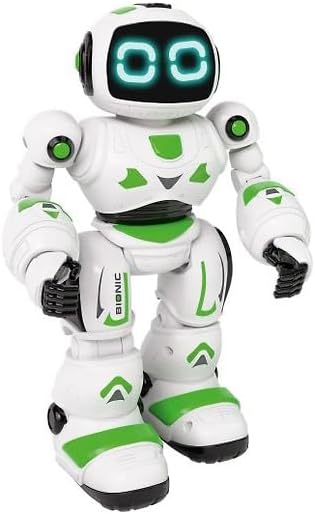
ภาพ: ด้านหน้า view of the Xtrem Bots Bionic Robot, showing its design.
2. เปิด/ปิดเครื่อง
- To power on the robot, locate the power switch on its back and slide it to the "ON" position.
- To power off the robot, slide the power switch to the "OFF" position.
- Ensure the remote control also has batteries installed and is powered on to establish a connection.
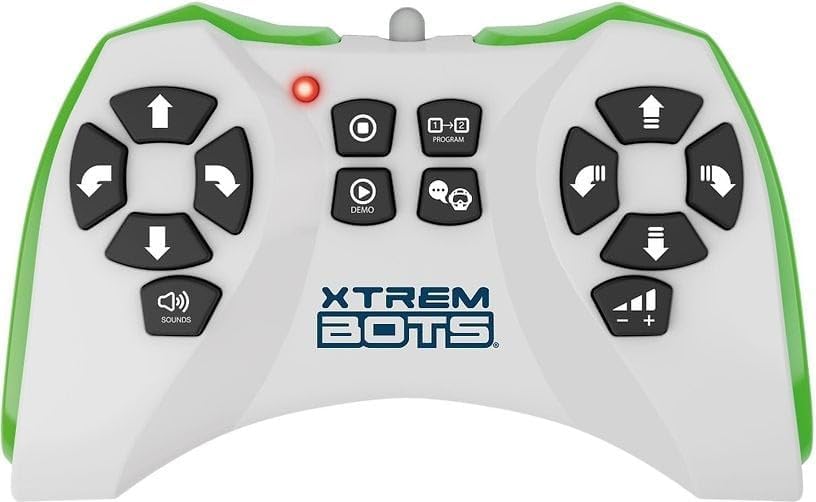
Image: The remote control for the Xtrem Bots Bionic Robot, showing various buttons for movement and functions.
คำแนะนำการใช้งาน
ฟังก์ชั่นการควบคุมระยะไกล
The remote control allows you to command your Bionic Robot with various actions. Familiarize yourself with the buttons and their corresponding functions:
- การควบคุมการเคลื่อนไหว: Use the directional buttons to make the robot move forward, backward, turn left, and turn right.
- โหมดสไลด์: The robot can perform sliding movements.
- โหมดเดิน: The robot can perform walking movements.
- การเขียนโปรแกรม: Utilize the programming function to create sequences of up to 20 different actions.
- ไฟ LED: The robot's eyes feature LED lights that illuminate during operation.
- Robotic Sound: The robot produces various robotic sounds.
ฟังก์ชั่นการเขียนโปรแกรม
To program a sequence of actions:
- กดปุ่ม "โปรแกรม" บนรีโมทคอนโทรล
- Input your desired sequence of movements and actions (up to 20 steps).
- Press the "Program" button again to execute the programmed sequence.
Video: Demonstration of a remote control robot's programmable functions, including movement, sounds, and gesture sensing.
การซ่อมบำรุง
- การทำความสะอาด: Wipe the robot and remote control with a dry, soft cloth. Do not use water or cleaning solutions.
- พื้นที่จัดเก็บ: Store the robot and remote control in a cool, dry place away from direct sunlight when not in use. Remove batteries if storing for extended periods.
- การดูแลแบตเตอรี่ ควรใช้แบตเตอรี่ใหม่และชนิดที่แนะนำเสมอ ห้ามใช้แบตเตอรี่เก่าและใหม่ปะปนกัน หรือใช้แบตเตอรี่ต่างชนิดกัน
การแก้ไขปัญหา
| ปัญหา | สาเหตุที่เป็นไปได้ | สารละลาย |
|---|---|---|
| หุ่นยนต์ไม่ตอบสนอง | Batteries are low or incorrectly installed. Remote control is off or out of range. | Check and replace batteries in both robot and remote. Ensure remote is within operating range. Power cycle both devices. |
| หุ่นยนต์เคลื่อนที่อย่างไม่เป็นระเบียบ | Interference from other electronic devices. Low battery power. | Move to an area with less electronic interference. Replace batteries. |
| Programming sequence is incorrect. | Incorrect button presses during programming. | Clear the current program and re-enter the sequence carefully. |
ข้อมูลจำเพาะ
| คุณสมบัติ | รายละเอียด |
|---|---|
| หมายเลขรุ่น | เอที3803418 |
| ยี่ห้อ | Xtrem Bots |
| ขนาด | 30 x 20 x 15 ซม. |
| น้ำหนัก | 500 กรัม |
| วัสดุ | พลาสติก |
| สี | สีเขียว |
| ประเภทแบตเตอรี่ | แบตเตอรี่ AA 2 ก้อน (รวมอยู่ด้วย) |
| จำเป็นต้องประกอบ | เลขที่ |
| คุณสมบัติพิเศษ | LED Lights, Robotic Sound, Programmable (up to 20 functions), Walk and Slide Movement Modes |
| วัตถุประสงค์ทางการศึกษา | Introduce children to programming concepts and provide an educational, fun experience. |
ข้อมูลด้านความปลอดภัย
- ไม่เหมาะสำหรับเด็กอายุต่ำกว่า 3 ปี เนื่องจากชิ้นส่วนขนาดเล็ก
- แนะนำให้มีผู้ใหญ่คอยดูแลระหว่างการเล่น
- Do not operate near stairs, water, or other hazards.
- Do not attempt to modify or disassemble the robot or remote control.
- กำจัดแบตเตอรี่อย่างมีความรับผิดชอบตามกฎระเบียบท้องถิ่น
การรับประกันและการสนับสนุน
For warranty information or technical support, please refer to the contact details provided on the product packaging or visit the official Xtrem Bots webเว็บไซต์.