
1. บทนำ
This manual provides detailed instructions for the installation, operation, and maintenance of your UNITOPSCI Android 15 Car Stereo. Please read this manual thoroughly before using the product to ensure proper functionality and safety. This unit is specifically designed for Honda Odyssey models from 2005 to 2010 (left-hand drive).
2. สินค้าหมดview
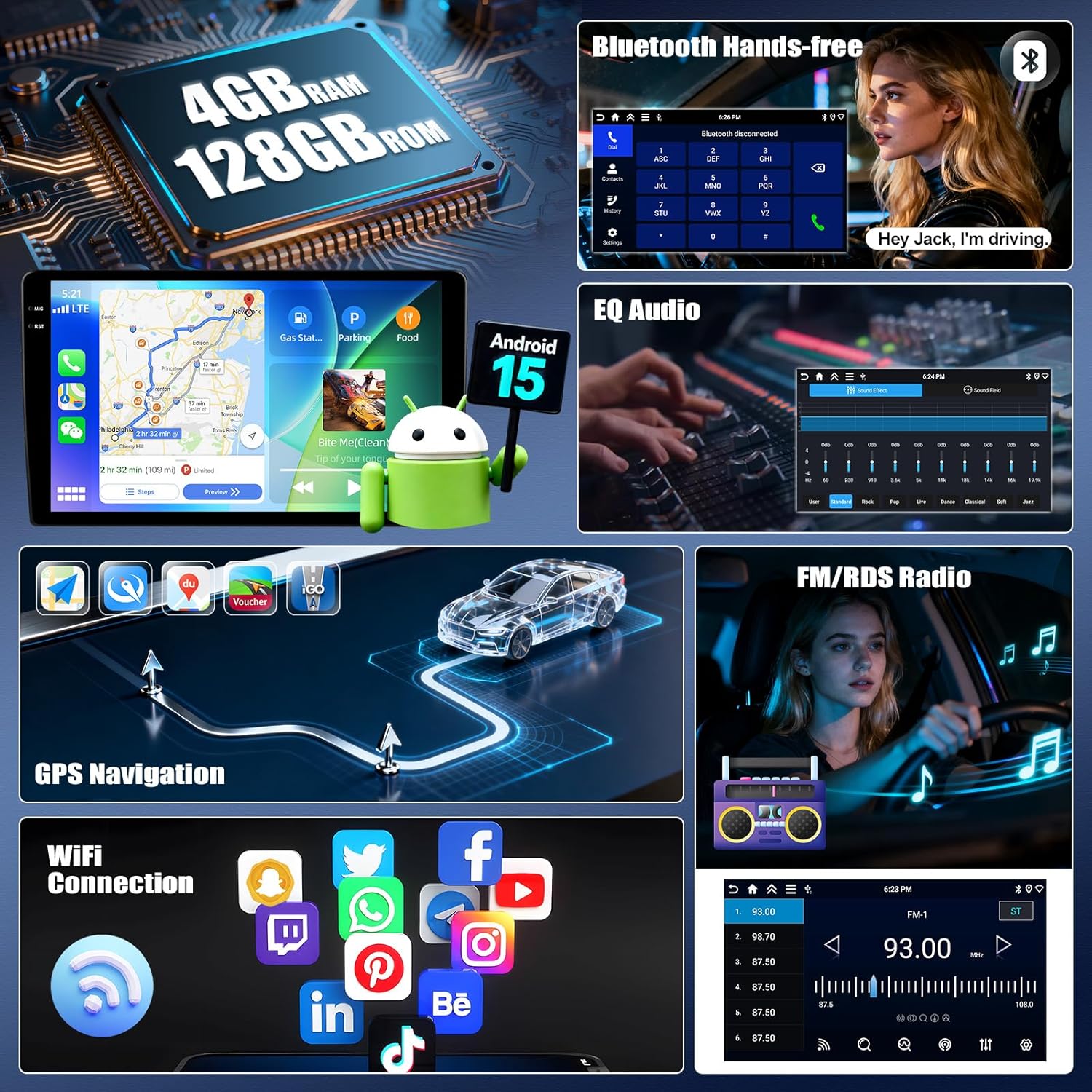
The UNITOPSCI Android 15 Car Stereo features a 10-inch IPS touchscreen with 1280x720P resolution, offering a clear and responsive interface. It is equipped with 4GB RAM and 128GB ROM, providing ample space for applications and smooth performance. Key features include:
- Wireless Carplay and Android Auto for seamless smartphone integration.
- Mirror Link functionality for both iOS and Android devices.
- Built-in GPS navigation with support for offline and online maps.
- บลูทูธ 5.0 สำหรับการโทรแบบแฮนด์ฟรีและการสตรีมเสียง
- FM/RDS radio with enhanced signal reception.
- EQ Audio settings for a customizable sound experience.
- รองรับการควบคุมด้วยพวงมาลัย (SWC)
- AHD Rear Camera input with parking assist lines.
- Multiple UI themes and Split Screen multitasking.
- Integrated WiFi for internet access and app downloads.
3. เนื้อหาบรรจุภัณฑ์
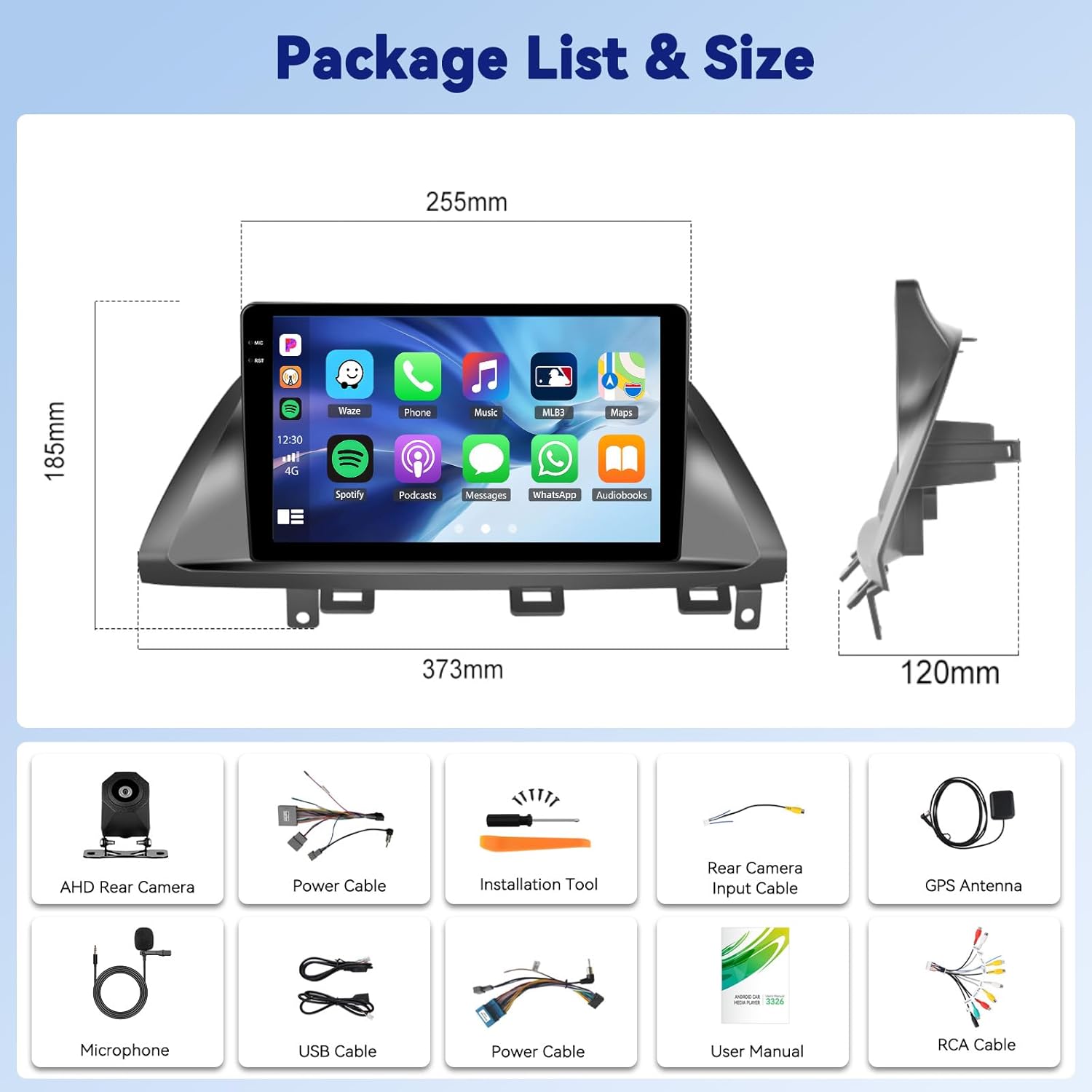
โปรดตรวจสอบว่าสินค้าทั้งหมดมีอยู่ในแพ็คเกจ:
- วิทยุรถยนต์ 1 เครื่อง
- สายไฟ 1 เส้น
- 1 x รถ ด้านหลัง View กล้อง
- 1 x เครื่องมือติดตั้ง
- เสาอากาศ GPS 1 เส้น
- 1 x สายอินพุตกล้องด้านหลัง
- สาย 1 x RCA
- สาย USB 2 เส้น
- 1 x คู่มือผู้ใช้
- 1 x ไมโครโฟน (MIC)

4. การติดตั้ง
Professional installation is recommended. Ensure the vehicle's power is disconnected before beginning installation. Refer to your vehicle's specific wiring diagram for accurate connections. The car stereo is designed to fit Honda Odyssey 2005-2010 models.

5. การทำงานพื้นฐาน
The 10-inch IPS touchscreen provides intuitive control over all functions. Navigate through menus by swiping and tapping. The main interface displays essential information and quick access to frequently used applications.
6. Wireless Carplay & Android Auto Connection
Connect your smartphone wirelessly to access navigation, music, calls, and messages directly from the car stereo display.
- Open the 'S-Play' application on the car stereo.
- ตรวจสอบให้แน่ใจว่าได้เปิดใช้งาน Bluetooth บนสมาร์ทโฟนและเครื่องเสียงในรถของคุณแล้ว
- Pair your phone's Bluetooth with the car stereo (e.g., 'BLINK_UNW2652').
- Follow the on-screen prompts to establish the Carplay or Android Auto connection.

7. Mirror Link (Jlink)
Mirror Link allows you to display your smartphone's screen directly onto the car stereo. Android users can also control their phone from the stereo's touchscreen.
- Open the 'Jlink' application on the car stereo.
- For initial setup, connect the car stereo to your mobile phone's hotspot via WiFi. If prompted, download the Jlink client to your phone by scanning the QR code.
- บนโทรศัพท์มือถือของคุณ ให้เปิดแอป Jlink และเริ่มการส่งภาพหน้าจอ
8. ระบบนำทาง GPS
The car stereo features a built-in GPS module supporting both online and offline navigation. You can download maps for offline use or utilize online mapping services via WiFi.

9.บลูทูธ 5.0
The integrated Bluetooth 5.0 module enables hands-free calling and wireless audio streaming from your paired smartphone. Access your phonebook, call history, and dial numbers directly from the stereo.
10. วิทยุ FM/RDS
Enjoy your favorite radio stations with improved signal reception thanks to the built-in FM/RDS tuner. The system allows you to store preset stations for quick access.
11. EQ Audio Settings
Customize your audio experience with the Equalizer (EQ) settings. Adjust various frequency bands to match your preferences and vehicle acoustics. Multiple preset sound effects are available.

12. ระบบควบคุมพวงมาลัย (SWC)
The car stereo supports your vehicle's existing steering wheel controls, allowing you to safely manage audio functions like volume, track changes, and call answering without taking your hands off the wheel. The system includes a learning function to map your steering wheel buttons.
13. ด้านหลัง View กล้อง
An AHD backup camera is included. When shifting into reverse gear, the display automatically switches to show a real-time view from the rear camera, complete with parking assist lines to aid in safe maneuvering.

14. Multiple UI Themes & Split Screen
Personalize your car stereo's appearance by choosing from various user interface themes. The split-screen function allows you to run two applications simultaneously, such as navigation and music playback, with adjustable sizing and positioning.
15. ข้อมูลจำเพาะ
| น้ำหนักสินค้า | 4.29 ปอนด์ |
| ขนาดสินค้า | 14.69 x 4.72 x 7.28 นิ้ว |
| ขนาดจอแสดงผล | 10 นิ้ว |
| ระบบปฏิบัติการ | แอนดรอยด์ 15 |
| แรม | 4GB |
| รอม | 128GB |
| ความละเอียดหน้าจอ | จอ IPS 1280*720 พิกเซล |
| เทคโนโลยีการเชื่อมต่อ | บลูทูธ 5.0, ไวไฟ |
| ประเภทบริการยานพาหนะ | Car (Honda Odyssey 2005-2010) |
16 การแก้ไขปัญหา
หากคุณพบปัญหาใดๆ โปรดดูวิธีแก้ไขทั่วไปต่อไปนี้:
- ไม่มีไฟฟ้า: ตรวจสอบการเชื่อมต่อไฟฟ้าและฟิวส์ทั้งหมด ตรวจสอบให้แน่ใจว่ากุญแจสตาร์ทติด
- ไม่มีเสียง: ตรวจสอบการเชื่อมต่อลำโพง ระดับเสียง และการตั้งค่า EQ ตรวจสอบว่าฟังก์ชันปิดเสียงทำงานอยู่หรือไม่
- ปัญหาการเชื่อมต่อบลูทูธ: Ensure Bluetooth is enabled on both devices. Delete previous pairings and try reconnecting. Check for interference.
- การสูญเสียสัญญาณ GPS: ตรวจสอบให้แน่ใจว่าติดตั้งเสาอากาศ GPS อย่างถูกต้องและมีความชัดเจน view ของท้องฟ้า
- หน้าจอสัมผัสไม่ตอบสนอง: ลองรีสตาร์ทเครื่อง หากปัญหายังคงอยู่ อาจจำเป็นต้องรีเซ็ตเป็นค่าจากโรงงาน (หมายเหตุ: การดำเนินการนี้จะลบข้อมูลผู้ใช้ทั้งหมด)
สำหรับปัญหาที่ซับซ้อนกว่านี้ โปรดติดต่อฝ่ายบริการลูกค้า
17. การรับประกันและการสนับสนุน
UNITOPSCI offers a 1-year warranty for this product. We also provide a 30-day money-back guarantee and a 12-month replacement service. Our dedicated 24/7 professional after-sales team is available to assist you with any inquiries or concerns regarding installation or usage.
For online support, please contact us at UNITOPSCI@126.com.