
1. บทนำ
Welcome to the instruction manual for your new boAt Aavante Prime X Soundbar. This 7.1.4 channel, 700W Dolby Atmos sound system is designed to provide an immersive audio experience for your home entertainment. It features truly wireless detachable satellite speakers and a wireless subwoofer for flexible placement and powerful sound. Please read this manual carefully to ensure proper setup, operation, and maintenance of your device.
2. อะไรอยู่ในกล่อง
เมื่อแกะกล่องแล้วโปรดตรวจสอบให้แน่ใจว่ามีสิ่งของต่อไปนี้ครบถ้วน:
- หน่วยซาวด์บาร์
- ซับวูฟเฟอร์ไร้สาย
- Detachable Satellite Speakers (2 units)
- สายไฟ
- Remote Control (with 1 AAA battery included)
- คู่มือการใช้งาน
- ชุดติดตั้งบนผนัง (ถ้ามี)

Image: The boAt Aavante Prime X soundbar system, showing the main soundbar unit, the wireless subwoofer, and two detachable satellite speakers.
3. สินค้าหมดview
3.1 ส่วนประกอบหลัก
- Main Soundbar: The central unit housing multiple speakers for front and center channels.
- ซับวูฟเฟอร์ไร้สาย: Provides deep bass frequencies for a powerful audio experience.
- Detachable Satellite Speakers: Two truly wireless speakers that can be placed independently for surround sound. They offer up to 12 hours of battery life with Dolby Atmos content and 7 hours with non-Dolby Atmos content when connected via HDMI.
3.2 ตัวเลือกการเชื่อมต่อ
The Aavante Prime X offers versatile connectivity for various audio sources:
- บลูทูธ v5.3: สำหรับการสตรีมเสียงแบบไร้สายจากอุปกรณ์ที่รองรับ
- HDMI (e-ARC): For high-quality audio transmission from your TV, supporting advanced audio formats like Dolby Atmos.
- ออปติคอล: Digital audio input for TVs and other devices.
- ช่องรับสัญญาณเสียงเข้า: ช่องรับสัญญาณเสียงอนาล็อกสำหรับอุปกรณ์ที่มีแจ็คขนาด 3.5 มม.
- ยูเอสบี: สำหรับการเล่นเสียง fileโดยตรงจากไดรฟ์ USB

Image: Visual representation of the soundbar's seamless connectivity options and the included master remote control.
3.3 การควบคุมระยะไกล
The included master remote control allows you to manage all functions of the soundbar system, including power, volume, input selection, and EQ modes.
4. การตั้งค่า
4.1 การจัดวาง
For optimal audio performance, place the main soundbar unit centrally below your television. The wireless subwoofer can be placed anywhere in the room, ideally near a wall for enhanced bass. The detachable satellite speakers should be positioned behind your listening area for the best surround sound effect.

ภาพ: แสดงให้เห็นถึงความก้าวหน้าtage of a truly wireless sound experience with the boAt Aavante Prime X compared to traditional wired soundbars.

Image: Depicts the optimal placement of the soundbar, subwoofer, and satellite speakers for a 7.1.4 channel sound experience.
4.2 Connecting Detachable Satellite Speakers
The satellite speakers are designed for truly wireless operation. To connect them to the main soundbar, simply ensure they are charged and powered on. They will automatically pair with the main unit. For charging, they can be re-attached to the main soundbar or charged via their dedicated ports (if available).

ภาพ: รายละเอียด view of how the detachable satellite speakers connect to the main soundbar unit.
4.3 การจับคู่ซับวูฟเฟอร์ไร้สาย
The subwoofer is pre-paired with the soundbar at the factory. If the connection is lost, ensure both the soundbar and subwoofer are powered on. Press and hold the pairing button on the back of the subwoofer (if available) and the pairing button on the soundbar until the indicator lights show a successful connection.
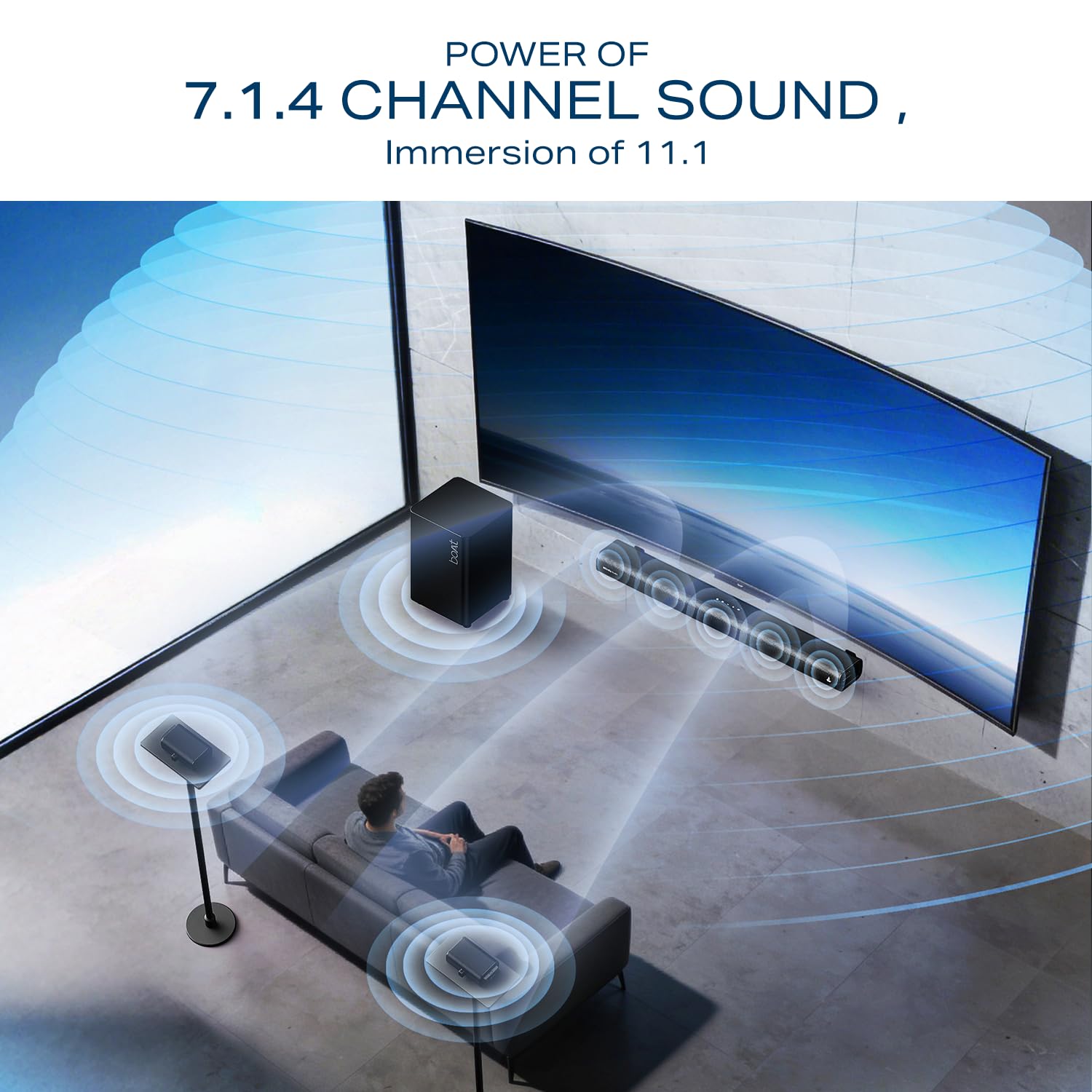
Image: The wireless subwoofer, designed to deliver powerful bass.
4.4 การสนับสนุนการติดตั้ง
For detailed installation guidance, including wall mounting instructions, please scan the QR code below:
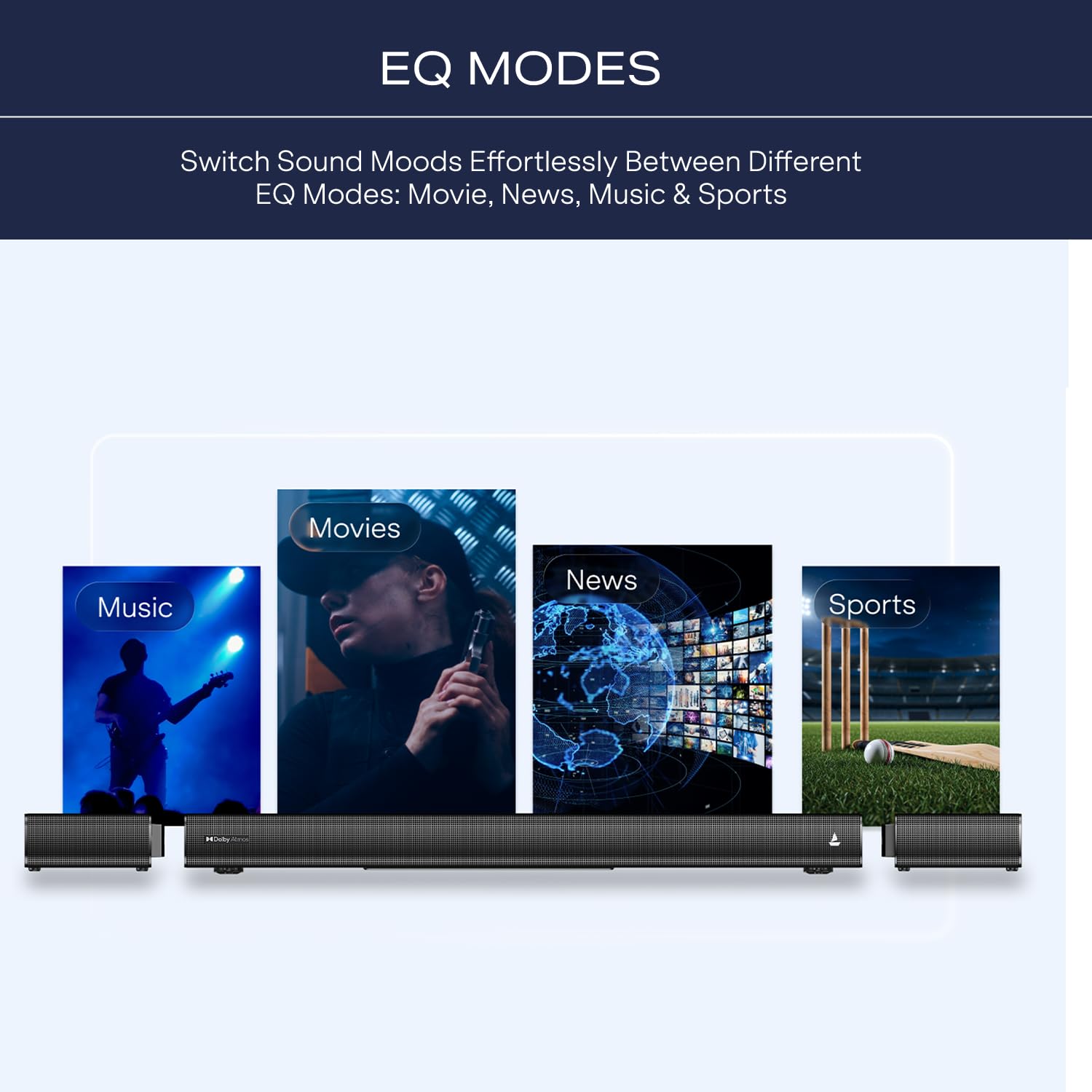
Image: QR code for accessing the online installation guide. Click the image to visit the support page.
5. คู่มือการใช้งาน
5.1 เปิด/ปิดเครื่อง
กดปุ่ม พลัง กดปุ่มบนซาวด์บาร์หรือรีโมทคอนโทรลเพื่อเปิดหรือปิดระบบ
5.2 การเลือกอินพุต
ใช้ ป้อนข้อมูล button on the remote control to cycle through available input sources: Bluetooth, HDMI (e-ARC), Optical, AUX, and USB.
5.3 การจับคู่บลูทูธ
- Turn on the soundbar and select Bluetooth input.
- On your mobile device, enable Bluetooth and search for "boAt Aavante Prime X".
- Select the device to pair. A confirmation tone will indicate successful pairing.
5.4 Using EQ Modes
The soundbar features tailored EQ modes to optimize your listening experience. Use the dedicated buttons on the remote control to switch between:
- โหมดภาพยนตร์: ช่วยเพิ่มประสิทธิภาพบทสนทนาและเทคนิคการถ่ายทำภาพยนตร์
- โหมดเพลง: Optimizes for musical playback.
- โหมดกลางคืน: Reduces dynamic range for quieter listening.
- โหมดข่าว: Clarifies speech for news and talk shows.
- โหมดกีฬา: Enhances ambient crowd noise for sports broadcasts.

Image: Visual representation of the soundbar's EQ modes for different content types.
5.5 Dolby Atmos Cinematic Sound
The boAt Aavante Prime X supports Dolby Atmos, providing a multi-dimensional audio experience. Ensure your source content and connected devices (e.g., TV, Blu-ray player) also support Dolby Atmos for the full immersive effect. Connect via HDMI e-ARC for optimal performance.

Image: Depicts the cinematic immersion achieved with Dolby Atmos technology.
Video: An official product video demonstrating the truly wireless sound experience and Dolby Atmos immersion of the boAt Aavante Prime X soundbar system.
6. การบำรุงรักษา
6.1 การทำความสะอาด
Wipe the surfaces of the soundbar, subwoofer, and satellite speakers with a soft, dry cloth. Do not use liquid cleaners or abrasive materials, as they may damage the finish. Ensure the devices are powered off and unplugged before cleaning.
6.2 พื้นที่จัดเก็บ
When not in use for extended periods, store the soundbar system in a cool, dry place away from direct sunlight and extreme temperatures. Ensure the detachable satellites are fully charged before long-term storage to preserve battery health.
7 การแก้ไขปัญหา
| ปัญหา | สาเหตุที่เป็นไปได้ | สารละลาย |
|---|---|---|
| ไม่มีไฟฟ้า | สายไฟไม่ได้เชื่อมต่อ เต้าเสียบไฟฟ้าไม่ทำงาน | ตรวจสอบให้แน่ใจว่าสายไฟเชื่อมต่อกับซาวด์บาร์ ซับวูฟเฟอร์ และเต้ารับไฟฟ้าที่ใช้งานได้แน่นหนาดีแล้ว |
| ไม่มีเสียง | เลือกอินพุตไม่ถูกต้อง ระดับเสียงต่ำเกินไป สายเคเบิลไม่ได้เชื่อมต่ออย่างถูกต้อง | Select the correct input source. Increase volume. Check all audio cables for secure connections. Ensure subwoofer and satellites are paired. |
| ซับวูฟเฟอร์ไม่จับคู่ | Out of range; Interference; Pairing lost. | Move subwoofer closer to the soundbar. Re-initiate pairing process as described in Section 4.3. |
| ปัญหาการเชื่อมต่อบลูทูธ | Device not in pairing mode; Out of range; Interference. | Ensure soundbar is in Bluetooth pairing mode. Move device closer. Disconnect and re-pair. |
| รีโมตคอนโทรลไม่ทำงาน | Low battery; Obstruction; Incorrect aiming. | Replace remote control battery (AAA). Ensure no obstructions between remote and soundbar. Aim remote directly at the soundbar's sensor. |
8. ข้อมูลจำเพาะ
| ยี่ห้อ | เรือ |
| ชื่อรุ่น | Aavante Prime X |
| หมายเลขรุ่น | HA0163 |
| ประเภทลำโพง | Soundbar with Wireless Subwoofer and Detachable Satellites |
| เทคโนโลยีการเชื่อมต่อ | Bluetooth v5.3, HDMI (e-ARC), Optical, AUX, USB |
| ช่องสัญญาณเสียง | ระบบเสียง 7.1.4 แชนแนล (Dolby Atmos) |
| กำลังขับ | 700วัตต์ |
| Satellite Battery Life | 12 hrs (Dolby Atmos @60% volume), 7 hrs (non-Dolby Atmos @60% volume) via HDMI cable connection |
| ประเภทการติดตั้ง | ติดผนัง |
| ขนาดสินค้า (ลึก x กว้าง x สูง) | 92D x 12W x 8H เซนติเมตร |
| น้ำหนักสินค้า | 6000 กรัม |
| ประเทศต้นกำเนิด | จีน |
| เนื้อหาในกล่อง | Soundbar, Subwoofer, Cable, Manual |
9. การรับประกันและการสนับสนุน
9.1 ข้อมูลการรับประกัน
Your boAt Aavante Prime X Soundbar comes with a รับประกัน 1 ปี นับจากวันที่ซื้อ. This warranty covers manufacturing defects. Please retain your purchase receipt as proof of purchase for warranty claims.
9.2 การสนับสนุนลูกค้า
For any technical assistance, service requests, or further inquiries, please contact boAt customer support. Refer to the official boAt webโปรดตรวจสอบเว็บไซต์หรือข้อมูลติดต่อที่ระบุไว้ในบรรจุภัณฑ์ของผลิตภัณฑ์ของคุณเพื่อรับรายละเอียดการสนับสนุนล่าสุด
Manufacturer Contact Information: Imagine Marketing Limited Unit no. 204 & 205| 2nd floor| D-wing & E-wing| Corporate Avenue|Andheri Ghatkopar Link Road| Mumbai| Maharashtra-400093| India.