
1. บทนำ
ขอบคุณสำหรับการซื้อasing the Surge Wireless Pro Controller. This controller is designed for multi-platform compatibility, offering an enhanced gaming experience across various devices. Please read this manual carefully before use to ensure proper operation and to maximize your gaming enjoyment.
คุณสมบัติหลัก:
- Multi-Platform Compatibility: Nintendo Switch/Switch 2 (Note: No C Button/Audio Port support for Switch 2), Windows PC, Steam Deck, Android, and iOS devices.
- Hall Effect Thumb Sticks & Triggers: Provides precise control and reduces the likelihood of stick drift.
- Turbo Functionality: Offers three adjustable turbo levels for rapid-fire control.
- Vibration Feedback: Four adjustable vibration levels for customizable haptic feedback.
- Motion Controls: Supports motion sensing in compatible games.
- Console Wake Up: Ability to wake the Nintendo Switch console from sleep mode (Nintendo Switch only).
- Rechargeable Battery: Built-in 600mAh Li-polymer battery provides up to 10 hours of play.
- USB-C Charging: Includes a 1-meter USB-C charging cable.
2. เนื้อหาบรรจุภัณฑ์
- 1 x Surge Wireless Pro Controller
- สายชาร์จ USB-C 1 เส้น (1 เมตร)
- 1 x คู่มือการใช้งาน
3. เค้าโครงของตัวควบคุม
Familiarize yourself with the buttons and features of your Surge Wireless Pro Controller.
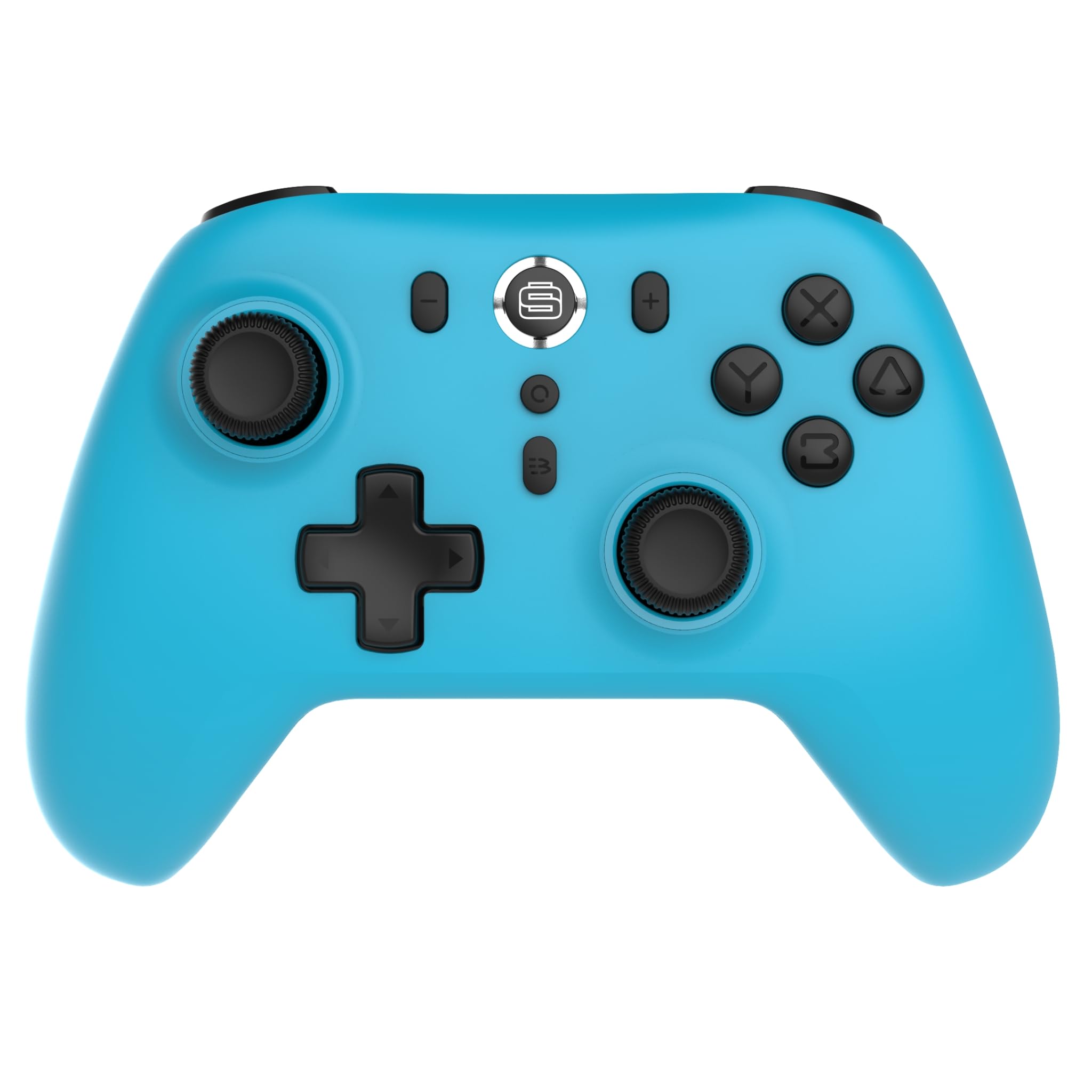
ด้านหน้า view of the Surge Wireless Pro Controller, showing the D-pad, left and right analog sticks, A/B/X/Y buttons, Home button, Capture button, Plus and Minus buttons, and the Surge logo button.

กลับ view of the Surge Wireless Pro Controller, showing the textured grips and the charging port.
4. การตั้งค่าและการจับคู่
The Surge Wireless Pro Controller supports multiple connection methods depending on your device.

This image displays the various platforms compatible with the Surge Wireless Pro Controller, including Nintendo Switch, Nintendo Switch 2, Windows PC, Android, and iOS.
4.1. Pairing with Nintendo Switch / Switch 2
- จากเมนู HOME เลือก ตัวควบคุม > เปลี่ยนกริป/สั่งซื้อ.
- บนตัวควบคุม ให้กด . ค้างไว้ ปุ่มโฮม for 3-5 seconds until the indicator lights begin to flash rapidly.
- เมื่อจับคู่แล้ว ไฟแสดงสถานะบนตัวควบคุมจะยังคงติดอยู่
- To wake the console from sleep mode, press the ปุ่มโฮม บนตัวควบคุม
4.2. Pairing with Windows PC
- ตรวจสอบให้แน่ใจว่าพีซีของคุณเปิดใช้งานบลูทูธแล้ว
- ไปที่ การตั้งค่าบลูทูธและอุปกรณ์อื่นๆ บนพีซีของคุณ
- เลือก เพิ่มบลูทูธหรืออุปกรณ์อื่น ๆ > บลูทูธ.
- บนตัวควบคุม ให้กด . ค้างไว้ ปุ่มโฮม for 3-5 seconds until the indicator lights begin to flash rapidly.
- Select the controller from the list of available devices on your PC.
- เมื่อจับคู่แล้ว ไฟแสดงสถานะบนตัวควบคุมจะยังคงติดอยู่
4.3. Pairing with Android / iOS Devices
- เปิดใช้งาน Bluetooth บนอุปกรณ์ Android หรือ iOS ของคุณ
- Go to the Bluetooth settings menu on your device.
- บนตัวควบคุม ให้กด . ค้างไว้ ปุ่มโฮม for 3-5 seconds until the indicator lights begin to flash rapidly.
- เลือกตัวควบคุมจากรายการอุปกรณ์ที่มีอยู่
- เมื่อจับคู่แล้ว ไฟแสดงสถานะบนตัวควบคุมจะยังคงติดอยู่
5. คุณสมบัติการใช้งาน
5.1. Hall Effect Thumb Sticks & Triggers
The controller is equipped with Hall Effect technology for its thumb sticks and triggers. This technology uses magnets and electrical conductors to detect position, providing enhanced precision and significantly reducing the risk of stick drift over time compared to traditional potentiometers.

This image highlights the Hall Effect thumbsticks and triggers, emphasizing their role in providing precise inputs and preventing stick drift.
5.2. ฟังก์ชั่นเทอร์โบ
The Turbo function allows for rapid, repeated input of a button press. This controller features 3 adjustable turbo levels.
- วิธีเปิดใช้งานเทอร์โบ: กดปุ่มค้างไว้ ปุ่มเทอร์โบ, then press the desired action button (A/B/X/Y, L1/R1, L2/R2, D-pad directions). The button will now rapidly repeat its input when held.
- วิธีปรับความเร็วเทอร์โบ: With Turbo active on a button, press and hold the ปุ่มเทอร์โบ และย้าย Right Analog Stick Up or Down to cycle through the 3 speed levels.
- วิธีปิดการใช้งาน Turbo: กดปุ่มค้างไว้ ปุ่มเทอร์โบจากนั้นกดปุ่มการกระทำเดิมอีกครั้ง
5.3. การตอบสนองด้วยการสั่นสะเทือน
The controller provides haptic feedback through vibration. You can choose from 4 vibration levels.
- To adjust Vibration level: กดปุ่มค้างไว้ ปุ่มสั่น (if present, or a designated button combination, refer to specific button mapping if available) and move the Left Analog Stick Up or Down to cycle through the 4 levels (Off, Low, Medium, High).
5.4. ระบบควบคุมการเคลื่อนไหว
The controller supports motion controls for compatible games, particularly on Nintendo Switch/Switch 2. This allows for intuitive gameplay where physical movement of the controller translates into in-game actions.

This image visually represents the controller's advanced features, including Turbo Function, Motion Controls, and Rumble Vibration, enhancing the gaming experience.
6. การชาร์จไฟ
The controller is equipped with a built-in 600mAh Li-polymer battery, providing up to 10 hours of gameplay on a single charge.

This image shows the controller being held, emphasizing its internal rechargeable battery for extended play sessions.
- Connect the included USB-C charging cable to the controller's USB-C port.
- ต่อปลายอีกด้านของสายเคเบิลเข้ากับแหล่งจ่ายไฟ USB (เช่น เครื่องเล่นเกม, คอมพิวเตอร์, อะแดปเตอร์ติดผนัง USB)
- The indicator lights on the controller will show charging status (e.g., blinking while charging, solid when fully charged).
- โดยทั่วไปการชาร์จเต็มจะใช้เวลาประมาณ 2-3 ชั่วโมง
7. การบำรุงรักษา
เพื่อให้มั่นใจถึงอายุการใช้งานที่ยาวนานและประสิทธิภาพสูงสุดของคอนโทรลเลอร์ของคุณ โปรดปฏิบัติตามแนวทางการบำรุงรักษาดังต่อไปนี้:
- การทำความสะอาด: ใช้ผ้านุ่มและแห้งเช็ดคอนโทรลเลอร์ สำหรับสิ่งสกปรกฝังแน่น ให้เช็ดเบาๆampชุบผ้าด้วยน้ำ หลีกเลี่ยงการใช้สารเคมีรุนแรงหรือน้ำยาทำความสะอาดที่มีฤทธิ์กัดกร่อน
- พื้นที่จัดเก็บ: เก็บตัวควบคุมไว้ในที่แห้งและเย็น ห่างจากแสงแดดโดยตรงและอุณหภูมิที่สูงหรือต่ำมาก
- หลีกเลี่ยงการหยด: ปกป้องตัวควบคุมจากการตกหล่นและแรงกระแทกซึ่งอาจทำให้ส่วนประกอบภายในเสียหายได้
- การสัมผัสของเหลว: อย่าให้ตัวควบคุมโดนน้ำหรือของเหลวอื่นๆ
8 การแก้ไขปัญหา
If you encounter issues with your Surge Wireless Pro Controller, please refer to the following common solutions:
| ปัญหา | สารละลาย |
|---|---|
| ตัวควบคุมไม่เปิดใช้งาน | ตรวจสอบให้แน่ใจว่าคอนโทรลเลอร์ชาร์จเต็มแล้ว เชื่อมต่อกับแหล่งจ่ายไฟโดยใช้สาย USB-C |
| Controller does not pair. | Ensure the controller is in pairing mode (indicator lights flashing rapidly). Check that Bluetooth is enabled on your device. Try restarting both the controller and the device. |
| ความล่าช้าของอินพุตหรือการตัดการเชื่อมต่อ | Ensure the controller is within range of the device. Reduce interference from other wireless devices. Ensure the controller is fully charged. |
| ปุ่มหรือแท่งไม่ตอบสนอง | Try resetting the controller (if a reset button is available, typically a small pinhole on the back). Ensure no debris is obstructing the buttons. |
| การสั่นสะเทือนไม่ทำงาน | Check the vibration settings on the controller and in the game. Ensure the vibration level is not set to 'Off'. |
9. ข้อมูลจำเพาะ
| คุณสมบัติ | รายละเอียด |
|---|---|
| หมายเลขรุ่น | เอสจี60095 |
| ประเภทแบตเตอรี่ | 1 Nonstandard Battery (Li-polymer, 600mAh) |
| อายุการใช้งานแบตเตอรี่ | สูงสุด 10 ชั่วโมง (โดยประมาณ) |
| พอร์ตชาร์จ | ยูเอสบี-ซี |
| ขนาด | 20.5 x 14 x 6.6 ซม. |
| น้ำหนัก | 320 กรัม |
| ประเทศต้นกำเนิด | จีน |
10. การรับประกันและการสนับสนุน
For warranty information and customer support, please refer to the documentation included with your purchase or visit the official Surge webไซต์นี้ โปรดเก็บหลักฐานการซื้อไว้เพื่อใช้ยืนยันการรับประกัน


