
1. บทนำ
This manual provides detailed instructions for the setup, operation, and maintenance of your DinoFire RF 2.4GHz Wireless Presentation Clicker. This device is designed to enhance your presentations by offering seamless control over slides and a convenient green laser pointer.
2. คุณสมบัติของผลิตภัณฑ์
- การเชื่อมต่อแบบเสียบแล้วใช้งานได้ทันที: No software or drivers required. Simply plug the USB receiver into your computer.
- Green Laser Pointer: A bright green laser for clear highlighting of presentation content.
- แบตเตอรี่แบบชาร์จไฟได้: Built-in 300mAh battery, fully rechargeable in approximately 2.5 hours, providing weeks of use.
- Essential Presentation Controls: Intuitive buttons for page up/down, full screen, and black screen functions.
- การออกแบบตามหลักสรีรศาสตร์: Comfortable to hold with clearly spaced buttons for confident operation.
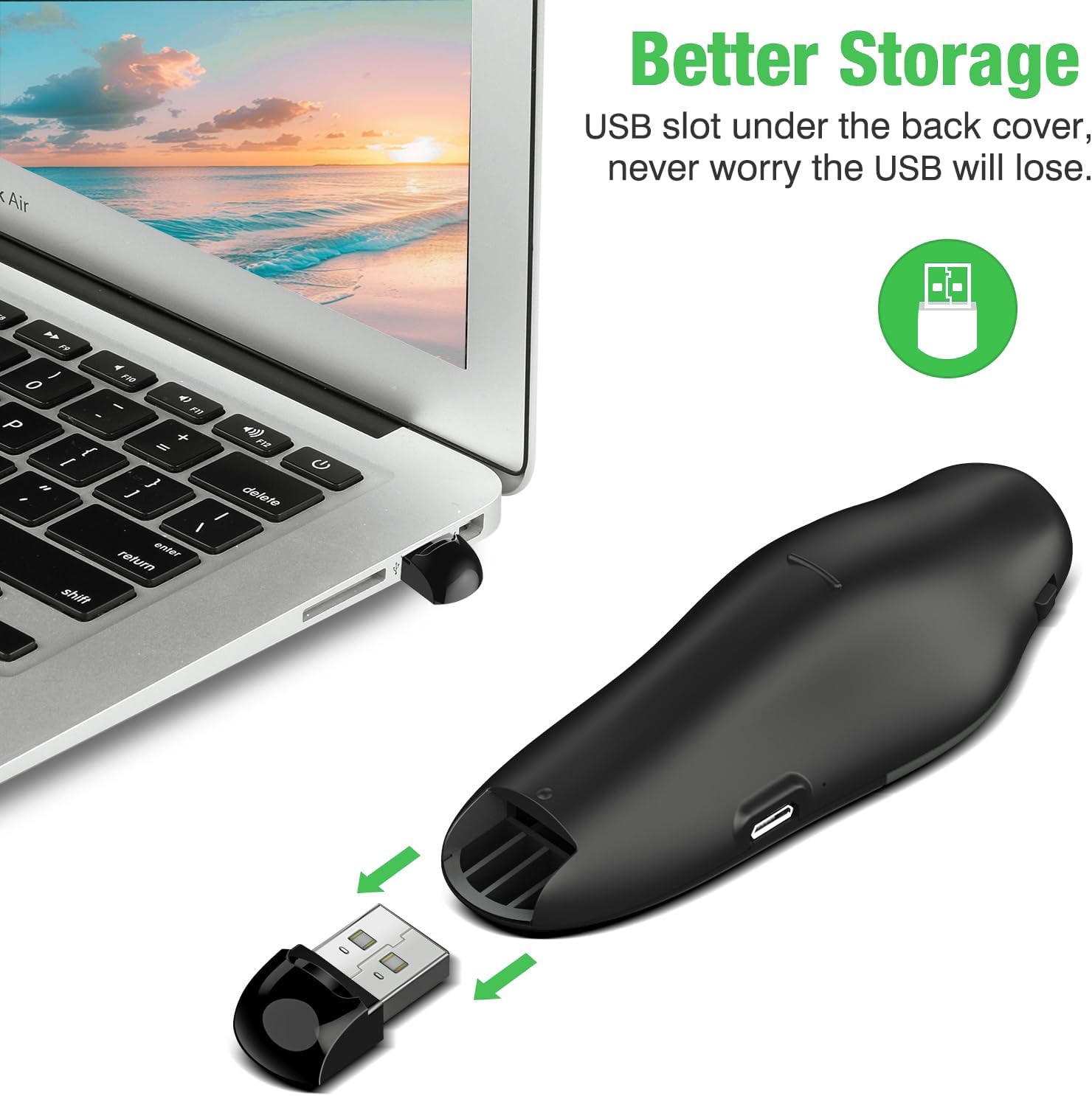
- ที่เก็บข้อมูลตัวรับ USB แบบบูรณาการ: The USB receiver stores securely inside the remote to prevent loss.
- ระยะสัญญาณไร้สาย: 2.4GHz wireless connection offers a control range of up to 115 feet (approximately 35 meters).
3. คำแนะนำในการตั้งค่า
- มอบหมายงานให้แก่ผู้บรรยาย: Before first use, ensure the presentation clicker is fully charged. Connect the clicker to a USB power source using the provided Micro USB cable. A full charge takes approximately 2.5 hours.
- ดึงข้อมูลตัวรับสัญญาณ USB: Open the battery compartment or the designated storage slot on the back of the clicker to retrieve the USB receiver.
- เชื่อมต่อเครื่องรับ: Plug the USB receiver into an available USB port on your computer or laptop. The system will automatically detect and install the necessary drivers.
- เปิดเครื่อง: Locate the power switch on the side of the clicker and slide it to the 'ON' position.
4. คู่มือการใช้งาน
Once the USB receiver is connected and the clicker is powered on, you can begin controlling your presentation.
- เลื่อนหน้าขึ้น/ลง: Use the arrow buttons (usually left/right or up/down arrows) to navigate through your presentation slides.
- Green Laser Pointer: Press and hold the central button (often marked with a triangle or laser icon) to activate the green laser pointer. Release the button to turn off the laser.
- เต็มหน้าจอ/หน้าจอดำ: The clicker features dedicated buttons for entering full-screen mode or blacking out the screen to redirect audience attention. Refer to the button icons for specific functions.

5 ข้อมูลแบตเตอรี่และการชาร์จแบตเตอรี่
The DinoFire Presentation Clicker is equipped with a long-lasting 300mAh rechargeable battery.
- การชาร์จ: Connect the clicker to any standard USB port using the included Micro USB cable. The charging indicator light will show the charging status.
- เวลาในการชาร์จ: โดยทั่วไปการชาร์จเต็มจะใช้เวลาประมาณ 2.5 ชั่วโมง
- อายุการใช้งานแบตเตอรี่: A fully charged battery can last for several weeks, depending on usage.

6. การบำรุงรักษาและการจัดเก็บ
- การทำความสะอาด: Use a soft, dry cloth to clean the surface of the clicker. Avoid using harsh chemicals or abrasive materials.
- พื้นที่จัดเก็บ: When not in use, turn off the clicker to conserve battery life. Store the USB receiver securely within the clicker's designated compartment to prevent loss. Keep the device in a cool, dry place away from direct sunlight and extreme temperatures.

7 การแก้ไขปัญหา
- อุปกรณ์ไม่ตอบสนอง:
- ตรวจสอบให้แน่ใจว่าตัวรับสัญญาณ USB เสียบเข้ากับพอร์ต USB ที่ใช้งานได้แน่นหนา
- Check if the clicker is powered on.
- Verify the clicker's battery level and recharge if necessary.
- ลองเสียบตัวรับสัญญาณ USB เข้ากับพอร์ต USB อื่น หรือคอมพิวเตอร์เครื่องอื่น เพื่อตรวจสอบว่าปัญหาไม่ได้เกิดจากพอร์ต
- เลเซอร์พอยเตอร์ใช้งานไม่ได้:
- Ensure the clicker is powered on and fully charged.
- กดปุ่มเลเซอร์ค้างไว้ให้แน่น
- ขอบเขตจำกัด:
- Ensure there are no significant obstructions (e.g., walls, large metal objects) between the clicker and the USB receiver.
- Move closer to the computer if possible.
- Avoid using the clicker near other 2.4GHz wireless devices that might cause interference.
8. ข้อมูลจำเพาะ
| คุณสมบัติ | รายละเอียด |
|---|---|
| ยี่ห้อ | ไดโนไฟร์ |
| เทคโนโลยีการเชื่อมต่อ | Radio Frequency (RF 2.4GHz) |
| อุปกรณ์ที่รองรับ | แล็ปท็อปคอมพิวเตอร์ |
| คุณสมบัติพิเศษ | Lightweight, Rechargeable, Green Laser |
| จำนวนอุปกรณ์ที่รองรับสูงสุด | 1 |
| น้ำหนักสินค้า | 2.08 ออนซ์ |
| ขนาดแพ็คเกจ | 4.72 x 2.4 x 1.26 นิ้ว |
9. การรับประกันและการสนับสนุน
For warranty information and customer support, please refer to the product packaging or contact DinoFire customer service directly. Keep your purchase receipt for warranty claims.