
1. บทนำ
Thank you for choosing the FOHERE Professional Bill Counter H-A16. This device is designed to efficiently count banknotes and detect counterfeits, making cash handling faster and more secure. It is ideal for various environments such as retail stores, banks, businesses, and restaurants. This manual provides detailed instructions for setup, operation, maintenance, and troubleshooting to ensure optimal performance and longevity of your bill counter.
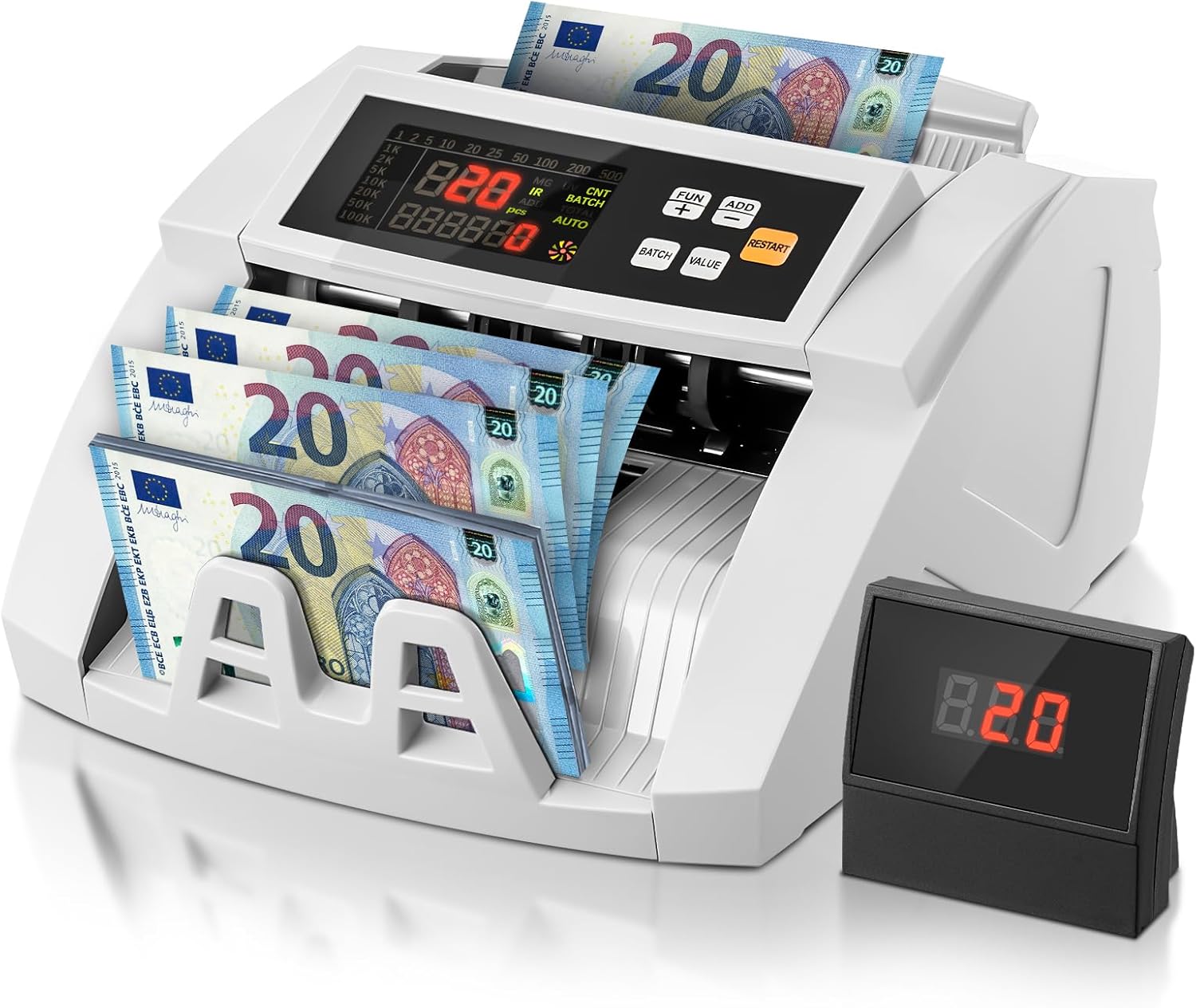
Image 1.1: FOHERE Bill Counter H-A16 processing Euro banknotes. The main LCD display shows counting information, and an external display unit is visible on the right.
2. คำแนะนำด้านความปลอดภัย
- อ่านคำแนะนำทั้งหมดก่อนใช้งานอุปกรณ์
- ควรเก็บอุปกรณ์ให้ห่างจากน้ำหรือของเหลวอื่นๆ เพื่อป้องกันไฟฟ้าช็อต
- อย่าเปิดอุปกรณ์casinก. ส่งต่อการบริการทั้งหมดให้กับบุคลากรที่มีคุณสมบัติเหมาะสม
- ใช้เฉพาะอะแดปเตอร์แปลงไฟและสายเคเบิลที่ให้มาเท่านั้น
- ตรวจสอบให้แน่ใจว่าเต้ารับไฟฟ้าตรงกับปริมาตรtagความต้องการของอุปกรณ์
- ถอดปลั๊กอุปกรณ์ออกจากแหล่งจ่ายไฟก่อนทำความสะอาดหรือเมื่อไม่ได้ใช้งานเป็นเวลานาน
- ขณะใช้งาน ควรระวังอย่าให้มือหรือเสื้อผ้าหลวมๆ อยู่ใกล้กลไกป้อนบิล
3. เนื้อหาบรรจุภัณฑ์
กรุณาตรวจสอบแพ็คเกจสำหรับรายการต่อไปนี้:
- 1 x FOHERE Professional Bill Counter H-A16
- สายไฟ 1 เส้น
- แปรงทำความสะอาด 1 ชิ้น
- 1 x External LCD Display
- 1 x คู่มือผู้ใช้ (เอกสารนี้)

ภาพที่ 3.1: จบแล้วview of the FOHERE Bill Counter H-A16 dimensions and included accessories.
4. สินค้าหมดview
The FOHERE H-A16 Bill Counter features a user-friendly design with a clear LCD display and intuitive controls. Key components include:
- ฮอปเปอร์: Where bills are loaded for counting.
- รถยก: Where counted bills are collected.
- แผงควบคุม: Buttons for mode selection, batch settings, and other functions.
- จอแสดงผล LCD: Shows counting results, error messages, and mode indicators.
- External Display Port: สำหรับเชื่อมต่อจอแสดงผลภายนอกที่รวมอยู่
- เซ็นเซอร์: UV, MG, IR, DD for counterfeit detection.

Image 4.1: Design features emphasizing efficiency and durability, including high-strength materials, user-friendly controls, and an improved bill rotor.
5. การตั้งค่า
- แกะ: Carefully remove the bill counter and all accessories from the packaging.
- การจัดวาง: Place the device on a stable, flat, and dry surface, ensuring adequate ventilation.
- การเชื่อมต่อไฟฟ้า: Connect the power cable to the device's power input and then plug it into a suitable electrical outlet.
- จอแสดงผลภายนอก (ตัวเลือก): If desired, connect the external LCD display to the designated port on the back of the bill counter.
- เปิดเครื่อง: Press the power switch, usually located on the back or side of the machine. The device will perform a self-test, and the display will light up.
6. คู่มือการใช้งาน
The FOHERE H-A16 offers multiple counting modes and advanced counterfeit detection.
6.1 การนับขั้นพื้นฐาน
- Ensure the machine is powered on and in the default counting mode (usually AUTO).
- Fan out the bills to prevent them from sticking together.
- Place the stack of bills neatly into the hopper. Ensure they are aligned correctly and not folded or crumpled.
- The machine will automatically start counting. The count will be displayed on the LCD screen.
- Once counting is complete, remove the bills from the stacker.
6.2 โหมดการนับ
Use the control panel buttons to select different operational modes:
- โหมดอัตโนมัติ: The default mode for continuous counting.
- โหมดแบตช์: Allows you to count bills in specific quantities. Press the 'BATCH' button, then use the numeric keys or '+' / '-' buttons to set the desired batch size (e.g., 10, 20, 50, 100). The machine will stop after counting the set number of bills.
- โหมดเพิ่ม: For cumulative counting. Each new count is added to the previous total. Press the 'ADD' button to activate.
- โหมดค่า: Calculates the total monetary value of a stack of bills. สำคัญ: This mode only works accurately for bills of the same denomination. Manually separate bills of different denominations and count them individually in this mode. Press the 'VALUE' button and select the denomination.

Image 6.1: Illustration of the four professional counting modes: Count, Add, Batch, and Value calculation.

Image 6.2: Display in Value Counting Mode, showing the quantity of bills and their total value. Note: Only count one denomination at a time for accurate value calculation.
6.3 การตรวจจับสินค้าปลอม
The FOHERE H-A16 is equipped with multiple detection technologies:
- ยูวี (อัลตราไวโอเลต): ตรวจจับคุณสมบัติ UV ที่มีอยู่ในธนบัตรแท้
- MG (แม่เหล็ก): Scans for magnetic ink patterns on bills.
- IR (อินฟราเรด): ตรวจสอบคุณสมบัติการรักษาความปลอดภัยอินฟราเรด
- DD (การตรวจจับมิติ): Verifies the physical dimensions of the banknotes.
If a suspicious bill is detected, the machine will automatically stop, display an error message on the screen, and emit an audible alarm. Remove the suspicious bill and press 'RESTART' to continue counting.
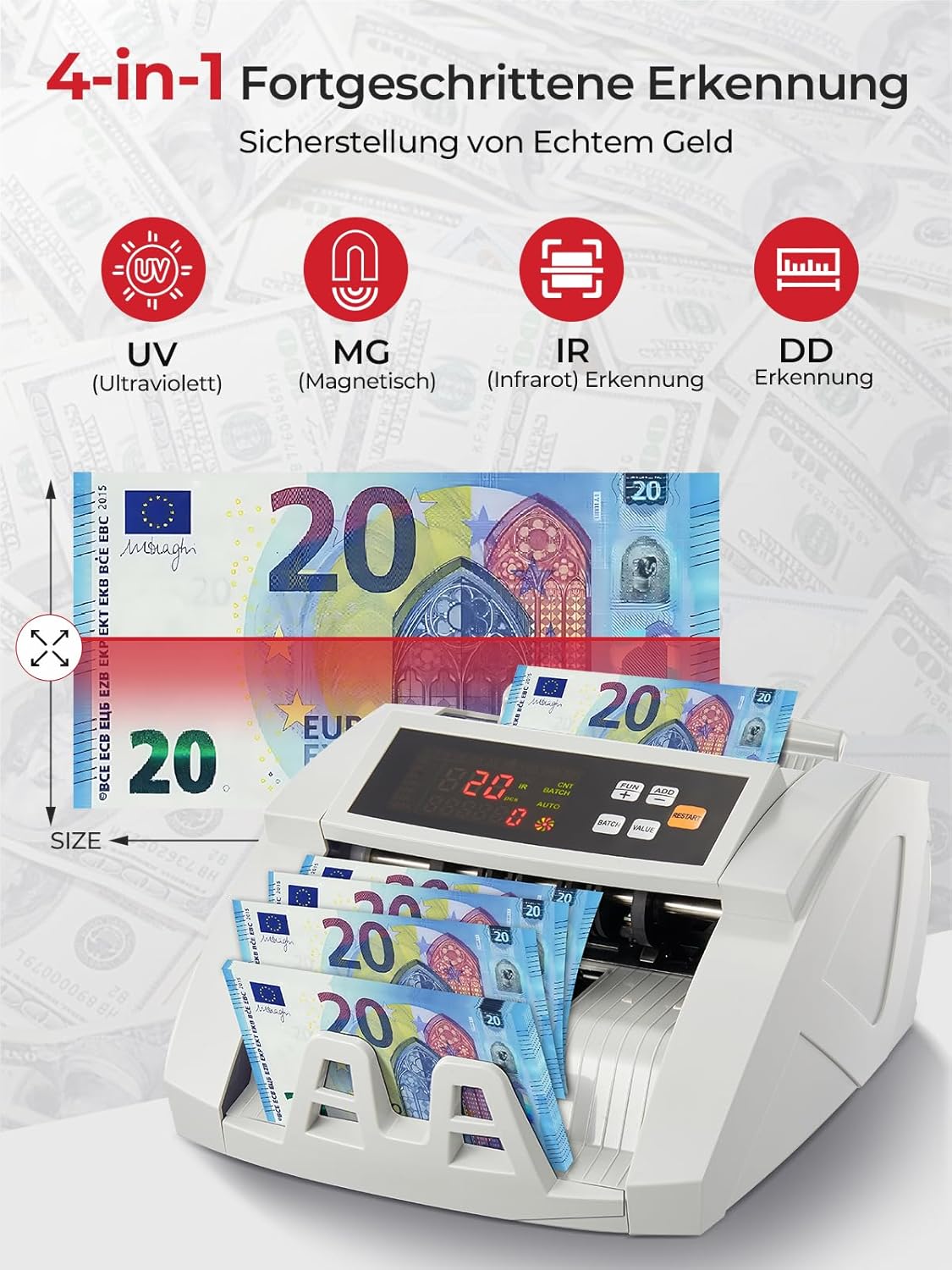
Image 6.3: Visual representation of the 4-in-1 advanced counterfeit detection system (UV, MG, IR, DD).
7. การบำรุงรักษา
Regular maintenance ensures the accuracy and longevity of your bill counter.
7.1 การทำความสะอาด
- หมดแรง: ควรปิดเครื่องและถอดปลั๊กออกก่อนทำความสะอาดทุกครั้ง
- การกำจัดฝุ่น: Use the provided cleaning brush or a soft, dry cloth to gently remove dust and debris from the hopper, stacker, and internal sensors.
- การทำความสะอาดเซ็นเซอร์: Pay special attention to the UV, MG, and IR sensors. Accumulated dust can affect detection accuracy. Use a soft, lint-free cloth, possibly lightly dampened with isopropyl alcohol, to clean the sensor surfaces. Ensure they are completely dry before powering on.
- ภายนอก: เช็ดทำความสะอาดภายนอกเครื่องด้วยผ้าแห้งเนื้อนุ่ม ห้ามใช้สารทำความสะอาดที่มีฤทธิ์กัดกร่อนหรือตัวทำละลาย
7.2 พื้นที่จัดเก็บ
When not in use for extended periods, store the bill counter in a clean, dry place, away from direct sunlight and extreme temperatures.
8 การแก้ไขปัญหา
โปรดดูตารางต่อไปนี้เพื่อดูปัญหาทั่วไปและวิธีแก้ไข:
| ปัญหา | สาเหตุที่เป็นไปได้ | สารละลาย |
|---|---|---|
| เครื่องไม่เปิดเครื่อง | ไม่ได้เสียบสายไฟ; ปิดสวิตช์ไฟ; มีปัญหาที่ปลั๊กไฟ | ตรวจสอบการเชื่อมต่อสายไฟ; ตรวจสอบให้แน่ใจว่าสวิตช์ไฟเปิดอยู่; ลองเสียบปลั๊กไฟกับเต้ารับอื่นดู |
| บิลติดขัดบ่อย | Bills not fanned out; Bills are crumpled/folded; Dust on rollers/sensors | Fan out bills before loading; Straighten bills; Clean rollers and sensors as per maintenance section. |
| Inaccurate counting results | Dust on sensors; Bills not inserted correctly; Worn rollers | Clean all sensors; Re-insert bills properly; Contact support if rollers appear worn. |
| ข้อผิดพลาดในการตรวจจับของปลอม | Dust on UV/MG/IR sensors; Bills are heavily worn or damaged | Clean UV, MG, and IR sensors; Try counting the bill manually or with another known genuine bill for comparison. |
| จอแสดงผลภายนอกใช้งานไม่ได้ | Cable not connected properly; Faulty display unit | Check the connection cable; Test with another external display if available, or contact support. |
9. ข้อมูลจำเพาะ
| คุณสมบัติ | ข้อมูลจำเพาะ |
|---|---|
| ยี่ห้อ | ที่นี่ |
| หมายเลขรุ่น | เอช-เอ16 |
| ความเร็วในการนับ | สูงสุด 1100 บิลต่อนาที |
| การตรวจจับของปลอม | UV (Ultraviolet), MG (Magnetic), IR (Infrared), DD (Dimension Detection) |
| ความจุของถังบรรจุ | ธนบัตร 200 ใบ |
| ทางแคบความจุ | ธนบัตร 200 ใบ |
| แสดง | LCD, External Display |
| ขนาดสินค้า (กว้าง x ยาว x สูง) | 28 x 23.5 x 16 ซม. |
| น้ำหนักสินค้า | 3.05 กิโลกรัม |
| Countable Banknote Size | 50 x 100 มม. ถึง 90 x 170 มม. |
| แหล่งจ่ายไฟ | 220V 50Hz |
| การใช้พลังงาน | <80วัตต์ |
| สี | สีขาว |

Image 9.1: Performance metrics of the FOHERE Bill Counter, including counting speed and capacities.
10. การรับประกันและการสนับสนุน
FOHERE products are manufactured to high-quality standards. For warranty information, please refer to the documentation provided with your purchase or contact your retailer. If you encounter any issues or have questions regarding the operation or maintenance of your FOHERE Professional Bill Counter H-A16, please contact FOHERE customer support for assistance.