
1. บทนำ
Thank you for choosing the Parsonver G01 GPS Smart Watch. This manual provides essential information for the proper setup, operation, and maintenance of your device. Please read it carefully to ensure optimal performance and longevity of your smartwatch.

Image: The Parsonver G01 Smart Watch displayed with various outdoor activity scenes, highlighting its versatile use.
2. เนื้อหาบรรจุภัณฑ์
เมื่อเปิดบรรจุภัณฑ์ ตรวจสอบว่ามีสิ่งของครบทั้งหมด:
- 1x Parsonver G01 Smart Watch
- สายชาร์จแม่เหล็ก 1 เส้น
- 1x คู่มือผู้ใช้

Image: An illustration detailing the package contents, including the smartwatch, charging cable, and user manual.
3. คู่มือการติดตั้ง
3.1 การชาร์จสมาร์ทวอทช์
Before initial use, fully charge your Parsonver G01 Smart Watch. The device features a 520mAh battery, providing extended usage time.
- เชื่อมต่อสายชาร์จแบบแม่เหล็กเข้ากับจุดชาร์จที่ด้านหลังของนาฬิกา
- เสียบปลายสาย USB-A เข้ากับอะแดปเตอร์แปลงไฟ USB มาตรฐาน (ไม่ได้รวมอยู่ในชุด) หรือพอร์ต USB ของคอมพิวเตอร์
- หน้าจอของนาฬิกาจะแสดงสถานะการชาร์จ โดยปกติการชาร์จเต็มจะใช้เวลาประมาณ 2 ชั่วโมง

Image: The smartwatch connected to its magnetic charging cable, illustrating the charging process and battery life indicators.
3.2 การติดตั้งและการจับคู่แอป
To unlock the full functionality of your smartwatch, download and install the companion application on your smartphone.
- Scan the QR code provided in the quick start guide or search for "Glory Fit" in your smartphone's app store (compatible with iOS 9.0/Android 5.0 or above).
- Install the "Glory Fit" application.
- เปิดแอปและทำตามคำแนะนำบนหน้าจอเพื่อสร้างบัญชีหรือเข้าสู่ระบบ
- ตรวจสอบให้แน่ใจว่าได้เปิดใช้งาน Bluetooth บนสมาร์ทโฟนของคุณแล้ว
- In the app, navigate to the device pairing section and select your Parsonver G01 Smart Watch from the list of available devices.
- ยืนยันคำขอจับคู่บนสมาร์ทโฟนและนาฬิกาของคุณทั้งคู่
4. คู่มือการใช้งาน
4.1 การนำทางพื้นฐาน
The Parsonver G01 features a 1.95-inch HD touchscreen for intuitive interaction.
- ปัดขึ้น/ลง: เข้าถึงการตั้งค่าด่วนหรือการแจ้งเตือน
- ปัดไปทางซ้าย/ขวา: สำรวจวิดเจ็ตและฟังก์ชันหลักต่างๆ
- แตะ: เลือกสินค้าหรือยืนยันการดำเนินการ
- กดปุ่มด้านข้าง: กลับสู่หน้าจอหลักหรือเปิด/ปิดเครื่อง
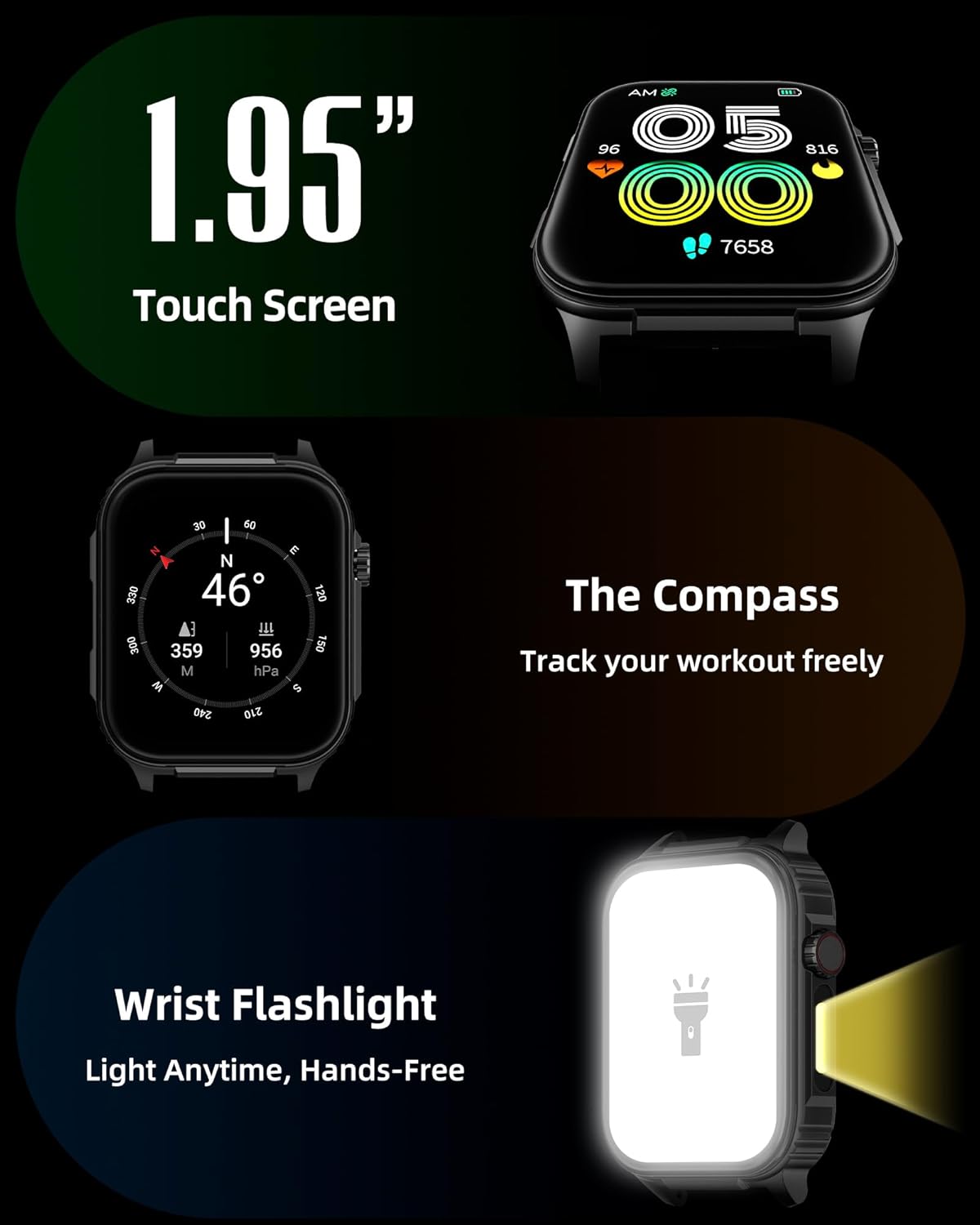
ภาพ: รายละเอียด view of the smartwatch screen, illustrating its 1.95-inch size, along with icons for compass and flashlight functions.
4.2 การโทรผ่านบลูทูธและการแจ้งเตือนอัจฉริยะ
Stay connected by making and receiving calls directly from your wrist and receiving instant notifications.
- โทรออก: Once paired via Bluetooth 5.3, access the call function on your watch to dial numbers or select contacts.
- การรับสาย: Incoming calls will display on the watch screen, allowing you to answer or reject them.
- การแจ้งเตือน: The watch provides vibration alerts for SMS, WhatsApp, Facebook, and other app notifications. Note: Direct replies from the watch are not supported.

Image: A man on a mountain trail interacting with his Parsonver G01 Smart Watch to manage a Bluetooth call, with notification icons floating above.

Image: The smartwatch screen showing incoming messages and app notifications, demonstrating its smart notification feature.
4.3 หน้าปัดนาฬิกา
Personalize your watch with over 400 available watch faces or create your own custom designs.
- Access the watch face market through the "Glory Fit" app.
- Browse and download various styles, from classic to modern.
- Use the DIY function to upload custom photos and create unique watch faces.

ภาพ: หน้าจอสมาร์ทวอทช์แสดงให้เห็น...asing a variety of watch face designs, illustrating the customization options.
4.4 Built-in GPS and Compass
Track your outdoor activities and navigate with precision, even without your phone.
- ติดตาม GPS: The built-in GPS accurately records your route, distance, and pace during outdoor workouts like running, hiking, and cycling. Ensure you are in an open area for optimal GPS signal acquisition.
- เข็มทิศ: Utilize the integrated compass for navigation and orientation during your adventures.

Image: A cyclist wearing the Parsonver G01 Smart Watch, with the watch display showing GPS tracking data and a map.

Image: Hikers on a mountain trail, with the smartwatch displaying compass and GPS navigation features.
ไฟฉาย LED 4.5 ดวง
The integrated LED flashlight provides convenient illumination when needed.
- Access the flashlight function from the quick settings menu or a dedicated shortcut.
- The flashlight provides hands-free lighting for various situations.

Image: The smartwatch with its LED flashlight illuminated, demonstrating its utility in dark environments.
โหมดกีฬา 4.6 โหมด
The watch supports over 100 built-in sports modes to track your physical activities.
- Select your desired sport from the activity menu.
- The watch will track metrics such as calories burned, steps, distance, and heart rate in real-time.
- Examples include running, cycling, yoga, hiking, football, and more.

Image: An athlete tying shoelaces, with the smartwatch displaying various sports tracking metrics like steps, calories, distance, and heart rate.

Image: A visual representation of the smartwatch's extensive range of over 100 built-in sports modes, including running, football, and cycling.
4.7 การตรวจติดตามสุขภาพ
The Parsonver G01 provides comprehensive health monitoring features to help you maintain a healthy lifestyle.
- การตรวจสอบอัตราการเต้นของหัวใจ: การติดตามอัตราการเต้นของหัวใจอย่างต่อเนื่องตลอด 24 ชั่วโมง 7 วันต่อสัปดาห์
- การตรวจวัดออกซิเจนในเลือด (SpO2): Track your blood oxygen levels in real-time.
- การติดตามการนอนหลับ: วิเคราะห์การนอนหลับtages (deep, light, awake) to provide insights into your sleep quality.
- Stress and Mood Monitoring: ช่วยให้คุณเข้าใจและจัดการระดับความเครียดของคุณ
- การแจ้งเตือนอยู่ประจำ: แจ้งเตือนให้คุณเคลื่อนไหวหลังจากช่วงเวลาที่ไม่ได้ใช้งาน
- การออกกำลังกายการหายใจ: Guided breathing sessions to help reduce stress.

Image: A collage illustrating the smartwatch's 24-hour health monitoring capabilities, including sleep, stress, heart rate, and blood oxygen tracking.

Image: A man sleeping, with the smartwatch on his wrist, and a graphic showing detailed sleep analysis data.
4.8 ฟังก์ชันการใช้งานอื่นๆ
The Parsonver G01 includes a variety of additional features to assist with daily tasks:
- นาฬิกาปลุก: ตั้งนาฬิกาปลุกหลายตัว
- นาฬิกาจับเวลาและตัวจับเวลา: เพื่อการจับเวลาที่แม่นยำ
- เครื่องคิดเลข: ฟังก์ชันเลขคณิตพื้นฐาน
- ปฏิทิน: View วันที่และตารางกำหนดการ
- การควบคุมเพลง: Play, pause, skip tracks on your connected phone.
- พยากรณ์อากาศ: รับข้อมูลอัปเดตสภาพอากาศแบบเรียลไทม์
- ผู้ช่วยเสียง: โต้ตอบกับผู้ช่วยเสียงในโทรศัพท์ของคุณ
- การควบคุมกล้องระยะไกล: สั่งงานกล้องของโทรศัพท์จากระยะไกล
- ค้นหาหมายเลขโทรศัพท์: ค้นหาสมาร์ทโฟนที่หายไปของคุณ
- Raise-to-Wake: หน้าจอจะเปิดโดยอัตโนมัติเมื่อคุณยกข้อมือขึ้น

Image: A display of various practical functions on the smartwatch, including alarm, timer, stopwatch, calculator, calendar, music control, and weather.
5. การบำรุงรักษา
5.1 ความต้านทานต่อน้ำ
The Parsonver G01 Smart Watch has an IP68 waterproof rating, meaning it is resistant to dust and can withstand immersion in water up to 1.5 meters for 30 minutes. It is suitable for daily splashes, hand washing, and light rain.
หมายเหตุสำคัญ:
- The IP68 rating does not make the watch suitable for swimming, showering, or sauna use. Exposure to hot water, steam, or high-pressure water jets may compromise the water resistance.
- หลีกเลี่ยงการกดปุ่มใต้น้ำ
- หากนาฬิกาเปียกน้ำ ให้เช็ดให้แห้งสนิทก่อนชาร์จหรือใช้งานหน้าจอสัมผัส

Image: A hand wearing the smartwatch under running water, illustrating its IP68 waterproof capabilities for everyday use.
5.2 การทำความสะอาดและการดูแล
- Regularly clean the watch and strap with a soft, dry cloth.
- หากจำเป็น ให้ใช้ง. เล็กน้อยamp ผ้าด้วยสบู่ชนิดอ่อน จากนั้นล้างออกและเช็ดให้แห้งสนิท
- หลีกเลี่ยงการใช้สารเคมีรุนแรง น้ำยาทำความสะอาดที่มีฤทธิ์กัดกร่อน หรือตัวทำละลาย เนื่องจากสารเหล่านี้อาจทำให้ผิวเคลือบและส่วนประกอบของนาฬิกาเสียหายได้
- รักษาความสะอาดของจุดสัมผัสการชาร์จและขจัดสิ่งสกปรก เพื่อให้การชาร์จเป็นไปอย่างถูกต้อง
6 การแก้ไขปัญหา
If you encounter issues with your Parsonver G01 Smart Watch, refer to the following common solutions:
- นาฬิกาไม่เปิด: ตรวจสอบให้แน่ใจว่านาฬิกาชาร์จเต็มแล้ว เสียบนาฬิกาเข้ากับเครื่องชาร์จอย่างน้อย 30 นาที
- ไม่สามารถจับคู่กับสมาร์ทโฟนได้:
- ตรวจสอบให้แน่ใจว่าได้เปิดใช้งานบลูทูธบนโทรศัพท์และนาฬิกาของคุณแล้ว
- ตรวจสอบให้แน่ใจว่านาฬิกาอยู่ในระยะบลูทูธของโทรศัพท์ของคุณ
- รีสตาร์ททั้งนาฬิกาและโทรศัพท์ของคุณ
- Check if the "Glory Fit" app has necessary permissions on your phone.
- ข้อมูล GPS ไม่ถูกต้อง:
- ให้แน่ใจว่าคุณอยู่ในพื้นที่กลางแจ้งที่เปิดโล่งและมีน้ำใส view ของท้องฟ้าเพื่อการรับสัญญาณดาวเทียมที่ดีขึ้น
- Allow sufficient time for the watch to acquire a GPS signal before starting an activity.
- Screen lights up during sleep: This can be caused by wrist movements activating the raise-to-wake feature. You may be able to disable or adjust the sensitivity of the raise-to-wake feature in the watch settings or the companion app.
- อายุการใช้งานแบตเตอรี่สั้น:
- Frequent use of GPS, Bluetooth calls, and continuous health monitoring can consume more battery.
- Reduce screen brightness or shorten screen-on time.
- ปิดการแจ้งเตือนที่ไม่จำเป็น
- Compass inaccuracy: Calibrate the compass if available in the watch settings or app. Ensure no strong magnetic fields are nearby.
If the issue persists, consult the FAQ section within the "Glory Fit" app or contact customer support.
7. ข้อมูลจำเพาะ
| คุณสมบัติ | ข้อมูลจำเพาะ |
|---|---|
| หมายเลขรุ่น | จี01 |
| ขนาดหน้าจอ | 1.95 นิ้ว |
| ประเภทจอภาพ | Full Touch Screen HD |
| ความจุของแบตเตอรี่ | ลิเธียมโพลีเมอร์ 520 mAh |
| อายุการใช้งานแบตเตอรี่ตามการใช้งานทั่วไป | 7-10 วัน |
| เวลาสแตนด์บาย | นานถึง 40 วัน |
| เวลาในการชาร์จ | Approx. 2 Hours (Magnetic Fast Charging) |
| การเชื่อมต่อ | บลูทูธ 5.3 |
| ความเข้ากันได้ของระบบปฏิบัติการ | iOS 9.0 / Android 5.0 ขึ้นไป |
| ระดับการต้านทานน้ำ | IP68 |
| คุณสมบัติในตัว | GPS, Compass, LED Flashlight |
| การติดตามสุขภาพ | Heart Rate, Blood Oxygen, Sleep, Stress, Mood |
| โหมดกีฬา | 100 ปีขึ้นไป |
| น้ำหนักสินค้า | 47 กรัม (1.66 ออนซ์) |
| ความจุของหน่วยความจำ | 256MB |
8. การรับประกันและการสนับสนุน
Parsonver is committed to providing reliable products and dedicated customer support. For any questions, technical assistance, or warranty inquiries, please refer to the contact information provided with your purchase or visit the official Parsonver webเว็บไซต์.