
1. บทนำ
ขอขอบคุณที่เลือกใช้หูฟังแปลภาษาแบบเรียลไทม์ MINISO MS193 AI หูฟังรุ่นนี้ได้รับการออกแบบมาเพื่อมอบการแปลภาษาแบบเรียลไทม์ ความคมชัดในการโทรระดับสูง และคุณภาพเสียงระดับพรีเมียม ในดีไซน์ที่น้ำหนักเบาและออกแบบตามหลักสรีรศาสตร์ คู่มือนี้ให้ข้อมูลสำคัญสำหรับการตั้งค่า การใช้งาน และการบำรุงรักษาอุปกรณ์ของคุณ
2. เนื้อหาบรรจุภัณฑ์
โปรดตรวจสอบว่าสินค้าทั้งหมดมีอยู่ในแพ็คเกจของคุณ:
- หูฟังแบบหนีบหู MS193
- เคสชาร์จไฟ
- คู่มือการใช้งาน
- สายชาร์จ USB-C
- สายคล้องคอ

ภาพที่ 2.1: สิ่งของภายในกล่องประกอบด้วยหูฟังแปลภาษาอัตโนมัติ MINISO MS193 AI
3. คุณสมบัติ
- หูฟัง AI แปลภาษา 3-in-1: ผสานรวมการแปลแบบเรียลไทม์ ความคมชัดระดับ HD และคุณภาพเสียงระดับพรีเมียม
- การแปลอย่างรวดเร็ว: การแปลที่รวดเร็วทันใจ (< 0.5 วินาที) ด้วยความแม่นยำ 98%
- รองรับหลายภาษาอย่างครอบคลุม: รองรับ 135 ภาษา รวมถึงภาษาสเปน จีน อังกฤษ ญี่ปุ่น เกาหลี เยอรมัน และฝรั่งเศส
- ระบบควบคุมแบบสัมผัส LCD ที่ใช้งานง่าย: หน้าจอ HD พร้อมฟังก์ชั่นมากกว่า 15 อย่าง รวมถึงการเล่นเพลง การตั้งค่าอีควอไลเซอร์ คำสั่งเสียง นาฬิกาปลุก นาฬิกาจับเวลา และการควบคุมกล้องระยะไกล
- อายุการใช้งานแบตเตอรี่ยาวนาน: ใช้งานได้นานสูงสุด 50 ชั่วโมง ด้วยเวลาชาร์จเพียง 1.5 ชั่วโมง
- โหมดการแปลหลายโหมด: ฟังก์ชั่นแฮนด์ฟรี, การควบคุมด้วยระบบสัมผัส, การแปลภาพถ่าย, ผู้ช่วยแชท AI, โหมดการประชุม, โหมดไฮบริด และบันทึกเสียง
- การจัดการตำแหน่งที่ตั้งอัจฉริยะ: มีระบบติดตามในตัวเพื่อช่วยค้นหาหูฟังที่หายไปผ่านแอปพลิเคชันที่ใช้งานร่วมกัน
- ความสะดวกสบายและคุณภาพเสียง: ดีไซน์ตามหลักสรีรศาสตร์ ลดแรงกดทับ พร้อมระบบตัดเสียงรบกวนแบบแอคทีฟ (ANC) ขั้นสูง เพื่อประสบการณ์เสียงที่สมจริง

ภาพที่ 3.1: หูฟังไร้สายแปลภาษาอัตโนมัติ MINISO MS193 พร้อมเคสชาร์จ

ภาพที่ 3.2: รายชื่อภาษาที่รองรับการแปลครอบคลุมถึง 135 ภาษา
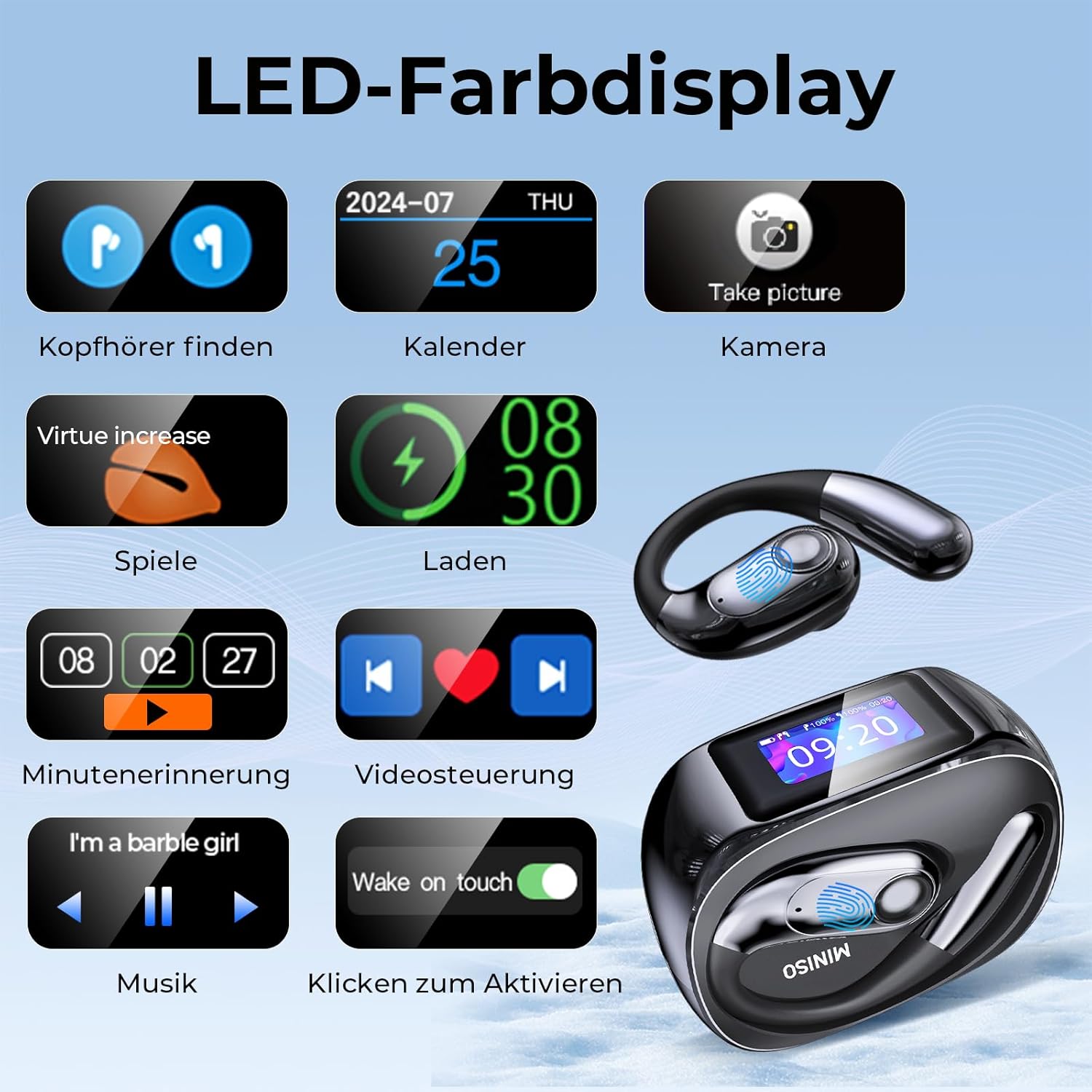
ภาพที่ 3.3: ฟังก์ชันต่างๆ ที่มีให้ใช้งานบนหน้าจอแสดงผลสี LED ของเคสชาร์จ
4. การตั้งค่า
4.1 ดาวน์โหลดและติดตั้งแอพ
หูฟังไร้สาย MINISO MS193 ต้องใช้แอปพลิเคชันที่ใช้งานร่วมกัน เอียร์จอยเพื่อให้ใช้งานได้อย่างเต็มประสิทธิภาพ โดยเฉพาะฟีเจอร์การแปล แอปนี้สามารถดาวน์โหลดได้ฟรีโดยไม่ต้องสมัครสมาชิก
- สแกนคิวอาร์โค้ดที่ให้มาในบรรจุภัณฑ์ หรือค้นหา "AuralIntelli" (หรือ "EarJoy" หากไม่พบ AuralIntelli) ในแอปสโตร์ของอุปกรณ์ของคุณ (App Store สำหรับ iOS, Google Play Store สำหรับ Android)
- ดาวน์โหลดและติดตั้งแอปพลิเคชัน

ภาพที่ 4.1: คู่มือภาพประกอบสำหรับการดาวน์โหลดและเชื่อมต่อแอปพลิเคชันเสริม
4.2 การเชื่อมต่อบลูทูธ
วิธีเชื่อมต่อหูฟังกับสมาร์ทโฟนของคุณ:
- โปรดตรวจสอบให้แน่ใจว่าหูฟังของคุณชาร์จแบตเตอรี่เต็มแล้ว และนำออกจากกล่องชาร์จแล้ว
- เปิดใช้งานบลูทูธบนสมาร์ทโฟนของคุณ
- เปิด เอียร์จอย แอป (หรือ AuralIntelli)
- ในแอป ให้ไปที่ส่วนการเชื่อมต่ออุปกรณ์ แล้วเลือก "เพิ่มอุปกรณ์ใหม่" หรือตัวเลือกที่คล้ายกัน
- ค้นหา "MINISO-MS193" หรือ "NE40" ในรายการอุปกรณ์บลูทูธที่ใช้งานได้ แล้วแตะเพื่อเชื่อมต่อ
- เมื่อเชื่อมต่อแล้ว แอปจะแสดงสถานะของอุปกรณ์
4.1 วิดีโอ: วิดีโอนี้สาธิตขั้นตอนการดาวน์โหลดแอปพลิเคชันเสริมและการเชื่อมต่อหูฟัง NE40 ผ่านบลูทูธกับสมาร์ทโฟน โดยแสดงวิธีการสแกนคิวอาร์โค้ด ค้นหา "AuralIntelli" ใน App Store ติดตั้งแอป และจับคู่หูฟังโดยเลือก "NE40" จากรายการอุปกรณ์บลูทูธภายในแอป
5. คู่มือการใช้งาน
MINISO MS193 มีโหมดต่างๆ สำหรับการแปลและการใช้งานด้านเสียง:
5.1 โหมดการแปล
- โหมดแฮนด์ฟรี: เพื่อการสนทนาแบบเรียลไทม์
- โหมดควบคุมด้วยระบบสัมผัส: ควบคุมการแปลภาษาด้วยหูฟังเพียงข้างเดียว
- การแปลภาพ: ถ่ายภาพข้อความด้วยกล้องโทรศัพท์ของคุณเพื่อแปลได้ทันที
- ผู้ช่วยแชท AI: สนทนาโต้ตอบอย่างเป็นธรรมชาติกับผู้ช่วย AI
- โหมดการประชุม: ช่วยอำนวยความสะดวกในการสนทนากลุ่มหลายภาษา
- โหมดไฮบริด: เพลิดเพลินกับเสียงเพลงและการแปลพร้อมกัน
- บันทึกเสียง: ถอดเสียงบันทึกช่วยจำโดยอัตโนมัติ

ภาพที่ 5.1: สาธิตโหมดการสนทนาด้วย AI สำหรับการแปลแบบโต้ตอบ

ภาพที่ 5.2: เกินview จากโหมดการแปลต่างๆ ที่มีให้ใช้งานกับหูฟัง
5.1 วิดีโอ: วิดีโอนี้แสดงให้เห็นถึงความสามารถในการแปลภาษาแบบเรียลไทม์ของหูฟัง NE40 โดยสาธิตการแปลบทสนทนาระหว่างภาษาอังกฤษและภาษาสเปน ซึ่งข้อความที่แปลแล้วจะปรากฏทั้งบนแอปพลิเคชันบนสมาร์ทโฟนและหน้าจอของหูฟัง
5.2 วิดีโอ: บทนำสั้นๆ นี้view วิดีโอนี้แสดงให้เห็นถึงการใช้งานหูฟังแปลภาษาแบบทันที Olycism ในสถานการณ์ต่างๆ เช่น การประชุมทางธุรกิจ การเดินทางทางอากาศ การซื้อสินค้าในต่างประเทศ และการแปลภาพถ่าย โดยเน้นให้เห็นถึงความสามารถในการเอาชนะอุปสรรคทางภาษาในสถานการณ์ที่แตกต่างกัน
5.2 การใช้งานทั่วไป
- การเล่นเสียง: ใช้หูฟังเพื่อฟังเพลงหรือเนื้อหาเสียงอื่นๆ ควบคุมการเล่นผ่านหน้าจอสัมผัส LCD ของเคสชาร์จหรืออุปกรณ์ที่เชื่อมต่ออยู่
- การโทรแบบ HD: หูฟังรุ่นนี้ให้เสียงที่คมชัดสำหรับการโทรศัพท์
- คำสั่งเสียง: ใช้คำสั่งเสียงสำหรับฟังก์ชันต่างๆ ที่แอปสนับสนุน

ภาพที่ 5.3: หูฟังไร้สายรุ่นนี้เหมาะสำหรับใช้งานในหลากหลายสถานการณ์ เช่น การประชุมทางธุรกิจ การเดินทาง และการใช้งานส่วนตัว
6. การบำรุงรักษา
เพื่อให้หูฟัง MINISO MS193 ของคุณใช้งานได้ยาวนานและมีประสิทธิภาพสูงสุด:
- การทำความสะอาด: ทำความสะอาดหูฟังและกล่องชาร์จเป็นประจำด้วยผ้านุ่มและแห้ง หลีกเลี่ยงการใช้สารเคมีรุนแรงหรือวัสดุที่มีฤทธิ์กัดกร่อน
- พื้นที่จัดเก็บ: ควรเก็บหูฟังไว้ในกล่องชาร์จเมื่อไม่ได้ใช้งาน เพื่อป้องกันฝุ่นละอองและความเสียหาย
- การชาร์จ: ใช้สาย USB-C ที่ให้มาในการชาร์จ หลีกเลี่ยงการชาร์จเกินกำลังหรือใช้สายที่ชำรุด
- ความต้านทานน้ำ: หูฟังมีมาตรฐาน IPX5 หมายความว่าสามารถทนต่อละอองน้ำและเหงื่อได้ แต่ห้ามจุ่มลงในน้ำ

ภาพที่ 6.1: หูฟังไร้สายรุ่นนี้มีคุณสมบัติกันน้ำระดับ IPX5 จึงเหมาะสำหรับการใช้งานขณะทำกิจกรรมต่างๆ
7 การแก้ไขปัญหา
หากคุณพบปัญหาเกี่ยวกับหูฟัง MINISO MS193 โปรดดูวิธีแก้ไขปัญหาทั่วไปต่อไปนี้:
- ปัญหาการเชื่อมต่อ: ตรวจสอบให้แน่ใจว่าได้เปิดใช้งานบลูทูธบนอุปกรณ์ของคุณและหูฟังอยู่ในระยะที่ใช้งานได้ ลองยกเลิกการจับคู่และจับคู่หูฟังอีกครั้ง
- แอปไม่ตอบสนอง: ปิดและเปิดแอป EarJoy (หรือ AuralIntelli) ใหม่ ตรวจสอบให้แน่ใจว่าแอปได้รับการอัปเดตเป็นเวอร์ชันล่าสุดแล้ว
- ความคลาดเคลื่อนในการแปล: จัดสภาพแวดล้อมการพูดให้เหมาะสมและพูดให้ชัดเจน ตรวจสอบการเชื่อมต่ออินเทอร์เน็ตหากใช้คุณสมบัติการแปลออนไลน์
- ปัญหาด้านเสียง: ตรวจสอบระดับเสียงทั้งในหูฟังและอุปกรณ์ที่เชื่อมต่อ ตรวจสอบให้แน่ใจว่าหูฟังอยู่ในหูอย่างถูกต้อง
- หูฟังหาย: ใช้ฟีเจอร์การจัดการตำแหน่งอัจฉริยะในแอปเพื่อติดตามตำแหน่งสุดท้ายที่ทราบ
หากต้องการความช่วยเหลือเพิ่มเติม โปรดติดต่อทีมสนับสนุนของเราผ่านแอปพลิเคชันที่แนบมาด้วย
8. ข้อมูลจำเพาะ
| คุณสมบัติ | รายละเอียด |
|---|---|
| ยี่ห้อ | มินิโซ |
| หมายเลขรุ่น | MS193 |
| ประเภทแบตเตอรี่ | ลิเธียมไอออน |
| แบตเตอรี่แบบชาร์จไฟได้ | ใช่ |
| การรับประกันจากผู้ผลิต | 1 ปี |
| ความต้านทานต่อน้ำ | IPX5 |
9. การรับประกันและการสนับสนุน
หูฟังแปลภาษาอัตโนมัติ MINISO MS193 AI มาพร้อมกับ... รับประกันจากผู้ผลิต 1 ปีโปรดเก็บหลักฐานการซื้อไว้เพื่อใช้เรียกร้องการรับประกัน
หากต้องการความช่วยเหลือด้านเทคนิค การแก้ไขปัญหา หรือสอบถามข้อมูลใดๆ เกี่ยวกับผลิตภัณฑ์ของคุณ โปรดดูที่ส่วนการสนับสนุนภายใน เอียร์จอย (หรือแอปพลิเคชันเสริม AuralIntelli) คุณยังสามารถเยี่ยมชมเว็บไซต์อย่างเป็นทางการของ MINISO ได้อีกด้วย webไซต์สำหรับแหล่งข้อมูลเพิ่มเติม