
1. บทนำ
This manual provides detailed instructions for the JONR ED12 Lite 3-in-1 Cordless Wet & Dry Stick Vacuum Cleaner. Please read this manual thoroughly before use to ensure proper operation, maintenance, and safety. Keep this manual for future reference.
2. สินค้าหมดview
The JONR ED12 Lite is a versatile 3-in-1 cordless stick vacuum cleaner designed for both wet and dry cleaning. It features powerful suction, automatic self-cleaning, and a lightweight, self-propelled design for efficient floor care.

Figure 2.1: JONR ED12 Lite 3-in-1 Cordless Wet & Dry Stick Vacuum Cleaner.
2.1 คุณสมบัติหลัก
- ฟังก์ชั่น 3-in-1: Vacuums, washes, and dries floors simultaneously.
- พลังดูดอันทรงพลัง: 20000Pa for effective removal of various debris.
- ระบบทำความสะอาดตัวเองอัตโนมัติ: Roller brush self-cleans while docked.
- การทำความสะอาดแบบทั่วทั้งพื้นที่: Designed to clean close to walls and into crevices.
- Lightweight & Self-Propelled: Easy to maneuver with minimal effort.
- รันไทม์ยาวนาน: Up to 45 minutes on a single charge (Auto mode).
- ถังขนาดใหญ่: Separate tanks for clean and dirty water.
2.2 ส่วนประกอบ

รูปที่ 2.2: เกินview of the JONR ED12 Lite and its key features compared to other cleaning types.
- Main Unit (Handle, Motor, Water Tanks)
- Floor Head with Roller Brush
- แท่นชาร์จ
- อะแดปเตอร์แปลงไฟ
- Cleaning Solution (included)
3. การตั้งค่า
- แกะ: นำส่วนประกอบทั้งหมดออกจากบรรจุภัณฑ์อย่างระมัดระวัง
- ประกอบ: Connect the handle to the main unit until it clicks into place.
- ค่าใช้จ่าย: Place the main unit on the charging dock. Ensure the power adapter is connected to the dock and a power outlet. The battery indicator lights will show charging status.
- เติมน้ำสะอาดในถัง: Remove the clean water tank (usually located at the top of the main unit). Fill it with clean water, and if desired, add a small amount of the provided cleaning solution. Do not overfill.

Figure 3.1: The clean water tank (850ml) and dirty water tank (450ml) are easily accessible for filling and emptying.
4. คู่มือการใช้งาน
- เปิดเครื่อง: Press the power button on the handle to start the cleaner.
- เลือกโหมด: The cleaner typically starts in Auto mode. Press the mode switch button on the handle to toggle between 'Auto' and 'Powerful' modes as needed.
- โหมดอัตโนมัติ: Suitable for daily dust and light spills, operating quietly and efficiently.
- โหมดทรงพลัง: Provides maximum suction (20000Pa) for stubborn dirt, heavy spills, or dried-on messes.
- การทำความสะอาด: Gently push the cleaner forward. The self-propelled feature assists movement. The 6cm thick head and 150° flat mechanism allow cleaning under furniture and close to edges (up to 1mm).

Figure 4.1: The cleaner can operate in Auto mode for general cleaning or Powerful mode for tougher messes.

Figure 4.2: The slim design allows for effective cleaning along edges and in tight spaces.
Video 4.1: Demonstration of the JONR ED12 Lite cleaning various wet and dry debris on a hard floor.
Video 4.2: The JONR ED12 Lite effectively cleans dry debris and liquid spills, including spaghetti, from hard floors.
- ถังน้ำสกปรกว่างเปล่า: When the dirty water tank is full, empty it and rinse thoroughly.
- หมดแรง: Press the power button to turn off the cleaner.
5. การบำรุงรักษา
5.1 การทำความสะอาดตัวเองอัตโนมัติ
- After use, place the cleaner back on its charging dock.
- Press the self-cleaning button on the handle. The roller brush will undergo a 40-second bi-directional wash cycle with high-speed water flow.

Figure 5.1: The cleaner performs an automatic self-cleaning cycle when placed on the charging dock.
Video 5.1: Demonstration of the self-cleaning function, showing the roller brush being cleaned automatically.
- The system will then air dry the roller brush to prevent odors and mold.
5.2 Roller Brush Cleaning & Hair Tangle Prevention
The ED12 Lite features a real-time scraper and comb blade structure that automatically cuts and collects hair as the brush rotates, reducing tangles by 99%. This minimizes hair accumulation on the brush and prevents allergens from scattering.
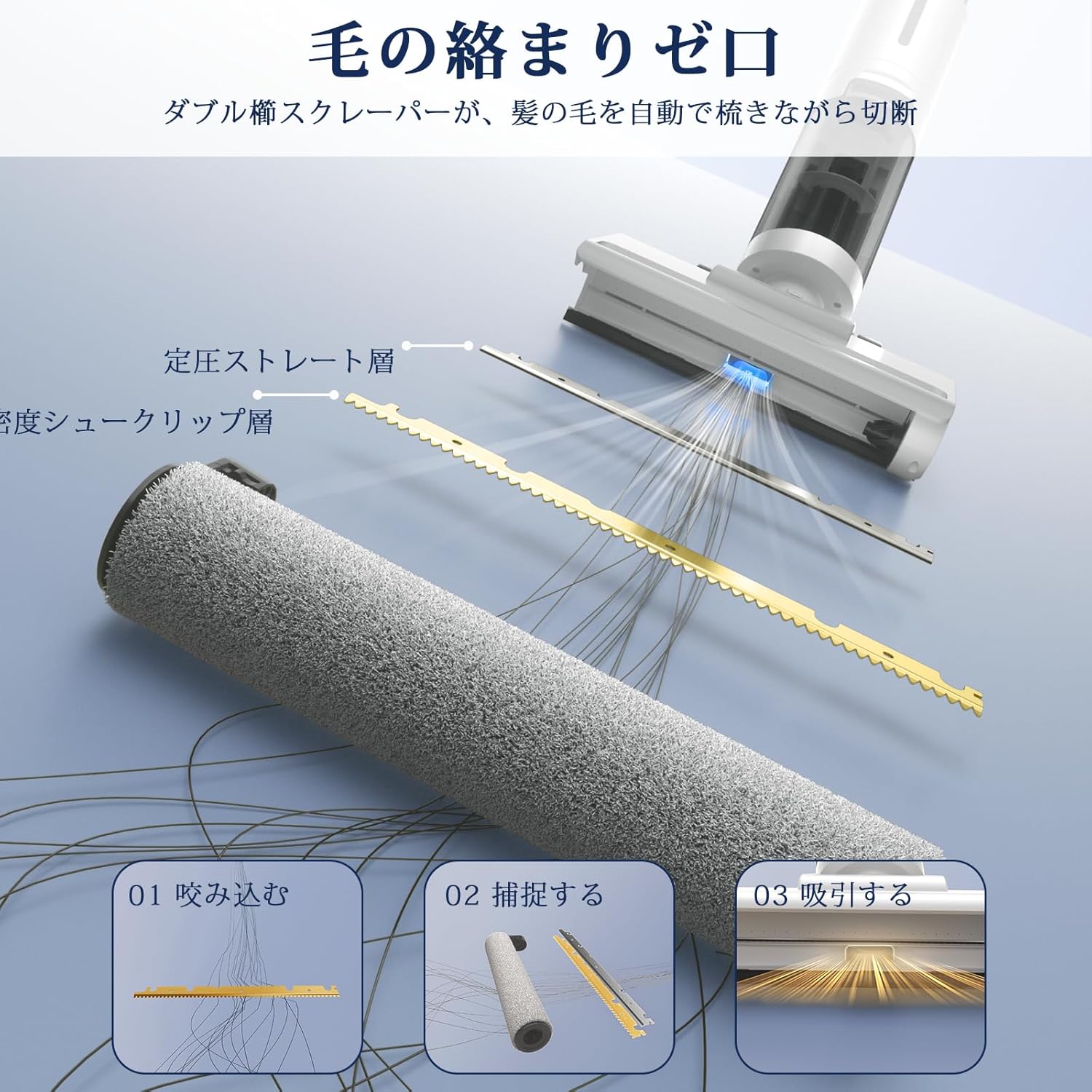
Figure 5.2: The internal mechanism with a scraper and comb blade prevents hair from tangling around the roller brush.
Video 5.2: Visual demonstration of the roller brush cleaning and hair removal process after use.
5.3 การบำรุงรักษาตัวกรอง
Regularly check and clean the HEPA filter to maintain optimal suction performance. Rinse the filter with water and allow it to air dry completely before reinserting.
6 การแก้ไขปัญหา
| ปัญหา | สาเหตุที่เป็นไปได้ | สารละลาย |
|---|---|---|
| ไม่มีไฟฟ้า | Battery drained, not charged properly. | Ensure the unit is correctly placed on the charging dock and connected to power. Allow sufficient charging time. |
| ดูดไม่ดี | Dirty water tank full, clean water tank empty, clogged filter, tangled roller brush. | Empty dirty water tank. Refill clean water tank. Clean the HEPA filter. Check and clean the roller brush for tangles. |
| รอยเปื้อนบนพื้น | Dirty roller brush, insufficient clean water, excessive cleaning solution. | Run self-cleaning cycle. Ensure clean water tank is filled. Use recommended amount of cleaning solution. |
| เสียงผิดปกติ | Obstruction in roller brush, motor issue. | Turn off and inspect the roller brush for any foreign objects. If the issue persists, contact customer support. |
7. ข้อมูลจำเพาะ
- ยี่ห้อ: จอนอาร์
- แบบอย่าง: ED12 Lite
- พลังดูด: 20000ปาสคาล
- ประเภทแบตเตอรี่: แบตเตอรี่ลิเธียมไอออน (2600 mAh)
- รันไทม์สูงสุด: Up to 45 minutes (Auto mode), approx. 25 minutes (Powerful mode)
- ความจุถังน้ำสะอาด: 850มล.
- ความจุถังน้ำเสีย: 450มล.
- น้ำหนักผลิตภัณฑ์: 3.4 kg (approx. 500g perceived weight with self-propulsion)
- ขนาดแพ็คเกจ: 55.4 x 34 x 31 ซม.
- คุณสมบัติ: Wet/Dry, Low Noise, Rechargeable, Self-Propelled, Lightweight, Edge Cleaning
- ประเภทตัวกรอง: แผ่นกรอง HEPA
- คำแนะนำการใช้: Various floor types (hard floors, carpets, tatami)
8. การรับประกันและการสนับสนุน
The JONR ED12 Lite comes with a สินค้ารับประกัน 2 ปี covering initial defects and malfunctions. For any issues or inquiries, การสนับสนุนออนไลน์ตลอด 24 ชั่วโมง is available. Please refer to your purchase documentation for contact details or visit the official JONR webเว็บไซต์สำหรับข้อมูลสนับสนุน