
1. บทนำ
This manual provides detailed instructions for the installation, operation, and maintenance of your PGST QEK-A105F-F Home Alarm System. This system offers comprehensive security for your home or business, featuring WiFi and 4G GSM connectivity, a 2.4-inch display, and compatibility with the Tuya Smart Life app, Alexa, and Google Assistant. Please read this manual thoroughly before using the product to ensure proper function and safety.
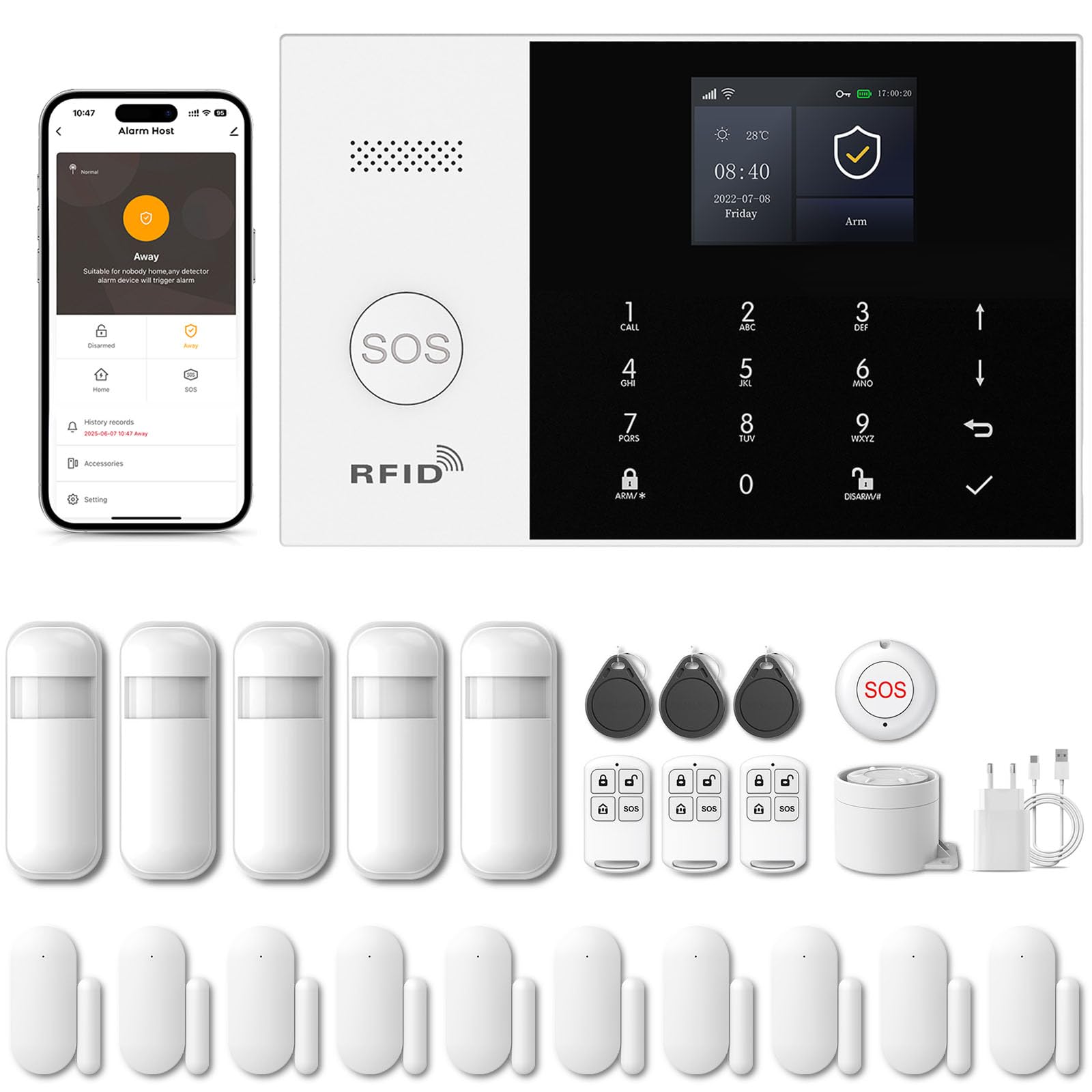
Image 1.1: PGST Home Alarm System main unit and included accessories.
2. ข้อมูลด้านความปลอดภัย
- อย่าให้อุปกรณ์สัมผัสกับอุณหภูมิ ความชื้น หรือแสงแดดโดยตรง
- ตรวจสอบให้แน่ใจว่าอะแดปเตอร์ไฟฟ้าเข้ากันได้กับเครื่องโวลตาท้องถิ่นของคุณtagอีและปัจจุบัน
- เก็บอุปกรณ์ให้ห่างจากน้ำและของเหลวอื่นๆ
- อย่าพยายามถอดประกอบหรือซ่อมแซมอุปกรณ์ด้วยตนเอง ติดต่อฝ่ายสนับสนุนลูกค้าเพื่อขอความช่วยเหลือ
- ใช้เฉพาะอุปกรณ์เสริมและชิ้นส่วนเปลี่ยนที่ได้รับอนุญาตเท่านั้น
3. เนื้อหาบรรจุภัณฑ์
ตรวจสอบว่ามีรายการทั้งหมดอยู่ในแพ็คเกจของคุณ:
- PGST Alarm Host Panel (QEK-A105F-F)
- อะแดปเตอร์แปลงไฟ
- รีโมทคอนโทรล
- เซ็นเซอร์ประตู/หน้าต่าง
- เครื่องตรวจจับความเคลื่อนไหว PIR
- อาร์เอฟไอดี Tags
- Mounting Screws and Adhesives
- คู่มือการใช้งาน

ภาพที่ 3.1: อดีตample of included components in the alarm kit.
4. สินค้าหมดview
4.1. Alarm Host Panel Layout

ภาพที่ 4.1: ด้านหน้าและด้านหลัง view of the alarm host panel with labeled components.
- ผู้บรรยาย: For alarm sounds and voice prompts.
- ปุ่ม SOS: Press for emergency alarm.
- พื้นที่ตรวจจับการ์ด RFID: For disarming with RFID tags.
- หน้าจอแสดงผล TFT: 2.4-inch screen for status and settings.
- Up/Down Function Buttons: สำหรับการนำทาง
- Back/Cancel Button: To go back or cancel an action.
- ปุ่มยืนยัน: เพื่อยืนยันการเลือก
- Dialing Buttons (0-9): For entering numbers or codes.
- Away Arming Key: Activates full arming mode.
- Home Arming Key: Activates home arming mode.
- Disarming Button: ปิดใช้งานระบบเตือนภัย
- Anti-prying switch: Triggers alarm if panel is tampเอเรดด้วย
- 3.5mm Siren Interface: For connecting an external wired siren.
- Wired Arming Area Interface: For connecting wired sensors.
- ช่องใส่ซิมการ์ด: For 2G/3G/4G GSM SIM card.
- สวิตช์เปิด/ปิด: สวิตช์ไฟหลัก
- Micro USB 110/220V AC to 5V: พอร์ตอินพุตไฟ
4.2. ขนาด
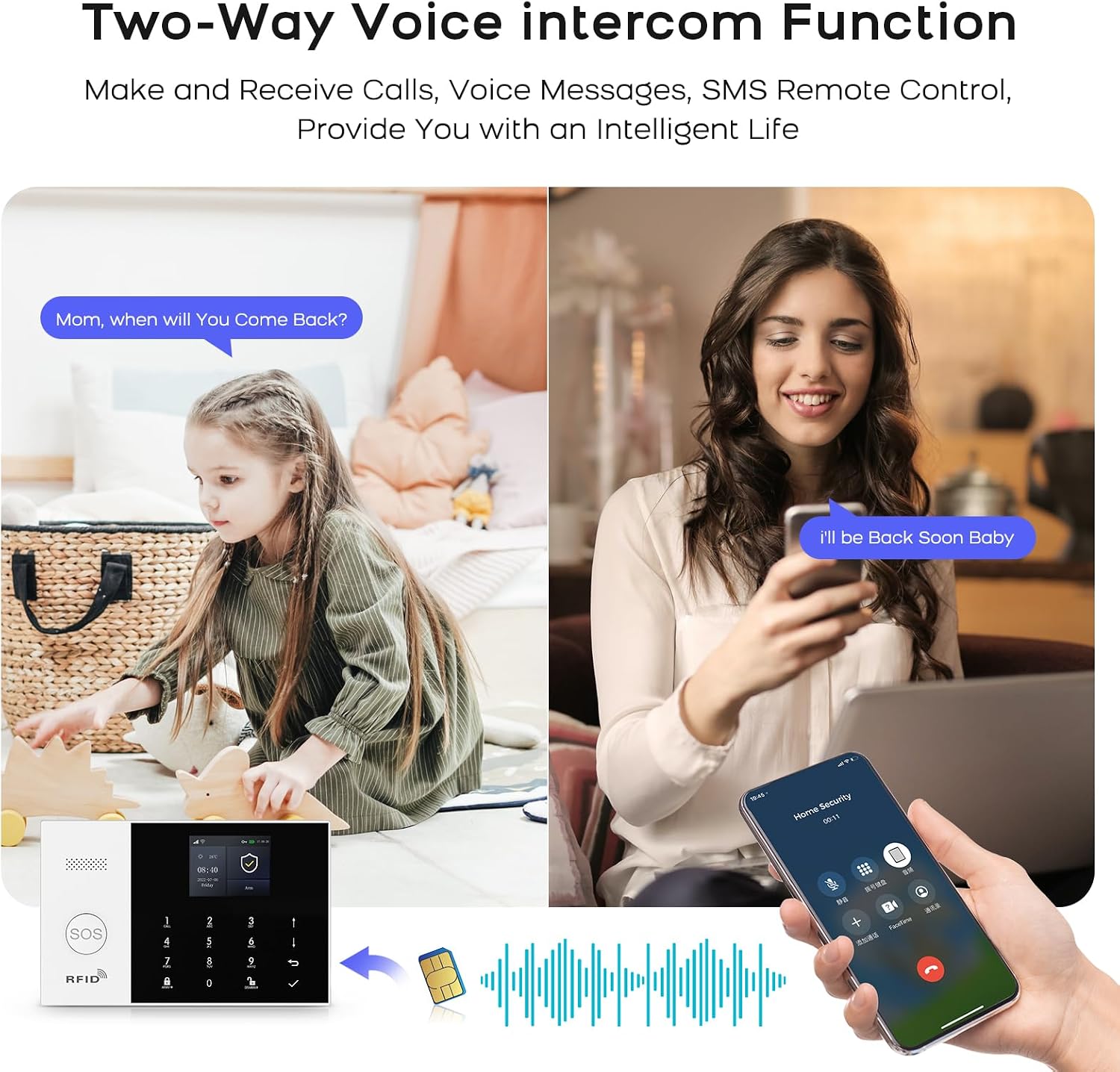
Image 4.2: Physical dimensions of the alarm host panel.
5. การตั้งค่าและการติดตั้ง
5.1. Powering the Host Panel
- Connect the power adapter to the Micro USB port on the host panel.
- เสียบอะแดปเตอร์เข้ากับเต้ารับที่ผนังมาตรฐาน
- Flip the ON/OFF switch to the 'ON' position. The panel will power on.
5.2. SIM Card Installation (Optional for 4G GSM Functionality)
- Ensure the host panel is powered off.
- Locate the SIM card slot on the rear of the panel.
- Insert a 2G/3G/4G GSM SIM card into the slot, ensuring correct orientation.
- Power on the host panel. The system will attempt to register with the cellular network.
5.3 การติดตั้งแอปและการเชื่อมต่อ Wi-Fi
The system uses the 'Smart Life' or 'Tuya Smart' app for remote control and configuration.
- Download the 'Smart Life' or 'Tuya Smart' app from your smartphone's app store (Google Play for Android, App Store for iOS).
- ลงทะเบียนหรือเข้าสู่ระบบบัญชีของคุณ
- On the alarm host panel, navigate to Menu > Wi-Fi > Soft AP Configuration.
- In the app, tap '+' to add a device. Select 'Sensors' > 'Alarm' > 'Wi-Fi Flashing'.
- Follow the on-screen instructions in the app to connect the alarm host to your 2.4GHz Wi-Fi network. (5GHz Wi-Fi is not supported).

Image 5.1: Steps for Wi-Fi configuration via the Smart Life app.
5.4. Adding Wireless Accessories (Sensors, Remotes)
The system supports up to 100 wireless storage locations for accessories.
- On the host panel, enter the pairing mode (refer to the panel's menu for 'Add Sensor' or 'Add Remote').
- Activate the accessory (e.g., trigger a motion sensor, separate a door sensor, press a button on the remote).
- The host panel will confirm successful pairing.
- Repeat for all desired accessories.

ภาพที่ 5.2: อดีตample of sensor placement within a home environment.
6. การใช้งานระบบ
6.1. การติดอาวุธและการปลดอาวุธ
- แขนออกไป: กดปุ่ม Away Arming Key on the panel, use the remote control, or arm via the Smart Life app. All sensors will be active.
- อาร์ม โฮม: กดปุ่ม Home Arming Key on the panel, use the remote control, or arm via the Smart Life app. Typically, perimeter sensors (doors/windows) are active, while internal motion sensors are inactive.
- ปลดอาวุธ: Enter your PIN on the panel, use the disarm button on the remote, use an RFID tag, or disarm via the Smart Life app.
6.2. ฟังก์ชันฉุกเฉิน SOS
ในกรณีฉุกเฉิน ให้กดปุ่ม ปุ่ม SOS on the host panel or the remote control. The system will immediately trigger the alarm and send notifications to pre-set emergency contacts.

Image 6.1: Remote control with SOS button for emergency alerts.
6.3. อินเตอร์คอมเสียงสองทาง
The alarm host supports two-way voice communication through the integrated speaker and microphone, allowing you to communicate with someone at the alarm panel via the app or a phone call.

Image 6.2: Two-way voice intercom function in use.
6.4. Timer Function (Scheduled Arm/Disarm)
You can set schedules for automatic arming and disarming of the system through the Smart Life app.

ภาพที่ 6.3: อดีตample of scheduled arming and disarming times.
6.5. Entry/Exit Delay
Configure custom entry and exit delays to allow time to leave or enter your property without triggering the alarm immediately. This can be set in the app.

Image 6.4: Customizing entry and exit delays via the app.
6.6. การควบคุมด้วยเสียง (Alexa และ Google Assistant)
Integrate your alarm system with Amazon Alexa or Google Assistant for convenient voice control commands such as arming or disarming the system.

Image 6.5: Using Alexa for voice control of the alarm system.
6.7. การแจ้งเตือนภัย
Upon alarm trigger, the system will:
- Sound the internal siren (up to 120dB) and any connected external sirens.
- Send instant push notifications to your smartphone via the Smart Life app.
- Send SMS messages to up to 5 pre-set phone numbers (if a SIM card is installed).
- Make phone calls to up to 5 pre-set phone numbers (if a SIM card is installed).

Image 6.6: Five preset alarm call numbers for notifications.
7. การบำรุงรักษา
7.1. การจัดการแบตเตอรี่
The host panel has a built-in 1000 mAh backup battery, providing approximately 5.5 hours of operation during a power outage. Wireless sensors are battery-powered and will send low battery alerts to the host panel and your app when replacement is needed.
Image 7.1: Low battery alerts for wireless sensors.
7.2. การทำความสะอาด
Wipe the host panel and sensors with a soft, dry cloth. Do not use liquid cleaners or abrasive materials.
7.3. แอนตี้-ทีampการป้องกันอย่างต่อเนื่อง
The alarm host is equipped with an anti-tampering switch. If the main unit is forcibly removed from its mounting, an alarm will be triggered immediately, regardless of its armed status.

Image 7.2: Anti-tampering protection feature.
8 การแก้ไขปัญหา
| ปัญหา | สาเหตุที่เป็นไปได้ | สารละลาย |
|---|---|---|
| Host panel not powering on. | Power adapter disconnected; ON/OFF switch off; faulty adapter. | Check power connection; ensure switch is ON; try a different adapter. |
| ไม่สามารถเชื่อมต่อ Wi-Fi ได้ | Incorrect Wi-Fi password; 5GHz network used; host too far from router. | Verify password; ensure 2.4GHz network; move host closer to router. |
| เซ็นเซอร์ไม่ส่งสัญญาณเตือน | Sensor battery low; sensor not paired; system disarmed. | Replace sensor battery; re-pair sensor; ensure system is armed. |
| No SMS/Call notifications. | No SIM card; SIM card not active; poor cellular signal; incorrect emergency numbers. | Install/activate SIM card; check signal strength; verify emergency numbers in settings. |
9. ข้อมูลจำเพาะ
- ยี่ห้อ: ป.ป.ช
- หมายเลขรุ่น: QEK-A105F-F
- เทคโนโลยีการเชื่อมต่อ: Wireless (Wi-Fi 2.4GHz, GSM/3G/4G)
- แหล่งพลังงาน: Battery (1000 mAh Lithium Polymer) / AC Adapter
- ขนาดสินค้า (กว้าง x ยาว x สูง) : 18 x 12 x 3 ซม. (7.09 x 4.72 x 1.18 นิ้ว)
- แสดง: หน้าจอ TFT ขนาด 2.4 นิ้ว
- วิธีการควบคุม: Application (Tuya Smart Life), Keypad, Remote Control, Voice Control (Alexa, Google Assistant)
- ช่วงไร้สายสูงสุด: เมตร 100 (พื้นที่เปิดโล่ง)
- ประเภทสัญญาณเตือน: เสียงและการเคลื่อนไหว
- ประเภทการติดตั้ง: Self-adhesive / Wall-mounted
10. การรับประกันและการสนับสนุน
Your PGST Home Alarm System comes with a standard manufacturer's warranty. Please refer to the warranty card included in your package for specific terms and conditions. For technical support, troubleshooting assistance, or warranty claims, please contact PGST customer service through the contact information provided on the official PGST webไซต์หรือแพลตฟอร์มการซื้อของคุณ