
OKP Life L1
OKP Life L1 Lidar Robot Vacuum Cleaner User Manual
รุ่น: L1
1. บทนำ
Thank you for choosing the OKP Life L1 Lidar Robot Vacuum Cleaner. This manual provides essential information for the safe operation, maintenance, and troubleshooting of your device. Please read it thoroughly before use and retain it for future reference.
2. คำแนะนำด้านความปลอดภัยที่สำคัญ
เพื่อลดความเสี่ยงต่อการบาดเจ็บหรือความเสียหาย โปรดอ่านคำแนะนำด้านความปลอดภัยเหล่านี้อย่างละเอียด และเก็บไว้ใกล้มือเมื่อทำการติดตั้ง ใช้งาน และบำรุงรักษาหุ่นยนต์ของคุณ
- เด็กอายุตั้งแต่ 8 ปีขึ้นไป รวมไปถึงบุคคลที่มีความบกพร่องทางร่างกาย ประสาทสัมผัส หรือจิตใจ หรือขาดประสบการณ์และความรู้ สามารถใช้เครื่องใช้ไฟฟ้านี้ได้ หากมีการดูแลหรือได้รับคำแนะนำเกี่ยวกับการใช้เครื่องใช้ไฟฟ้าในลักษณะที่ปลอดภัย และเข้าใจถึงอันตรายที่อาจเกิดขึ้น
- ควรมีผู้ดูแลเด็กเพื่อให้แน่ใจว่าไม่ได้เล่นกับเครื่องใช้ไฟฟ้าดังกล่าว
- การทำความสะอาดและการบำรุงรักษาผู้ใช้ไม่ควรทำโดยเด็กโดยไม่มีผู้ดูแล
- โปรดใช้เฉพาะอะแดปเตอร์แปลงไฟที่ผู้ผลิตให้มาเท่านั้น
- ห้ามใช้หุ่นยนต์ในบริเวณที่มีเปลวไฟหรือวัตถุแตกหักง่าย
- Ensure the robot is used on dry surfaces only.
- เก็บผม เสื้อผ้าที่หลวม นิ้ว และส่วนต่างๆ ของร่างกายให้ห่างจากช่องเปิดและชิ้นส่วนที่เคลื่อนไหว
3. เนื้อหาบรรจุภัณฑ์
ตรวจสอบว่ามีส่วนประกอบทั้งหมดอยู่ในแพ็คเกจ:
- OKP Life L1 Robot Vacuum Cleaner
- แท่นชาร์จ
- อะแดปเตอร์แปลงไฟ
- แปรงด้านข้าง (2 คู่)
- แผ่นกรอง HEPA (สำรอง 1 ชิ้น)
- เครื่องมือทำความสะอาด
- คู่มือการใช้งาน
4. สินค้าหมดview
Familiarize yourself with the components of your OKP Life L1 robot vacuum.

รูปที่ 4.1: สูงสุด view of the OKP Life L1 Lidar Robot Vacuum Cleaner alongside its mobile application interface. The robot is white with a dark grey Lidar sensor on top and a power button. The app shows cleaning status and control options.
ส่วนประกอบหุ่นยนต์:
- Lidar Sensor: เพื่อการนำทางและการทำแผนที่ที่แม่นยำ
- ปุ่มเปิด/ปิด: To start/pause cleaning or power on/off.
- ถังขยะ: เก็บรวบรวมเศษซาก
- แปรงด้านข้าง: กวาดเศษซากต่างๆ ไปรวมไว้ในทางเดินหลักของพุ่มไม้
- Main Brush Roll: Agitates and lifts debris from floors.
- หน้าสัมผัสการชาร์จ: For automatic recharging at the dock.
- เซ็นเซอร์หน้าผา: ป้องกันไม่ให้หุ่นยนต์ตกบันได
- กันชน: ตรวจจับสิ่งกีดขวาง
5. การตั้งค่าและการใช้งานเบื้องต้น
5.1 Preparing the Robot
- ลอกฟิล์มป้องกันและสติกเกอร์ทั้งหมดออกจากหุ่นยนต์และแท่นชาร์จ
- Install the side brushes by pressing them onto the posts until they click.
5.2 การวางแท่นชาร์จ
Place the charging dock against a wall in an open, uncluttered area. Ensure there is at least 0.5 meters (1.6 feet) of clear space on both sides and 1.5 meters (4.9 feet) in front of the dock. Plug in the power adapter.
5.3 ค่าบริการเริ่มต้น
Place the robot on the charging dock. The indicator light will show charging status. Fully charge the robot before its first use (approximately 5-6 hours).
5.4 Connecting to the OKP Life App
The OKP Life L1 supports remote control via the OKP Life App. This allows for scheduling, mode customization, and real-time monitoring.
- Download the "OKP Life" app from your mobile device's app store.
- ลงทะเบียนบัญชีและเข้าสู่ระบบ
- Follow the in-app instructions to add your L1 robot vacuum. Ensure your Wi-Fi network is 2.4GHz.
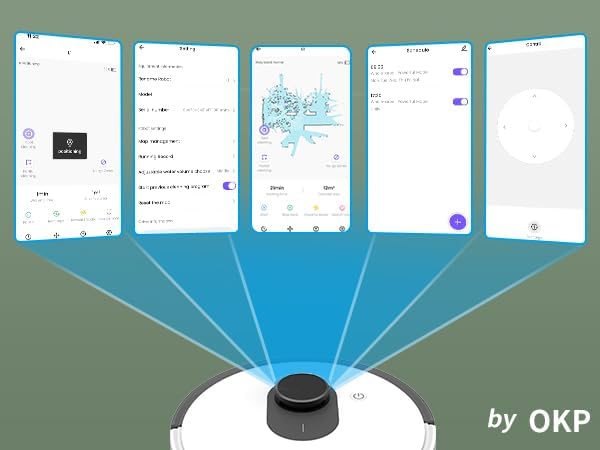
รูปที่ 5.1: Various screenshots of the OKP Life mobile application, demonstrating features like device connection, settings, mapping, and remote control options.
5.5 การบูรณาการการควบคุมด้วยเสียง
The L1 is compatible with Amazon Alexa and Google Assistant for hands-free operation.
- Ensure your robot is connected to the OKP Life App.
- เปิดแอป Alexa หรือ Google Home
- ค้นหา the "OKP Life" skill/service and enable it.
- Link your OKP Life account.
- You can now use voice commands such as "Alexa, turn on L1" or "Hey Google, start cleaning with L1."

รูปที่ 5.2: The OKP Life L1 robot vacuum on a rug, with an Amazon Echo Dot speaker and a smartphone displaying the control app. This illustrates the voice and app control capabilities.
6. การใช้งานหุ่นยนต์ดูดฝุ่นของคุณ
6.1 โหมดการทำความสะอาดและการนำทาง
The L1 utilizes advanced LDS laser radar and SLAM navigation to create accurate real-time maps of your home, optimizing cleaning routes and ensuring comprehensive coverage.

รูปที่ 6.1: The OKP Life L1 robot vacuum navigating a living room, with blue lines illustrating its precision LiDAR mapping and navigation path.
หุ่นยนต์มีโหมดทำความสะอาดต่างๆ ที่สามารถเข้าถึงได้ผ่านแอป:
- ทำความสะอาดอัตโนมัติ: หุ่นยนต์ทำความสะอาดบ้านของคุณอย่างชาญฉลาด
- ทำความสะอาดเฉพาะจุด: Cleans a specific area with concentrated effort.
- โซนสะอาด: เลือกห้องหรือพื้นที่เฉพาะบนแผนที่สำหรับการทำความสะอาด
- บริการทำความสะอาดตามกำหนด: ตั้งเวลาเฉพาะให้หุ่นยนต์ทำความสะอาดอัตโนมัติ

รูปที่ 6.2: The OKP Life L1 robot vacuum next to a smartphone displaying its app, which shows a floor plan map where a user can select a specific zone for vacuuming using the LiDAR sensor data.

รูปที่ 6.3: The OKP Life L1 robot vacuum on a rug, with a smartphone displaying the app's features including No-Go Zones, Real-time Mapping, Recharge Resume, Partial Cleaning, and Spot Cleaning.
6.2 พลังดูดและแรงดูดสำหรับพรม
The L1 features a 4000Pa suction motor for effective cleaning. It automatically increases suction power when detecting carpets for deeper cleaning.

รูปที่ 6.4: The OKP Life L1 robot vacuum moving from a hard floor to a carpet, illustrating its ability to boost suction power for effective carpet cleaning.
6.3 เขตห้ามเข้าและกำแพงที่มองไม่เห็น
Use the OKP Life App to define "No-Go Zones" or "Invisible Walls" to prevent the robot from entering specific areas or protecting fragile items.

รูปที่ 6.5: The OKP Life L1 robot vacuum demonstrating its ability to respect "No-Go Zones" (preventing entry into a pet area) and "Invisible Walls" (blocking access to a specific room entrance).
6.4 การหลีกเลี่ยงอุปสรรค
Freemove 3.0 obstacle avoidance technology ensures the robot navigates smoothly around furniture, stairs, walls, and pets, minimizing collisions and preventing it from getting stuck.
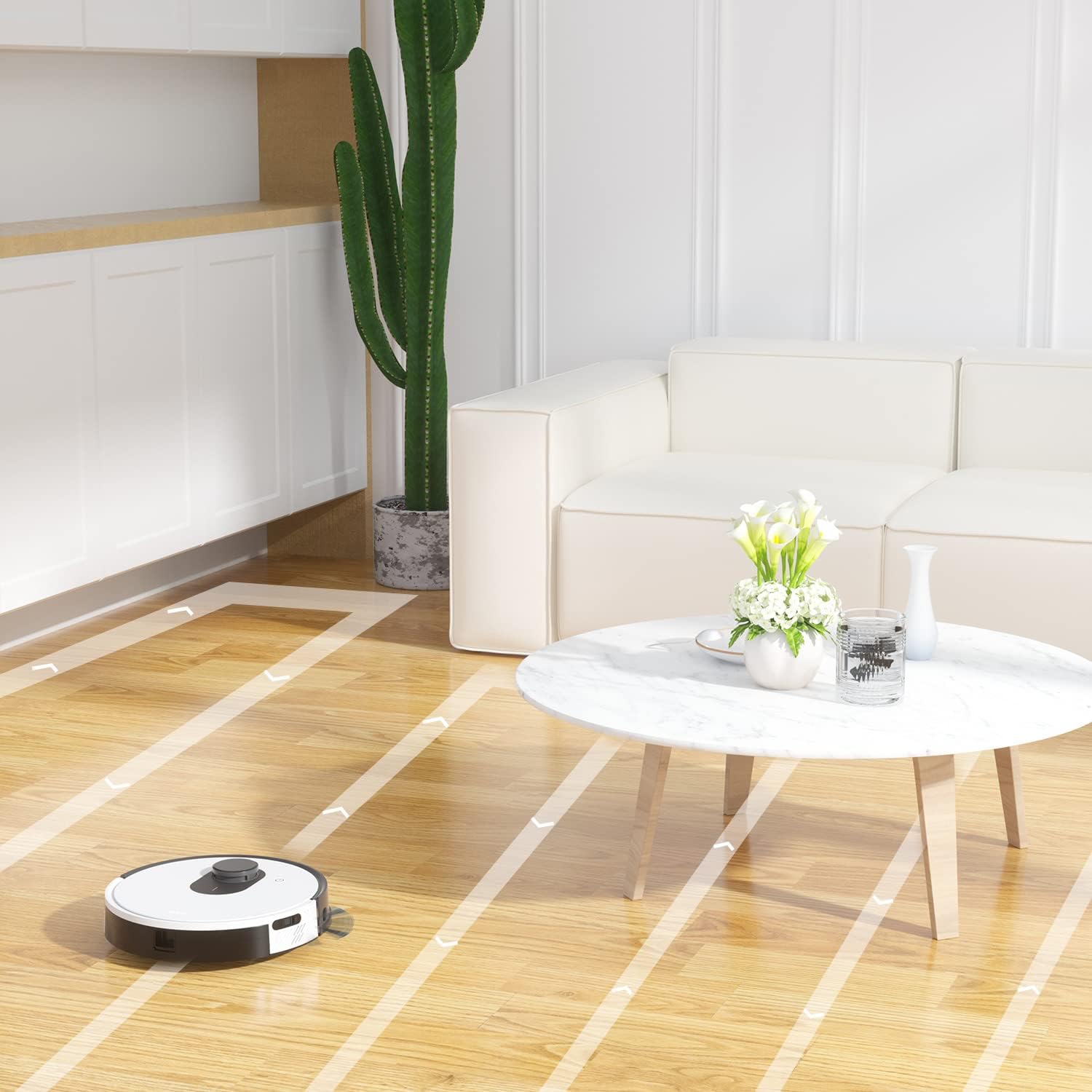
รูปที่ 6.6: The OKP Life L1 robot vacuum cleaning a room, illustrating its efficient path planning and obstacle avoidance capabilities.
6.5 การจัดการแบตเตอรี่
The robot features a 4000mAh battery, providing up to 200 minutes of continuous cleaning. When the battery is low or cleaning is complete, the robot automatically returns to its charging dock.
7. การบำรุงรักษา
การบำรุงรักษาอย่างสม่ำเสมอจะช่วยให้หุ่นยนต์ดูดฝุ่นของคุณทำงานได้อย่างมีประสิทธิภาพสูงสุด
7.1 การล้างถังขยะ
Empty the dustbin after each cleaning cycle. Press the dustbin release button, remove the dustbin, and discard collected debris. Clean the filter inside the dustbin.
7.2 Cleaning the Main Brush Roll
The self-cleaning brush roll reduces hair tangles. However, periodically remove the main brush roll and use the provided cleaning tool to remove any tangled hair or debris.
7.3 การทำความสะอาดแปรงด้านข้าง
Check side brushes regularly for wear or damage. Remove any tangled hair or debris. Replace worn brushes as needed.
7.4 การทำความสะอาดเซ็นเซอร์และหน้าสัมผัสการชาร์จ
Wipe the cliff sensors, bumper sensor, and charging contacts on both the robot and the charging dock with a clean, dry cloth to ensure proper function.
7.5 การเปลี่ยนไส้กรอง
Replace the HEPA filter every 3-6 months, or more frequently depending on usage, to maintain optimal suction performance.
8 การแก้ไขปัญหา
โปรดดูหัวข้อนี้เพื่อดูปัญหาทั่วไปและวิธีแก้ไข
| ปัญหา | สาเหตุที่เป็นไปได้ | สารละลาย |
|---|---|---|
| หุ่นยนต์ไม่เปิด | แบตเตอรี่ต่ำ สวิตช์ไฟปิด | Charge the robot; Ensure power switch is on. |
| หุ่นยนต์ไม่สามารถกลับไปยังแท่นชาร์จได้ | แท่นชาร์จถูกกีดขวาง; หุ่นยนต์อยู่ห่างจากแท่นชาร์จมากเกินไป | Clear obstacles around the dock; Manually place robot near dock. |
| พลังดูดไม่ค่อยแรง | ถังขยะเต็ม ตัวกรองอุดตัน แปรงหลักพันกัน | เทถังฝุ่นทิ้ง; ทำความสะอาด/เปลี่ยนแผ่นกรอง; ทำความสะอาดแปรงหลัก |
| หุ่นยนต์ติดขัดบ่อยครั้ง | Loose cables/rugs; Small obstacles. | Clear floor of obstructions; Use No-Go Zones. |
| ปัญหาการเชื่อมต่อแอป | Wi-Fi ไม่ถูกต้อง (ไม่ใช่ 2.4GHz); มีปัญหาที่เราเตอร์ | ตรวจสอบให้แน่ใจว่าใช้ Wi-Fi 2.4GHz; รีสตาร์ทเราเตอร์และหุ่นยนต์; จับคู่ใหม่ในแอป |
9. ข้อมูลจำเพาะ
| คุณสมบัติ | รายละเอียด |
|---|---|
| ยี่ห้อ | โอเคพีไลฟ์ |
| ชื่อรุ่น | L1 Lidar Robot Vacuum |
| คุณสมบัติพิเศษ | HEPA Filtration, Vacuums |
| สี | เมฆขาว |
| ขนาดสินค้า | ยาว 12 นิ้ว x กว้าง 12 นิ้ว x สูง 3.5 นิ้ว |
| ส่วนประกอบที่รวมอยู่ | แบตเตอรี่ |
| อายุการใช้งานแบตเตอรี่ | Up to 200 minutes (4000mAh battery) |
| ความจุ (ถังขยะ) | 500 มิลลิลิตร |
| แบตเตอรี่ที่จำเป็น | แบตเตอรี่ลิเธียมไอออน 1 ก้อน (รวมอยู่ด้วย) |
| อุปกรณ์ที่รองรับ | Amazon Echo, Google Home, สมาร์ทโฟน |
| น้ำหนักสินค้า | 7 ปอนด์ |
| ผู้ผลิต | โอเคพีไลฟ์ |
| หมายเลขรุ่นสินค้า | L1 |
10. การรับประกันและการสนับสนุน
For warranty information and technical support, please refer to the official OKP Life webหรือติดต่อฝ่ายบริการลูกค้า เก็บใบเสร็จรับเงินไว้เป็นหลักฐานการซื้อ
การสนับสนุนทางออนไลน์: Visit the official OKP Life webเว็บไซต์สำหรับคำถามที่พบบ่อย คำแนะนำในการแก้ไขปัญหา และข้อมูลการติดต่อ
บริการลูกค้า: Refer to your product packaging or the OKP Life webเว็บไซต์นี้มีรายละเอียดการติดต่อฝ่ายบริการลูกค้าโดยเฉพาะ
Ask a question about this manual
Ask about setup, troubleshooting, compatibility, parts, safety, or missing instructions. Manuals+ will review the question and use this page’s manual context to help answer it.