
1. คำแนะนำด้านความปลอดภัยที่สำคัญ
โปรดอ่านคำแนะนำทั้งหมดอย่างละเอียดก่อนใช้งานเครื่องใช้ไฟฟ้านี้ และเก็บรักษาไว้เพื่อใช้อ้างอิงในอนาคต การไม่ปฏิบัติตามคำแนะนำเหล่านี้อาจทำให้เกิดไฟฟ้าช็อต ไฟไหม้ หรือการบาดเจ็บร้ายแรงได้
- ตรวจสอบแหล่งจ่ายไฟ voltage ตรงกับฉลากการจัดอันดับบนเครื่องใช้
- ห้ามใช้งานพัดลมหากสายไฟหรือปลั๊กชำรุด หากสายไฟชำรุด จำเป็นต้องเปลี่ยนโดยผู้ผลิต ตัวแทนบริการ หรือผู้เชี่ยวชาญ เพื่อหลีกเลี่ยงอันตราย
- ควรถอดปลั๊กพัดลมออกจากเต้ารับไฟฟ้าทุกครั้งก่อนทำความสะอาด ซ่อมบำรุง หรือเคลื่อนย้าย
- ห้ามสอดนิ้วหรือวัตถุใดๆ เข้าไปในตะแกรงพัดลมขณะที่พัดลมกำลังทำงาน
- Keep the fan away from water or other liquids. Do not use it in wet or damp สภาพแวดล้อม
- เครื่องใช้นี้มีไว้สำหรับใช้ภายในอาคารเท่านั้น ห้ามใช้กลางแจ้ง
- Do not place the fan near heat sources such as radiators, heat registers, stoves, or other appliances that produce heat.
- ดูแลเด็กไม่ให้เล่นกับเครื่อง
- Do not use the fan in areas where gasoline, paint, or flammable liquids are stored.
2. สินค้าหมดview
The Altus AL 40 TFB is a sleek and efficient tower air cooler designed for indoor use. It features a compact design, multiple speed settings, and easy-to-use push-button controls.
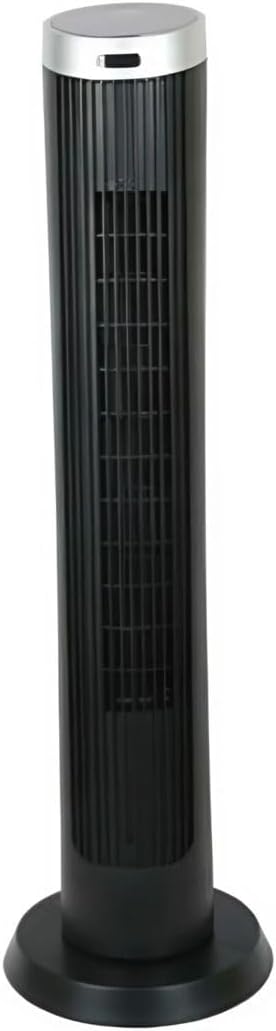
รูปที่ 2.1: ด้านหน้า view of the Altus AL 40 TFB Tower Air Cooler. This image shows the tall, slender black body of the fan with its air outlet grille and a stable round base.
ส่วนประกอบ:
- แผงควบคุม: Located on the top of the unit for easy access to all functions.
- ช่องระบายอากาศ: Vertical grille on the front for air dispersion.
- ฐาน: Stable round base for secure placement.
- สายไฟ: ตั้งอยู่บริเวณด้านหลังของยูนิต

รูปที่ 2.2: รายละเอียด view of the control panel on top of the Altus AL 40 TFB Tower Air Cooler. The panel features a digital display showing '28' and several push buttons for various functions.
3. การตั้งค่า
Follow these steps to set up your Altus AL 40 TFB Tower Air Cooler:
- แกะ: Carefully remove the fan from its packaging. Retain the packaging for future storage or transport.
- ชุดฐาน (ถ้าจำเป็น): Some models may require minor base assembly. If your unit's base is detached, align the base sections and secure them according to the diagrams in the packaging. Ensure it is firmly attached.
- การจัดวาง: Place the fan on a firm, level surface. Ensure there is adequate space around the fan for proper airflow, at least 30 cm (12 inches) from walls or furniture. This appliance is designed for indoor use only.
- การเชื่อมต่อไฟฟ้า: Plug the power cord into a standard electrical outlet. Ensure the outlet meets the voltage ตามข้อกำหนดที่ระบุไว้บนฉลากผลิตภัณฑ์
4. คู่มือการใช้งาน
Your Altus AL 40 TFB Tower Air Cooler is equipped with user-friendly push-button controls on the top panel.
ฟังก์ชั่นแผงควบคุม:
- ปุ่มเพาเวอร์ (⏻): Press once to turn the fan ON, press again to turn it OFF.
- ปุ่มความเร็ว (💨): Press repeatedly to cycle through the 3 available fan speeds: Low, Medium, and High. The current speed setting may be indicated on the digital display.
- ปุ่มโหมด (M): If available, press to select different operating modes (e.g., Normal, Natural, Sleep). Refer to the digital display for the active mode.
- ปุ่มสั่น (↔): Press to activate or deactivate the oscillation function, which allows the fan to rotate from side to side to distribute air over a wider area.
- ปุ่มตั้งเวลา (🕒): If available, press to set an automatic shut-off timer. Each press typically increases the timer duration by a set increment (e.g., 1 hour).
การดำเนินการทั่วไป:
- เสียบพัดลมเข้ากับเต้ารับไฟฟ้าที่เหมาะสม
- กดปุ่มเปิด/ปิด (⏻) to turn on the fan.
- Select your desired fan speed using the Speed Button (💨).
- Activate oscillation if desired by pressing the Oscillation Button (↔).
- To turn off the fan, press the Power Button (⏻) อีกครั้ง.
5. การบำรุงรักษา
Regular maintenance ensures optimal performance and extends the lifespan of your Altus AL 40 TFB Tower Air Cooler.
การทำความสะอาด:
- ควรถอดปลั๊กพัดลมทุกครั้งก่อนทำความสะอาด
- การทำความสะอาดภายนอก: เช็ดพื้นผิวภายนอกของพัดลมด้วยผ้านุ่มๆamp cloth. Do not use abrasive cleaners, waxes, or polishes as they may damage the finish.
- Air Inlet/Outlet Grilles: Use a vacuum cleaner with a brush attachment to gently remove dust and debris from the air inlet and outlet grilles. Do not attempt to disassemble the fan for cleaning.
- ตรวจสอบให้แน่ใจว่าพัดลมแห้งสนิทก่อนเสียบปลั๊กและใช้งานอีกครั้ง
พื้นที่จัดเก็บ:
เมื่อไม่ได้ใช้งานเป็นเวลานาน ควรเก็บพัดลมไว้ในที่แห้งและเย็น แนะนำให้เก็บไว้ในบรรจุภัณฑ์เดิมเพื่อป้องกันฝุ่นและความเสียหาย
6 การแก้ไขปัญหา
If you encounter any issues with your Altus AL 40 TFB Tower Air Cooler, please refer to the following common problems and solutions:
- พัดลมไม่เปิด:
- ตรวจสอบว่าสายไฟเสียบเข้ากับเต้ารับไฟฟ้าที่ใช้งานได้แน่นหนาหรือไม่
- Ensure the power button on the control panel has been pressed.
- Verify that the household circuit breaker or fuse has not tripped.
- การไหลเวียนของอากาศที่อ่อนแอ:
- Check if the fan speed is set to a higher setting.
- Ensure the air inlet and outlet grilles are not blocked by dust or obstructions. Clean them if necessary.
- เสียงรบกวนที่ผิดปกติ:
- ตรวจสอบให้แน่ใจว่าได้วางพัดลมไว้บนพื้นผิวที่มั่นคงและเรียบเสมอกัน
- Check for any foreign objects that might have fallen into the fan grilles.
- หากยังมีเสียงอยู่ ให้หยุดใช้งานและติดต่อฝ่ายสนับสนุนลูกค้า
If the problem cannot be resolved using the above steps, please contact Altus customer support.
7. ข้อมูลจำเพาะ
Detailed technical specifications for the Altus AL 40 TFB Tower Air Cooler:
| คุณสมบัติ | ข้อมูลจำเพาะ |
|---|---|
| ยี่ห้อ | อัลตัส |
| ชื่อรุ่น | AL 40 TFB |
| สี | สีดำ |
| การออกแบบพัดลมไฟฟ้า | Floor Fan (Tower Type) |
| แหล่งพลังงาน | สายไฟ |
| ขนาดสินค้า (ลึก x กว้าง x สูง) | 29D x 29W x 101H ซม. |
| ประเภทการติดตั้ง | ชั้นเมา |
| ประเภทการเสร็จสิ้น | ทาสี |
| การใช้งานในร่ม/กลางแจ้ง | ในร่ม |
| วิธีการควบคุม | ปุ่มกด |
| จำนวนระดับพลังงาน | 3 |
| ไร้สาย | เลขที่ |
8. การรับประกันและการสนับสนุน
Altus provides comprehensive support for its products. For any assistance or warranty-related inquiries, please contact our customer service.

รูปที่ 8.1: Altus customer service and warranty information. The image displays the Altus logo, a message about service availability, and a contact number for support.
Our services are always available for your Altus products. You can benefit from our door-to-door service by calling our support line for any assistance you may need.
Arçelik Service Warranty: For products under warranty, our home product pickup service is provided free of charge.
Customer Support Line: 0850 210 0 888
Please have your product model number (AL 40 TFB) and purchase details ready when contacting support.