
1. สินค้าหมดview
The JZAQ A50 is an ultra-thin wireless Bluetooth headset designed for motorcycle helmets, offering high-definition audio, DSP noise reduction, and intelligent features for communication and entertainment during riding, skiing, and other sports. It features a long-lasting 1000mAh battery and IP67 waterproof rating.
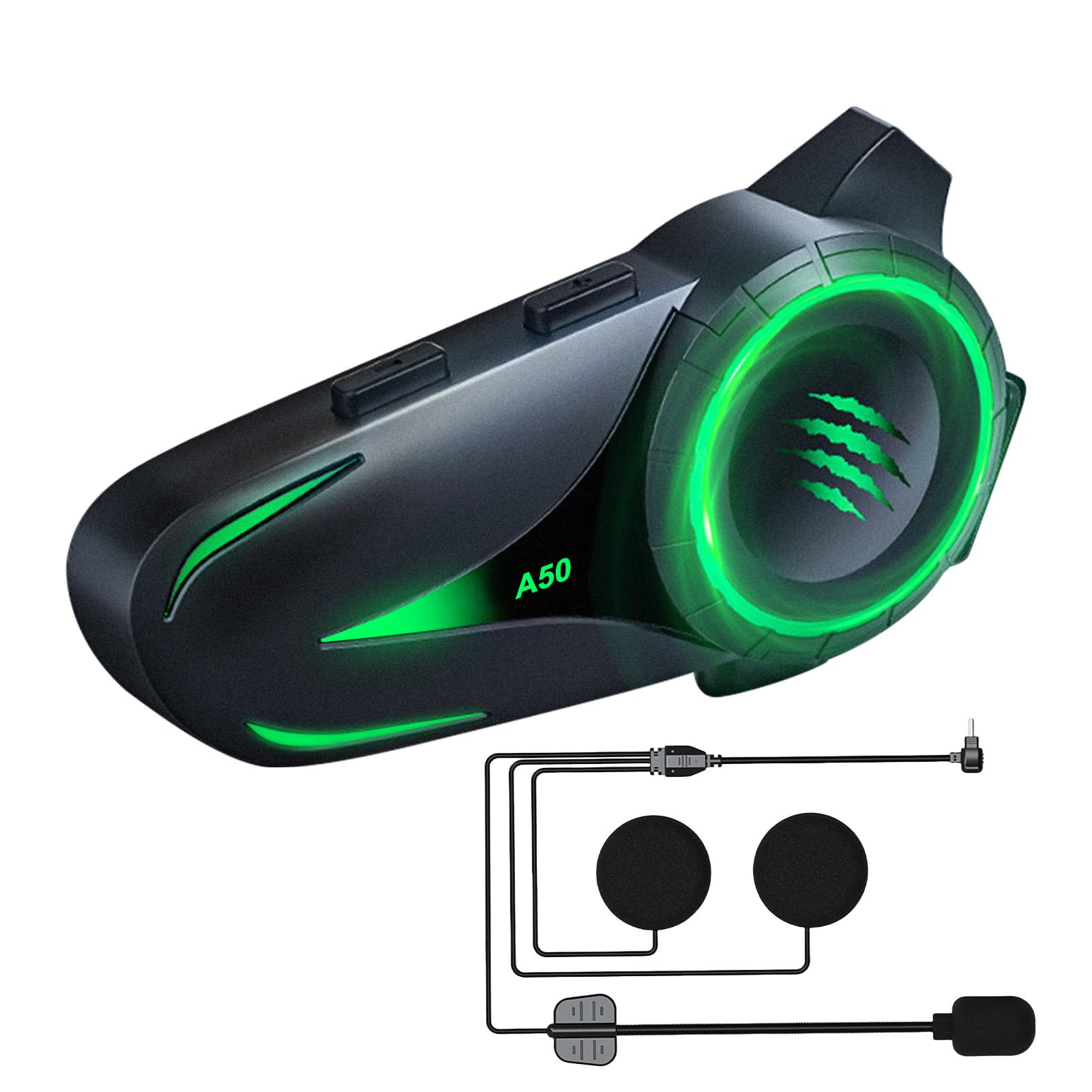
Image: The JZAQ A50 Motorcycle Helmet Bluetooth Headset, showcasing การออกแบบที่เพรียวบาง
2. อะไรอยู่ในกล่อง
ตรวจสอบว่ามีส่วนประกอบทั้งหมดอยู่ในแพ็คเกจ:
- Bluetooth Host (Main Unit)
- Speaker Microphone Set (with soft and hard microphones)
- ฐานคลิป
- 3M Glue Base
- สายชาร์จ (USB Type-C)
- Velcro Pads (4 pieces)
- Noise-Reducing Windproof Cotton (2 pieces)
- คู่มือการใช้งาน (เอกสารนี้)

Image: All components included in the JZAQ A50 package, laid out for easy identification.
3. การตั้งค่าและการติดตั้ง
Follow these steps to install your JZAQ A50 headset into your helmet.
3.1 การชาร์จชุดหูฟัง
Before first use, fully charge the headset. Connect the provided USB Type-C charging cable to the headset's charging port and a suitable USB power source. A full charge takes approximately 2 hours.

Image: The JZAQ A50 headset highlighting its 1000mAh battery capacity and charging port.
3.2 การติดตั้งยูนิตหลัก
The JZAQ A50 is designed for easy installation in various helmet types. You can choose between the clip base or the 3M glue base.
- เลือกตำแหน่งการติดตั้ง: Select a flat surface on the left side of your helmet, near the bottom edge.
- แนบฐาน:
- Clip Base: Slide the clip base between the helmet shell and the inner padding. Ensure it is securely fastened.
- 3M Glue Base: Clean the chosen area on the helmet. Peel off the protective film from the 3M glue base and firmly press it onto the helmet for at least 30 seconds. Allow 24 hours for the adhesive to fully cure before attaching the main unit.
- Mount the main unit: Slide the JZAQ A50 main unit onto the installed base until it clicks securely into place.

Image: The JZAQ A50 headset shown compatible with various helmet styles, demonstrating its versatile installation.
3.3 การติดตั้งลำโพงและไมโครโฟน
The ultra-thin speakers (0.38 inches) are designed to fit comfortably without squeezing your ears.
- Attach Velcro pads: Place the provided Velcro pads inside the helmet's ear pockets.
- Position speakers: Attach the speakers to the Velcro pads, ensuring they are centered over your ears for optimal audio.
- Position microphone: Choose either the soft or hard microphone based on your helmet type and preference. Position the microphone near your mouth for clear voice transmission.
- Connect to main unit: Plug the speaker and microphone cable into the designated port on the main unit.
Video: A demonstration of the JZAQ A50 headset's features, including installation steps for the main unit, speakers, and microphone, as well as showcasing the various lighting effects.
4. คู่มือการใช้งาน
Learn how to use your JZAQ A50 headset for calls, music, and voice assistance.
4.1 การเปิด/ปิดเครื่องและการจับคู่บลูทูธ
- เปิดเครื่อง: Press and hold the Power button for approximately 3 seconds until the indicator light flashes and you hear a power-on tone.
- การจับคู่บลูทู ธ :
- When powered on for the first time, the headset will automatically enter pairing mode (indicator light flashes rapidly).
- On your mobile device, enable Bluetooth and search for "JZAQ A50".
- Select "JZAQ A50" to connect. Once paired, the indicator light will slow down or turn solid, and you will hear a confirmation tone.
- For subsequent uses, the headset will automatically connect to the last paired device when powered on.
- หมดแรง: Press and hold the Power button for approximately 5 seconds until the indicator light turns off and you hear a power-off tone.

Image: Visual representation of Bluetooth 5.4 technology, indicating stable connection, reduced energy consumption, and improved transmission efficiency.
4.2 การเล่นเพลง
- เล่น/หยุดชั่วคราว: กดปุ่มมัลติฟังก์ชั่นหนึ่งครั้ง
- เพลงถัดไป: กดปุ่มเพิ่มระดับเสียง (+) ค้างไว้
- แทร็กก่อนหน้า: กดปุ่มลดระดับเสียง (-) ค้างไว้
- การปรับระดับเสียง: Press the Volume Up (+) or Volume Down (-) buttons to adjust the volume.
The headset provides loud, 3D sound quality with high/low pitch effects, ensuring clear music playback even while riding.

Image: A motorcyclist enjoying music with loud, clear sound, illustrating the DSP noise reduction technology of the JZAQ A50 headset.
4.3 การโทรศัพท์
- รับสาย: The headset will automatically answer incoming calls after a few rings. Alternatively, press the Multi-function button once to answer.
- วางสาย: กดปุ่มมัลติฟังก์ชันหนึ่งครั้งในระหว่างการโทร
- ปฏิเสธสาย: กดปุ่มมัลติฟังก์ชั่นค้างไว้ 2 วินาทีเมื่อมีสายเรียกเข้า
- โทรซ้ำหมายเลขล่าสุด: กดปุ่มมัลติฟังก์ชั่นสองครั้ง
The DSP noise reduction ensures clear call quality, allowing you to communicate effectively while riding.
4.4 ผู้ช่วยเสียง
Activate your smartphone's intelligent voice assistant (e.g., Siri, Google Assistant) directly from the headset.
- เปิดใช้งาน Voice Assistant: Double-click the Volume Down (-) button.

Image: A motorcyclist interacting with the intelligent voice assistant feature of the JZAQ A50 headset, indicated by a glowing microphone icon.
4.5 เอฟเฟกต์แสง
The JZAQ A50 features 4 dazzling lighting effects that can be switched to personalize your headset's appearance.
- เอฟเฟกต์แสงสวิตช์: Refer to the specific button combination in the quick start guide or experiment with the main unit buttons to cycle through the lighting modes.

Image: Four JZAQ A50 headsets displaying different intelligent lighting effects in red, blue, pink, and green.
5. การบำรุงรักษา
Proper maintenance ensures the longevity and optimal performance of your JZAQ A50 headset.
- การทำความสะอาด: Use a soft, dry cloth to wipe the main unit. For speakers, gently clean with a slightly damp cloth if necessary. Avoid harsh chemicals or abrasive materials.
- การกันน้ำ: The headset has an IP67 waterproof rating, meaning it is protected from dust and can withstand immersion in water up to 1 meter for 30 minutes. This allows for confident use on rainy days. Ensure the charging port cover is securely closed when not charging to maintain waterproofing.
- การดูแลแบตเตอรี่
- หลีกเลี่ยงการปล่อยแบตเตอรี่จนหมดบ่อยครั้ง
- Charge the headset regularly, even if not in use for extended periods, to maintain battery health.
- Store the headset in a cool, dry place.

Image: The JZAQ A50 headset demonstrating its IP67 deep waterproof capability, suitable for riding in wet conditions.
6 การแก้ไขปัญหา
If you encounter issues with your JZAQ A50 headset, refer to the following common problems and solutions:
| ปัญหา | สาเหตุที่เป็นไปได้ | สารละลาย |
|---|---|---|
| หูฟังไม่สามารถเปิดเครื่องได้ | แบตเตอรี่อ่อน | ชาร์จหูฟังอย่างน้อย 2 ชั่วโมง |
| ไม่สามารถเชื่อมต่อกับโทรศัพท์ได้ | ไม่ได้เปิดใช้งานบลูทูธในโทรศัพท์; ชุดหูฟังไม่ได้อยู่ในโหมดจับคู่; มีอุปกรณ์ที่จับคู่มากเกินไป | Ensure phone Bluetooth is on. Power off/on headset to re-enter pairing mode. Forget previous devices on phone and try again. |
| ไม่มีเสียงหรือเสียงต่ำ | Volume too low; speakers incorrectly positioned; loose connection. | Increase headset and phone volume. Adjust speaker position. Ensure speaker/mic cable is fully plugged into the main unit. |
| คุณภาพการโทรไม่ดี | Microphone not positioned correctly; excessive wind noise. | Adjust microphone closer to your mouth. Ensure noise-reducing windproof cotton is installed on the microphone. |
| การเชื่อมต่อบลูทูธไม่เสถียร | Interference; device too far from headset. | Ensure no major obstructions between phone and headset. Keep devices within optimal Bluetooth range. |
7. ข้อมูลจำเพาะ
| คุณสมบัติ | รายละเอียด |
|---|---|
| แบบอย่าง | เอ50 |
| เวอร์ชันบลูทูธ | 5.4 |
| ความจุของแบตเตอรี่ | 1000mAh |
| เวลาในการชาร์จ | ประมาณ 2 ชั่วโมง |
| เวลาเล่นเพลง | นานถึง 160 ชั่วโมง |
| เวลาสแตนด์บาย | นานถึง 600 ชั่วโมง |
| ความต้านทานต่อน้ำ | กันน้ำระดับ IP67 |
| การควบคุมเสียงรบกวน | DSP Noise Reduction, Adaptive Noise Cancellation |
| ความหนาของลำโพง | 0.38 นิ้ว (บางพิเศษ) |
| อินเตอร์เฟซการชาร์จ | ยูเอสบี ไทป์ ซี |
| น้ำหนัก | 0.16 กิโลกรัม (ประมาณ 5.6 ออนซ์) |
| การรับรอง | CE, FCC, Bluetooth Association |
8. การรับประกันและการสนับสนุน
JZAQ is committed to providing quality products and customer satisfaction.
8.1 การสนับสนุนลูกค้า
If you encounter any issues with your JZAQ A50 helmet headset, please contact us through the Amazon Buyer Center. Our support team aims to respond within 12 hours to assist you with troubleshooting or product-related inquiries.
หากต้องการความช่วยเหลือเพิ่มเติม โปรดไปที่ JZAQ Store on Amazon.
8.2 ข้อมูลการรับประกัน
Specific warranty details are typically provided with your purchase documentation. Please retain your proof of purchase for any warranty claims. The product is designed and manufactured to high standards, holding CE and FCC certifications.