
1. บทนำ
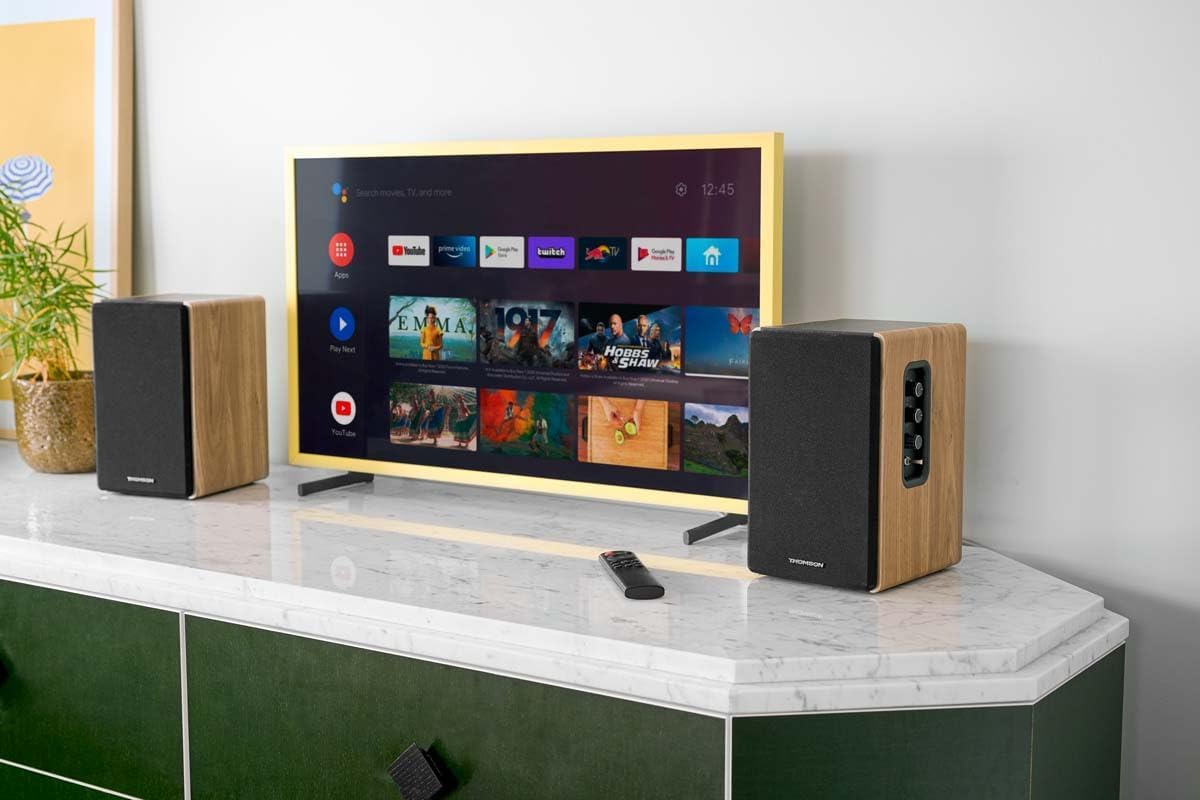
Thank you for choosing the THOMSON WS902DUO Cosy Bookshelf Speakers. These active stereo speakers deliver a powerful 150W audio experience with deep bass from two 10 cm woofers. They offer versatile connectivity options including Bluetooth 5.3, Optical, HDMI (ARC), RCA, and USB playback. The included remote control and side panel adjustments provide precise control over your audio. Please read this manual carefully before use to ensure proper operation and to maximize your listening experience.

Image 1.1: THOMSON WS902DUO Bookshelf Speakers in a living space, showcasing their elegant wood finish.
2. คำแนะนำด้านความปลอดภัยที่สำคัญ
- Read these instructions thoroughly before operating the product.
- เก็บคำแนะนำเหล่านี้ไว้เพื่อใช้อ้างอิงในอนาคต
- ปฏิบัติตามคำเตือนทั้งหมดเกี่ยวกับผลิตภัณฑ์และในคู่มือการใช้งาน
- ปฏิบัติตามคำแนะนำทั้งหมด
- ห้ามใช้อุปกรณ์นี้ใกล้น้ำ
- ทำความสะอาดด้วยผ้าแห้งเท่านั้น
- อย่าปิดกั้นช่องระบายอากาศใดๆ ติดตั้งตามคำแนะนำของผู้ผลิต
- ห้ามติดตั้งใกล้แหล่งความร้อน เช่น หม้อน้ำ เครื่องทำความร้อน เตา หรืออุปกรณ์อื่น ๆ (รวมถึง ampเครื่องให้ความร้อน) ที่ผลิตความร้อน
- อย่าละเลยจุดประสงค์ด้านความปลอดภัยของปลั๊กแบบมีขั้วหรือแบบมีสายดิน ปลั๊กแบบมีขั้วจะมีใบมีด 2 ใบ โดยใบหนึ่งจะกว้างกว่าอีกใบ ปลั๊กแบบมีสายดินจะมีใบมีด 2 ใบและขาต่อสายดินที่สาม ขาที่กว้างหรือขาต่อสายดินที่สามนั้นมีไว้เพื่อความปลอดภัยของคุณ หากปลั๊กที่ให้มาไม่พอดีกับเต้ารับของคุณ ให้ปรึกษาช่างไฟฟ้าเพื่อขอเปลี่ยนเต้ารับที่ล้าสมัย
- ปกป้องสายไฟไม่ให้ถูกเหยียบหรือถูกหนีบ โดยเฉพาะที่ปลั๊ก เต้ารับไฟฟ้า และจุดที่สายไฟออกจากเครื่อง
- ใช้เฉพาะอุปกรณ์เสริม/สิ่งที่แนบตามที่ผู้ผลิตกำหนดเท่านั้น
- ใช้ได้เฉพาะกับรถเข็น ขาตั้ง ขาตั้งกล้อง ขายึด หรือโต๊ะที่ผู้ผลิตกำหนด หรือจำหน่ายพร้อมกับอุปกรณ์เท่านั้น เมื่อใช้รถเข็น ควรใช้ความระมัดระวังในการเคลื่อนย้ายรถเข็น/อุปกรณ์รวมกันเพื่อหลีกเลี่ยงการบาดเจ็บจากการล้ม
- ถอดปลั๊กอุปกรณ์นี้ในระหว่างพายุฝนฟ้าคะนองหรือเมื่อไม่ได้ใช้งานเป็นเวลานาน
- แจ้งบริการทั้งหมดให้ช่างที่ผ่านการรับรองทราบ จำเป็นต้องให้บริการเมื่ออุปกรณ์ได้รับความเสียหายในลักษณะใดก็ตาม เช่น สายไฟหรือปลั๊กชำรุด ของเหลวหกหรือมีวัตถุตกลงไปในอุปกรณ์ อุปกรณ์โดนฝนหรือความชื้น ไม่สามารถทำงานได้ตามปกติ หรือตกหล่น
3. เนื้อหาบรรจุภัณฑ์
โปรดตรวจสอบว่ารายการทั้งหมดที่ระบุไว้ด้านล่างรวมอยู่ในแพ็คเกจของคุณหรือไม่:
- THOMSON WS902DUO Bookshelf Speakers (2 units)
- รีโมทคอนโทรล
- สายไฟ
- สายเชื่อมต่อลำโพง
- 3.5mm Jack to RCA Adapter Cable
- คู่มือการใช้งาน (เอกสารนี้)

Image 3.1: Packaging of the THOMSON WS902DUO Bookshelf Speakers.
4. สินค้าหมดview
4.1. Side Control Panel (Active Speaker)
The active speaker features a side control panel for easy access to essential functions.

Image 4.1: Side control panel.
- การควบคุมเสียงเบส: ปรับเอาท์พุตความถี่ต่ำ
- การควบคุมเสียงแหลม: ปรับเอาท์พุตความถี่สูง
- การควบคุมระดับเสียง: ปรับระดับเสียงโดยรวม
- สวิตช์ไฟ: เปิดหรือปิดลำโพง
- ไฟแสดงสถานะ LED: Shows the current status or selected input.
4.2. Rear Panel (Active Speaker)
The rear panel of the active speaker provides all necessary input and output connections.
ภาพที่ 4.2: การเชื่อมต่อแผงด้านหลัง
- อินพุตออปติคัล: For connecting digital audio sources like TVs, game consoles, or Blu-ray players.
- อ็อกซ์อิน (RCA): For connecting analog audio sources such as turntables, CD players, or PCs. A 3.5mm jack adapter is provided.
- TV Audio (HDMI ARC): For connecting to a TV's HDMI ARC port, allowing TV remote control of the speaker volume.
- เล่นผ่าน USB: สำหรับเล่นไฟล์ MP3 fileโดยตรงจากแฟลชไดรฟ์ USB
- ย่อยออก: For connecting an external active subwoofer for enhanced bass.
- เอาท์พุตลำโพง: เชื่อมต่อกับลำโพงแบบพาสซีฟ
- กำลังไฟเข้า: เชื่อมต่อกับแหล่งจ่ายไฟหลัก
4.3. รีโมทคอนโทรล
The remote control provides convenient access to all speaker functions from a distance.

Image 4.3: Remote control.
- ปุ่มเปิด/ปิด: เปิด/ปิดลำโพง
- ปุ่มปิดเสียง: ปิดเสียง/เปิดเสียง
- ระดับเสียง +/-: ปรับระดับเสียง
- Playback Controls (Play/Pause, Skip): สำหรับเล่นไฟล์ผ่าน USB
- Source Selection Buttons (OPT, BT, ARC, USB, LINE): เลือกแหล่งสัญญาณเสียงเข้า
- EQ Mode Buttons (MOVIE, MUSIC, DIALOG): Selects preset equalization modes.
5. การตั้งค่า
5.1. การวางตำแหน่งลำโพง
Place the speakers on a stable, flat surface such as a bookshelf, desk, or speaker stands. For optimal stereo imaging, position the speakers equidistant from your listening position and at ear level. Ensure there is adequate space around the speakers for ventilation.
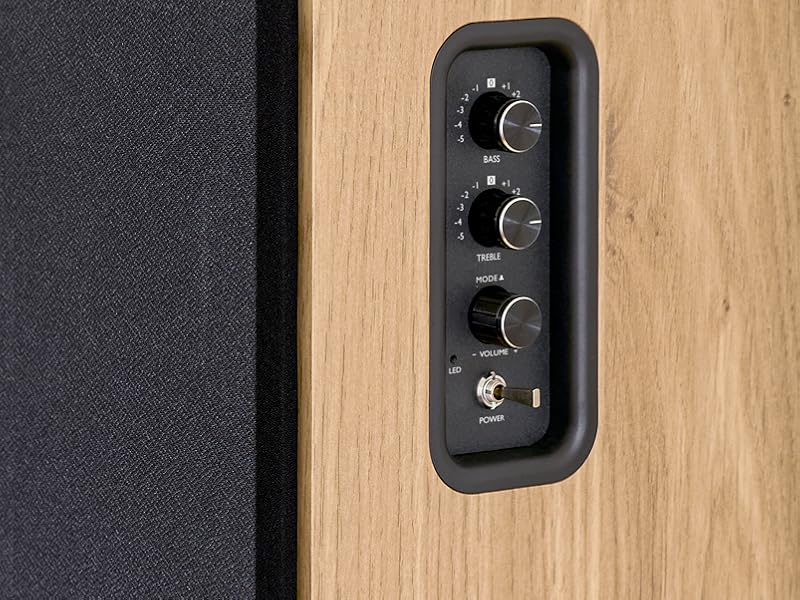
Image 5.1: Recommended speaker placement on a desk.
5.2. การเชื่อมต่อลำโพง
- ระบุลำโพงหลัก (ที่มีปุ่มควบคุมและช่องรับสัญญาณ) และลำโพงสำรอง
- Connect the included speaker cable from the speaker output terminals on the active speaker to the input terminals on the passive speaker. Ensure correct polarity (+ to + and - to -).
5.3. การเชื่อมต่อแหล่งเสียง
Connect your desired audio sources to the active speaker using the appropriate cables.
- อินพุตออปติคัล: Use an optical cable to connect your TV, game console, or Blu-ray player to the OPTICAL IN port.
- ช่องต่อ HDMI (ARC): Use an HDMI cable to connect your TV's HDMI ARC port to the TV AUDIO (HDMI) port on the speaker. This allows your TV remote to control the speaker volume.
- ช่องต่อ RCA (AUX): Use an RCA cable (or the provided 3.5mm jack to RCA adapter) to connect devices like a turntable, CD player, or PC to the AUX IN (RCA) ports.
- ช่องต่อ USB: ใส่แฟลชไดรฟ์ USB ที่มี MP3 files into the USB PLAY port.

Image 5.2: Speakers connected to a television via HDMI ARC.
5.4. การจับคู่บลูทู ธ
- ตรวจสอบให้แน่ใจว่าลำโพงเปิดอยู่
- Press the 'BT' button on the remote control or the side panel to select Bluetooth input. The LED indicator will flash, indicating pairing mode.
- บนสมาร์ทโฟน แท็บเล็ต หรือคอมพิวเตอร์ของคุณ ให้เปิดใช้งานบลูทูธ แล้วค้นหาอุปกรณ์ที่ใช้งานได้
- Select "THOMSON WS902DUO" from the list of devices.
- เมื่อจับคู่สำเร็จแล้ว ไฟ LED จะหยุดกะพริบและติดสว่างค้าง คุณสามารถสตรีมเสียงแบบไร้สายได้แล้ว
5.5. Subwoofer Connection (Optional)
If you wish to enhance bass further, connect an active subwoofer to the 'Sub Out' port on the rear panel of the active speaker using an RCA cable.
6. คู่มือการใช้งาน
6.1. เปิด/ปิดเครื่อง
Use the power switch on the side control panel or the power button on the remote control to turn the speakers on or off.
6.2. การเลือกแหล่งที่มา
Press the corresponding source button on the remote control (OPT, BT, ARC, USB, LINE) to switch between connected audio inputs. The LED indicator will change to reflect the selected source.
6.3. การควบคุมระดับเสียง
Adjust the volume using the 'Volume' knob on the side control panel or the 'VOL+/-' buttons on the remote control.
6.4. การปรับแต่งเสียง
Fine-tune the sound to your preference:
- เบส/เสียงแหลม: Use the 'Bass' and 'Treble' knobs on the side control panel to adjust the low and high frequencies.
- โหมด EQ: Press the 'MOVIE', 'MUSIC', or 'DIALOG' buttons on the remote control to select preset equalization settings optimized for different content types.
6.5. การเล่นผ่าน USB
When a USB flash drive with MP3 files is inserted and USB source is selected, the speakers will automatically begin playing. Use the playback control buttons on the remote control (Play/Pause, Skip) to manage your music.
6.6. การทำงานของบลูทูธ
After successful pairing (see Section 5.4), you can stream audio from your Bluetooth device. Use your device's controls or the speaker's remote control for playback and volume adjustments.
7. การบำรุงรักษา
การบำรุงรักษาอย่างถูกวิธีจะช่วยให้ลำโพงของคุณมีอายุการใช้งานยาวนานและทำงานได้อย่างมีประสิทธิภาพ
- การทำความสะอาด: Wipe the speaker surfaces with a soft, dry cloth. Do not use liquid cleaners or abrasive materials.
- การระบายอากาศ : ตรวจสอบให้แน่ใจว่าช่องระบายอากาศไม่ถูกปิดกั้นเพื่อป้องกันไม่ให้เกิดความร้อนมากเกินไป
- พื้นที่จัดเก็บ: หากต้องเก็บลำโพงไว้เป็นเวลานาน ควรดึงปลั๊กออกจากเต้ารับไฟฟ้าและเก็บไว้ในที่แห้งและเย็น
- หลีกเลี่ยงความชื้น: Keep the speakers away from water and high humidity.
8 การแก้ไขปัญหา
หากคุณพบปัญหาใดๆ โปรดดูคำแนะนำการแก้ไขปัญหาต่อไปนี้:
| ปัญหา | สาเหตุที่เป็นไปได้ | สารละลาย |
|---|---|---|
| ไม่มีไฟฟ้า | Power cable not connected; Power switch off; Wall outlet not working. | Ensure power cable is securely connected. Turn on the power switch. Test the wall outlet with another device. |
| ไม่มีเสียง | Incorrect input source selected; Volume too low; Mute function active; Audio cable not connected properly. | Select the correct input source. Increase volume. Press Mute button on remote. Check all audio cable connections. |
| การจับคู่บลูทูธล้มเหลว | Speakers not in pairing mode; Device too far; Bluetooth disabled on source device. | Ensure speakers are in Bluetooth pairing mode (flashing LED). Move device closer to speakers. Enable Bluetooth on your source device. |
| การเล่น USB ไม่ทำงาน | ไดรฟ์ USB ไม่ได้ฟอร์แมตอย่างถูกต้อง; Files not MP3; USB drive not inserted properly. | Ensure USB drive is FAT32 formatted. Verify files are in MP3 format. Re-insert USB drive firmly. |
| การบิดเบือนเสียง | Volume too high; Source audio quality poor; Bass/Treble settings too extreme. | Lower the volume. Test with a different audio source. Adjust Bass and Treble controls. |
9. ข้อมูลจำเพาะ
| คุณสมบัติ | ข้อมูลจำเพาะ |
|---|---|
| ยี่ห้อ | ทอมสัน |
| หมายเลขรุ่น | WS902DUO |
| กำลังขับสูงสุดของลำโพง | 150 วัตต์ |
| การตอบสนองความถี่ | 60 เฮิรตซ์ |
| เทคโนโลยีการเชื่อมต่อ | Bluetooth, HDMI (ARC), Optical, RCA, USB |
| เวอร์ชันบลูทูธ | 5.3 |
| โหมดเอาต์พุตเสียง | Stereo (2.0 channels) |
| อินพุต Voltage | 230 โวลต์ (AC) |
| ประเภทการติดตั้ง | ชั้นวางของ |
| ประเภทลำโพง | Multimedia Bookshelf |
| คุณสมบัติพิเศษ | Stereo Pairing, USB Port, Sub-Out, Remote Control, EQ Modes |
| การใช้ที่แนะนำ | Smartphone, Tablet, PC, TV, Game Console, DVD Player, Turntable |
| สี | เคลือบไม้ธรรมชาติ |
| วิธีการควบคุม | Remote Control, Side Panel Knobs |
| ขนาดวูฟเฟอร์ | 10 เซนติเมตร |
| ขนาด (สูง x กว้าง x ลึก) | ขนาดโดยประมาณ 28 ซม. x 24 ซม. x 47 ซม. ต่อลำโพงหนึ่งตัว |
| น้ำหนัก | 5048 Grams (total for pair) |
| จำนวนรายการ | 2 |
| ประเทศต้นกำเนิด | จีน |
10. ข้อมูลการรับประกัน
This THOMSON WS902DUO product comes with a รับประกันจำกัด 1 ปี นับจากวันที่ซื้อสินค้า การรับประกันนี้ครอบคลุมถึงข้อบกพร่องจากการผลิตและฝีมือการผลิตภายใต้การใช้งานปกติ ไม่ครอบคลุมถึงความเสียหายที่เกิดจากการใช้งานผิดวิธี อุบัติเหตุ การดัดแปลงโดยไม่ได้รับอนุญาต หรือการสึกหรอตามปกติ โปรดเก็บหลักฐานการซื้อไว้เพื่อใช้ในการเรียกร้องการรับประกัน
11. การสนับสนุนลูกค้า
For technical assistance, warranty claims, or any questions regarding your THOMSON WS902DUO speakers, please contact your retailer or visit the official THOMSON support website. Please have your model number (WS902DUO) and proof of purchase ready when contacting support.
การสนับสนุนทางออนไลน์: www.thomsonconsumer.com (โปรดตรวจสอบข้อมูลติดต่อฝ่ายสนับสนุนในแต่ละภูมิภาค)