
1. บทนำ
This manual provides essential information for the safe and efficient operation of your PETLIBRO Automatic Pet Feeder with Camera. This device is designed to automate pet feeding schedules, monitor your pet, and facilitate two-way communication, ensuring your pet receives meals on time and you stay connected.
The feeder features a 1080P HD camera with night vision, 5G WiFi connectivity, two-way audio, and a stainless steel slow-feed bowl to promote healthier eating habits.

Figure 1: PETLIBRO Automatic Pet Feeder with Camera
2. ส่วนประกอบผลิตภัณฑ์
ตรวจสอบว่ามีส่วนประกอบทั้งหมดอยู่ในแพ็คเกจ:
- 1 x PETLIBRO Automatic Camera Feeder
- 1 x Stainless Steel Slow Food Bowl
- อะแดปเตอร์ไฟฟ้า 1 ตัว
- 1 x Desiccant Bag (pre-installed or separate)
- 1 x คู่มือผู้ใช้
3. คู่มือการติดตั้ง
3.1 การแกะและการจัดวาง
- นำส่วนประกอบทั้งหมดออกจากบรรจุภัณฑ์อย่างระมัดระวัง
- Place the feeder on a flat, stable surface in a dry area, away from direct sunlight or heat sources.
- ตรวจสอบให้แน่ใจว่าสามารถเข้าถึงเต้ารับไฟฟ้าได้ง่าย
3.2 การเชื่อมต่อสายไฟ
- เชื่อมต่ออะแดปเตอร์แปลงไฟเข้ากับเครื่องให้อาหารสัตว์ แล้วเสียบเข้ากับเต้ารับที่ผนัง
- เพื่ออำนาจ outage protection, install 3 D-cell batteries (not included) in the battery compartment at the bottom of the feeder.
3.3 การดาวน์โหลดแอปและการเชื่อมต่อ WiFi
- ดาวน์โหลด PETLIBRO App จากร้านแอปของสมาร์ทโฟนของคุณ (iOS หรือ Android)
- Create an account and follow the in-app instructions to add your feeder. The feeder supports both 2.4GHz and 5GHz WiFi networks.
- Ensure your phone is connected to the same WiFi network you intend to connect the feeder to during setup.
3.4 การเติมอาหารลงในถังอาหาร
- เปิดฝาถังอาหาร
- Pour dry pet food into the tank. The feeder has a 5L capacity.
- Ensure the desiccant bag is placed in its compartment to keep food fresh. Replace the desiccant bag every 15-30 days.
- ปิดฝาให้สนิทเพื่อรักษาความสดของอาหาร
3.5 Attaching the Slow Food Bowl
- Place the stainless steel slow food bowl into the designated slot at the base of the feeder. Ensure it is seated correctly.

Figure 2: Stainless Steel Slow Food Bowl
4. คู่มือการใช้งาน
4.1 Scheduling Meals
- Use the PETLIBRO App to set up to 10 meals per day.
- Adjust portion sizes from 1 to 50 portions per meal, according to your pet's dietary needs.
- The app allows for flexible scheduling and monitoring of feeding history.
4.2 การให้อาหารด้วยตนเอง
- Press the manual feed button on the feeder or use the app's "Feed Now" function to dispense a single portion instantly.
4.3 Camera Features and Monitoring
The built-in 1080P HD camera allows you to monitor your pet's mealtime in real-time.
- แบบเรียลไทม์ Viewการลง: Access the live camera feed through the PETLIBRO App.
- การมองเห็นตอนกลางคืน: The camera automatically switches to night vision in low-light conditions, providing clear monitoring even at night.
- Automatic Capture: Feeding moments are automatically recorded and stored for playback within the app.
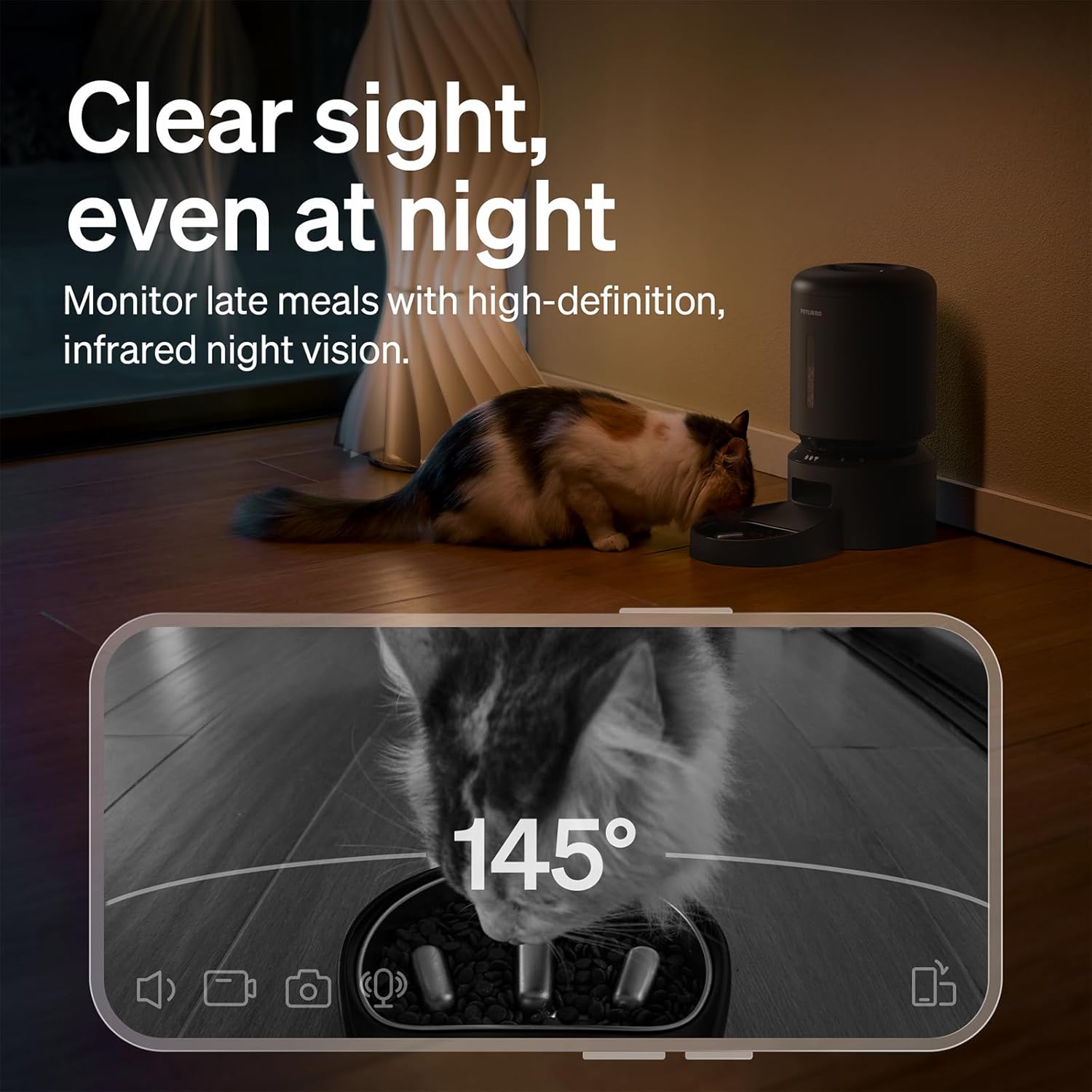
Figure 3: Night Vision Monitoring
4.4 Two-Way Audio Interaction
- Use the two-way audio feature in the app to speak to your pet remotely.
- You can also record a personalized 10-second meal call that plays during scheduled feeding times.
4.5 การแจ้งเตือนและข้อความแจ้งเตือน
The PETLIBRO App provides instant alerts to keep you informed:
- ระดับอาหารต่ำ: Receive alerts when the food tank is running low, prompting you to refill.
- Food Jams: The anti-blockage system detects and alerts you to any food dispensing issues.
- การตรวจจับการเคลื่อนไหวและเสียง: Get notifications for detected motion or sound around the feeder.

รูปที่ 4: การแจ้งเตือนแบบเรียลไทม์
4.6 Slow Feeding Benefits
The integrated stainless steel slow-feed bowl is designed with ridges to reduce eating speed by up to 2 times. This helps prevent choking, bloating, and indigestion, supporting better digestion for pets that eat too fast.

Figure 5: Slow Feeding in Action
4.7 การสาธิตวิดีโอ
Watch this short video to see the PETLIBRO Automatic Pet Feeder in operation, demonstrating its food dispensing capabilities.
Video 1: PETLIBRO Automatic Dog Feeder with Slow Bowl, 1080P HD (6 seconds)
5. การบำรุงรักษา
5.1 Cleaning the Slow Food Bowl
- The stainless steel bowl is removable and dishwasher safe for easy cleaning.
- Wash regularly to maintain hygiene and prevent bacterial growth.

Figure 6: Dishwasher Safe Components
5.2 Cleaning the Food Tank and Dispenser
- Wipe the interior of the food tank with a damp cloth. Ensure it is completely dry before refilling.
- Clean the food dispensing outlet regularly to prevent blockages.
5.3 การเปลี่ยนถุงดูดความชื้น
- Replace the desiccant bag in the lid compartment every 15-30 days to ensure food freshness.
6 การแก้ไขปัญหา
| ปัญหา | สาเหตุที่เป็นไปได้ | สารละลาย |
|---|---|---|
| Feeder not powering on | Power adapter disconnected; no battery backup; batteries depleted. | Check power connection; install fresh D-cell batteries. |
| อาหารไม่พร้อมจำหน่าย | Food tank empty; food jam; dispenser blocked. | Refill food tank; clear any food blockages in the dispenser; clean the outlet. |
| การเชื่อมต่อ WiFi ล้มเหลว | Incorrect WiFi password; feeder too far from router; incompatible WiFi band. | Verify password; move feeder closer to router; ensure 2.4GHz or 5GHz network is used. |
| กล้องไม่ทำงาน | App permissions; network issue. | Check app camera permissions; ensure stable WiFi connection. |
| ไม่ได้รับการแจ้งเตือน | App notification settings; phone settings. | Enable notifications in the PETLIBRO App and your phone's settings. |
If issues persist, please contact PETLIBRO customer support.
7. ข้อมูลจำเพาะ
- หมายเลขรุ่น: PLAF203-SB
- ขนาดสินค้า : ยาว 12.99 นิ้ว x กว้าง 7.48 นิ้ว x สูง 13.78 นิ้ว
- น้ำหนักสินค้า: 3.8 ปอนด์
- ความจุ: 5 ลิตร
- วัสดุ: Stainless Steel (bowl), Plastic (feeder body)
- เทคโนโลยีการเชื่อมต่อ: WiFi (2.4GHz & 5GHz)
- แหล่งพลังงาน: Corded Electric, Battery Backup (3 x D-cell batteries, not included)
- กล้อง: 1080P HD with Night Vision
- คุณสมบัติพิเศษ: Two-Way Audio, Slow Food Bowl, App Control, Motion/Sound Detection, Low Food Alerts
- สายพันธุ์เป้าหมาย: แมว สุนัข สัตว์เล็ก
8. การรับประกันและการสนับสนุน
Your PETLIBRO Automatic Pet Feeder with Camera comes with a รับประกัน 24 เดือน นับจากวันที่ซื้อ การรับประกันนี้ครอบคลุมถึงข้อบกพร่องจากการผลิตและการทำงานผิดปกติภายใต้การใช้งานปกติ
For warranty claims, technical support, or any questions regarding your product, please visit the official PETLIBRO webหรือติดต่อฝ่ายบริการลูกค้าโดยตรง โปรดเก็บใบเสร็จรับเงินไว้เป็นหลักฐานการซื้อ
การสนับสนุนทางออนไลน์: www.petlibro.com/support