
1. บทนำ
Welcome to the LOKMAT APPLLP 7 MAX Android Smart Watch user manual. This guide provides comprehensive instructions to help you set up, operate, and maintain your new smartwatch. Please read this manual thoroughly before using the device to ensure optimal performance and safety.
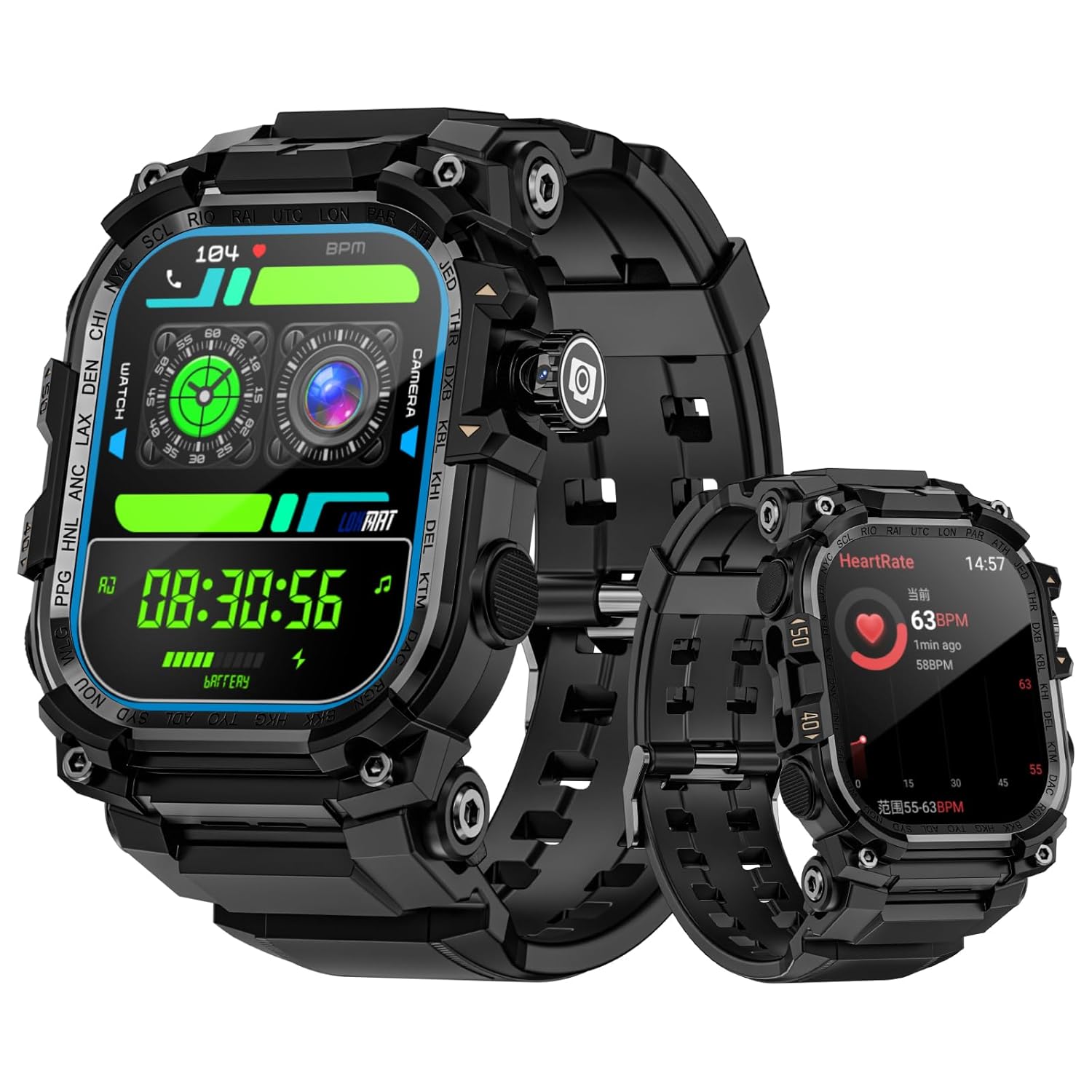
Figure 1: LOKMAT APPLLP 7 MAX Smart Watch displaying different watch faces and health metrics.
The LOKMAT APPLLP 7 MAX is an advanced Android smartwatch featuring a 2.06-inch AMOLED display, a 2-megapixel rotating camera, and 4G/5G network support for enhanced connectivity and functionality.
2. ข้อมูลด้านความปลอดภัย
To ensure safe and proper use of your LOKMAT APPLLP 7 MAX Smart Watch, please observe the following precautions:
- Do not attempt to disassemble, repair, or modify the device. Unauthorized modifications may void your warranty and pose safety risks.
- เก็บอุปกรณ์ให้ห่างจากอุณหภูมิที่สูงหรือต่ำมาก แสงแดดโดยตรง และความชื้น
- หลีกเลี่ยงการให้เครื่องได้รับแรงกระแทกหรือแรงสั่นสะเทือนรุนแรง
- โปรดใช้เฉพาะสายชาร์จและอะแดปเตอร์ที่ให้มาเท่านั้น การใช้อุปกรณ์เสริมที่ไม่เข้ากันอาจทำให้เกิดความเสียหายหรือไฟไหม้ได้
- If the device becomes unusually hot, discontinue use immediately and contact customer support.
- เก็บอุปกรณ์ให้ห่างจากมือเด็กและสัตว์เลี้ยง
- Consult a medical professional before using the device for health monitoring if you have pre-existing medical conditions.
3. การเริ่มต้น: การตั้งค่า
3.1. การชาร์จอุปกรณ์
Before initial use, fully charge your smartwatch. The device features magnetic charging.
- เชื่อมต่อสายชาร์จแม่เหล็กเข้ากับอะแดปเตอร์แปลงไฟ USB ที่ใช้งานร่วมกันได้ (ไม่ได้รวมอยู่ในชุด)
- Align the magnetic end of the cable with the charging contacts on the back of the watch. The magnets will snap into place.
- Ensure the charging icon appears on the watch screen.
- ใช้เวลาประมาณ 2 ชั่วโมงในการชาร์จจนเต็ม

Figure 2: The smartwatch connected to its magnetic charging cable, indicating charging status.
3.2. การเปิด/ปิดเครื่อง
- การเปิดเครื่อง: Press and hold the power button (usually located on the side) until the LOKMAT logo appears.
- วิธีปิดเครื่อง: Press and hold the power button, then select "Power Off" from the options on the screen.
3.3. การติดตั้งซิมการ์ด (ไม่บังคับ)
The APPLLP 7 MAX supports 4G/5G cellular connectivity. To use cellular features, install a nano-SIM card.
- หาช่องใส่ซิมการ์ดที่ด้านข้างของนาฬิกา
- Carefully open the SIM tray using the provided tool (if applicable) or your fingernail.
- Insert a nano-SIM card into the tray with the gold contacts facing down, ensuring it is correctly oriented.
- Gently push the SIM tray back into the watch until it clicks into place.

Figure 3: Illustration of inserting a SIM card into the smartwatch for 4G/5G connectivity.
3.4. การตั้งค่าและการจับคู่เบื้องต้น
Follow the on-screen instructions to complete the initial setup, including language selection, time zone, and connecting to Wi-Fi. To unlock full functionality, pair your smartwatch with your smartphone via the dedicated companion application.
- Download the official LOKMAT companion app from your smartphone's app store.
- เปิดใช้งานบลูทูธบนสมาร์ทโฟนของคุณ
- Open the LOKMAT app and follow the instructions to search for and pair with your APPLLP 7 MAX.
- ยืนยันคำขอจับคู่บนสมาร์ทโฟนและสมาร์ทวอทช์ของคุณทั้งสอง
4. คู่มือการใช้งาน
4.1. การแสดงผลและการนำทาง
The APPLLP 7 MAX features a 2.06-inch AMOLED full-touch display for intuitive interaction.

Figure 4: The 2.06-inch AMOLED display provides clear and vibrant visuals.
- ปัดขึ้น/ลง: เข้าถึงการตั้งค่าด่วนหรือการแจ้งเตือน
- ปัดไปทางซ้าย/ขวา: Navigate between different widgets or app screens.
- แตะ: เลือกรายการหรือเปิดแอปพลิเคชัน
- กดค้างไว้: Customize watch faces or access context menus.
4.2. การใช้กล้อง
The smartwatch is equipped with a 2-megapixel telescopic camera with 190-degree rotation.
- Open the Camera application on your watch.
- Rotate the camera module to adjust the viewมุมเอียงตามต้องการ
- Tap the screen to focus, then tap the shutter icon to capture a photo or start/stop video recording.

Figure 5: The smartwatch's rotating camera module for flexible photo and video capture.
4.3. Connectivity and Communication
- 4G/5G Network: With a SIM card installed, you can make and receive calls, send messages, and use data directly from your watch.
- ไวไฟ : Connect to Wi-Fi networks for internet access and faster data transfers.
- บลูทูธ: Pair with Bluetooth headphones for music or other accessories.
- วิดีโอคอล: Utilize the camera and network connectivity for high-definition video calls.
4.4. Applications and Features
The APPLLP 7 MAX runs on Android, allowing access to various applications.

Figure 6: The smartwatch's interface displaying a selection of popular applications.
- แอปสโตร์: Download and install additional applications from the built-in app market.
- การเล่นเพลง: Use pre-installed music apps or download others. Connect Bluetooth headphones for a private listening experience.
- ไฟฉาย: Activate the built-in flashlight feature for illumination.
- การปลดล็อกด้วย NFC: Utilize NFC for quick and secure unlocking of compatible devices or systems.

Figure 7: The smartwatch displaying a music playback interface, ready for Bluetooth headphone connection.

Figure 8: The smartwatch's integrated flashlight providing illumination.

Figure 9: Using the smartwatch's NFC function for quick induction unlocking.
5. การบำรุงรักษา
5.1. การทำความสะอาดสมาร์ทวอทช์ของคุณ
การทำความสะอาดเป็นประจำจะช่วยรักษารูปลักษณ์และฟังก์ชันการทำงานของอุปกรณ์ของคุณ
- เช็ดหน้าจอและตัวเรือนนาฬิกาด้วยผ้าเนื้อนุ่มที่ไม่เป็นขุย
- สำหรับรอยเปื้อนฝังแน่น ให้เช็ดออกเล็กน้อยampชุบผ้าด้วยน้ำ หลีกเลี่ยงการใช้สารเคมีรุนแรงหรือวัสดุที่มีฤทธิ์กัดกร่อน
- ตรวจสอบให้แน่ใจว่าหน้าสัมผัสการชาร์จสะอาดและแห้งก่อนชาร์จ
5.2. การดูแลแบตเตอรี่
- หลีกเลี่ยงการปล่อยแบตเตอรี่จนหมดบ่อยครั้ง
- ควรชาร์จนาฬิกาเป็นประจำ แม้ว่าจะไม่ได้ใช้งานทุกวัน เพื่อรักษาอายุการใช้งานของแบตเตอรี่
- เก็บนาฬิกาไว้ในที่แห้งและเย็นเมื่อไม่ได้ใช้งานเป็นเวลานาน
6 การแก้ไขปัญหา
If you encounter issues with your LOKMAT APPLLP 7 MAX, refer to the following common solutions:
6.1. Device Will Not Power On or Charge
- ตรวจสอบให้แน่ใจว่าสายชาร์จเชื่อมต่อกับนาฬิกาและแหล่งจ่ายไฟอย่างแน่นหนาแล้ว
- ตรวจสอบว่าอะแดปเตอร์แปลงไฟใช้งานได้ปกติ
- ทำความสะอาดขั้วสัมผัสการชาร์จบนนาฬิกาและสายเคเบิล
- ลองใช้พอร์ต USB หรืออะแดปเตอร์จ่ายไฟอื่น
- If the battery is completely drained, it may take a few minutes for the charging indicator to appear.
- Perform a forced restart by pressing and holding the power button for approximately 10-15 seconds.
6.2. อายุการใช้งานแบตเตอรี่สั้น
- ลดความสว่างหน้าจอ
- ปิดการแจ้งเตือนที่ไม่จำเป็นหรือการรีเฟรชแอปพื้นหลัง
- Turn off Wi-Fi, Bluetooth, or cellular data when not in use.
- Limit the use of power-intensive features like GPS or continuous heart rate monitoring.
- ตรวจสอบให้แน่ใจว่าแอปทั้งหมดได้รับการอัปเดตเป็นเวอร์ชันล่าสุด
6.3. App or Sensor Inaccuracy
- Ensure the watch's software and companion app are updated.
- Restart the watch and your paired smartphone.
- For health sensors (e.g., heart rate, steps), ensure the watch is worn snugly on your wrist.
- Calibrate sensors if an option is available in the watch settings or companion app.
- If an app is not working, try uninstalling and reinstalling it.
6.4. Connectivity Issues (Bluetooth, Wi-Fi, Cellular)
- Ensure Bluetooth/Wi-Fi/Cellular is enabled on the watch.
- For Bluetooth, unpair and re-pair the device.
- สำหรับ Wi-Fi ให้ลืมเครือข่ายแล้วเชื่อมต่อใหม่อีกครั้ง
- For cellular, ensure the SIM card is correctly inserted and activated with your carrier. Check network signal strength.
- Restart both the watch and the connected device (e.g., smartphone).
7. ข้อมูลจำเพาะ
| คุณสมบัติ | รายละเอียด |
|---|---|
| แบบอย่าง | APPLLP 7 MAX |
| แสดง | หน้าจอ AMOLED ขนาด 2.06 นิ้ว ความละเอียด 410 x 502 พิกเซล |
| ระบบปฏิบัติการ | แอนดรอยด์ |
| กล้อง | 2-megapixel, 190° rotation |
| การเชื่อมต่อ | 4G, 5G, Wi-Fi, Bluetooth |
| ความจุของหน่วยความจำ | 32GB |
| ความจุของแบตเตอรี่ | 930 มิลลิวินาทีamp ชั่วโมง (ลิเธียมโพลิเมอร์) |
| เวลาในการชาร์จ | ประมาณ 2 ชั่วโมง |
| น้ำหนักสินค้า | 222 กรัม |
| คุณสมบัติพิเศษ | Camera, NFC, Flashlight |
8. การรับประกันและการสนับสนุน
For warranty information and customer support, please refer to the documentation included with your purchase or visit the official LOKMAT webไซต์นี้ โปรดเก็บหลักฐานการซื้อไว้เพื่อใช้ยืนยันการรับประกัน
If you require further assistance or have questions not covered in this manual, please contact LOKMAT customer service.