
โมโตโรลา โมโต G15 พาวเวอร์
คู่มือการใช้งานสมาร์ทโฟน Motorola Moto G15 Power 4G
Model: Moto G15 Power
1. บทนำ
Welcome to the user manual for your new Motorola Moto G15 Power 4G smartphone. This guide provides essential information to help you set up, operate, maintain, and troubleshoot your device. The Moto G15 Power is designed to deliver a superior mobile experience with its advanced features, including a vibrant Full HD+ display, a high-resolution camera system, and a long-lasting battery.
Please read this manual carefully to ensure optimal performance and longevity of your device. Keep it for future reference.
2. การตั้งค่าเริ่มต้น
2.1 เนื้อหาบรรจุภัณฑ์
ตรวจสอบให้แน่ใจว่าแพ็คเกจของคุณมีรายการต่อไปนี้:
- สมาร์ทโฟน Motorola Moto G15 Power
- เครื่องชาร์จ TurboPower 30W
- สาย USB-C
- เครื่องมือถอดซิม
- คู่มือการเริ่มต้นฉบับย่อ (คู่มือนี้)
2.2 การใส่ซิมการ์ดและการ์ด microSD
- ค้นหาถาดซิมที่ด้านข้างโทรศัพท์ของคุณ
- ใส่เครื่องมือถอดซิมเข้าไปในรูเล็ก ๆ ข้างถาดและกดเบา ๆ จนถาดหลุดออกมา
- Place your Nano-SIM card(s) and/or microSD card into the tray with the gold contacts facing down. Ensure they are correctly seated. The Moto G15 Power supports Dual SIM functionality.
- ค่อยๆ ดันถาดกลับเข้าไปในโทรศัพท์จนกระทั่งล็อคเข้าที่

ภาพ: ด้านข้าง view of the Motorola Moto G15 Power, illustrating the location of the SIM card tray.
2.3 การชาร์จอุปกรณ์
Before first use, fully charge your Moto G15 Power. Connect the USB-C cable to the phone's charging port and the 30W TurboPower charger to a power outlet. The battery indicator will show charging progress.
2.4 การเปิด/ปิดเครื่อง
- To power on: Press and hold the Power button (located on the right side of the phone) until the Motorola logo appears.
- วิธีปิดเครื่อง: กดปุ่มเปิด/ปิดค้างไว้ จากนั้นแตะ 'ปิดเครื่อง' บนหน้าจอ
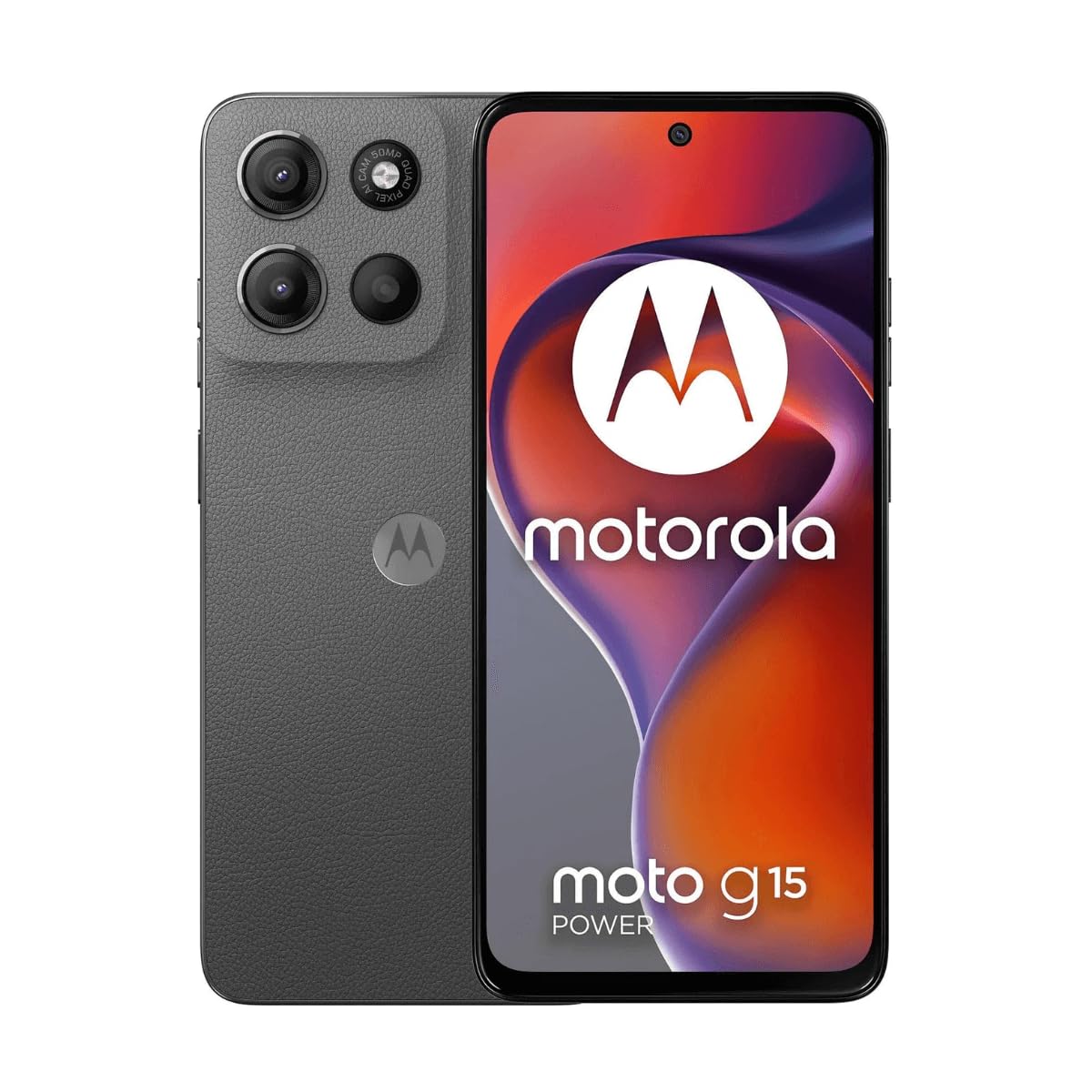
ภาพ: ด้านหน้า view of the Motorola Moto G15 Power, displaying the screen and the location of the power button on the right side.
3. การใช้งานอุปกรณ์ของคุณ
3.1 การนำทางแบบหน้าจอสัมผัส
Your Moto G15 Power features a responsive 6.72-inch Full HD+ display. Use the following gestures for navigation:
- แตะ: เลือกรายการหรือเปิดแอป
- ปัด: เลื่อนดูหน้าจอหรือรายการ
- หยิก: ซูมเข้าหรือออกจากรูปภาพและ web หน้า
- กดแบบยาว: เข้าถึงเมนูบริบทหรือย้ายไอคอน
3.2 การโทรและการส่งข้อความ
To make a call, open the Phone app and dial the number or select a contact. To send a message, open the Messages app, tap 'Start chat', and enter the recipient and your message.
3.3 การใช้งานกล้อง
The Moto G15 Power is equipped with a 50 MP main camera with Quad Pixel technology and an 8 MP front camera. Open the Camera app to capture photos and videos.
- โหมดภาพถ่าย: กดปุ่มชัตเตอร์เพื่อถ่ายภาพ
- โหมดวิดีโอ: เปลี่ยนเป็นโหมดวิดีโอแล้วแตะปุ่มบันทึกเพื่อเริ่ม/หยุดการบันทึก
- กล้องเซลฟี่: Tap the camera switch icon to use the front camera.
- คุณสมบัติขั้นสูง: Explore settings for portrait mode, night vision, and other photographic enhancements.

ภาพ: ด้านหลัง view of the Motorola Moto G15 Power, highlighting the 50MP camera module.
3.4 ระบบเสียงและจอแสดงผล
Experience enhanced audio with Dolby Atmos support, whether through headphones or the phone's speakers. The 6.72-inch Full HD+ display features a High Brightness Mode for improved outdoor visibility.
3.5 การจัดการแบตเตอรี่
Your device is equipped with a 6000 mAh battery and supports 30W TurboPower charging. To optimize battery life:
- ปรับความสว่างหน้าจอ
- ปิดแอปที่ไม่ได้ใช้งาน
- เปิดใช้งานโหมดประหยัดแบตเตอรี่เมื่อจำเป็น
3.6 การเชื่อมต่อ
The Moto G15 Power supports 4G cellular networks, Wi-Fi, Bluetooth, and NFC. Access these settings via the Quick Settings panel or the Settings app.
4. การบำรุงรักษาและการดูแล
4.1 การทำความสะอาดอุปกรณ์ของคุณ
ใช้ผ้านุ่มไม่เป็นขุยทำความสะอาดหน้าจอและตัวเครื่องโทรศัพท์ หลีกเลี่ยงวัสดุที่มีฤทธิ์กัดกร่อนหรือสารเคมีรุนแรง สำหรับรอยเปื้อนฝังแน่น ให้เช็ดเบาๆampเทน้ำลงบนผ้า
4.2 ความต้านทานต่อน้ำ
The Moto G15 Power is designed to be splash and liquid resistant. This means it can withstand minor splashes or light rain. It is not waterproof and should not be submerged in water. Liquid damage is not covered under warranty.
4.3 การอัปเดตซอฟต์แวร์
ตรวจสอบและติดตั้งการอัปเดตซอฟต์แวร์เป็นประจำเพื่อให้แน่ใจว่าอุปกรณ์ของคุณมีฟีเจอร์ แพตช์ความปลอดภัย และการปรับปรุงประสิทธิภาพล่าสุด ไปที่ การตั้งค่า> ระบบ> การอัปเดตระบบ.
4.4 การดูแลแบตเตอรี่
To prolong battery life, avoid exposing your phone to extreme temperatures. Do not leave it fully charged or fully discharged for extended periods.
5 การแก้ไขปัญหา
5.1 อุปกรณ์ไม่เปิด
- ตรวจสอบให้แน่ใจว่าแบตเตอรี่ชาร์จเต็มแล้ว เสียบที่ชาร์จและรอสักครู่ก่อนลองเปิดเครื่อง
- กดปุ่มเปิด/ปิดค้างไว้อย่างน้อย 10-15 วินาทีเพื่อบังคับให้รีสตาร์ท
5.2 ปัญหาการชาร์จ
- Check if the charger and USB-C cable are securely connected to both the phone and the power outlet.
- ลองใช้ที่ชาร์จและสายเคเบิลอื่นที่ใช้งานร่วมกันได้ เพื่อตรวจสอบว่าอุปกรณ์เสริมมีปัญหาหรือไม่
- ตรวจสอบให้แน่ใจว่าพอร์ตการชาร์จสะอาดและไม่มีสิ่งสกปรก
5.3 ปัญหาการเชื่อมต่อเครือข่าย
- รีสตาร์ทโทรศัพท์ของคุณ
- ตรวจสอบว่าโหมดเครื่องบินถูกปิดใช้งานอยู่หรือไม่
- ตรวจสอบให้แน่ใจว่าได้ใส่ซิมการ์ดอย่างถูกต้องและเปิดใช้งานแล้ว
- รีเซ็ตการตั้งค่าเครือข่าย: การตั้งค่า > ระบบ > ตัวเลือกการรีเซ็ต > รีเซ็ต Wi-Fi มือถือ และบลูทูธ.
5.4 แอปขัดข้องหรือหยุดทำงาน
- ปิดและเปิดแอปใหม่อีกครั้ง
- ล้างแคชและข้อมูลของแอป: การตั้งค่า > แอป > [ชื่อแอป] > พื้นที่จัดเก็บและแคช > ล้างแคช / ล้างพื้นที่จัดเก็บ.
- อัปเดตแอปจาก Google Play Store
- หากปัญหายังคงมีอยู่ ให้ถอนการติดตั้งและติดตั้งแอปใหม่อีกครั้ง
6. ข้อมูลจำเพาะ
| คุณสมบัติ | ข้อมูลจำเพาะ |
|---|---|
| ชื่อรุ่น | โมโต จี15 พาวเวอร์ |
| ระบบปฏิบัติการ | แอนดรอยด์ |
| โปรเซสเซอร์ | มีเดียเทค เฮลิโอ จี81 เอ็กซ์ตรีม |
| แรม | 8GB |
| การจัดเก็บข้อมูลภายใน | 512GB |
| พื้นที่เก็บข้อมูลแบบขยายได้ | ความจุสูงสุด 512 GB (microSD) |
| ขนาดจอแสดงผล | 6.72 นิ้ว |
| ความละเอียดการแสดงผล | 2340 x 1080 พิกเซล (Full HD+) |
| กล้องหลัง | 50 MP |
| กล้องหน้า | 8 MP |
| ความจุของแบตเตอรี่ | 6000 มิลลิแอมป์ |
| การชาร์จไฟ | เทอร์โบพาวเวอร์ 30 วัตต์ |
| การเชื่อมต่อ | 4G, 2G, Wi-Fi, Bluetooth, NFC |
| ประเภทซิม | ซิมนาโนคู่ |
| ขนาด | 9 x 76 x 166 มม. |
| ความต้านทานต่อน้ำ | Splash and liquid resistant |
| แจ็คหูฟัง | ยูเอสบี-ซี |
| สี | เกรย์แรงโน้มถ่วง |
7. ข้อมูลการรับประกัน
Your Motorola Moto G15 Power is covered by a limited warranty. The terms and conditions of this warranty may vary by region. Please refer to the warranty card included in your product packaging or visit the official Motorola webเว็บไซต์สำหรับข้อมูลโดยละเอียดเกี่ยวกับการคุ้มครองการรับประกัน ระยะเวลา และขั้นตอนการเรียกร้อง
เก็บหลักฐานการซื้อของคุณไว้เพื่อใช้ในกรณีการเรียกร้องการรับประกัน
8. การสนับสนุน
หากต้องการความช่วยเหลือเพิ่มเติม การสนับสนุนด้านเทคนิค หรือเข้าถึงทรัพยากรเพิ่มเติม โปรดไปที่ฝ่ายสนับสนุน Motorola อย่างเป็นทางการ website. You can find FAQs, software downloads, and contact information for customer service.
ฝ่ายสนับสนุนอย่างเป็นทางการของ Motorola: www.motorola.com/support
Ask a question about this manual
Ask about setup, troubleshooting, compatibility, parts, safety, or missing instructions. Manuals+ will review the question and use this page’s manual context to help answer it.