
Zostuic DC101
Zostuic 4K Digital Camera User Manual
Model: DC101 | Brand: Zostuic
การแนะนำ
This manual provides comprehensive instructions for the operation, maintenance, and troubleshooting of your Zostuic 4K Digital Camera. Please read this manual thoroughly before using the camera to ensure proper functionality and to maximize your photographic and videographic experience.

Figure 1: Zostuic 4K Digital Camera and included accessories.
มีอะไรอยู่ในกล่อง
Upon unboxing your Zostuic 4K Digital Camera, please verify that all the following items are included:
- Zostuic 4K Digital Camera Body
- Wide-angle Lens (detachable)
- 2 x Nonstandard Battery (rechargeable)
- Battery Cradle Charger
- สาย USB
- การ์ดหน่วยความจำ 32GB
- สายคล้องคอ
- ฝาปิดเลนส์
- กระเป๋ากล้อง
- ผ้าเช็ดทำความสะอาด
- คู่มือการใช้งาน (เอกสารนี้)

Figure 2: All components included in the Zostuic 4K Digital Camera package.
สินค้าเกินview
The Zostuic 4K Digital Camera is designed for ease of use while offering advanced features for high-quality photography and videography. Key components include:
- เลนส์: Features autofocus and 16X digital zoom.
- 3-inch 180° Flip Screen: Ideal for vlogging and selfies.
- แฟลชในตัว: For improved low-light performance.
- ปุ่มควบคุม: Intuitive layout for easy navigation and settings adjustment.
- ฮอตชู: For external accessories like microphones.
- 1/4 Screw Port: For tripod mounting.

Figure 3: Detailed diagram of the camera's external features and controls.
การตั้งค่า
1. การติดตั้งและการชาร์จแบตเตอรี่
- เปิดฝาช่องใส่แบตเตอรี่ที่อยู่บริเวณด้านล่างของกล้อง
- Insert the battery, ensuring the correct orientation as indicated inside the compartment.
- ปิดฝาช่องใส่แบตเตอรี่ให้แน่น
- To charge the battery, insert one or both batteries into the provided battery cradle charger.
- Connect the USB cable to the charger and then to a power adapter (not included) or a computer's USB port.
- The indicator light on the charger will show charging status (e.g., red for charging, blue for fully charged).
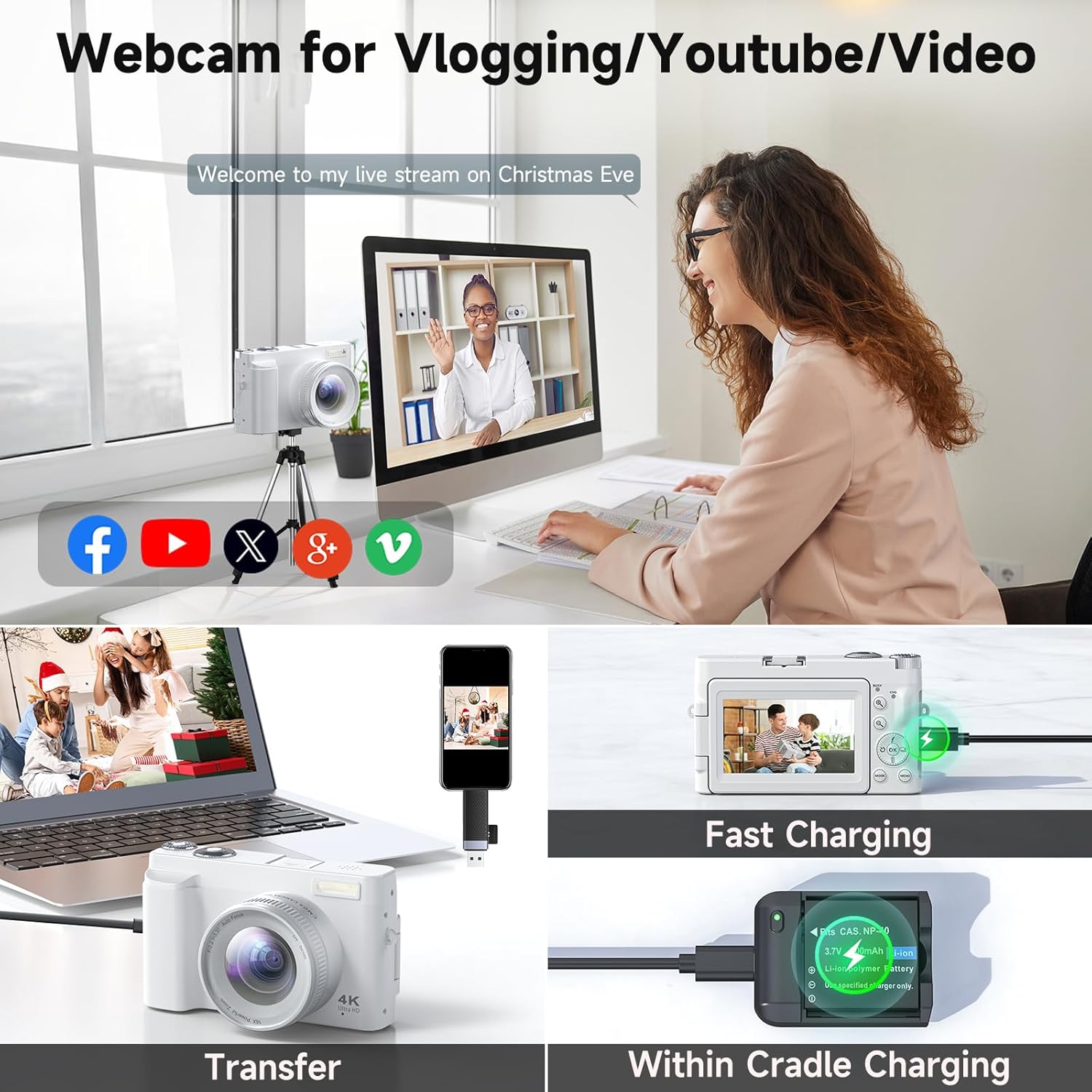
Figure 4: The camera can be charged directly or via the battery cradle charger. This image also shows file ความสามารถในการถ่ายโอน
2. การติดตั้งการ์ดหน่วยความจำ
- ค้นหาช่องเสียบการ์ดหน่วยความจำที่ด้านข้างของกล้อง
- Insert the 32GB memory card (included) into the slot until it clicks into place. Ensure the correct orientation.
- ในการถอดการ์ด ให้ค่อยๆ ดันการ์ดเข้าไปจนกว่ามันจะเด้งออกมา
3. Attaching Lenses
The camera comes with a detachable wide-angle lens. To attach it:
- Align the threads of the wide-angle lens with the threads on the camera's main lens.
- Gently twist the wide-angle lens clockwise until it is securely fastened.
- To remove, twist counter-clockwise.
คำแนะนำการใช้งาน
1. เปิด/ปิดเครื่อง
Press and hold the power button located on the top of the camera to turn it on or off.
2.การถ่ายภาพ
- โฟกัสอัตโนมัติ: The camera features autofocus for clear images. Half-press the shutter button to focus, then fully press to capture.
- แฟลช: Activate the built-in flash for low-light conditions.
- ซูม: ใช้ปุ่มควบคุมการซูมเพื่อปรับการซูมดิจิทัล 16 เท่า
- ถ่ายภาพต่อเนื่อง: Capture a series of photos rapidly by enabling continuous shooting mode.
- Timing (Self-timer): Set a delay (2/5/10 seconds) before the photo is taken, useful for group shots or selfies.

Figure 5: The 48MP autofocus ensures clear photography, and the 180° flip screen is convenient for selfies.

Figure 6: Clear imaging technology with bright flash, anti-shake, and 1-16X digital zoom capabilities.
3. บันทึกวิดีโอ
- ความละเอียด 4K: Record high-definition videos in 4K.
- ฟังก์ชั่นหยุดชั่วคราว: Pause and resume video recording to save editing time.
- เวลาที่ล่วงเลย: Capture sequences of images over time to create time-lapse videos.
- การเคลื่อนช้าๆ: Record videos in slow-motion for dramatic effects.

Figure 7: The camera supports 4K UHD video recording with features like date stamp and pause/play.
4. ใช้เป็น Webลูกเบี้ยว
Connect the camera to your computer via the USB cable to use it as a webกล้องสำหรับไลฟ์สตรีมมิ่งหรือวิดีโอคอล

Figure 8: The camera can function as a webกล้องสำหรับไลฟ์สตรีมมิ่งและวิดีโอคอล
5. การโอน Files
Connect the camera to your computer using the USB cable to transfer photos and videos. The camera will appear as a removable disk drive.
6. Exposure Compensation
Adjust the exposure compensation settings to control the brightness of your images, allowing for brighter or darker results as desired.

Figure 9: Visual representation of exposure compensation, showing how different settings affect image brightness.
7 ฟิลเตอร์
Utilize the various built-in filters to enhance the atmosphere and style of your photos.

Figure 10: The camera offers multiple filter options to customize the look of your photos.
การซ่อมบำรุง
- รักษากล้องให้สะอาดโดยการเช็ดด้วยผ้าแห้งนุ่มๆ
- หลีกเลี่ยงการให้กล้องสัมผัสกับอุณหภูมิที่สูงหรือฝุ่นละอองหรือความชื้นมากเกินไป
- Clean the lens with a specialized lens cleaning cloth and solution only.
- Store the camera in its protective pouch when not in use.
- ถอดแบตเตอรี่ออกหากจะไม่ใช้กล้องเป็นเวลานาน
การแก้ไขปัญหา
| ปัญหา | สาเหตุที่เป็นไปได้ | สารละลาย |
|---|---|---|
| กล้องไม่สามารถเปิดได้ | แบตเตอรี่อ่อนหรือหมด หรือใส่แบตเตอรี่ไม่ถูกต้อง | ชาร์จแบตเตอรี่ให้เต็ม ตรวจสอบให้แน่ใจว่าใส่แบตเตอรี่ถูกต้องแล้ว |
| ภาพมีความเบลอ | Lens is dirty; camera not focused; anti-shake off. | Clean the lens. Half-press the shutter to allow autofocus. Ensure anti-shake is enabled. |
| ไม่สามารถบันทึกวิดีโอได้ | Memory card full; incorrect mode. | ลบที่ไม่จำเป็น files or insert a new memory card. Switch to video recording mode. |
| Fileไม่สามารถถ่ายโอนไปยังคอมพิวเตอร์ได้ | การเชื่อมต่อ USB หลวม ปัญหาไดรเวอร์ | ตรวจสอบให้แน่ใจว่าเสียบสาย USB แน่นดีแล้ว ลองเสียบเข้ากับพอร์ต USB อื่นหรือคอมพิวเตอร์เครื่องอื่นดู |
ข้อมูลจำเพาะ
| คุณสมบัติ | รายละเอียด |
|---|---|
| ยี่ห้อ | Zostuic |
| ชื่อรุ่น | ดีซี101 |
| ความละเอียดของภาพ | 48MP (Ultra HD) |
| ความละเอียดวิดีโอ | 4K |
| ซูม | ซูมดิจิตอล 16 เท่า |
| หน้าจอ | 3-inch 180° Flip Screen |
| ออโต้โฟกัส | ใช่ |
| ระบบป้องกันภาพสั่นไหว | ดิจิตอล |
| เทคโนโลยีโฟโต้เซนเซอร์ | ซีมอส |
| รองรับ File รูปแบบ | เจพีเจ |
| น้ำหนักสินค้า | 1.25 ปอนด์ |
| แบตเตอรี่ | แบตเตอรี่ที่ไม่ได้มาตรฐาน 2 ก้อน (รวมอยู่ด้วย) |
| การติดตั้งที่เข้ากันได้ | ขาตั้งกล้อง |
การรับประกันและการสนับสนุน
Zostuic provides a 2-year warranty for the 4K Digital Camera (Model: DC101). We also offer a worry-free 18-month replacement and refund warranty.
For customer support, please contact our team. We aim to assist you within 12 hours.
For more information and product registration, please visit the Zostuic Store on Amazon.