
1. บทนำ
This manual provides detailed instructions for the installation, operation, and maintenance of your COUGAR OmnyX Mid Tower PC Case. Please read this manual thoroughly before beginning assembly to ensure correct setup and optimal performance. Keep this manual for future reference.
2. ข้อมูลด้านความปลอดภัย
- Always disconnect the power supply from the wall outlet before installing or servicing any components inside the PC case.
- โปรดหยิบจับชิ้นส่วนทั้งหมดด้วยความระมัดระวังเพื่อป้องกันความเสียหายจากไฟฟ้าสถิต พิจารณาใช้สายรัดข้อมือป้องกันไฟฟ้าสถิต
- Avoid placing the PC case in direct sunlight, near heat sources, or in areas with high humidity.
- ตรวจสอบให้แน่ใจว่ามีการระบายอากาศที่เหมาะสมรอบเคสเพื่อป้องกันความร้อนสูงเกินไป
- เก็บชิ้นส่วนและเครื่องมือขนาดเล็กให้ห่างจากเด็ก
3. เนื้อหาบรรจุภัณฑ์
ตรวจสอบว่ามีรายการทั้งหมดอยู่ในแพ็คเกจของคุณ:
- COUGAR OmnyX Mid Tower PC Case
- กล่องอุปกรณ์เสริม (บรรจุ สกรู สแตนด์ออฟ สายรัด ฯลฯ)
- คู่มือการใช้งาน (เอกสารนี้)
- Pre-installed 160mm fans (quantity as specified in product details)
4. สินค้าหมดview
The COUGAR OmnyX case is designed for high expandability and efficient cooling, suitable for various computing needs. Its symmetrical design allows for flexible placement, showcasing internal components from multiple angles. Key features include:
- การออกแบบที่สมมาตร: Allows for versatile orientation on your desk.
- Omnidirectional Dynamic Flow System (ODF): Optimized airflow for superior cooling performance.
- Quad 160mm Fans: Equipped with four large 160mm fans for powerful cooling.
- Ambidextrous I/O Module: Features 4x USB 3.0 Type-A and 2x USB 3.2 Gen 2 Type-C ports for convenient connectivity.
- กลไกการปลดเร็ว: Tool-less panel removal for easy access and installation.
- การจัดการสายเคเบิลที่คล่องตัว: Dedicated channels and tie-down points for a clean build.
- Bracketless Vertical GPU Mount: Supports vertical GPU installation without additional brackets.
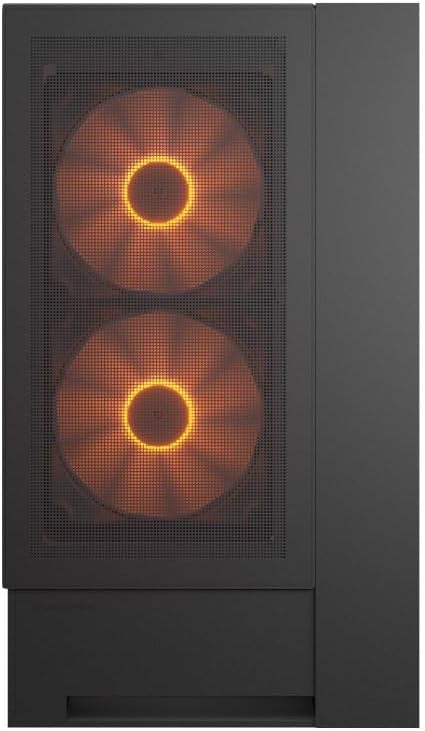
ด้านหน้า view of the COUGAR OmnyX PC case, highlighting the pre-installed 160mm fans.

Illustration of the symmetrical design, allowing flexible case orientation.

Close-up of the large 160mm fans providing powerful cooling.
วิดีโอแสดงผลิตภัณฑ์อย่างเป็นทางการasing the COUGAR OmnyX PC case features, including its symmetrical design, quad 160mm fans, ambidextrous I/O module, cable management, and quick release mechanism for easy installation.
5. การตั้งค่าและการติดตั้ง
5.1. การเตรียมพร้อม
ก่อนเริ่มต้น ให้แน่ใจว่าคุณมีพื้นที่ทำงานที่สะอาด มีแสงสว่างเพียงพอ และมีเครื่องมือที่จำเป็น รวมถึงไขควงปากแฉก
5.2. การถอดแผง
The OmnyX case features a quick-release mechanism for easy panel removal. Gently pull the panels to detach them from the chassis. Refer to the exploded view เพื่อการระบุส่วนประกอบ

ถอดประกอบ view of the COUGAR OmnyX case, showing removable panels and components.
5.3. การติดตั้งเมนบอร์ด
The OmnyX supports Mini ITX, Micro ATX, and ATX motherboards. Install the necessary standoffs for your motherboard size, then carefully place the motherboard and secure it with screws.

ภายใน view showing the motherboard tray and mounting points.
5.4. การติดตั้งการ์ดจอ (GPU)
Install your graphics card into the appropriate PCIe slot. The case supports GPUs up to 380mm in length. For vertical GPU mounting, utilize the integrated bracketless vertical GPU mount.

Illustration of the bracketless vertical GPU mounting option.
5.5. การติดตั้งไดรฟ์
The case provides bays for 2x 3.5-inch drives and 2x 2.5-inch drives. Secure your storage devices in the designated locations using the provided screws.
5.6. การติดตั้งชุดจ่ายไฟ (PSU)
Install your power supply unit in the rear-mount location. The case accommodates PSUs up to 200mm in length.
5.7. การจัดการสายเคเบิล
Utilize the dedicated cable management channels and tie-down points behind the motherboard tray to route and secure cables. This ensures optimal airflow and a clean internal appearance.

View illustrating the efficient cable management system within the case.
5.8. การเชื่อมต่อ I/O ด้านหน้า
Connect the front panel I/O cables (USB 3.0, USB 3.2 Gen 2 Type-C, audio, power, reset) to their corresponding headers on your motherboard. The ambidextrous I/O module offers flexible placement.

Close-up of the front I/O panel with USB ports and controls.
6. คู่มือการใช้งาน
6.1. เปิด/ปิดเครื่อง
After all components are installed and cables connected, plug the power supply into a wall outlet. Press the power button on the front I/O panel to turn on your PC.
6.2. การควบคุมแสง RGB
The pre-installed fans feature RGB lighting. Control of the RGB effects and fan speed is typically managed through your motherboard's software or a dedicated controller if included. Refer to your motherboard manual for specific instructions on RGB synchronization.

Illustration depicting RGB LED and fan speed control capabilities.
7. การบำรุงรักษา
Regular maintenance helps ensure the longevity and performance of your PC case:
- การทำความสะอาดฝุ่น: Periodically clean dust filters and internal components using compressed air or a soft brush. Dust accumulation can impede airflow and lead to overheating.
- การทำความสะอาดภายนอก: เช็ดพื้นผิวภายนอกด้วยผ้านุ่ม damp ผ้า. หลีกเลี่ยงน้ำยาทำความสะอาดที่มีฤทธิ์กัดกร่อน
- ตรวจสอบสายเคเบิล: Ensure all internal cables remain securely connected and neatly routed.
8 การแก้ไขปัญหา
หากคุณพบปัญหา โปรดดูขั้นตอนการแก้ไขปัญหาทั่วไปต่อไปนี้:
- ไม่มีไฟฟ้า: Check if the power supply is properly connected to the wall outlet and the motherboard. Ensure the power button cable is correctly connected to the motherboard header.
- พัดลมไม่หมุน: Verify that the fan cables are securely connected to the motherboard fan headers or a fan controller. Check BIOS settings for fan speed control.
- ไฟ RGB ไม่ทำงาน: Confirm RGB cables are connected to the correct motherboard headers or controller. Check your motherboard's RGB software for settings.
- ความร้อนสูงเกินไป: Ensure all fans are functioning correctly and oriented for optimal airflow. Clean any dust buildup from filters and components. Verify CPU cooler and GPU cooler installations.
For more complex issues, consult your component manuals or contact COUGAR support.
9. ข้อมูลจำเพาะ
| คุณสมบัติ | ข้อมูลจำเพาะ |
|---|---|
| ชื่อรุ่น | ออมนี่เอ็กซ์ |
| หมายเลขรุ่น | CGR-2WA3B-RGB |
| ประเภทเคส | มิดทาวเวอร์ |
| การรองรับเมนบอร์ด | มินิ ITX / ไมโคร ATX / ATX |
| ขนาด (D x W x H) | 300 x 470 x 520 มม. |
| ช่องไดรฟ์ขนาด 3.5 นิ้ว | 2 |
| ช่องไดรฟ์ขนาด 2.5 นิ้ว | 2 |
| ขีดจำกัดความสูงของตัวระบายความร้อนซีพียู | 170มม. |
| ขีดจำกัดความยาวของ GPU | 380มม. |
| ข้อจำกัดความยาวของแหล่งจ่ายไฟ (PSU) | 200มม. |
| พัดลมที่ติดตั้งล่วงหน้า | 4 x 160มม. |
| พอร์ต I / O ด้านหน้า | 4x USB 3.0 Type-A, 2x USB 3.2 Gen 2 Type-C |
| น้ำหนัก | 12.6 กก. |
10. การรับประกันและการสนับสนุน
The COUGAR OmnyX PC Case comes with a รับประกัน 1 ปี from the date of purchase. This warranty covers manufacturing defects and faulty components under normal use. It does not cover damage caused by misuse, accidents, unauthorized modifications, or improper installation.
For technical support, warranty claims, or further assistance, please visit the official COUGAR webไซต์หรือติดต่อผู้ค้าปลีกในพื้นที่ของคุณ
COUGAR Official Webเว็บไซต์: www.cougar-gaming.com