
1. บทนำ
Thank you for choosing the Schneider 43A1 4K UHD LED TV. This television combines advanced display technology with smart features to provide an immersive viewing experience. Featuring a 4K Ultra High Definition display, QLED-LCD technology with Direct LED backlighting, and the VIDAA Smart TV platform, your new TV offers vibrant colors, deep blacks, and access to a wide range of entertainment.
This manual provides essential information for the safe and efficient use of your television. Please read it thoroughly before operating the device and retain it for future reference.
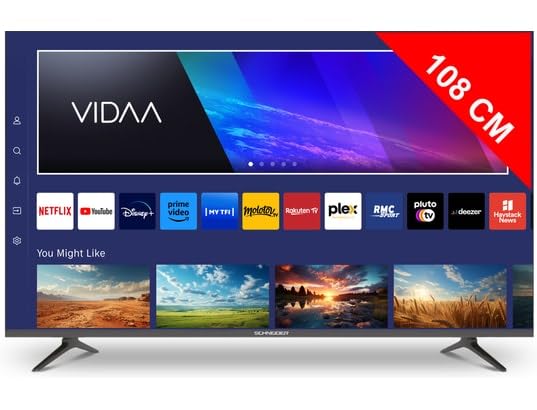
ภาพที่ 1.1: ด้านหน้า view of the Schneider 43A1 TV with VIDAA interface.
2. ข้อมูลด้านความปลอดภัย
เพื่อให้มั่นใจถึงการทำงานที่ปลอดภัยและป้องกันความเสียหาย โปรดปฏิบัติตามข้อควรระวังด้านความปลอดภัยต่อไปนี้:
- การจัดวาง: Position the TV on a stable, level surface. Avoid placing it in direct sunlight, near heat sources, or in environments with high humidity or dust.
- การระบายอากาศ : Ensure adequate ventilation around the TV. Do not block ventilation openings. Maintain a minimum distance of 10 cm from walls or other objects.
- แหล่งจ่ายไฟ: ใช้เฉพาะแหล่งจ่ายไฟ voltage. Ensure the power cord is not pinched or walked on. Disconnect the power plug during lightning storms or when unused for extended periods.
- การทำความสะอาด: ถอดปลั๊กทีวีก่อนทำความสะอาด ใช้ผ้าแห้งนุ่มๆ เช็ดทำความสะอาด ห้ามใช้น้ำยาทำความสะอาดหรือสเปรย์กระป๋อง
- ของเหลว: Do not expose the TV to dripping or splashing liquids. Do not place objects filled with liquids, such as vases, on the TV.
- เด็ก: ดูแลเด็กๆ อย่างใกล้ชิด เพื่อให้แน่ใจว่าพวกเขาจะไม่ปีนป่ายทีวีหรือเฟอร์นิเจอร์
- การติดตั้งบนผนัง: If wall-mounting, use a VESA compatible bracket (200 x 200 mm) and ensure proper installation by qualified personnel to prevent injury.
3. เนื้อหาบรรจุภัณฑ์
โปรดตรวจสอบว่าสินค้าทั้งหมดมีอยู่และอยู่ในสภาพดี:
- Schneider 43A1 4K UHD LED TV
- รีโมทคอนโทรล
- สายไฟ
- ชั้นวางทีวี (2 ชิ้น)
- สกรูสำหรับขาตั้งทีวี
- คู่มือการใช้งาน (เอกสารนี้)
4. การตั้งค่า
4.1 การแกะกล่อง
Carefully remove the TV from its packaging. It is recommended to keep the original packaging for potential future transport or service needs.
4.2 การติดตั้งขาตั้ง
If you are not wall-mounting the TV, attach the included stand pieces to the bottom of the TV using the provided screws. Ensure the stand is securely fastened before placing the TV upright.
4.3 การติดตั้งบนผนัง (ทางเลือก)
The Schneider 43A1 is compatible with VESA 200 x 200 mm wall mounts. For safe installation, it is highly recommended to use a professional installer. Refer to your wall mount's instructions for specific details.
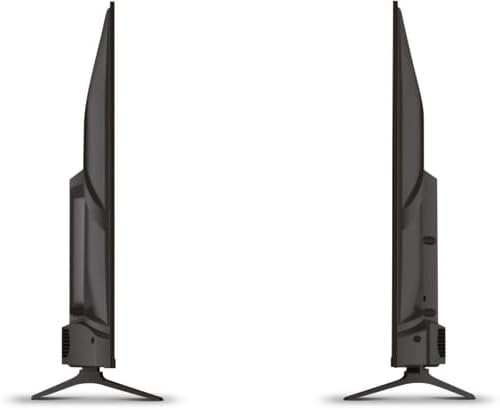
ภาพที่ 4.1: ด้านข้าง view of the Schneider 43A1 TV, illustrating its profile for placement or wall mounting.
4.4 การเชื่อมต่ออุปกรณ์ภายนอก
ทีวีของคุณมีตัวเลือกการเชื่อมต่อที่หลากหลาย:
- ช่องต่อ HDMI: เชื่อมต่ออุปกรณ์ HDMI 2.0 ได้สูงสุดสามเครื่อง (เช่น เครื่องเล่นบลูเรย์ เครื่องเล่นเกม กล่องรับสัญญาณทีวี) เข้ากับพอร์ต HDMI
- ยูเอสบี: Two USB ports are available for connecting USB storage devices to play media.
- AV/Audio Input: For older devices requiring composite video and stereo audio.
- เอาต์พุตโคแอกเชียล: สำหรับเชื่อมต่อกับระบบเสียงภายนอก
- อินพุตเสาอากาศ/สายเคเบิล: Connect your antenna or cable TV signal for DVB-T/T2/C/S2 reception.
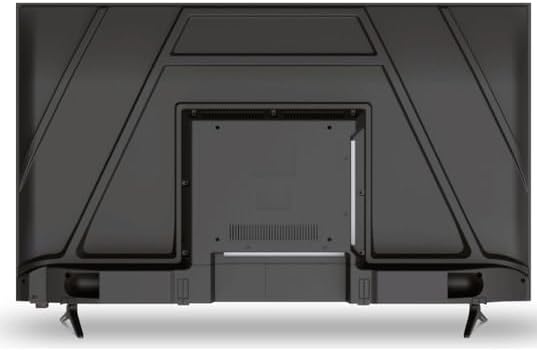
ภาพที่ 4.2: ด้านหลัง view of the Schneider 43A1 TV, highlighting connection ports.
4.5 การต่อสายไฟ
Plug the power cable into the TV's power input, then into a suitable wall outlet.
4.6 ตัวช่วยการตั้งค่าเริ่มต้น
Upon first power-on, the TV will guide you through an initial setup process. This includes selecting your language, connecting to a Wi-Fi network, and scanning for available channels (DVB-T/T2/C/S2).
5. ปฏิบัติการ
5.1 ฟังก์ชั่นการควบคุมระยะไกล
รีโมตคอนโทรลช่วยให้คุณสามารถใช้งานฟังก์ชั่นต่างๆ ของทีวีได้:
- ปุ่มเปิด/ปิด: เปิดหรือปิดทีวี
- เพิ่ม/ลดระดับเสียง: ปรับระดับเสียง
- ช่องขึ้น/ลง: เปลี่ยนช่องทีวี
- อินพุต/แหล่งที่มา: Selects the input source (HDMI, USB, TV Tuner).
- ปุ่มนำทาง: สำหรับการนำทางเมนู
- ปุ่มควบคุมสมาร์ททีวี: Direct access to popular apps like Netflix, Prime Video, YouTube.
5.2 Smart TV (VIDAA)
The integrated VIDAA Smart TV platform provides access to a variety of applications and streaming services. Connect your TV to the internet via Wi-Fi to enjoy features like Netflix, Prime Video, and YouTube. Bluetooth connectivity allows for wireless connection to compatible audio devices.

ภาพที่ 5.1: ด้านหน้าเอียง view of the Schneider 43A1 TV, displaying the VIDAA Smart TV interface.
5.3 การเลือกอินพุต
Press the 'Input' or 'Source' button on your remote control to switch between connected devices (HDMI 1, HDMI 2, HDMI 3, USB, AV, TV Tuner).
5.4 การตั้งค่าภาพและเสียง
Access the TV's menu to adjust picture and sound settings. The 4K UHD resolution, QLED-LCD technology, and Direct LED backlighting ensure a high-quality visual experience. The TV also features upscaling to enhance lower-resolution content. Audio is delivered via 2 x 8 W RMS stereo speakers with Dolby Audio support.
5.5 PC Monitor Mode
The TV can be used as a PC monitor by connecting your computer via an HDMI cable. This mode optimizes the display for computer use.
6. การบำรุงรักษา
6.1 การทำความสะอาดทีวี
Before cleaning, ensure the TV is unplugged from the power outlet.
- หน้าจอ: เช็ดหน้าจอเบาๆ ด้วยผ้านุ่มที่ไม่เป็นขุย สำหรับรอยฝังแน่น ให้เช็ดเบาๆampเทน้ำหรือน้ำยาทำความสะอาดหน้าจอชนิดพิเศษลงบนผ้า (อย่าฉีดลงบนหน้าจอโดยตรง)
- ภายนอก: ใช้ผ้าแห้งนุ่มๆ เช็ดทำความสะอาดทีวีasinก. หลีกเลี่ยงน้ำยาทำความสะอาดหรือตัวทำละลายที่มีฤทธิ์กัดกร่อน
6.2 การอัปเดตซอฟต์แวร์
ทีวีของคุณอาจได้รับการอัปเดตซอฟต์แวร์เพื่อปรับปรุงประสิทธิภาพและเพิ่มคุณสมบัติใหม่ ตรวจสอบให้แน่ใจว่าทีวีของคุณเชื่อมต่อกับอินเทอร์เน็ตเพื่อรับการอัปเดตเหล่านี้โดยอัตโนมัติ หรือตรวจสอบด้วยตนเองผ่านเมนูการตั้งค่า
7 การแก้ไขปัญหา
หากคุณประสบปัญหาเกี่ยวกับทีวี โปรดดูปัญหาทั่วไปและวิธีแก้ไขต่อไปนี้:
- ไม่มีไฟฟ้า:
- ตรวจสอบว่าสายไฟเสียบเข้ากับทีวีและเต้ารับที่ผนังอย่างแน่นหนาหรือไม่
- ตรวจสอบให้แน่ใจว่าเต้ารับไฟที่ผนังใช้งานได้ (ทดสอบด้วยอุปกรณ์อื่น)
- กดปุ่มเปิดปิดบนรีโมทคอนโทรลหรือบนทีวีโดยตรง
- ไม่มีภาพ/เสียง:
- ตรวจสอบว่าเลือกแหล่งอินพุตที่ถูกต้อง (เช่น HDMI 1, ทีวี)
- ตรวจสอบการเชื่อมต่อสายเคเบิลทั้งหมดระหว่างทีวีและอุปกรณ์ภายนอก
- ตรวจสอบให้แน่ใจว่าระดับเสียงไม่ได้ถูกปิดไว้หรือตั้งไว้ที่ระดับต่ำสุด
- หากใช้เสาอากาศ โปรดตรวจสอบการเชื่อมต่อเสาอากาศและทำการสแกนหาช่องสัญญาณ
- รีโมทคอนโทรลไม่ทำงาน:
- เปลี่ยนแบตเตอรี่ในรีโมทคอนโทรล
- ตรวจสอบให้แน่ใจว่าไม่มีสิ่งกีดขวางระหว่างรีโมทและเซ็นเซอร์ IR ของทีวี
- Smart TV/Network Issues:
- ตรวจสอบเราเตอร์ Wi-Fi และการเชื่อมต่ออินเทอร์เน็ตของคุณ
- Go to the TV's network settings to re-connect to your Wi-Fi network.
- Restart the TV and your router.
หากปัญหายังคงมีอยู่หลังจากลองวิธีแก้ไขเหล่านี้แล้ว โปรดติดต่อฝ่ายสนับสนุนลูกค้า
8. ข้อมูลจำเพาะ
| คุณสมบัติ | ข้อมูลจำเพาะ |
|---|---|
| แบบอย่าง | Schneider 43A1 |
| ขนาดจอแสดงผล | 109 ซม. (43 นิ้ว) |
| ปณิธาน | 4K Ultra HD (3840 x 2160 พิกเซล) |
| เทคโนโลยีการแสดงผล | QLED-LCD with Direct LED Backlight |
| อัตราส่วนคอนทราสต์ | 1100:1 น. |
| ความสว่าง | 200 ซีดี/ตรม. |
| เอาท์พุตเสียง | 2 x 8 W RMS Stereo |
| เทคโนโลยีเสียง | ระบบเสียงดอลบี้ |
| พอร์ต HDMI | 3 (HDMI 2.0) |
| พอร์ต USB | 2 |
| อินพุตอื่นๆ | AV/Audio Input |
| เอาท์พุต | เอาต์พุตโคแอกเซียล |
| จูนเนอร์ | DVB-T/T2/C/S2 |
| แพลตฟอร์มสมาร์ททีวี | VIDAA (Netflix, Prime Video, YouTube) |
| การเชื่อมต่อแบบไร้สาย | ไวไฟ, บลูทูธ |
| ความเข้ากันได้ของ VESA | 200 x 200 มม. |
| น้ำหนัก | 7.5 กิโลกรัม |