
1. บทนำ
This manual provides detailed instructions for the setup, operation, and maintenance of your SMAJAYU SMA28H Laser RTK and SMA26 Pro Base GNSS Survey System. This system is designed for high-precision surveying applications, offering advanced features such as 2cm accuracy laser measurement, dual-camera AR real-scene stakeout, and robust multi-network GNSS connectivity.
2. เนื้อหาบรรจุภัณฑ์
ตรวจสอบว่าสินค้าทั้งหมดที่ระบุไว้ด้านล่างนี้รวมอยู่ในแพ็คเกจของคุณแล้ว หากมีสินค้าใดสูญหายหรือเสียหาย โปรดติดต่อฝ่ายสนับสนุนลูกค้า

Image: SMA28H and SMA26 Pro Base package contents.

ภาพ: รายละเอียด view of SMA28H and SMA26 Pro Base components.
2.1 SMA28H Rover List:
- 1x SMA28H Receiver
- 1x คอนโทรลเลอร์มือถือ
- 1x Handheld Bracket
- อะแดปเตอร์ไฟฟ้า 1x
- สายชาร์จ 1x
- เสาอากาศวิทยุ 1 ชิ้น
- 1x คู่มือผู้ใช้
2.2 SMA26 Pro Base List:
- 1x GNSS Receiver
- อะแดปเตอร์ไฟฟ้า 1x
- 1x Disc
- 1x Extension Rod
- 1x สายวัด
- 1x Terminal Antenna
- 1x คู่มือผู้ใช้
2.3 Unboxing Videos:
Video: SMA26 Pro RTK Unboxing. This video demonstrates the unboxing process for the SMA26 Pro Base unit, showing all included components.
Video: SMA28H Unboxing. This video guides you through unboxing the SMA28H Rover, detailing each component.
3. คุณสมบัติของผลิตภัณฑ์
- 2cm Accuracy Laser Measurement: Non-contact point measurements up to 30m, with 3-4cm accuracy within 15m. Ideal for hard-to-reach points.
- Dual Cameras AR Real Scene Stakeout: Features dual high-definition cameras for augmented reality (AR) stakeout, displaying points directly on the live video feed for intuitive guidance.
- 120° Tilt Survey with High Accuracy: Integrated Inertial Measurement Unit (IMU) provides less than 2cm accuracy within a 60° tilt range, supporting angles up to 120°.
- Long-Distance Communication: Integrated UHF radio communication system with a working range of up to 15 kilometers in open environments.
- Multi-Network GNSS Connectivity: Supports PPP, PPK, RTK, and direct CORS network connections with a built-in 4G module for direct network access via SIM card.
- การออกแบบที่ทนทาน: IP67 waterproof and 1.8m drop-tested.
- อายุการใช้งานแบตเตอรี่ที่ยาวนานขึ้น: 6600 mAh battery provides up to 20 hours of rover use.
- การเชื่อมต่อ: Integrated 4G LTE, UHF radio, Wi-Fi, Bluetooth, and WEBแพลตฟอร์ม UI

ภาพ: เหนือview of SMA28H features including battery, channels, IP rating, 4G, NFC, and WEBUI
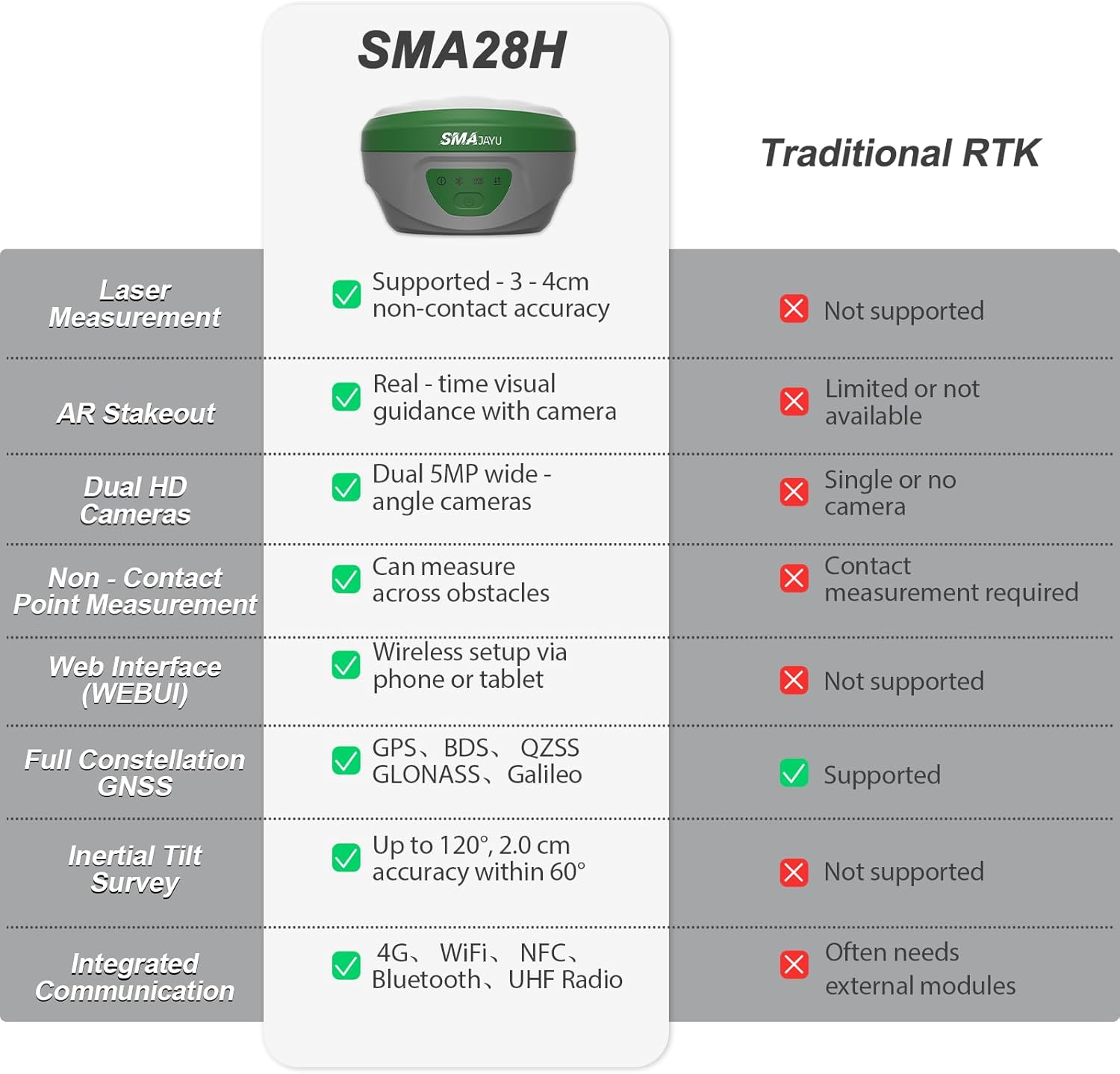
Image: Comparison table highlighting SMA28H advantages over traditional RTK systems.
4. การตั้งค่า
4.1 การประกอบเบื้องต้น
- Attach the SMA28H Rover to the handheld bracket and secure it.
- Connect the radio antenna to the SMA28H Rover.
- For the SMA26 Pro Base, attach the terminal antenna and extension rod as needed.
- ตรวจสอบให้แน่ใจว่าส่วนประกอบทั้งหมดถูกยึดอย่างแน่นหนา
4.2 การเปิดเครื่องและการเชื่อมต่อ
- Power on both the SMA28H Rover and SMA26 Pro Base units.
- On the handheld controller, navigate to the communication settings.
- Select the appropriate RTK model (SMA28H) and connect via Bluetooth.
- Ensure a fixed solution state is achieved for accurate measurements.
5. คู่มือการใช้งาน
5.1 Laser Measurement
The SMA28H features a visible green laser for non-contact measurements, ideal for points that are difficult to access directly.

Image: SMA28H GNSS Receiver demonstrating non-contact, high-precision laser measurement.
To perform laser measurements:
- Ensure the SMA28H is in rover mode and has a fixed solution.
- Navigate to the 'Survey' menu on the handheld controller and select 'Point Survey'.
- Click the laser mode icon, then the laser-assisted camera icon to activate the laser and camera view.
- Aim the laser at the desired point. The distance will be displayed on the screen.
- Click the measuring point icon to record the point.
Laser Measurement Videos:
Video: SMA28H RTK Laser Measurement. This video demonstrates how to use the laser measurement function of the SMA28H.
Video: SMA28H RTK GNSS Laser Focus at 15m & 30m. This video illustrates the stability and focus of the laser measurement at various distances.
5.2 AR Real Scene Stakeout
The AR stakeout feature provides real-time directional guidance by overlaying stakeout points onto a live video feed from the dual cameras.

Image: Demonstration of Dual Cameras AR Real Scene Stakeout.
To use AR Stakeout:
- From the 'Survey' menu, select 'Point Stakeout'.
- Choose the desired point from the 'Point Coordinates' list.
- Click the 'Stakeout' button.
- Select the 'Video Stakeout' option (AR icon).
- Follow the on-screen directional guidance to reach the stakeout point.
AR Stakeout Videos:
Video: SMA28H Laser RTK for AR Visual Stakeout. This video demonstrates the AR visual stakeout functionality.
Video: SMA28H Laser RTK Point Setting. This video shows how to set points using the laser RTK system.
5.3 120° Tilt Survey
The integrated IMU allows for accurate measurements even when the pole is tilted, providing flexibility in challenging environments.

Image: Demonstration of 120° Tilt Surveying capability.
The system automatically compensates for tilt up to 120°, maintaining accuracy of less than 2 cm within a 60° tilt range.
5.4 Long-Distance UHF Communication
The UHF radio communication system enables reliable data transmission over long distances.

Image: Diagram illustrating the 15KM communication distance of the built-in transceiver radio module.
In open environments, the system can maintain communication up to 15 kilometers, suitable for large-scale projects.
5.5 Multi-Network GNSS Connectivity
The system supports various GNSS constellations and correction methods for robust positioning.

Image: Diagram showing full constellation support including GPS, BDS, GLONASS, Galileo, and QZSS.
The SMA28H supports PPP, PPK, RTK, and direct CORS network connections. A built-in 4G module allows direct access to the 4G network and CORS login by inserting a SIM card, eliminating the need for external equipment.
5.6 Data Management (Export/Import)
The handheld controller facilitates easy export and import of survey data.
Data Export Video:
Video: Data Export Operation. This video demonstrates the steps to export survey data from the handheld controller.
Data Import Video:
Video: Data Import Operation. This video shows how to import survey data into the handheld controller.
5.7 Base Station Panning Operation
If the base station is restarted or moved, recalibration is necessary.
Base Station Panning Video:
Video: Base Station Panning Operation. This video explains how to recalibrate the base station if it has been moved or restarted.
6. การบำรุงรักษา
- Keep the devices clean and free from dust and debris.
- Store the equipment in its protective case when not in use.
- Charge batteries regularly, even during periods of non-use, to maintain battery health.
- ควรหลีกเลี่ยงการวางอุปกรณ์ไว้ในที่ที่มีอุณหภูมิสูงหรือต่ำเกินไป หรือโดนแสงแดดโดยตรงเป็นเวลานาน
- Regularly check for firmware updates to ensure optimal performance and access to new features.
7 การแก้ไขปัญหา
หากพบปัญหาใด ๆ โปรดดูคำแนะนำในการแก้ไขปัญหาทั่วไปต่อไปนี้:
- No Fixed Solution: ตรวจสอบให้แน่ใจว่าท้องฟ้าปลอดโปร่ง view, check base station setup, verify internet/UHF connection for corrections.
- ปัญหาการเชื่อมต่อ: Re-pair Bluetooth, check Wi-Fi/4G signal strength, ensure devices are within range.
- การวัดที่ไม่ถูกต้อง: Perform IMU calibration, check pole height settings, ensure base station is stable and correctly positioned.
- แบตเตอรี่หมดเร็ว: Reduce screen brightness, close unused applications, ensure batteries are fully charged before use.
For more complex issues, please contact SMAJAYU customer support.
8. ข้อมูลจำเพาะ
| คุณสมบัติ | ข้อมูลจำเพาะ |
|---|---|
| น้ำหนักสินค้า | 14.96 ปอนด์ |
| ขนาดสินค้า | 15.75 x 12.6 x 12.2 นิ้ว |
| ขนาดจอแสดงผล | 5.5 นิ้ว |
| อายุการใช้งานแบตเตอรี่ | 20 ชั่วโมง |
| คำสั่งเสียง | ปุ่ม, หน้าจอสัมผัส |
| คุณสมบัติพิเศษ | Non-Contact Laser Measurement, AR Real-Scene Stakeout, Long-Distance UHF Communication |
| เทคโนโลยีการเชื่อมต่อ | Wi-Fi, Bluetooth, USB, 4G LTE |
| ประเภทแผนที่ | ภูมิศาสตร์ |
| ความจุของหน่วยความจำ | 32GB |
| คลาสเลเซอร์ | Class3R |
| ระดับการกันน้ำ | IP67 |
9. การรับประกันและการสนับสนุน
Your SMAJAYU SMA28H Laser RTK & SMA26 Pro Base GNSS Survey System comes with a standard manufacturer's warranty. Please refer to the warranty card included in your package for specific terms and conditions.
For technical support, troubleshooting assistance, or any inquiries regarding your product, please contact SMAJAYU customer service. Our team of expert engineers is available to provide online support.

ภาพ: อดีตample of one-on-one expert engineer online support.
You can also visit the official SMAJAYU webเว็บไซต์นี้รวบรวมคำถามที่พบบ่อย แหล่งข้อมูลเพิ่มเติม และข้อมูลการติดต่อ