
1. บทนำ
This manual provides essential information for the safe and efficient installation, operation, and maintenance of the HLTNC HS320 Variable Frequency Drive (VFD) Inverter. The HS320 is designed to control the speed of three-phase AC motors, commonly used in applications such as spindle speed control. Please read this manual thoroughly before using the product to ensure proper functionality and safety.
2. ข้อมูลด้านความปลอดภัย
WARNING: Improper installation or operation can lead to serious injury or equipment damage. Always follow safety guidelines.
- อันตรายจากไฟฟ้า: Ensure all power is disconnected from the supply before performing any installation, wiring, or maintenance. Wait at least 10 minutes after disconnecting power for capacitors to discharge before touching internal components.
- การต่อลงดิน: Always ensure the VFD is properly grounded according to local electrical codes.
- บุคลากรที่ผ่านการรับรอง: การติดตั้งและการบำรุงรักษาควรดำเนินการโดยช่างไฟฟ้าที่มีคุณสมบัติเหมาะสมเท่านั้น
- สิ่งแวดล้อม: Do not operate the VFD in environments with excessive dust, moisture, corrosive gases, or direct sunlight. Mount the inverter on a non-combustible surface.
- ระบบป้องกันการโอเวอร์โหลด: Do not bypass any safety or overload protection features.
Refer to the warning labels on the device for additional safety instructions.

3. สินค้าหมดview
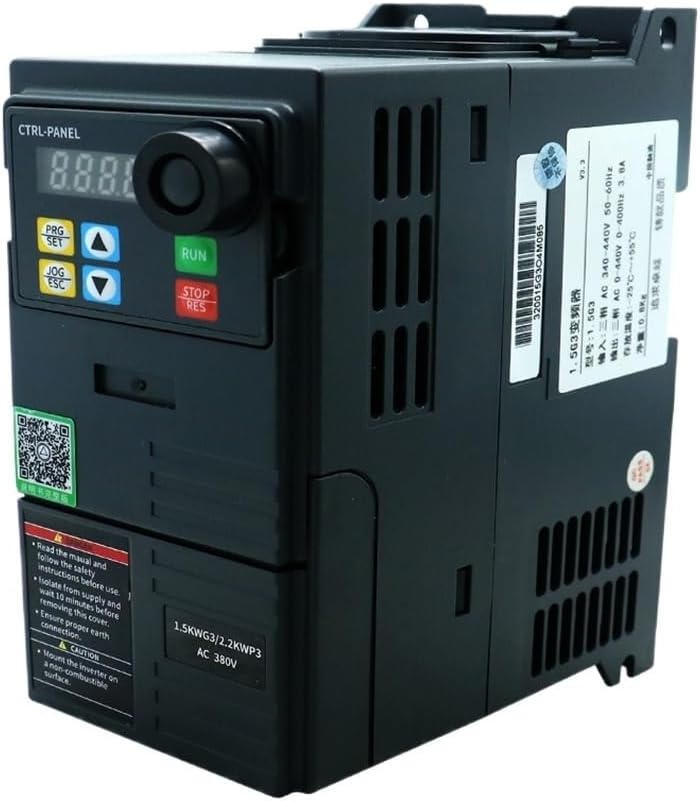
The HLTNC HS320 is a compact Variable Frequency Drive designed for precise motor speed control. It features a digital display, control buttons, and a rotary encoder for parameter adjustment. The unit is equipped with various input/output terminals for external control and monitoring.


4. ข้อมูลจำเพาะ
The following table outlines the key technical specifications for the HLTNC HS320 VFD (0.75KW, 380V, 0-400Hz variant).
| คุณสมบัติ | ข้อมูลจำเพาะ |
|---|---|
| หมายเลขรุ่น | HS320 |
| อินพุต Voltage | กระแสสลับ 380 โวลต์ |
| กำลังขับ | 0.75 กิโลวัตต์ |
| เฟสเอาท์พุท | 3 เฟส |
| ช่วงความถี่เอาท์พุท | 0-400เฮิรตซ์ |
| พิมพ์ | อินเวอร์เตอร์ DC/AC |
| วิธีการควบคุม | Vector Control / V/F Control (refer to detailed parameter settings) |
| วิธีการทำความเย็น | พัดลมระบายความร้อน |
| อุณหภูมิในการทำงาน | Typically -10°C to 40°C (14°F to 104°F) |
| ความชื้น | ความชื้นสัมพัทธ์น้อยกว่า 90% ไม่มีการควบแน่น |
| ระดับความสูง | Below 1000m (3300ft) |
| ระดับการป้องกัน | IP20 (typical for enclosed VFDs) |
| ขนาดและน้ำหนักทางกายภาพ | Refer to product packaging or official documentation for accurate physical dimensions and weight. |
5. การติดตั้ง
5.1 การติดตั้ง
- Mount the VFD vertically on a sturdy, non-combustible surface.
- Ensure adequate ventilation space around the unit (typically 10cm above and below, 5cm on sides) for proper heat dissipation.
- Avoid mounting in direct sunlight, near heat sources, or in areas subject to vibration.
- Use appropriate screws and mounting hardware to secure the VFD firmly.
5.2 การเดินสายไฟ
All wiring must comply with local and national electrical codes. Use appropriate wire gauges for the VFD's power rating.
5.2.1 Power Input (R, S, T)
- Connect the 380V AC three-phase power supply to the R, S, and T terminals.
- Install an appropriate circuit breaker or fuse upstream for protection.
5.2.2 Motor Output (U, V, W)
- Connect the three-phase motor to the U, V, and W output terminals.
- Ensure the motor's rated voltage and current are compatible with the VFD.
5.2.3 Grounding (PE)
- Connect the VFD's grounding terminal (PE) to a reliable earth ground. This is critical for safety and EMI reduction.
5.2.4 ขั้วต่อควบคุม
The VFD provides various control terminals for external start/stop, speed reference (analog input), multi-function inputs, and relay outputs. Refer to the detailed wiring diagram in the full product manual for specific terminal assignments and functions. Common connections include:
- อินพุตแบบอะนาล็อก: For external speed control via potentiometer or 0-10V/4-20mA signal.
- อินพุตดิจิตอล: For external start, stop, forward/reverse, multi-step speed commands.
- เอาท์พุทรีเลย์: For fault indication or run status.
6. การดำเนินการ
6.1 ฟังก์ชั่นแผงควบคุม
The integrated control panel allows for direct operation and parameter setting.
- จอแสดงผลดิจิตอล: Shows frequency, output current, voltage, and parameter codes.
- ปุ่ม RUN: สตาร์ทมอเตอร์
- ปุ่ม STOP/RES: Stops the motor or resets a fault.
- ปุ่ม PRG/SET: Enters/exits parameter setting mode, confirms parameter changes.
- ปุ่ม JOG/ESC: Initiates JOG operation (momentary run) or exits a menu without saving.
- ลูกศรขึ้น/ลง: เรียกดูพารามิเตอร์หรือปรับค่าต่างๆ
6.2 ขั้นตอนการทำงานพื้นฐาน
- เปิดเครื่อง: เสียบปลั๊กไฟให้กับ VFD หน้าจอจะสว่างขึ้น
- ตั้งความถี่: Use the Up/Down arrows to set the desired output frequency.
- สตาร์ทมอเตอร์: กดปุ่ม วิ่ง กดปุ่ม มอเตอร์จะเร่งความเร็วไปจนถึงความถี่ที่ตั้งไว้
- หยุดมอเตอร์: กดปุ่ม หยุด/รีเซ็ต ปุ่ม. มอเตอร์จะชะลอความเร็วและหยุด.
7. การตั้งค่าพารามิเตอร์
The HLTNC HS320 VFD has a comprehensive set of parameters to customize its operation. Accessing and modifying these parameters allows fine-tuning for specific applications.
7.1 Entering Parameter Mode
- กดปุ่ม PRG/SET button to enter parameter setting mode. The display will show a parameter group code (e.g., P00).
- Use the Up/Down arrows to navigate through parameter groups (e.g., P00, P01, P02, etc.).
- กด PRG/SET again to enter a specific parameter within a group (e.g., P00.01).
7.2 Modifying Parameters
- Once a specific parameter is selected, use the Up/Down arrows to change its value.
- กด PRG/SET to save the new value. The display may flash to confirm.
- กด JOG/ESC to exit the current parameter or group without saving changes.
7.3 Important Parameters (Exampเลส)
- P00.01 (Max Output Frequency): Sets the maximum frequency the VFD can output.
- P00.03 (Acceleration Time): Defines the time it takes for the motor to accelerate from 0Hz to the maximum frequency.
- P00.04 (Deceleration Time): Defines the time it takes for the motor to decelerate from the maximum frequency to 0Hz.
- P00.05 (Rated Motor Frequency): Set to the motor's nominal frequency.
- P00.06 (Rated Motor Voltagจ): Set to the motor's nominal voltage.
- P00.07 (Rated Motor Current): Set to the motor's nominal current.
For a complete list of parameters and their detailed descriptions, refer to the comprehensive parameter manual provided with your HLTNC HS320 VFD.
8. การบำรุงรักษา
การบำรุงรักษาอย่างสม่ำเสมอจะช่วยให้ VFD ของคุณมีอายุการใช้งานยาวนานและทำงานได้อย่างน่าเชื่อถือ
- การทำความสะอาด: Periodically clean the VFD's exterior and cooling fins to prevent dust accumulation, which can hinder heat dissipation. Use a soft, dry cloth. Do not use liquids or solvents.
- การตรวจสอบพัดลม: Check the cooling fan for proper operation and ensure it is free from obstructions. Replace if noisy or not functioning.
- ความแน่นที่ปลายสาย: Periodically check all wiring terminals for tightness. Loose connections can cause overheating and intermittent operation.
- การตรวจสอบสิ่งแวดล้อม: ตรวจสอบให้แน่ใจว่าสภาพแวดล้อมการทำงานยังคงอยู่ในช่วงอุณหภูมิและความชื้นที่กำหนด
9 การแก้ไขปัญหา
This section provides solutions for common issues. For complex problems, contact technical support.
| รหัสปัญหา/ข้อผิดพลาด | สาเหตุที่เป็นไปได้ | สารละลาย |
|---|---|---|
| ไม่มีจอแสดงผล/พลังงาน | No input power; Blown fuse; Internal fault. | Check power supply and fuses. If power is present, contact support. |
| มอเตอร์ไม่ทำงาน | VFD not in RUN mode; Incorrect frequency setting; Motor wiring issue; Fault condition. | Press RUN. Check frequency setting. Verify motor wiring. Check for fault codes. |
| Overcurrent Fault (OC) | Motor overload; Short circuit in motor wiring; Rapid acceleration/deceleration. | Reduce load. Check motor wiring. Increase acceleration/deceleration times (P00.03/P00.04). |
| โอเวอร์โวลtage Fault (OV) | Regenerative braking from motor; High input voltage. | Increase deceleration time. Check input voltage. Consider braking resistor if needed. |
| อันเดอร์โวลtage Fault (UV) | ปริมาณอินพุตต่ำtage; Power sag. | ตรวจสอบแรงดันไฟฟ้าขาเข้าtage. |
| Overheat Fault (OH) | Insufficient ventilation; High ambient temperature; Clogged fan. | Ensure proper ventilation. Clean cooling fins and fan. Reduce ambient temperature. |
กดปุ่ม .เสมอ หยุด/รีเซ็ต button to clear a fault after addressing the cause.
10. การรับประกันและการสนับสนุน
For warranty information, technical support, or service inquiries, please refer to the documentation provided with your purchase or contact your vendor. Ensure you have your product model number (HS320) and purchase details available when seeking support.