
การแนะนำ
Thank you for choosing the MAXDONE PH960W-SGE Solar WiFi Trail Camera. This camera is designed for wildlife observation, outdoor surveillance, and home security, offering high-resolution images and videos with advanced features like solar power, WiFi connectivity, and night vision. This manual provides detailed instructions for setup, operation, and maintenance to ensure optimal performance.
The camera features a 64MP photo resolution, 4K video recording with sound, a 0.1-second trigger speed, and 850nm low-glow LEDs for clear night vision. Its integrated 6000mAh lithium battery and flexible solar panel provide extended operation, while IP66 waterproofing ensures reliability in various weather conditions.
เนื้อหาแพ็คเกจ
กรุณาตรวจสอบแพ็คเกจเพื่อให้แน่ใจว่ามีสินค้าครบทั้งหมด:
- MAXDONE PH960W-SGE Trail Camera
- Detachable Solar Panel (with 1.4m cable)
- สายชาร์จ USB/ข้อมูล
- สายรัดสำหรับติดตั้ง
- Wall/Tree Mounting Bracket
- สกรูสำหรับติดตั้ง
- การ์ด MicroSD 32GB
- คู่มือการใช้งาน (เอกสารนี้)
คุณสมบัติผลิตภัณฑ์
- การถ่ายภาพความละเอียดสูง: Captures 64 Megapixel still images and records 4K Ultra HD video with audio.
- ความเร็วทริกเกอร์ที่รวดเร็ว: PIR sensor activates recording in 0.1 seconds.
- การมองเห็นกลางคืนขั้นสูง: Equipped with 14 low-glow 850nm infrared LEDs for clear nighttime recording without disturbing wildlife.
- Solar Power & Long Battery Life: Features a detachable solar panel and an integrated 6000mAh lithium-polymer battery for extended operation and environmental friendliness.
- การเชื่อมต่อ WiFi และ Bluetooth: Connects directly to the "TrailCam Go" mobile app via integrated WiFi and Bluetooth for remote viewing, downloading, and sharing of media within approximately 15 meters.
- การออกแบบที่ทนทาน: IP66 waterproof rating ensures reliable performance in rain, snow, and heat.
- พื้นที่จัดเก็บ: Supports up to 256GB MicroSD cards (32GB card included).
- ฟังก์ชั่นอเนกประสงค์: Includes timestamp, timelapse, operating times, password protection, and loop recording.
การตั้งค่า
1. การติดตั้งแบตเตอรี่และการ์ด SD
- ชาร์จแบตเตอรี่: Before first use, fully charge the integrated 6000mAh lithium-polymer battery using the provided USB cable and a standard USB power adapter (not included). The solar panel will maintain the charge during outdoor use.
- ใส่การ์ด MicroSD: Open the camera's housing. Locate the MicroSD card slot. Insert the included 32GB MicroSD card (or another compatible card up to 256GB) with the gold contacts facing the back of the camera until it clicks into place. Ensure the card is formatted before first use (refer to the Operating Instructions section).
2. การเชื่อมต่อแผงโซลาร์เซลล์
Connect the detachable solar panel to the camera's designated power input port. The solar panel can be mounted independently in a sunny location using its 1.4m cable to ensure optimal charging, regardless of the camera's orientation.
3. การติดตั้งกล้อง

Image: MAXDONE PH960W-SGE Trail Camera mounted on a tree with its solar panel, highlighting its IP66 waterproof rating and operating temperature range of -20°C to 60°C.
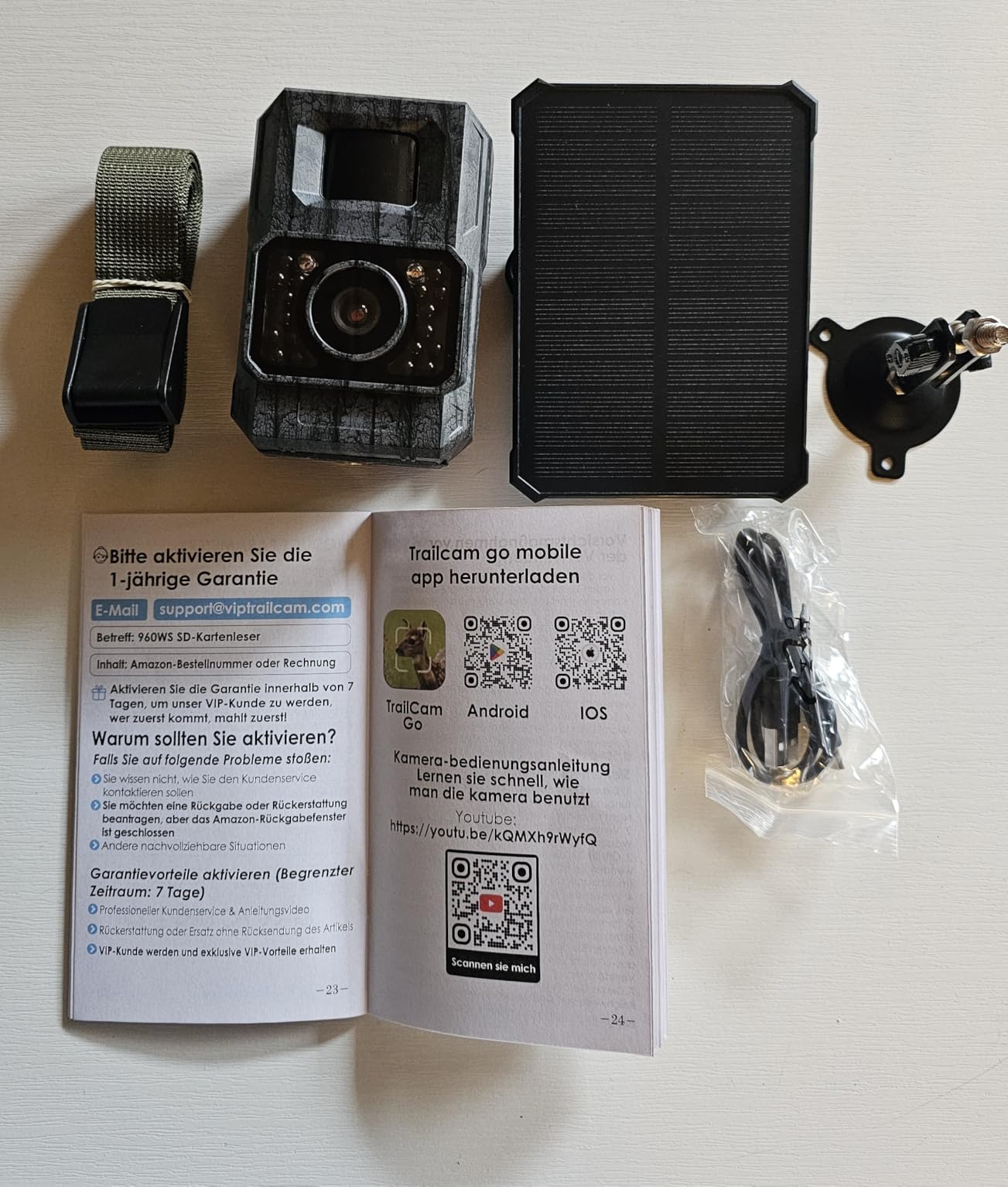
Image: The trail camera secured to a tree using the provided mounting strap, demonstrating a typical outdoor installation.
The camera can be mounted using the included strap or the wall/tree mounting bracket and screws. Choose a location that provides a clear view of the area you wish to monitor and allows the solar panel to receive adequate sunlight.
- การติดตั้งสายรัด: สอดสายรัดสำหรับติดตั้งผ่านช่องด้านหลังกล้อง แล้วยึดไว้กับต้นไม้หรือเสา
- การติดตั้งวงเล็บ: Use the screws to attach the mounting bracket to a wall or tree. Then, attach the camera to the bracket. Adjust the camera angle as needed.
4. การติดตั้งและการเชื่อมต่อแอป

Image: The trail camera connected to a smartphone running the 'TrailCam Go' app, illustrating the WiFi remote control feature.
- ดาวน์โหลดแอป: ค้นหา "TrailCam Go" in your smartphone's app store (iOS or Android) and install it.
- Enable Camera WiFi/Bluetooth: Turn on the camera. Activate its WiFi and Bluetooth functions (refer to the camera's internal menu or quick start guide for specific steps).
- เชื่อมต่อกับแอพ: Open the "TrailCam Go" app. The app will use Bluetooth to discover the camera. Once discovered, it will prompt you to connect via the camera's integrated WiFi hotspot. Follow the on-screen instructions to establish the connection.
- บันทึก: The camera connects to your mobile phone via its own hotspot WiFi and does not support connection to home Wi-Fi networks. The connection range is approximately 15 meters.
คำแนะนำการใช้งาน
1. การทำงานพื้นฐาน
- เปิด/ปิดเครื่อง: Use the power switch located inside the camera housing to turn the camera ON or OFF.
- การเลือกโหมด: The camera typically has modes like 'OFF', 'SETUP', and 'ON' (or 'MONITOR'). Use 'SETUP' mode to configure settings and 'ON' to activate recording.
- การนำทางเมนู: Use the camera's internal buttons (usually 'MENU', 'UP', 'DOWN', 'LEFT', 'RIGHT', 'OK') to navigate through settings on the built-in screen.
2. การฟอร์แมตการ์ด SD
It is recommended to format the MicroSD card before first use and periodically thereafter to ensure optimal performance and prevent data corruption.
- In 'SETUP' mode, navigate to the 'Format SD Card' option in the menu.
- Select 'Yes' and confirm to format the card. All data on the card will be erased.
3. Configuring Camera Settings
Access the camera's menu in 'SETUP' mode to adjust various parameters:
- โหมด: Select 'Photo', 'Video', or 'Photo + Video'.
- ความละเอียดภาพ: Choose from available options, up to 64MP.
- ความละเอียดวิดีโอ: Choose from available options, up to 4K.
- ความยาววิดีโอ: Set the duration for each video clip.
- ความไว PIR: Adjust the motion sensor sensitivity (Low, Medium, High) based on the environment.
- ช่วงเวลา PIR: ตั้งค่าความล่าช้าระหว่างทริกเกอร์ต่อเนื่องกัน
- เวลาทำการ : Define specific times of day for the camera to be active.
- ไทม์แลปส์: Enable time-lapse photography for long-term observation.
- เวลาamp: เปิดใช้งานหรือปิดใช้งานการตั้งค่าวันที่และเวลาampอยู่ในการบันทึก
- การบันทึกแบบวนซ้ำ: If enabled, the camera will overwrite the oldest fileเมื่อการ์ด SD เต็ม
- การป้องกันด้วยรหัสผ่าน: Set a password to prevent unauthorized access to camera settings.
4. Using the "TrailCam Go" App
Once connected via WiFi, the app allows you to:
- สด View: See a real-time feed from the camera.
- Browse Gallery: View photos and videos stored on the SD card.
- Download Media: Transfer photos and videos directly to your smartphone.
- เปลี่ยนการตั้งค่า: Adjust camera settings remotely.
- แชร์เนื้อหา: Easily share captured moments.
การซ่อมบำรุง
- การทำความสะอาด: Regularly clean the camera lens and PIR sensor window with a soft, dry cloth. Do not use abrasive cleaners or solvents.
- การดูแลแบตเตอรี่ Ensure the solar panel is clean and positioned to receive maximum sunlight for continuous charging. If storing the camera for an extended period, fully charge the battery and store it in a cool, dry place.
- การจัดการการ์ด SD: รีเป็นระยะๆview และลบสิ่งที่ไม่จำเป็นออก files from the SD card to free up space and maintain performance. Reformat the card every few months.
- การปกป้องสิ่งแวดล้อม: While the camera is IP66 waterproof, avoid submerging it in water. Ensure the housing is securely closed to prevent moisture ingress.
การแก้ไขปัญหา
| ปัญหา | สาเหตุที่เป็นไปได้ | สารละลาย |
|---|---|---|
| กล้องไม่สามารถเปิดได้ | แบตเตอรี่ต่ำ สวิตช์ไฟปิด | Charge the battery fully. Ensure the power switch is in the 'ON' or 'SETUP' position. |
| No photos/videos recorded. | SD card full/corrupted; PIR sensitivity too low; Camera in 'SETUP' mode; Incorrect settings. | Format the SD card. Increase PIR sensitivity. Switch camera to 'ON' mode. Verify recording settings (mode, resolution). |
| คุณภาพการมองเห็นในเวลากลางคืนไม่ดี | IR LEDs obstructed; Objects too far/close; Low battery. | Ensure IR LEDs are clear. Position camera appropriately. Ensure battery is sufficiently charged. |
| Cannot connect to "TrailCam Go" app. | Camera WiFi/Bluetooth off; Out of range; App issues. | Ensure camera WiFi/Bluetooth is enabled. Move closer to the camera (within 15m). Restart the app and camera. |
| แผงโซล่าเซลล์ไม่ชาร์จ | Insufficient sunlight; Panel obstructed/dirty; Cable disconnected. | Relocate the solar panel to a sunnier spot. Clean the panel surface. Check cable connection. |
ข้อมูลจำเพาะ
| คุณสมบัติ | รายละเอียด |
|---|---|
| หมายเลขรุ่น | PH960W-SGE |
| ผู้ผลิต | แม็กซ์โดน |
| ขนาดสินค้า | 7 x 5 x 10 ซม. |
| น้ำหนัก | 520 กรัม |
| ประเภทแบตเตอรี่ | Integrated 6000mAh Lithium-polymer |
| ความละเอียดของภาพ | สูงถึง 64MP |
| ความละเอียดวิดีโอ | สูงถึง 4K |
| ความเร็วในการเรียก | 0.1 วินาที |
| ไฟ LED ในตอนกลางคืน | LED อินฟราเรดแสงน้อย 14 ดวง ขนาด 850 นาโนเมตร |
| การเชื่อมต่อ | WiFi, Bluetooth (for app connection) |
| ความเข้ากันได้ของแอป | "TrailCam Go" (iOS/Android) |
| ช่วง WiFi | ประมาณ 15 เมตร |
| พื้นที่จัดเก็บ | การ์ด microSD ความจุสูงสุด 256GB (มีให้ในชุด 32GB) |
| ระดับการกันน้ำ | IP66 |
| สภาพแวดล้อมการทำงาน | กลางแจ้ง |
| ประเภทการติดตั้ง | Tree mounting (strap/bracket) |
| สี | โทนสีเทา |
ข้อมูลการสนับสนุนและการรับประกัน
MAXDONE is committed to providing excellent customer service. For any questions, technical assistance, or warranty claims, please contact our support team.
- การสนับสนุนลูกค้า: Available 24 hours for assistance.
- นโยบายการคืนสินค้า: 7-day return without reason.
- บริการทดแทน: 365-day lifetime replacement service.
Please refer to your purchase documentation or the MAXDONE official webโปรดเยี่ยมชมเว็บไซต์เพื่อดูข้อมูลการติดต่อล่าสุดและเงื่อนไขการรับประกันโดยละเอียด