
1. บทนำ
This manual provides essential information for setting up, operating, maintaining, and troubleshooting your realme Note 70T smartphone. Please read this guide thoroughly to ensure optimal performance and longevity of your device.
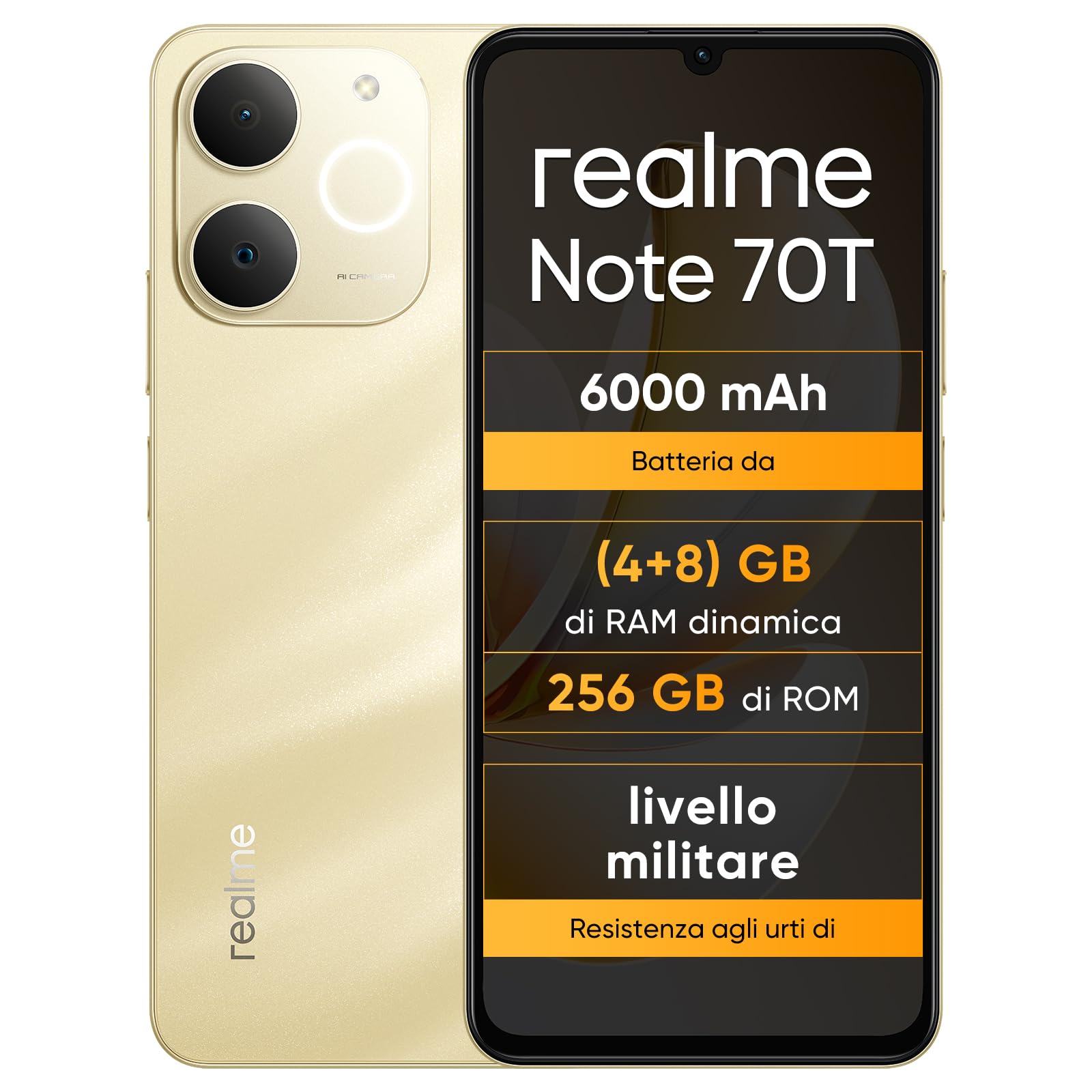
ภาพ: ด้านหน้าและด้านหลัง view of the realme Note 70T smartphone.
2. คู่มือการติดตั้ง
2.1 เนื้อหาบรรจุภัณฑ์
ตรวจสอบว่าแพ็คเกจของคุณมีรายการต่อไปนี้:
- สมาร์ทโฟน realme Note 70T
- สาย USB
- เคสโทรศัพท์
- ฟิล์มกันรอย
2.2 การใส่ซิมการ์ดและการเปิดเครื่อง
- Locate the SIM card tray on the side of the device. Use the provided SIM ejector tool to open the tray.
- Carefully place your Nano-SIM card(s) and/or microSD card into the tray, ensuring correct orientation. The realme Note 70T supports Dual SIM.
- ค่อยๆ ดันถาดกลับเข้าไปในช่องจนกระทั่งชิดกับตัวเครื่องโทรศัพท์
- Press and hold the Power button (located on the right side) until the realme logo appears on the screen.

ภาพ: ด้านข้าง view of the realme Note 70T, illustrating the location of the SIM card tray.
2.3 การชาร์จเริ่มต้น
Before first use, it is recommended to fully charge your device. Connect the USB cable to the phone's USB-C port and the other end to a compatible power adapter (not included) or a computer's USB port.

ภาพ: ด้านล่าง view of the realme Note 70T, highlighting the USB-C charging port.
3. คู่มือการใช้งาน
3.1 ฟังก์ชั่นพื้นฐาน
- เปิด/ปิดเครื่อง: กดปุ่มเปิด/ปิดค้างไว้ เลือก 'ปิดเครื่อง' หรือ 'รีสตาร์ท'
- การควบคุมระดับเสียง: ใช้ปุ่มเพิ่มระดับเสียงและลดระดับเสียงที่ด้านข้างอุปกรณ์
- ล็อค/ปลดล็อคหน้าจอ: กดปุ่มเปิด/ปิดสั้นๆ เพื่อล็อคหรือปลดล็อคหน้าจอ
- การจดจำใบหน้า: Configure facial recognition in Settings for quick and secure unlocking.

ภาพ: ด้านข้าง view of the realme Note 70T, showing the power and volume buttons.
3.2 คุณสมบัติการแสดงผล
The realme Note 70T features a 6.75-inch Eye Comfort Display with a 90Hz refresh rate. This provides smooth visuals and reduces eye strain. The display offers vivid clarity and comfortable viewการไอเอ็นจี

Image: The realme Note 70T display showcasing its 90Hz refresh rate and eye comfort features with a vibrant beach scene.
3.3 ฟังก์ชันกล้อง
Capture every moment with the 13MP rear camera and 5MP front camera. The device includes advanced AI features to enhance your photography:
- AI Clear Face: Improves blurry portraits for sharper results.
- ยางลบ AI: Removes unwanted elements from photos.
- การตัดขอบภาพด้วย AI: Allows you to easily remove subjects from backgrounds.

Image: Demonstration of the AI Clear Face feature, showing a blurry portrait before and after AI enhancement.

Image: Demonstration of the AI Eraser feature, showing an object removed from a photo.

Image: Demonstration of the AI Image Matting feature, showing a person isolated from the background.
3.4 การจัดการแบตเตอรี่
The 6000mAh battery provides up to two days of usage on a single charge. It supports extended standby and includes 38 levels of charging protection for long-term battery health.

Image: Illustration of the realme Note 70T's 6000mAh battery capacity and estimated usage times for various activities.
3.5 Performance and Audio
Powered by an octa-core chipset with speeds up to 1.8 GHz, the realme Note 70T ensures smooth performance for gaming and applications. It supports fast app launch times and keeps up to 16 apps active in the background.
Experience enhanced audio with 300% ultra volume and AI Call 2.0, which provides intelligent noise reduction for clear calls.

Image: Visual representation of the realme Note 70T's octa-core processor.

Image: Illustration of the AI Call 2.0 feature, demonstrating noise reduction during calls.
4. การบำรุงรักษา
4.1 ความทนทานต่อน้ำและฝุ่น (IP54)
The realme Note 70T is rated IP54 for water and dust resistance, protecting against splashes and dust ingress. The speaker vibrates at a specific frequency to expel accumulated water. This feature ensures the device remains functional in various daily situations.

Image: The realme Note 70T being splashed with water, demonstrating its IP54 water resistance.
4.2 การป้องกัน ArmorShell
The device features ArmorShell protection, having passed the MIL-STD 810H military-grade shock resistance test. This includes multi-angle drop tests and high-intensity impact tests, ensuring durability against accidental drops from up to 1.8 meters.

Image: The realme Note 70T being dropped onto a rocky surface, illustrating its military-grade resistance.
4.3 การดูแลทั่วไป
- Keep the device clean using a soft, dry cloth. Avoid abrasive materials.
- ควรหลีกเลี่ยงการวางโทรศัพท์ไว้ในที่ที่มีอุณหภูมิสูงหรือต่ำเกินไป หรือโดนแสงแดดโดยตรงเป็นเวลานาน
- อย่าพยายามถอดประกอบหรือซ่อมแซมอุปกรณ์ด้วยตนเอง เนื่องจากอาจทำให้การรับประกันเป็นโมฆะและเกิดความเสียหายได้
5 การแก้ไขปัญหา
5.1 ปัญหาทั่วไปและแนวทางแก้ไข
- อุปกรณ์ไม่เปิด: ตรวจสอบให้แน่ใจว่าแบตเตอรี่ชาร์จเต็มแล้ว เสียบอุปกรณ์ชาร์จแล้วลองอีกครั้ง
- หน้าจอไม่ตอบสนอง: รีสตาร์ทอุปกรณ์โดยกดปุ่มเปิด/ปิดค้างไว้เป็นเวลานาน (ปกติ 10-15 วินาที)
- แอปขัดข้องหรือประสิทธิภาพช้า: Close background applications. Utilize the AI Optimization feature to improve app smoothness.

Image: Screenshot of the AI Optimization feature on the realme Note 70T, showing options to improve app smoothness.
5.2 รีเซ็ตเป็นค่าโรงงาน
หากปัญหายังคงอยู่ คุณอาจพิจารณาทำการรีเซ็ตเป็นค่าเริ่มต้นจากโรงงาน คำเตือน: This will erase all data on your device. Back up important information before proceeding. Navigate to การตั้งค่า > ระบบ > ตัวเลือกการรีเซ็ต > ลบข้อมูลทั้งหมด (รีเซ็ตเป็นค่าโรงงาน).
6. ข้อมูลจำเพาะ
| คุณสมบัติ | ข้อมูลจำเพาะ |
|---|---|
| ยี่ห้อ | เรียลมี |
| ชื่อรุ่น | realme Note 70T |
| ระบบปฏิบัติการ | แอนดรอยด์ 15 |
| ขนาดแรม | 4GB |
| ความจุในการเก็บข้อมูล | 256GB |
| ขนาดหน้าจอ | 6.75 นิ้ว |
| ปณิธาน | 720 x 1600 |
| อัตราการรีเฟรช | 90 เฮิรตซ์ |
| เทคโนโลยีเซลลูล่าร์ | 4G |
| เทคโนโลยีการเชื่อมต่อ | บลูทูธ |
| สี | แซนดี้ โกลด์ |
| Number of SIM Card Slots | ซิมคู่ |
| ประเภทพอร์ตการชาร์จ | ยูเอสบี-ซี |
| Biometric Identification Features | การจดจำใบหน้า |
| ระดับความต้านทานต่อน้ำ | ทนน้ำ (IP54) |
| แจ็คหูฟัง | No 3.5 mm Jack |
| Maximum Supported Flash Memory Size | 256GB |
| Front Camera Sensor Resolution | 5 MP |
| Rear Camera Sensor Resolution | 13 MP |
| Number of Rear Cameras | 1 |
| Number of Front Cameras | 1 |
| พลังงานแบตเตอรี่สูงสุด | 6000 มิลลิวินาทีampเออร์-ชั่วโมง (mAh) |
| ขนาดรายการ | 15.7 x 7.4 x 0.9 ซม. |
| อายุการใช้งานแบตเตอรี่โดยเฉลี่ย | 2 วัน |
| ความละเอียดในการจับภาพวิดีโอ | 1080p |
| อัตราเฟรม | 30 เฟรมต่อวินาที |
| GPS and Georeferencing Features | จริง |
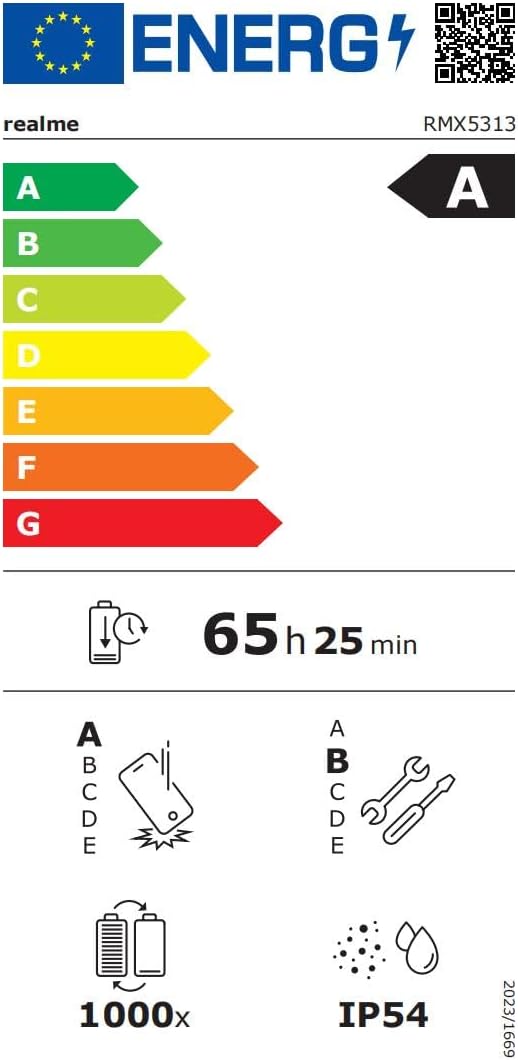
Image: EU Energy Label for realme Note 70T, showing energy efficiency, battery life, and IP54 rating. For more details, visit eprel.ec.europa.eu/qr/2361473.
7. ข้อมูลการรับประกัน
Your realme Note 70T smartphone comes with a limited manufacturer's warranty. Please refer to the warranty card included in your package or visit the official realme webดูรายละเอียดข้อกำหนดและเงื่อนไขเกี่ยวกับการรับประกัน ระยะเวลา และขั้นตอนการบริการได้ที่เว็บไซต์นี้
8. การสนับสนุนลูกค้า
หากต้องการความช่วยเหลือเพิ่มเติม การสนับสนุนทางเทคนิค หรือสอบถามข้อมูลเกี่ยวกับบริการ โปรดติดต่อฝ่ายบริการลูกค้าของ realme ผ่านช่องทางอย่างเป็นทางการ website or the contact information provided in your product documentation. You can also find FAQs and troubleshooting tips on the realme support portal.
Additional resources, including a Data Transparency Declaration, can be found ที่นี่.