
1. บทนำ
This manual provides comprehensive instructions for the Nokia G310 5G TA-1573 smartphone. It covers essential information for setup, operation, maintenance, and troubleshooting to ensure optimal use of your device. The Nokia G310 5G TA-1573 features a 6.6-inch HD+ 90 Hz IPS LCD display, a Snapdragon 480+ octa-core processor, 4 GB of RAM, and 5G connectivity, running on Android 13.
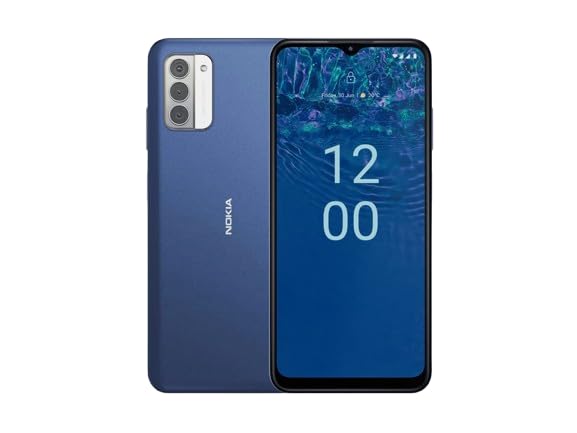
รูปที่ 1.1: Nokia G310 5G TA-1573 Smartphone. This image displays the front view of the Nokia G310 5G smartphone, highlighting its display and general form factor.
2. อะไรอยู่ในกล่อง
Upon unboxing your Nokia G310 5G TA-1573, please verify that all the following items are included:
- Nokia G310 5G TA-1573 Smartphone
- สาย USB-C
- เครื่องมือถอดซิม
3. การตั้งค่า
3.1. การชาร์จอุปกรณ์
Before initial use, fully charge your Nokia G310 5G. Connect the provided USB-C cable to the phone's USB-C port and the other end to a compatible power adapter (sold separately) or a computer's USB port. The battery indicator on the screen will show charging progress.
3.2. การใส่ซิมการ์ด
- ค้นหาถาดใส่การ์ด SIM ที่ด้านข้างโทรศัพท์ของคุณ
- เสียบเครื่องมือถอดซิมเข้าไปในรูเล็กๆ บนถาดเพื่อเปิดออก
- ใส่ซิมการ์ดนาโนลงในถาดโดยให้ด้านขั้วสีทองคว่ำลง ตรวจสอบให้แน่ใจว่าใส่แน่นสนิทดีแล้ว
- ค่อยๆ ดันถาดกลับเข้าไปในโทรศัพท์จนกระทั่งล็อคเข้าที่
3.3. การเปิดเครื่องและการตั้งค่าเริ่มต้น
- Press and hold the Power button (usually on the right side) until the Nokia logo appears.
- ทำตามคำแนะนำบนหน้าจอเพื่อเลือกภาษา เชื่อมต่อกับเครือข่าย Wi-Fi และตั้งค่าบัญชี Google ของคุณ
- ทำตามขั้นตอนการตั้งค่าให้เสร็จสมบูรณ์เพื่อปรับแต่งการตั้งค่าอุปกรณ์ของคุณ
4. การใช้งานอุปกรณ์ของคุณ
4.1. การนำทางพื้นฐาน
- ท่าทางการสัมผัสหน้าจอ: แตะเพื่อเลือก ปัดเพื่อเลื่อน บีบเพื่อซูม
- หน้าจอหลัก: เข้าถึงแอป วิดเจ็ต และการแจ้งเตือน
- แถบนำทาง: ใช้ปุ่มย้อนกลับ ปุ่มโฮม และปุ่มแอปที่ใช้ล่าสุดที่ด้านล่างของหน้าจอ
4.2. การโทรและการส่งข้อความ
- เปิด โทรศัพท์ แอปสำหรับโทรออกหรือเลือกรายชื่อผู้ติดต่อ
- เปิด ข้อความ แอปสำหรับเขียนและส่งข้อความ
4.3. การเชื่อมต่อกับเครือข่าย
- ไวไฟ : ไปที่ การตั้งค่า > เครือข่ายและอินเทอร์เน็ต > อินเทอร์เน็ต เพื่อเชื่อมต่อกับเครือข่าย Wi-Fi ที่มีอยู่
- บลูทูธ: ไปที่ การตั้งค่า > อุปกรณ์ที่เชื่อมต่อ > การตั้งค่าการเชื่อมต่อ > Bluetooth เพื่อจับคู่กับอุปกรณ์บลูทูธ
- ข้อมูลมือถือ: ตรวจสอบให้แน่ใจว่าข้อมูลมือถือเปิดใช้งานแล้ว การตั้งค่า > เครือข่ายและอินเทอร์เน็ต > ซิม สำหรับการเข้าถึงอินเตอร์เน็ตผ่านเครือข่ายโทรศัพท์มือถือของคุณ
4.4. การใช้กล้อง
เปิด กล้อง app to capture photos and videos. Tap the shutter button to take a picture or hold it to record a video. Explore different modes and settings within the app.
5. การบำรุงรักษา
5.1. การทำความสะอาดอุปกรณ์ของคุณ
Use a soft, lint-free cloth to clean the screen and body of your phone. Avoid using harsh chemicals or abrasive materials, which can damage the device's finish or screen coating.
5.2. การดูแลแบตเตอรี่
- หลีกเลี่ยงการให้โทรศัพท์สัมผัสกับอุณหภูมิที่สูงหรือต่ำเกินไป
- อย่าปล่อยให้แบตเตอรี่หมดจนหมดเป็นประจำ
- ใช้เฉพาะเครื่องชาร์จและสายไฟที่ได้รับการรับรองเท่านั้น
5.3. การอัปเดตซอฟต์แวร์
ตรวจสอบและติดตั้งการอัปเดตซอฟต์แวร์เป็นประจำเพื่อให้แน่ใจว่าอุปกรณ์ของคุณมีฟีเจอร์ แพตช์ความปลอดภัย และการปรับปรุงประสิทธิภาพล่าสุด ไปที่ การตั้งค่า > ระบบ > อัปเดตระบบ.
5.4. การจัดการการจัดเก็บข้อมูล
เพื่อเพิ่มประสิทธิภาพการทำงาน ควรลบสิ่งที่ไม่จำเป็นออกเป็นประจำ files ถอนการติดตั้งแอปที่ไม่ได้ใช้และย้ายสื่อขนาดใหญ่ files to cloud storage or an external device. Check storage usage in การตั้งค่า > การจัดเก็บข้อมูล.
6 การแก้ไขปัญหา
6.1. อุปกรณ์ไม่เปิด
Ensure the battery is charged. Connect the phone to a charger and wait a few minutes before attempting to power it on again. If it still doesn't turn on, try holding the Power button for 10-15 seconds.
6.2 ปัญหาการเชื่อมต่อเครือข่าย
- ไม่มีสัญญาณ: Check if your SIM card is properly inserted. Try restarting the phone.
- Wi-Fi ไม่เชื่อมต่อ: Ensure the Wi-Fi password is correct. Restart your router and phone.
- ปัญหาการจับคู่บลูทูธ: ตรวจสอบให้แน่ใจว่าอุปกรณ์ทั้งสองอยู่ในโหมดจับคู่และอยู่ในระยะที่อุปกรณ์สามารถเชื่อมต่อได้
6.3. แอปขัดข้องหรือหยุดทำงาน
Try force-closing the app (Settings > Apps > See all apps > [App Name] > Force stop). ล้างแคชและข้อมูลของแอป (การตั้งค่า > แอป > ดูแอปทั้งหมด > [ชื่อแอป] > พื้นที่เก็บข้อมูลและแคช > ล้างแคช / ล้างพื้นที่เก็บข้อมูล) หากปัญหายังคงมีอยู่ ให้ถอนการติดตั้งและติดตั้งแอปใหม่อีกครั้ง
6.4. รีเซ็ตเป็นค่าโรงงาน
หากปัญหายังคงอยู่และวิธีสุดท้ายคือการรีเซ็ตเป็นค่าเริ่มต้นจากโรงงาน คำเตือน: การดำเนินการนี้จะลบข้อมูลทั้งหมดในโทรศัพท์ของคุณ สำรองข้อมูลสำคัญก่อนดำเนินการต่อ ไปที่ การตั้งค่า > ระบบ > ตัวเลือกการรีเซ็ต > ลบข้อมูลทั้งหมด (รีเซ็ตเป็นค่าโรงงาน).
7. ข้อมูลจำเพาะ
| คุณสมบัติ | รายละเอียด |
|---|---|
| ชื่อรุ่น | Nokia G310 5G TA-1573 |
| ระบบปฏิบัติการ | แอนดรอยด์ 13.0 |
| ขนาดจอแสดงผล | 6.6 นิ้ว |
| ปณิธาน | 720 x 1560 พิกเซล |
| อัตราการรีเฟรช | 90 เฮิรตซ์ |
| รุ่นซีพียู | Qualcomm Snapdragon MSM8260A (Snapdragon 480+ equivalent) |
| ความเร็วซีพียู | 2 กิกะเฮิรตซ์ |
| ขนาดหน่วยความจำ RAM ที่ติดตั้ง | 4GB |
| ความจุของหน่วยความจำ | 128 GB (ภายใน) |
| เทคโนโลยีการเชื่อมต่อ | 5G |
| ระดับพลังงานแบตเตอรี่ | 3600 มิลลิวินาทีamp ชั่วโมง (ลิเธียมไอออน) |
| แจ็คเสียง | ยูเอสบี-ซี |
| น้ำหนักสินค้า | 6.9 ออนซ์ |
| สี | สีฟ้า |
8. การรับประกันและการสนับสนุน
8.1. ข้อมูลการรับประกัน
For specific warranty details regarding your Nokia G310 5G TA-1573, please refer to the documentation provided by the seller at the time of purchase. As this is a renewed product, warranty terms may differ from new devices. It is recommended to contact the seller directly for precise warranty coverage and duration.
8.2. การสนับสนุนด้านเทคนิค
If you encounter issues that cannot be resolved using the troubleshooting steps in this manual, please contact:
- The seller from whom you purchased the device.
- Nokia's official support channels for general product inquiries.
Please have your device model number (TA-1573) and proof of purchase ready when contacting support.