
การแนะนำ
Thank you for choosing the T'nB FMCT10 Bluetooth FM Transmitter. This device allows you to stream music from your smartphone, make hands-free calls, and charge your devices directly through your vehicle's audio system. It features Bluetooth 5.0, multiple charging ports (USB-C 30W, USB-A 18W, USB-A 5W), and a noise-cancelling microphone for clear communication. Please read this manual carefully before use to ensure proper operation and to maximize your experience.
ข้อมูลด้านความปลอดภัย
- ห้ามถอดประกอบหรือดัดแปลงอุปกรณ์
- Keep away from water, moisture, and extreme temperatures.
- หลีกเลี่ยงการให้อุปกรณ์ถูกแสงแดดโดยตรงเป็นเวลานาน
- อย่าใช้สารเคมีรุนแรงหรือน้ำยาทำความสะอาดที่มีฤทธิ์กัดกร่อน
- Ensure the device is securely plugged into the cigarette lighter socket to prevent dislodgement during driving.
- ให้ความสำคัญกับการขับขี่อย่างปลอดภัยเสมอ อย่าใช้งานอุปกรณ์ในลักษณะที่ทำให้เสียสมาธิจากถนน
เนื้อหาแพ็คเกจ
- T'nB FMCT10 Bluetooth FM Transmitter
- คู่มือการใช้งาน
สินค้าเกินview
The T'nB FMCT10 is designed to enhance your in-car audio experience and connectivity. It integrates several functions into one compact device.
คุณสมบัติหลัก:
- บลูทูธ 5.0 เพื่อการเชื่อมต่อไร้สายที่เสถียร
- Hands-free calling with noise-cancelling microphone.
- Multiple charging ports: USB-C (30W PD), USB-A (18W QC3.0), USB-A (5W).
- Music playback via Bluetooth, USB drive (up to 64GB), or AUX input.
- Automatic FM station search (87.6-107.8 MHz).
- Bass Boost function for enhanced audio.

ภาพ: เกินview of the T'nB FMCT10 FM Transmitter, showing the cigarette lighter plug, the central control knob, and the three charging ports (USB-C PD30W, USB QC3.0, and a standard USB port).
การตั้งค่า
- ใส่เข้าไปในซ็อกเก็ตรถ: Plug the FMCT10 into your vehicle's 12V-24V cigarette lighter socket. The device will power on automatically.
- ตั้งค่าความถี่ FM:
- Tune your car radio to an empty FM frequency (one with no strong broadcast signal).
- On the FMCT10, press the "CH" button (or similar frequency adjustment button) and then use the navigation buttons (or rotary knob) to match the frequency displayed on the transmitter to your car radio's frequency. The device also supports automatic station search.

ภาพ: Illustration showing a smartphone pairing with "FMCT10" via Bluetooth, and a hand adjusting the car radio frequency to match the transmitter's display.
- จับคู่บลูทูธ:
- เปิดใช้งานบลูทูธบนสมาร์ทโฟนหรืออุปกรณ์เสียงอื่น ๆ ของคุณ
- ค้นหา available devices and select "FMCT10" to pair. Once paired, a voice prompt will confirm the connection.
- ตำแหน่งการวางไมโครโฟน: The external magnetic microphone can be attached to a convenient location in your vehicle for optimal voice pickup during calls. Use the adhesive backing to secure it.

ภาพ: Close-up of the magnetic noise-cancelling microphone, showing its compact design and indicating its noise reduction capability.
คำแนะนำการใช้งาน
การเล่นเพลง
The FMCT10 supports three modes for music playback: Bluetooth, USB drive, and AUX input.

ภาพ: Diagram illustrating the three connection modes: Bluetooth for wireless streaming, USB-A port for music via USB drive, and AUX input for wired audio connection.
- บลูทูธสตรีมมิ่ง: Once paired with your smartphone, music will automatically stream through your car's speakers via the selected FM frequency. Use your phone or the transmitter's buttons to control playback (play/pause, next/previous track).
- การเล่นไฟล์จาก USB Drive: ใส่แฟลชไดรฟ์ USB (สูงสุด 64GB) ที่มี MP3/WMA/WAV/FLAC files into the designated USB-A port (often marked with a music note icon). The device will automatically detect and play music from the drive.
- อินพุต AUX: Connect an audio device (e.g., MP3 player) to the AUX port on the FMCT10 using a 3.5mm audio cable.
การโทรแบบแฮนด์ฟรี
When your phone is connected via Bluetooth, you can manage calls directly through the FMCT10.
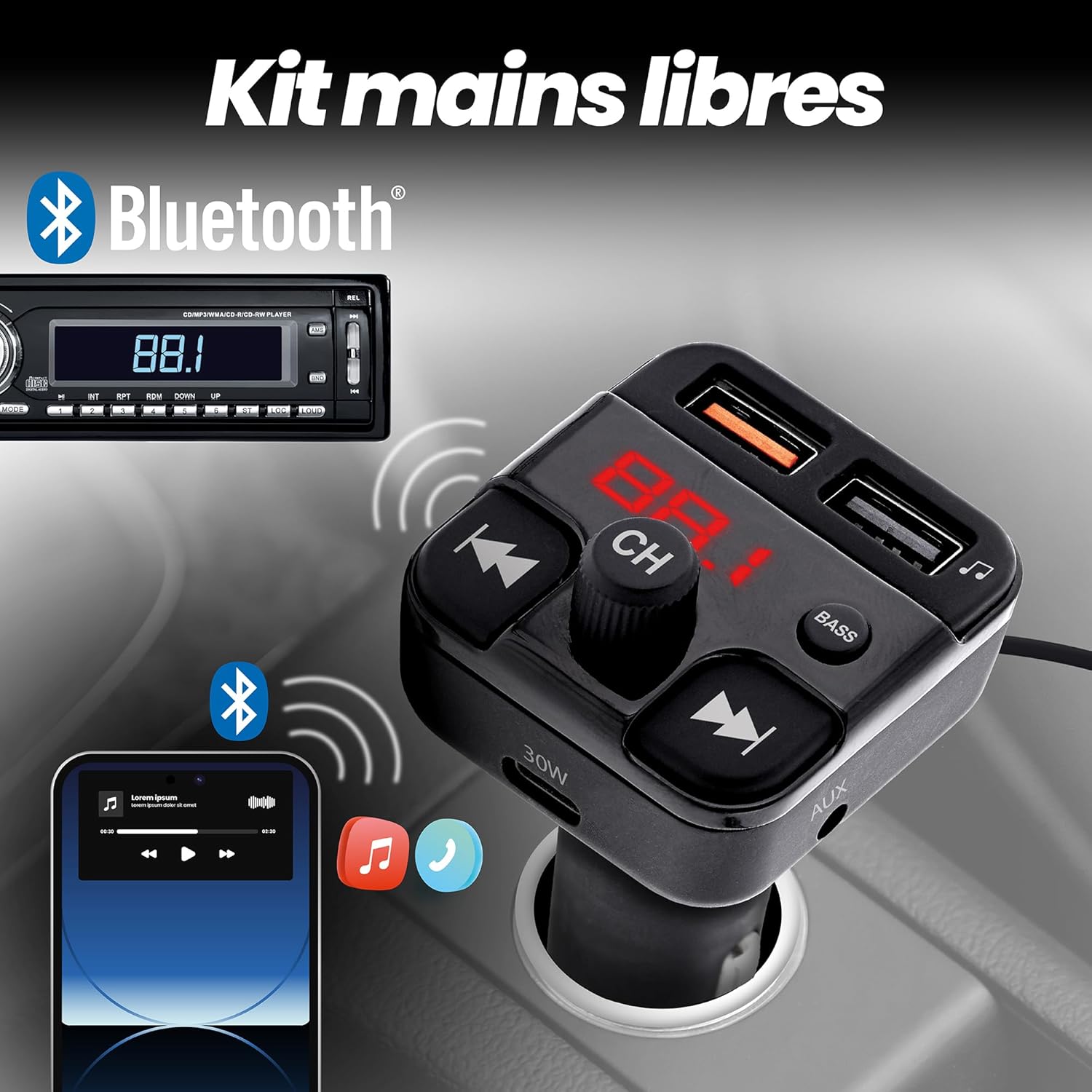
ภาพ: Depiction of the FMCT10 in a car, showing a smartphone connected via Bluetooth for hands-free calls and music playback through the car's radio.
- รับ/วางสาย: Press the multi-function button (usually the central knob or a dedicated phone button) once to answer an incoming call or end an ongoing call.
- ปฏิเสธสาย: กดปุ่มมัลติฟังก์ชันค้างไว้เพื่อปฏิเสธสายเรียกเข้า
- โทรซ้ำ: Double-press the multi-function button to redial the last number.
อุปกรณ์ชาร์จไฟ
The FMCT10 is equipped with three charging ports to power your devices.
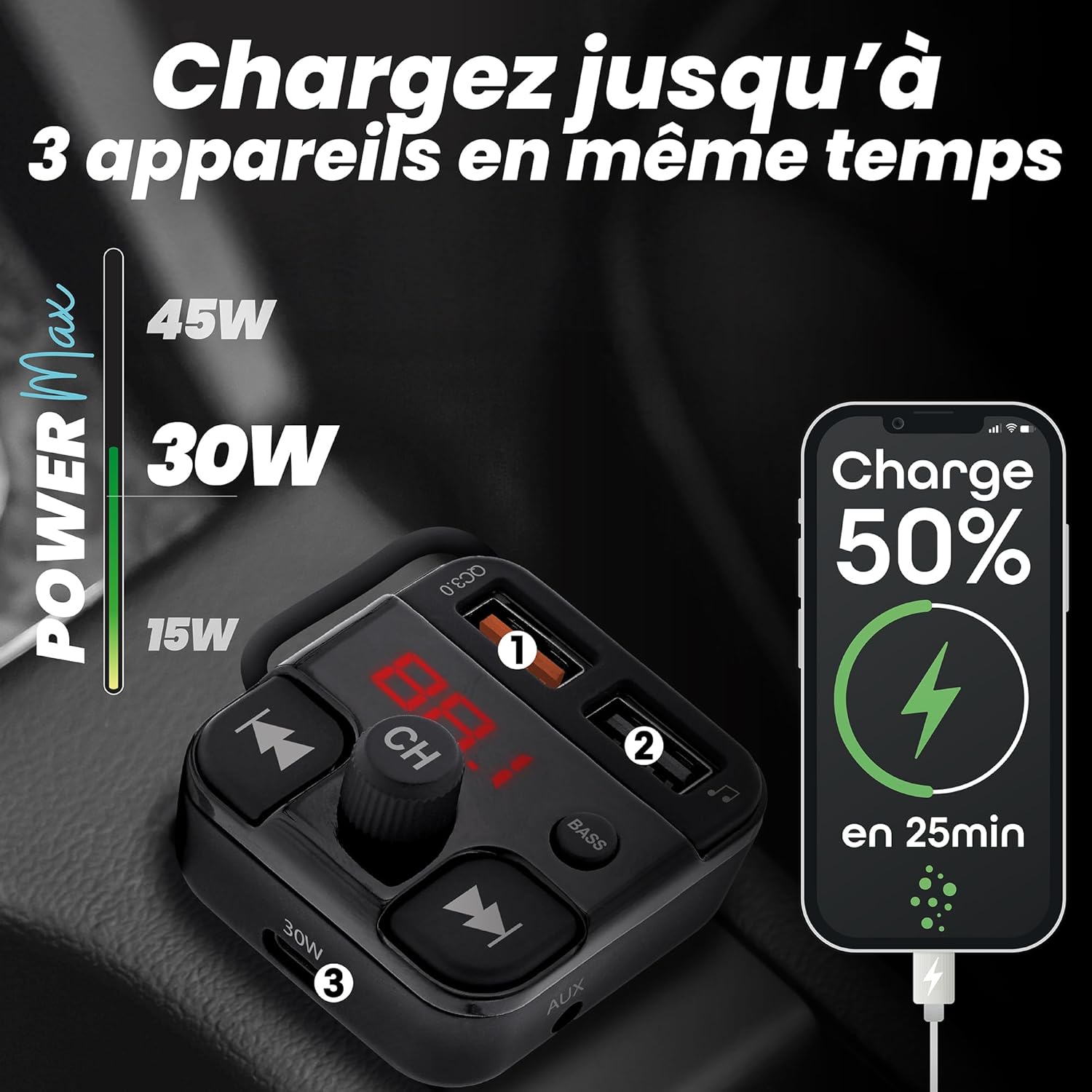
ภาพ: Visual representation of the FMCT10 charging three devices simultaneously, highlighting the fast charging capabilities (e.g., 50% charge in 25 minutes).
- USB-C PD 30W: สำหรับอุปกรณ์ที่รองรับการชาร์จเร็ว
- USB-A QC 18W: สำหรับอุปกรณ์ที่รองรับระบบชาร์จเร็ว (Quick Charge)
- USB-A 5 วัตต์: Standard charging port.
All functions of the product can be used while charging your phone.
ฟังก์ชั่นเพิ่มเสียงเบส
Press the "BASS" button on the transmitter to activate or deactivate the bass boost feature for a more dynamic listening experience.

ภาพ: Close-up of the "BASS" button on the FMCT10, with an illustration of sound waves indicating enhanced bass.
การซ่อมบำรุง
- ทำความสะอาดอุปกรณ์ด้วยผ้านุ่มแห้ง
- Do not use liquid cleaners or sprays.
- ตรวจสอบให้แน่ใจว่าช่องเสียบที่จุดบุหรี่และพอร์ต USB ปราศจากฝุ่นและสิ่งสกปรก
การแก้ไขปัญหา
| ปัญหา | สาเหตุที่เป็นไปได้ | สารละลาย |
|---|---|---|
| No power to the transmitter. | Loose connection; vehicle's cigarette lighter socket is faulty; vehicle's fuse is blown. | Ensure the transmitter is firmly plugged in. Check if the car's cigarette lighter socket is working with another device. Check the vehicle's fuse box. |
| คุณภาพเสียงไม่ดี/มีเสียงรบกวน | สัญญาณรบกวนความถี่ FM; ระดับเสียงต่ำ/สูงเกินไป; ปัญหาการเชื่อมต่อบลูทูธ | Find a clearer FM frequency on your car radio and transmitter. Adjust volume on both the transmitter and car radio. Re-pair Bluetooth. |
| บลูทูธไม่เชื่อมต่อ | Bluetooth not enabled on phone; device not in pairing mode; interference. | Ensure Bluetooth is enabled on your phone. Restart the transmitter and your phone. Try pairing again. |
| การชาร์จช้าหรือไม่ทำงาน | Cable issue; device not compatible with fast charging; port malfunction. | Use a different charging cable. Ensure your device supports the fast charging protocols (PD/QC). Try a different charging port. |
ข้อมูลจำเพาะ
- ชื่อรุ่น : เอฟเอ็มซีที10
- ยี่ห้อ: ทีแอนด์บี
- แหล่งพลังงาน: Electric (12V-24V car cigarette lighter socket)
- เวอร์ชันบลูทูธ: 5.0
- ช่วงความถี่ FM: 87.6-107.8 เมกะเฮิรตซ์
- เอาท์พุต USB-C: การจ่ายพลังงาน 30 วัตต์ (PD)
- USB-A Output 1 (QC3.0): ชาร์จเร็ว 18W
- เอาต์พุต USB-A 2: 5W
- พลังสูงสุดทั้งหมด: 38วัตต์
- USB Drive Support: สูงสุด 64GB
- การเชื่อมต่อ: Bluetooth, USB Type A, USB Type C, AUX
- จำนวนพอร์ต: 3 (2x USB-A, 1x USB-C)
- คุณสมบัติพิเศษ: Hands-free kit, Noise-cancelling microphone, Bass Boost, Automatic station search
- ประเทศต้นกำเนิด: จีน
การรับประกัน
ผลิตภัณฑ์นี้มาพร้อมกับ การรับประกันจากผู้ผลิต 2 ปีโปรดเก็บหลักฐานการซื้อไว้เพื่อใช้ในการเคลมประกัน การรับประกันครอบคลุมถึงข้อบกพร่องในวัสดุและฝีมือการผลิตภายใต้การใช้งานปกติ ไม่ครอบคลุมถึงความเสียหายที่เกิดจากการใช้งานผิดวิธี อุบัติเหตุ การดัดแปลงโดยไม่ได้รับอนุญาต หรือการสึกหรอตามปกติ
สนับสนุน
For technical support, troubleshooting assistance, or warranty inquiries, please contact T'nB customer service. You can typically find contact information on the official T'nB webเว็บไซต์หรือผ่านผู้ค้าปลีกของคุณ
T'nB Official Webเว็บไซต์: www.tnb.com (Please note: This is a generic placeholder. Refer to your product packaging or official brand channels for the most accurate support contact information.)