
การแนะนำ
Thank you for choosing the Cleyver DECT Office Mono Headset ODHW20V2. This manual provides detailed instructions for the proper setup, operation, and maintenance of your new headset. Please read this manual carefully before using the product to ensure optimal performance and longevity.
เนื้อหาแพ็คเกจ
กรุณาตรวจสอบเนื้อหาในแพ็คเกจเพื่อให้แน่ใจว่ามีสินค้าครบทั้งหมด:
- Cleyver DECT Office Mono Headset
- สถานีฐาน DECT
- อะแดปเตอร์ไฟฟ้าสำหรับสถานีฐาน
- สายเชื่อมต่อโทรศัพท์ (RJ11)
- USB Connection Cable (Type-C to Type-A)
- คู่มือการใช้งาน (เอกสารนี้)
สินค้าเกินview
ส่วนประกอบชุดหูฟัง
The Cleyver DECT Office Mono Headset is designed for comfortable, single-ear communication. Key components include:
- แถบคาดศีรษะปรับได้: เพื่อความกระชับและสวมใส่สบาย
- เบาะรองหู: Soft padding for extended wear.
- บูมไมโครโฟน: Flexible arm with an anti-snore microphone for clear voice transmission.
- การควบคุมระดับเสียง: Buttons on the earcup for adjusting listening volume.
- ปุ่มปิดเสียง: To temporarily disable the microphone.
- ปุ่มควบคุมการโทร: สำหรับการรับสายและวางสาย
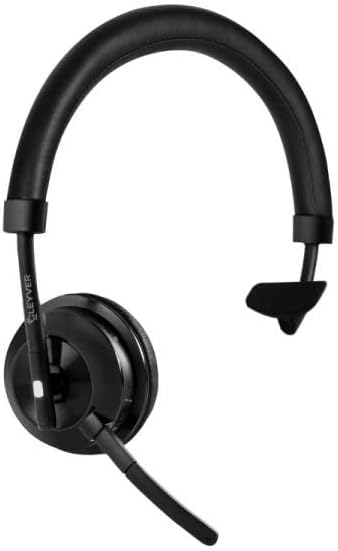
Image 1: Cleyver DECT Office Mono Headset. This image shows the mono headset with an adjustable headband, ear cushion, and a flexible microphone boom.
ส่วนประกอบสถานีฐาน
The DECT Base Station serves as the charging dock and connection hub for your headset.
- แท่นชาร์จ: ตำแหน่งที่วางหูฟังสำหรับชาร์จไฟ
- พอร์ตไฟ: สำหรับการเชื่อมต่ออะแดปเตอร์ไฟฟ้า
- Telephone Port (RJ11): For connecting to a DECT telephone.
- พอร์ต USB (Type-C): For connecting to a computer for softphone applications (if supported).
- พอร์ต AUX: Additional connection option (if available).
- ปุ่มจับคู่: To initiate pairing with the headset.
- ตัวบ่งชี้สถานะ: LEDs to show power, charging, and connection status.
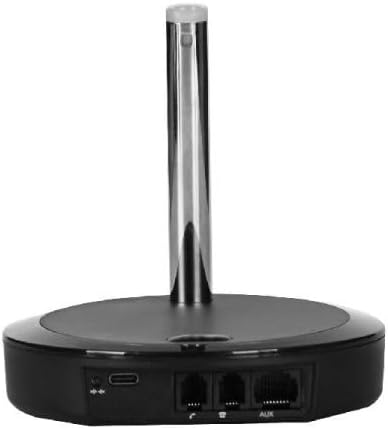
ภาพที่ 2: ด้านหลัง view of the Cleyver DECT Base Station. This image highlights the various connection ports including USB-C, telephone (RJ11), and AUX ports.
การตั้งค่า
1. การเชื่อมต่อสถานีฐาน
- เชื่อมต่อพลังงาน: Plug the power adapter into the base station's power port and then into a wall outlet. The power indicator LED on the base station should illuminate.
- Connect to Telephone:
- For DECT Phones: Connect one end of the telephone connection cable (RJ11) to the "TEL" port on the base station and the other end to the headset port on your DECT telephone.
- For USB Connection (Softphone): Connect the USB-C end of the USB cable to the base station's USB port and the USB-A end to an available USB port on your computer.
2. การชาร์จชุดหูฟัง
Place the Cleyver DECT Office Mono Headset into the charging cradle on the base station. Ensure it is seated correctly. The charging indicator LED on the base station should light up, indicating that the headset is charging. For first use, charge the headset for at least 2 hours.
3. Pairing the Headset with the Base Station
The headset and base station are usually pre-paired from the factory. If pairing is lost or you are setting up for the first time and the headset does not connect:
- ตรวจสอบให้แน่ใจว่าชุดหูฟังได้รับการชาร์จและเปิดอยู่
- Press and hold the pairing button on the base station for approximately 3 seconds until the pairing indicator LED starts flashing.
- On the headset, press and hold the call control button for approximately 3 seconds until the headset's indicator light flashes rapidly.
- Once paired, the indicator lights on both the headset and base station will become solid, or flash slowly, indicating a successful connection.
คำแนะนำการใช้งาน
การสวมชุดหูฟัง
Adjust the headband for a comfortable fit. Position the microphone boom approximately 2 cm (0.8 inches) from the corner of your mouth for optimal voice pickup. The microphone boom is flexible and can be adjusted.
เปิด/ปิดเครื่อง
- การเปิดเครื่อง: Press and hold the Call Control button on the headset for approximately 2 seconds.
- วิธีปิดเครื่อง: Press and hold the Call Control button on the headset for approximately 3 seconds.
การโทรออกและรับสาย
- รับสาย: When an incoming call rings, press the Call Control button on the headset.
- การวางสาย: During a call, press the Call Control button on the headset.
- การโทร: Dial the number on your connected DECT phone or softphone. The call will automatically route to the headset once connected.
การควบคุมระดับเสียง
Use the Volume Up (+) and Volume Down (-) buttons located on the earcup of the headset to adjust the listening volume during a call or for media playback (if connected to a computer).
ฟังก์ชั่นปิดเสียง
Press the Mute button on the headset to temporarily disable the microphone. Press it again to unmute. A tone or indicator light on the headset may confirm the mute status.
การซ่อมบำรุง
- การทำความสะอาด: Use a soft, dry cloth to clean the headset and base station. Do not use abrasive cleaners or solvents. Avoid getting moisture into any openings.
- พื้นที่จัดเก็บ: When not in use, store the headset on its base station or in a cool, dry place away from direct sunlight and extreme temperatures.
- การดูแลแบตเตอรี่ เพื่ออายุการใช้งานแบตเตอรี่ที่ดีที่สุด ควรหลีกเลี่ยงการใช้หูฟังจนหมดบ่อยเกินไป ชาร์จหูฟังเป็นประจำ โดยเฉพาะอย่างยิ่งหากต้องเก็บหูฟังไว้เป็นเวลานาน
การแก้ไขปัญหา
| ปัญหา | วิธีแก้ปัญหาที่เป็นไปได้ |
|---|---|
| ไม่มีเสียงจากหูฟัง |
|
| ไมโครโฟนไม่ทำงาน |
|
| หูฟังไม่ชาร์จ |
|
| Cannot pair headset. |
|
ข้อมูลจำเพาะ
- ยี่ห้อ: Cleyver
- หมายเลขรุ่น: ODHW20V2
- การเชื่อมต่อ: DECT, Wired (RJ11, USB-C)
- ประเภทชุดหูฟัง: Mono, Over-the-head
- ไมโครโฟน: Anti-snore, Noise-cancelling
- ความเข้ากันได้: DECT Phones, PCs (via USB for softphones)
- ASIN: B0FGJLNGRM
การรับประกันและการสนับสนุน
Cleyver products are designed for reliability and performance. This product is covered by a standard manufacturer's warranty against defects in materials and workmanship. For specific warranty terms and conditions, please refer to the warranty card included with your purchase or visit the official Cleyver webเว็บไซต์.
For technical support, troubleshooting assistance, or to inquire about replacement parts, please contact Cleyver customer service through their official website or the contact information provided in your product packaging. Please have your model number (ODHW20V2) and proof of purchase ready when contacting support.