
1. บทนำ
Thank you for choosing the roborock Q10 S5 Robot Vacuum and Mop Cleaner. This manual provides essential information for setting up, operating, and maintaining your device to ensure optimal performance and longevity. Please read this manual thoroughly before using the product and keep it for future reference.
2. ข้อมูลด้านความปลอดภัย
To reduce the risk of injury, electric shock, fire, or damage, please observe the following safety precautions:
- เด็กอายุตั้งแต่ 8 ปีขึ้นไป รวมไปถึงบุคคลที่มีความบกพร่องทางร่างกาย ประสาทสัมผัส หรือจิตใจ หรือขาดประสบการณ์และความรู้ สามารถใช้เครื่องใช้ไฟฟ้านี้ได้ หากมีการดูแลหรือได้รับคำแนะนำเกี่ยวกับการใช้เครื่องใช้ไฟฟ้าในลักษณะที่ปลอดภัย และเข้าใจถึงอันตรายที่อาจเกิดขึ้น
- ควรมีผู้ดูแลเด็กเพื่อให้แน่ใจว่าไม่ได้เล่นกับเครื่องใช้ไฟฟ้าดังกล่าว
- การทำความสะอาดและการบำรุงรักษาผู้ใช้ไม่ควรทำโดยเด็กโดยไม่มีผู้ดูแล
- Do not use the robot in areas with open flames or fragile objects.
- ตรวจสอบให้แน่ใจว่าแท่นชาร์จวางอยู่บนพื้นผิวระดับเดียวกับผนัง
- โปรดใช้อะแดปเตอร์แปลงไฟที่ให้มากับอุปกรณ์เท่านั้น
- Do not expose the robot to direct sunlight or moisture.
- Before cleaning, remove power cords, small objects, and fragile items from the floor.
3. สินค้าหมดview
Familiarize yourself with the components of your roborock Q10 S5 robot vacuum.
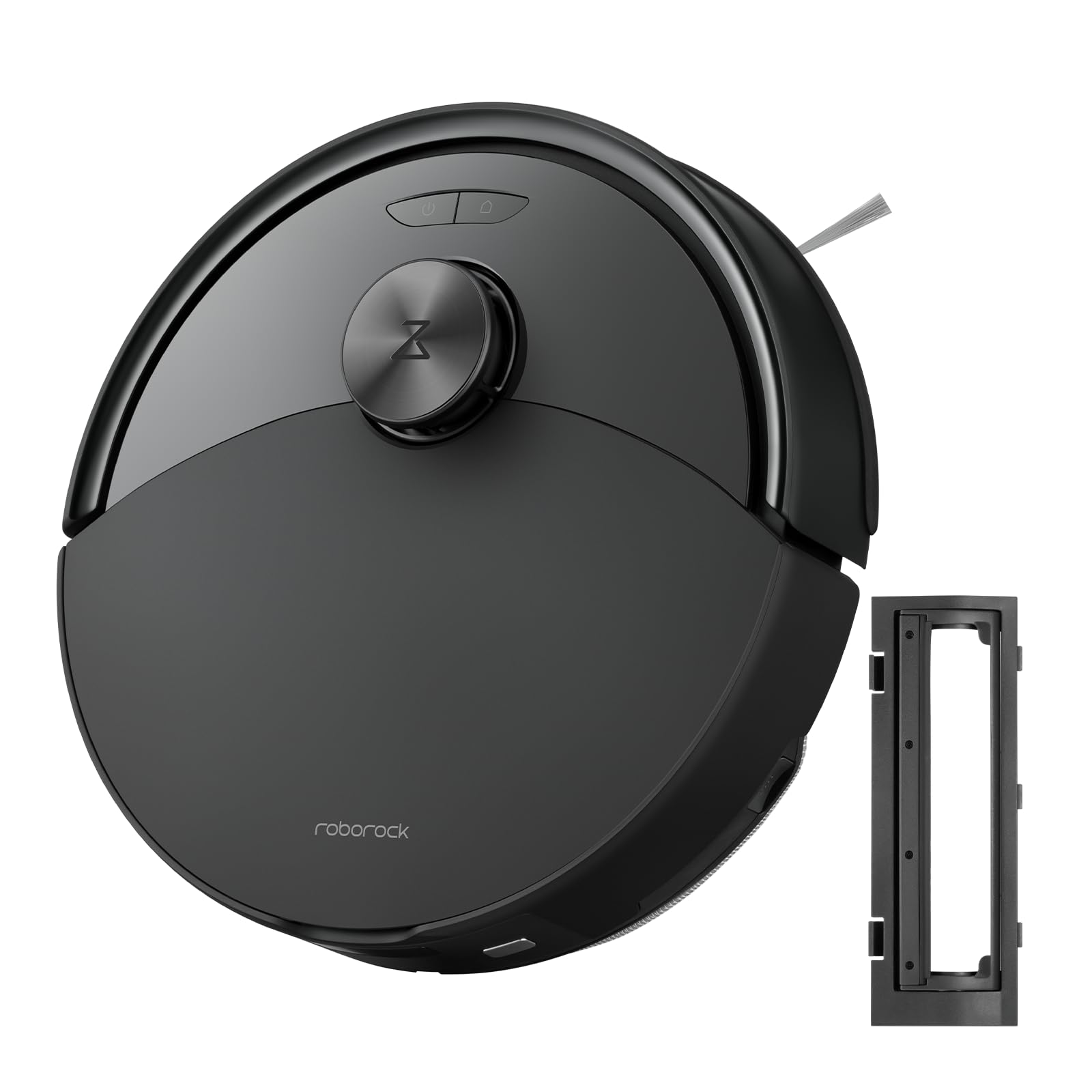
รูปที่ 1: The roborock Q10 S5 Robot Vacuum and Mop Cleaner. This image shows the top view of the robot, highlighting its sleek black design and main control buttons.
ส่วนประกอบหุ่นยนต์:
- ฝาครอบด้านบน: Lifts to reveal the dustbin and Wi-Fi indicator.
- ปุ่มเปิดปิด/ล้าง: Press to start/pause cleaning, hold to turn on/off.
- Dock/Spot Clean Button: Press to send the robot back to the dock, hold for spot cleaning.
- เซ็นเซอร์ LDS: For navigation and mapping.
- กันชน: ตรวจจับสิ่งกีดขวาง
- แปรงด้านข้าง: กวาดเศษขยะจากขอบและมุม
- แปรงหลัก: Collects dirt and debris from floors. Features a floating design for better contact.
- วงล้อรอบทิศทาง: เพื่อการเคลื่อนไหว
- หน้าสัมผัสการชาร์จ: Connects with the charging dock.
- เซ็นเซอร์หน้าผา: ป้องกันไม่ให้หุ่นยนต์ตกบันได
- ถังเก็บน้ำและแผ่นถูพื้น: For mopping functionality.
แท่นชาร์จ:
- Dock Location Beacon: Helps the robot locate the dock.
- หน้าสัมผัสการชาร์จ: Transfers power to the robot.
- Power Cable Port: เชื่อมต่ออะแดปเตอร์ไฟ
4. การตั้งค่า
- แกะกล่องหุ่นยนต์: Carefully remove the robot and all accessories from the packaging. Remove any protective films or shipping materials.
- Install the Side Brush: Press the side brush onto its post until it clicks into place.
- วางแท่นชาร์จ:
- วางแท่นชาร์จบนพื้นผิวเรียบแข็งชิดผนัง
- Ensure there is at least 0.5 meters (1.6 feet) of clear space on both sides and 1.5 meters (4.9 feet) in front of the dock.
- เชื่อมต่อสายไฟเข้ากับแท่นชาร์จและเสียบเข้ากับเต้ารับที่ผนัง
- ค่าใช้จ่ายเริ่มต้น: Place the robot on the charging dock. The robot will automatically turn on and begin charging. For first-time use, fully charge the robot before operation (approximately 4-6 hours). The power indicator light will breathe white during charging and turn solid white when fully charged.
- ดาวน์โหลดแอป: ค้นหา "Roborock" in the App Store or Google Play Store, or scan the QR code on the packaging to download and install the app.
- เชื่อมต่อกับ Wi-Fi:
- Open the Roborock app and follow the on-screen instructions to add your device.
- ตรวจสอบให้แน่ใจว่าโทรศัพท์ของคุณเชื่อมต่อกับเครือข่าย Wi-Fi 2.4 GHz
- กดปุ่มค้างไว้ ท่าเรือ และ พลัง buttons simultaneously for 3 seconds until you hear the "Resetting Wi-Fi" voice alert.
- Follow the app's instructions to complete the connection.
5. คู่มือการใช้งาน
เริ่มต้นการทำความสะอาด:
- จากหุ่นยนต์: กดปุ่ม พลัง button once. The robot will start cleaning.
- จากแอป: Open the Roborock app and tap the "Clean" button.
Pausing/Resuming/Stopping:
- หยุดชั่วคราว: กดปุ่มใดก็ได้บนหุ่นยนต์หรือแตะ "หยุดชั่วคราว" ในแอป
- ประวัติย่อ: กดปุ่ม พลัง button or tap "Resume" in the app.
- หยุด: To stop a cleaning cycle, press the ท่าเรือ button to send the robot back to the charging dock, or tap "Stop" in the app.
ฟังก์ชั่นถูพื้น:
- เติมถังน้ำ: Open the water tank cover, fill with clean water, and close securely.
- ติดแผ่นม็อป: Wet the mop pad and wring it out. Slide it into the mop pad slot until it is securely attached.
- Start Mopping: The robot will automatically detect the mop module and switch to mopping mode. You can adjust water flow levels in the app.
คุณสมบัติของแอพ:
- การจัดการแผนที่: Create and save maps, set no-go zones, virtual walls, and invisible barriers.
- บริการทำความสะอาดห้องเฉพาะส่วน: เลือกห้องที่ต้องการทำความสะอาดโดยเฉพาะ
- การทำความสะอาดตามกำหนดเวลา: Set cleaning schedules for different times and days.
- Custom Cleaning Modes: ปรับระดับกำลังดูดและอัตราการไหลของน้ำ
- รีโมทคอนโทรล: ควบคุมการเคลื่อนไหวของหุ่นยนต์ด้วยตนเอง
6. การบำรุงรักษา
Regular maintenance ensures your roborock Q10 S5 operates efficiently. Always turn off the robot and unplug the charging dock before performing any maintenance.
Dustbin and Filter (Weekly):
- ยกฝาครอบด้านบนของหุ่นยนต์ขึ้น
- นำถังขยะออก
- เปิดฝาถังขยะและเทสิ่งของภายในลงในถังขยะ
- Remove the filter. Tap it gently to remove dust. The filter can be rinsed with water; ensure it is completely dry before reinstallation (allow 24 hours).
- Rinse the dustbin with water if necessary and allow it to dry completely.
- Reinstall the dry filter and dustbin.
Main Brush (Weekly):
- พลิกหุ่นยนต์
- Press the tabs to remove the main brush cover.
- ยกแปรงหลักออก
- ใช้เครื่องมือทำความสะอาด (ถ้ามีให้) หรือกรรไกรตัดและกำจัดขนหรือเศษสิ่งสกปรกที่พันรอบแปรงออก
- Reinstall the main brush and cover, ensuring it clicks into place.
Side Brush (Monthly):
- คลายเกลียวแปรงด้านข้าง
- กำจัดขนหรือเศษสิ่งสกปรกออก
- Reattach and tighten the screw.
Sensors and Charging Contacts (Monthly):
- เช็ดทำความสะอาดเซ็นเซอร์ทั้งหมด (เซ็นเซอร์ตรวจจับหน้าผา เซ็นเซอร์ตรวจจับผนัง เซ็นเซอร์ LDS แบบหน้าต่าง) และจุดสัมผัสการชาร์จทั้งบนหุ่นยนต์และแท่นชาร์จด้วยผ้าแห้งนุ่มๆ
Mop Pad (After Each Use):
- นำแผ่นซับน้ำออกจากถังเก็บน้ำ
- Rinse thoroughly with water and allow it to air dry completely before next use.
7 การแก้ไขปัญหา
If you encounter issues with your robot, please refer to the following table before contacting support.
| ปัญหา | สาเหตุที่เป็นไปได้ | สารละลาย |
|---|---|---|
| หุ่นยนต์ไม่เปิด | แบตเตอรี่อ่อนหรือไม่ได้ชาร์จ | วางหุ่นยนต์ลงบนแท่นชาร์จและตรวจสอบให้แน่ใจว่ากำลังชาร์จอยู่ |
| หุ่นยนต์ไม่สามารถเชื่อมต่อกับ Wi-Fi ได้ | รหัสผ่าน Wi-Fi ไม่ถูกต้อง เครือข่าย 5GHz หรือสัญญาณอ่อน | Ensure correct 2.4GHz Wi-Fi, reset Wi-Fi on robot, move closer to router. |
| หุ่นยนต์ติดขัดบ่อยครั้ง | Obstacles, tangled cables, or dirty sensors. | Clear floor, clean sensors, use no-go zones in app. |
| ประสิทธิภาพการทำความสะอาดไม่ดี | Full dustbin, dirty filter, tangled brushes. | Empty dustbin, clean/replace filter, clean main/side brushes. |
| หุ่นยนต์มีเสียงผิดปกติ | Debris in main brush, side brush, or wheels. | Inspect and clean all brushes and wheels for obstructions. |
If the problem persists, please refer to the Roborock app for more detailed error messages or contact customer support.
8. ข้อมูลจำเพาะ
| คุณสมบัติ | รายละเอียด |
|---|---|
| แบบอย่าง | Q10 S5 |
| ขนาด | ประมาณ 353 x 350 x 96.5 มม. (13.9 x 13.8 x 3.8 นิ้ว) |
| น้ำหนัก | ประมาณ 3.7 กก. (8.16 ปอนด์) |
| แบตเตอรี่ | Lithium-Ion (Capacity not specified, typical for robot vacuums) |
| กำลังไฟที่กำหนด | Approx. 60W (Typical for robot vacuums) |
| ความจุของถังขยะ | Approx. 470 ml (Typical for robot vacuums) |
| ความจุถังน้ำ | Approx. 300 ml (Typical for robot vacuums) |
| พลังดูด | Up to 10,000 Pa (HyperForce Suction Power from feature bullets) |
| การเชื่อมต่อ Wi-Fi | 2.4 กิกะเฮิรตซ์ |
หมายเหตุ: ข้อมูลจำเพาะอาจเปลี่ยนแปลงได้โดยไม่ต้องแจ้งให้ทราบล่วงหน้า
9. การรับประกันและการสนับสนุน
roborock products are manufactured to the highest quality standards. For detailed warranty information, please refer to the warranty card included in your product packaging or visit the official roborock website. For technical support, troubleshooting assistance, or to purchase replacement parts, please contact roborock customer service through the app or their official webเว็บไซต์.
เป็นทางการ Webเว็บไซต์: www.roborock.com