
1. บทนำ
Thank you for choosing the Cecotec Conga Y50 Robot Vacuum and Mop. This device is designed to provide efficient and autonomous cleaning for your home, combining powerful vacuuming with effective mopping. Featuring advanced laser navigation and a convenient self-draining base, the Conga Y50 simplifies your cleaning routine. Please read this manual thoroughly before operating the robot to ensure proper use, maintenance, and optimal performance.
2. คำแนะนำด้านความปลอดภัย
To reduce the risk of injury or damage, always observe basic safety precautions when operating your robot vacuum cleaner. Keep this manual for future reference.
- เด็กอายุตั้งแต่ 8 ปีขึ้นไป รวมไปถึงบุคคลที่มีความบกพร่องทางร่างกาย ประสาทสัมผัส หรือจิตใจ หรือขาดประสบการณ์และความรู้ สามารถใช้เครื่องใช้ไฟฟ้านี้ได้ หากมีการดูแลหรือได้รับคำแนะนำเกี่ยวกับการใช้เครื่องใช้ไฟฟ้าในลักษณะที่ปลอดภัย และเข้าใจถึงอันตรายที่อาจเกิดขึ้น
- ควรมีผู้ดูแลเด็กเพื่อให้แน่ใจว่าไม่ได้เล่นกับเครื่องใช้ไฟฟ้าดังกล่าว
- การทำความสะอาดและการบำรุงรักษาผู้ใช้ไม่ควรทำโดยเด็กโดยไม่มีผู้ดูแล
- ตรวจสอบให้แน่ใจว่าหุ่นยนต์วางอยู่บนพื้นผิวที่มั่นคงและเรียบเสมอกัน
- Do not expose the robot or its base to water or other liquids.
- เก็บผม เสื้อผ้าที่หลวม นิ้ว และส่วนต่างๆ ของร่างกายให้ห่างจากช่องเปิดและชิ้นส่วนที่เคลื่อนไหว
- ห้ามใช้งานหุ่นยนต์ในบริเวณที่มีเปลวไฟหรือวัสดุระเบิด
- Only use the original power adapter and charging base provided by the manufacturer.
- ก่อนทำความสะอาด ควรนำสายไฟที่วางระเกะระกะ วัตถุขนาดเล็ก หรือสิ่งของที่แตกหักง่ายออกจากพื้น เพื่อป้องกันการพันกันหรือความเสียหาย
3. เนื้อหาบรรจุภัณฑ์
Carefully unpack the box and ensure all components are present and in good condition. If any items are missing or damaged, contact customer support.
- Conga Y50 Robot Vacuum Cleaner
- เอกสารแนบม็อบ
- ฐานที่ว่างเปล่าด้วยตนเอง
- Dust bag (pre-installed in base)
- อะแดปเตอร์แปลงไฟ
- Side brushes (spare set)
- เครื่องมือทำความสะอาด
- คู่มือการใช้งาน
4. สินค้าหมดview
Familiarize yourself with the main components and features of your Conga Y50 robot vacuum.
ส่วนประกอบของหุ่นยนต์

รูปที่ 4.1: ด้านบน view of the Conga Y50 robot, highlighting the power, home, and Wi-Fi indicator buttons.

รูปที่ 4.2: ด้านล่าง view of the robot, illustrating the main multifunctional brush, side brushes, and driving wheels.
Self-Draining Base

Figure 4.3: The Conga Y50 robot next to its self-draining base, ready for automatic dust collection.
คุณสมบัติหลัก
- Advanced Laser Navigation: The robot uses advanced laser technology to create an interactive map of your home, ensuring precise and personalized cleaning regardless of ambient light. This system provides fast and accurate tracking, reducing navigation errors and ensuring comprehensive coverage.
- 5000Pa High Suction Power: Equipped with a powerful 5000Pa motor, the robot effectively removes dust, hair, and various types of dirt, leaving surfaces thoroughly clean.
- Self-Draining Base: The self-draining base automatically empties the robot's dustbin into a 3-liter dust bag, providing up to 12 weeks of autonomous cleaning. This feature is ideal for allergy sufferers as it keeps dust and allergens contained.
- แปรงอเนกประสงค์: The robot includes an all-round brush with bristles and rubber silicone, making it suitable for cleaning all types of surfaces, including hard floors and carpets.
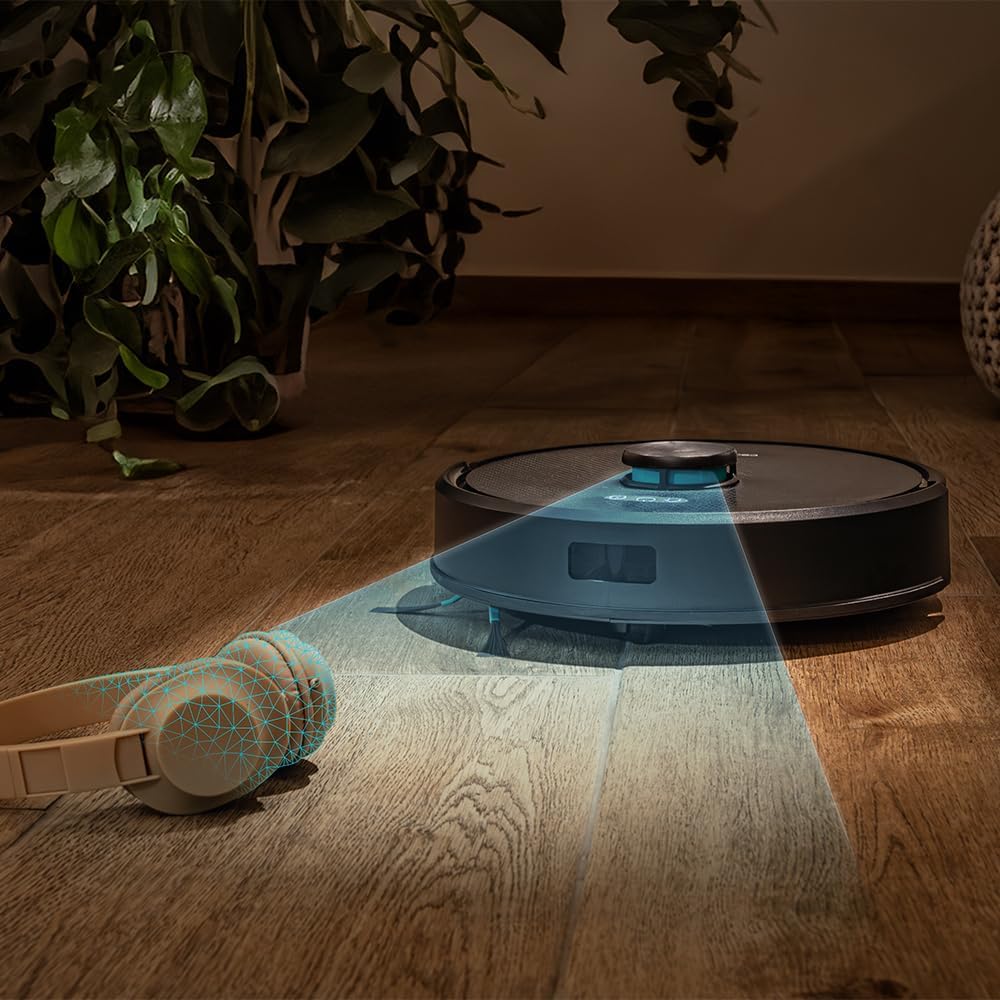
Figure 4.4: The robot's laser navigation system actively mapping its surroundings for efficient cleaning.

Figure 4.5: The robot actively vacuuming a floor, effectively collecting debris.

Figure 4.6: Visual representation of the robot emptying its dustbin into the self-draining base.

Figure 4.7: The robot cleaning a carpet, highlighting the effectiveness of its multifunctional brush.
5. การตั้งค่า
Follow these steps to prepare your Conga Y50 for its first cleaning session.
5.1 การแกะและการจัดวาง
- Remove all packaging materials and protective films from the robot and the self-draining base.
- Place the self-draining base against a wall in an open area, ensuring there is at least 0.5 meters of clear space on both sides and 1.5 meters in front of the base. Avoid placing it near stairs or obstacles that could block the robot's return path.
- Connect the power adapter to the self-draining base and plug it into a wall outlet. Ensure the power cable is neatly tucked away to prevent entanglement.

Figure 5.1: The robot correctly docked at its self-draining base.
5.2 การชาร์จเริ่มต้น
- Place the robot onto the charging contacts of the self-draining base. Ensure the charging indicators on the robot illuminate.
- Allow the robot to charge completely before its first use. This typically takes 4-6 hours. The indicator lights will change to show a full charge.
5.3 การติดตั้งและการจับคู่แอป
The Conga Y50 can be controlled via a smartphone app.
- Download the official Cecotec Conga app from your smartphone's app store (iOS or Android).
- เปิดแอปและสร้างบัญชีหรือเข้าสู่ระบบ
- Follow the in-app instructions to add your Conga Y50 robot. This usually involves connecting the robot to your home Wi-Fi network.
- Once paired, you can access all smart features, including mapping, scheduling, and cleaning mode selection.

Figure 5.2: Controlling the robot through the dedicated smartphone application.
6. การควบคุมหุ่นยนต์
Learn how to start, stop, and manage your robot's cleaning tasks.
6.1 การเริ่มรอบการทำความสะอาด
- เริ่มต้นด้วยตนเอง: กดปุ่มเปิด/ปิดบนหุ่นยนต์หนึ่งครั้ง หุ่นยนต์จะเริ่มทำความสะอาดในโหมดอัตโนมัติ
- การเริ่มแอป: Open the Cecotec Conga app, select your robot, and tap the 'Start Cleaning' button. You can also choose specific cleaning modes or areas from the app.
6.2 การหยุดชั่วคราวและการดำเนินการต่อ
- To pause cleaning, press the Power button on the robot or the 'Pause' button in the app.
- To resume cleaning, press the Power button again or the 'Resume' button in the app.
6.3 Returning to Base
- Press the Home button on the robot or the 'Return to Base' button in the app. The robot will navigate back to its self-draining base to charge and empty its dustbin.

Figure 6.1: The robot intelligently returning to its charging and self-draining station.
6.4 Cleaning Modes and Scheduling
The app allows for advanced control over cleaning modes (e.g., Auto, Edge, Spot, Restricted Areas) and scheduling cleaning times. Refer to the in-app guide for detailed instructions on these features.

Figure 6.2: The robot following a planned path to clean the floor.

Figure 6.3: The robot demonstrating its versatility across various floor surfaces.
7. การบำรุงรักษา
Regular maintenance ensures optimal performance and extends the lifespan of your Conga Y50.
7.1 Emptying the Self-Draining Base Dust Bag
The 3-liter dust bag in the self-draining base typically needs replacement every 12 weeks, depending on usage. The app will notify you when it's full.
- Open the lid of the self-draining base.
- นำถุงเก็บฝุ่นที่เต็มแล้วออกอย่างระมัดระวังและทิ้งให้เรียบร้อย
- ใส่ถุงเก็บฝุ่นใหม่ ตรวจสอบให้แน่ใจว่าเข้าที่อย่างถูกต้อง
- Close the lid of the self-draining base.
แปรงทำความสะอาด 7.2 อัน
The multifunctional brush and side brushes should be cleaned regularly to prevent hair and debris buildup.
- แปรงหลัก: Turn the robot over. Remove the main brush cover and lift out the brush. Use the provided cleaning tool to cut and remove tangled hair. Reinstall the brush and cover.
- แปรงด้านข้าง: Gently pull the side brushes off. Remove any hair or debris. If damaged, replace with new ones. Push them back into place.
7.3 การทำความสะอาดเซ็นเซอร์และหน้าสัมผัสการชาร์จ
Wipe the anti-drop sensors, wall sensors, and charging contacts on both the robot and the base with a clean, dry cloth. This prevents navigation errors and ensures proper charging.
7.4 Mop Maintenance
If using the mopping function, remove the mop cloth after each use, wash it, and allow it to air dry. Replace mop cloths periodically for best results.
8 การแก้ไขปัญหา
If you encounter issues with your Conga Y50, refer to the following common problems and solutions.
| ปัญหา | สาเหตุที่เป็นไปได้ | สารละลาย |
|---|---|---|
| หุ่นยนต์ไม่เปิดขึ้น | แบตเตอรี่อ่อน; กดปุ่มเปิด/ปิดไม่ถูกต้อง | วางหุ่นยนต์ลงบนแท่นชาร์จ กดปุ่มเปิด/ปิดค้างไว้ 3 วินาที |
| Robot cannot find charging base | Base obstructed; Robot too far from base | Ensure base has clear space; Manually place robot closer to base |
| ประสิทธิภาพการทำความสะอาดแย่ | Brushes tangled; Dust bag full; Filters clogged | Clean main and side brushes; Replace dust bag; Clean or replace filters |
| หุ่นยนต์ติดขัดบ่อยมาก | สิ่งกีดขวางบนพื้น เซ็นเซอร์สกปรก | Clear floor of clutter; Clean all sensors |
| ปัญหาการเชื่อมต่อแอพ | Incorrect Wi-Fi password; Robot out of Wi-Fi range; Router issues | Verify Wi-Fi credentials; Move robot closer to router; Restart router and robot |
For further assistance, consult the FAQ section in the Cecotec Conga app or contact customer support.
9. ข้อมูลจำเพาะ
| คุณสมบัติ | รายละเอียด |
|---|---|
| ยี่ห้อ | เซโคเทค |
| ชื่อรุ่น | Conga Y50 |
| หมายเลขรุ่น | A01_EU01_114519 |
| ขนาดสินค้า (กว้าง x ยาว x สูง) | กว้าง 32 ยาว 32 สูง 10 เซนติเมตร |
| น้ำหนักสินค้า | 3.81 กิโลกรัม |
| แรงดันการดูด | 5000 ปา |
| Self-Emptying Base Capacity | 3 Liters (dust bag) |
| ประเภทการนำทาง | การนำทางด้วยเลเซอร์ |
| ประเภทแบตเตอรี่ | ลิเธียมไอออน |
| แหล่งพลังงาน | ใช้พลังงานจากแบตเตอรี่ |
| วิธีการควบคุม | แอป |
| อุปกรณ์ที่รองรับ | สมาร์ทโฟน |
| ส่วนประกอบที่รวมอยู่ | Robot vacuum cleaner, mop, self-emptying base, dust bag |
| ปีที่ผลิต | 2025 |
10. การรับประกันและการสนับสนุน
Cecotec products are manufactured to high-quality standards. This product comes with a standard manufacturer's warranty. Please refer to the warranty card included in your package or visit the official Cecotec webเว็บไซต์สำหรับข้อกำหนดและเงื่อนไขการรับประกันโดยละเอียด
For spare parts, Cecotec ensures EU spare part availability for a duration of 10 years from the date of manufacture (2025).
หากต้องการความช่วยเหลือด้านเทคนิค การแก้ไขปัญหา หรือสอบถามเกี่ยวกับอะไหล่ โปรดติดต่อฝ่ายบริการลูกค้าของ Cecotec ผ่านช่องทางอย่างเป็นทางการ webไซต์หรือข้อมูลการติดต่อที่ระบุไว้ในเอกสารผลิตภัณฑ์ของคุณ