1. บทนำ
This manual provides essential information for the safe and efficient operation of your Generic Pure Sine Wave Inverter 7000W 72V to 220V. This device converts direct current (DC) from a battery or solar panel into alternating current (AC) suitable for powering various electronic devices and appliances. Please read this manual thoroughly before installation and use.
ข้อมูลด้านความปลอดภัยที่สำคัญ
- Ensure the inverter switch is in the OFF position before making any connections.
- Connect the inverter only to a battery with a matching voltage (72V for this model). Incorrect voltagเพราะจะทำให้อินเวอร์เตอร์เสียหาย
- Securely tighten all positive (+) and negative (-) connections to prevent overheating due to poor contact.
- Avoid overloading the inverter. The continuous output power of the inverter should be higher than the total power consumption of the connected devices, especially for inductive loads.
- อย่าให้อินเวอร์เตอร์โดนน้ำ ฝน หรือความชื้นมากเกินไป
- ตรวจสอบให้แน่ใจว่ามีการระบายอากาศที่เพียงพอรอบๆ อินเวอร์เตอร์เพื่อป้องกันความร้อนสูงเกินไป
2. คุณสมบัติของผลิตภัณฑ์
The Generic Pure Sine Wave Inverter is designed with several features to ensure reliable and safe power conversion:
- เอาท์พุตคลื่นไซน์บริสุทธิ์: Provides clean and stable power, suitable for sensitive electronics.
- อินพุต/เอาท์พุตอเนกประสงค์: Converts 72V DC to 220V AC.
- Robust Power Capacity: This 7000W model offers substantial power for various applications.
- การป้องกันที่ครอบคลุม: Includes overload, over-voltage, กระแสเกิน, ต่ำกว่าปริมาตรtage. การป้องกันอุณหภูมิเกินและไฟฟ้าลัดวงจร
- พัดลมระบายความร้อนอัจฉริยะ: Dual cooling fans operate quietly, activating automatically at ≥45°C and stopping at ≤45°C to optimize performance and extend lifespan.
- หน้าจอแสดงผล LCD: Shows real-time usage status including working temperature, battery status, output voltage, อินพุต voltage, device power used, and protection reasons.
- โครงสร้างทนทาน: Aluminum-Magnesium Alloy Shell provides protection against drops and collisions.
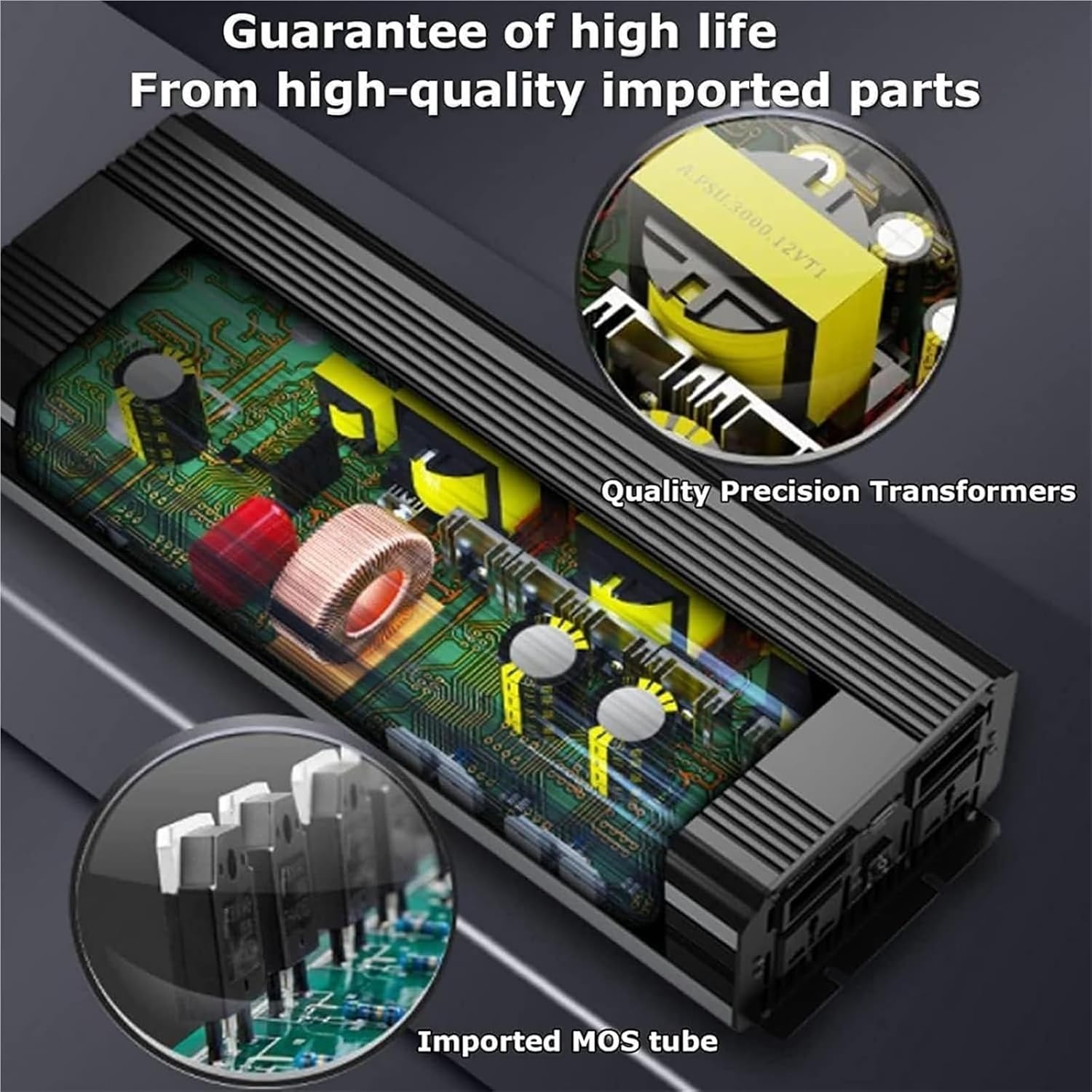
Image: Internal components of the inverter, showing high-quality precision transformers and imported MOS tubes, contributing to product longevity.
3. คำแนะนำในการตั้งค่า
Follow these steps to correctly set up your inverter:
- Prepare the Inverter: ตรวจสอบให้แน่ใจว่าสวิตช์เปิดปิดของอินเวอร์เตอร์อยู่ในตำแหน่งปิด
- เชื่อมต่อกับแบตเตอรี่: Connect the positive (+) ring terminal wire from the inverter to the positive (+) terminal of your 72V battery. Connect the negative (-) ring terminal wire from the inverter to the negative (-) terminal of your 72V battery. Ensure connections are tight and secure.
- เชื่อมต่ออุปกรณ์: Plug your AC appliances into the AC output sockets on the inverter.
- เปิดเครื่อง: Once all connections are secure, turn the inverter switch to the ON position. The LCD display will illuminate, showing operational parameters.

Image: Step-by-step diagram illustrating how to connect the inverter to a battery and then to an electrical appliance, emphasizing secure connections and turning the inverter on last.

Image: Inverter working diagram, illustrating how the inverter takes input from a battery or photovoltaic panels and provides AC output for various devices like bread machines, lighting, office equipment, household appliances, and electrical tools.

Image: Working principle of a solar link inverter, demonstrating how a solar panel charges a battery via a controller, and the battery then supplies DC power to the inverter, which converts it to AC for devices such as printers, bread machines, TVs, computers, and fans.
4. คู่มือการใช้งาน
Once the inverter is properly connected and powered on, it will begin converting DC power to AC power. The LCD display provides crucial operational feedback:
- อุณหภูมิในการทำงาน: Monitors the internal temperature of the inverter.
- สถานะแบตเตอรี่: Indicates the current charge level or voltage ของแบตเตอรี่ที่เชื่อมต่อ
- อินพุต Voltage: แสดงค่าแรงดันไฟฟ้ากระแสตรง (DC vol)tage received from the battery.
- ปริมาณการส่งออกtage: Shows the AC voltage being supplied to your appliances (e.g., 220V).
- Device Power Used: บ่งชี้การใช้พลังงานปัจจุบันของอุปกรณ์ที่เชื่อมต่อ
- Converter Protection Reasons: Provides codes or messages if a protection mechanism is activated.
Always monitor the LCD display to ensure optimal performance and to identify any potential issues early.
5. การบำรุงรักษา
To ensure the longevity and efficient operation of your inverter, follow these maintenance guidelines:
- การทำความสะอาด: Periodically clean the exterior of the inverter with a dry, soft cloth. Do not use liquid cleaners or solvents.
- การระบายอากาศ : Ensure that the ventilation openings are clear of dust and debris to allow proper airflow for cooling.
- การทำงานของพัดลม: The intelligent cooling fans will activate automatically when the internal temperature reaches ≥45°C and stop when it drops to ≤45°C. This automatic operation helps maintain optimal temperature and reduces noise.
- การตรวจสอบการเชื่อมต่อ: Regularly inspect all cable connections to ensure they remain tight and free from corrosion.
- พื้นที่จัดเก็บ: หากต้องเก็บรักษาอินเวอร์เตอร์เป็นเวลานาน ควรตัดการเชื่อมต่อจากแบตเตอรี่และเก็บไว้ในที่แห้งและเย็น
6 การแก้ไขปัญหา
The inverter is equipped with multiple protection features to safeguard itself and your devices. If the inverter stops functioning or displays an error, refer to the LCD screen for protection reasons and consider the following common issues:
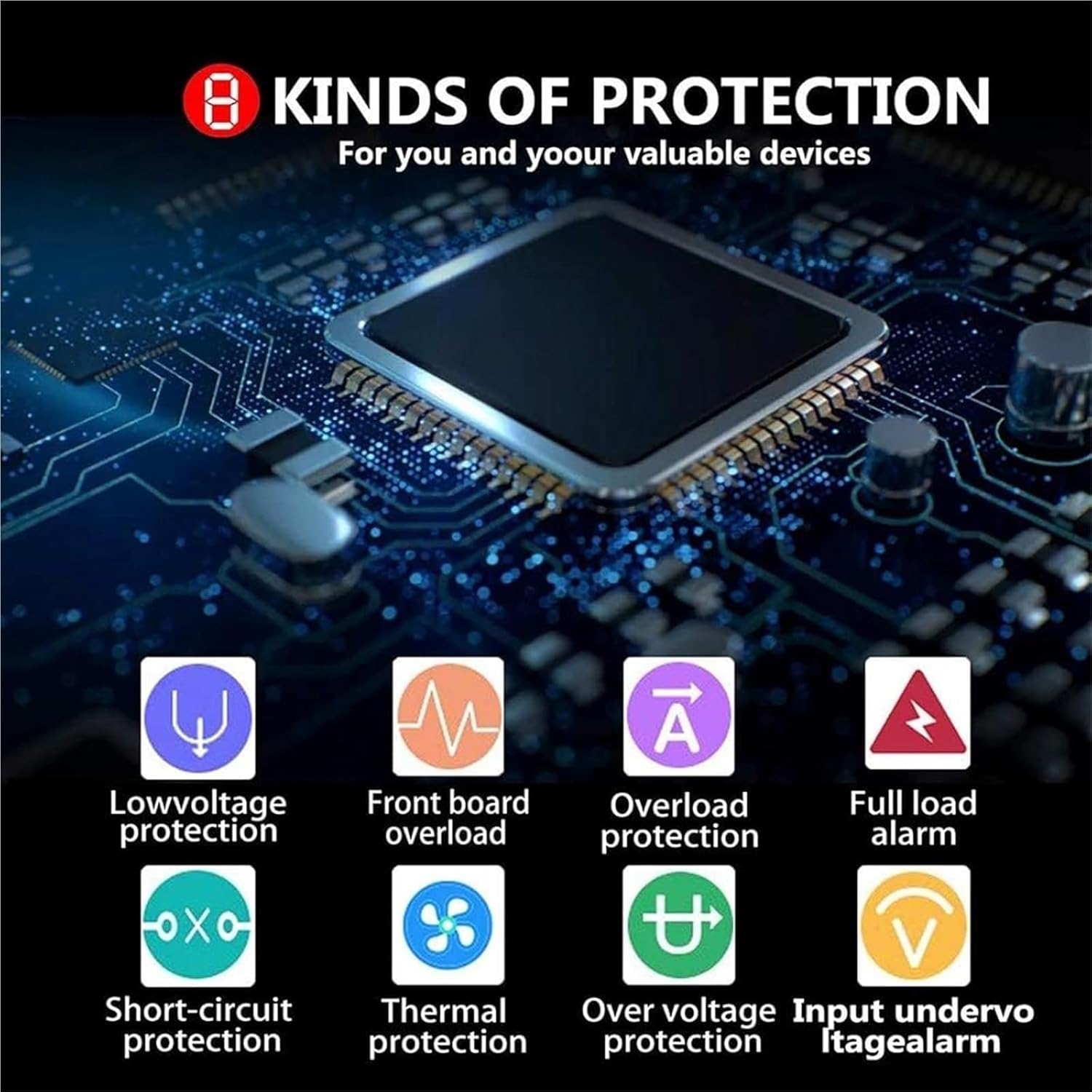
Image: Diagram detailing the 8 types of protection integrated into the inverter, including low voltage, front board overload, general overload, full load alarm, short-circuit, thermal, over voltage, and input undervoltage alarm, designed to protect the device and connected equipment.
| ปัญหา | สาเหตุที่เป็นไปได้ | สารละลาย |
|---|---|---|
| No output power / Inverter not turning on | สวิตซ์อินเวอร์เตอร์ปิด การเชื่อมต่อแบตเตอรี่หลวม ปริมาณแบตเตอรี่tage ต่ำ/สูงเกินไป ฟิวส์ขาด | เปิดสวิตซ์ ON ตรวจสอบและกระชับการเชื่อมต่อ Ensure 72V battery, charge if low Check and replace fuse (if accessible and safe) |
| เปิดใช้งานการป้องกันโอเวอร์โหลด | Total power of connected devices exceeds inverter's rated power | Reduce the load by disconnecting some appliances. Restart the inverter. |
| เปิดใช้งานการป้องกันอุณหภูมิเกินแล้ว | การระบายอากาศไม่ดี อุณหภูมิแวดล้อมสูง โหลดเกิน | Ensure clear ventilation paths. Move inverter to a cooler area. Reduce load. |
| ปริมาณต่ำtagสัญญาณเตือน/ปิดเครื่อง | ปริมาณแบตเตอรี่tagอีต่ำเกินไป | ชาร์จหรือเปลี่ยนแบตเตอรี่ |
| Short-circuit protection activated | Short circuit in connected appliance or wiring | Disconnect all appliances. Check wiring for damage. Restart inverter. |
7. ข้อมูลจำเพาะ
| คุณสมบัติ | ข้อมูลจำเพาะ |
|---|---|
| แบบอย่าง | 7000W 72V to 220V |
| อินพุต DC Voltage | กระแสตรง 72 โวลต์ |
| เอาต์พุต AC Voltage | กระแสสลับ 220V-240V |
| รูปคลื่นเอาท์พุต | เพียวไซน์เวฟ |
| พลังสูงสุด | 7000วัตต์ |
| กำลังไฟที่กำหนด | Approximately 3500W (typically half of peak power for pure sine wave inverters) |
| คุณสมบัติการป้องกัน | Overload, Over-voltage, Over-current, Under-voltage, Over-temperature, Short-circuit |
| การทำให้เย็น | Intelligent Dual Cooling Fans |
| แสดง | หน้าจอ LCD |
| วัสดุของเปลือกหอย | Aluminum-Magnesium Alloy |
8. การรับประกันและการสนับสนุน
Specific warranty details and support contact information are not provided in the product description. For warranty claims, technical assistance, or further inquiries, please refer to the documentation included with your purchase or contact the seller directly through the platform where the product was acquired.


