
การแนะนำ
This manual provides detailed instructions for the installation, operation, and maintenance of your Rosewill VSB 750W 80+ Bronze Semi-Modular Power Supply. Please read this manual thoroughly before installation and use to ensure proper function and safety.
ข้อมูลด้านความปลอดภัย
WARNING: Power supplies contain high voltage components. Do not open the power supply unit. There are no user-serviceable parts inside. Opening the casing will void the warranty and poses a risk of electric shock.
- ตรวจสอบให้แน่ใจว่าได้ตัดการเชื่อมต่อแหล่งจ่ายไฟจากเต้ารับไฟฟ้า AC ก่อนการติดตั้งหรือการจัดการ
- ติดตั้งแหล่งจ่ายไฟในบริเวณที่มีอากาศถ่ายเทได้ดี
- ใช้เฉพาะสายเคเบิลที่ให้มาพร้อมกับแหล่งจ่ายไฟเท่านั้น
- Do not block any ventilation openings on the power supply.
- ผลิตภัณฑ์นี้ออกแบบมาเพื่อใช้กับคอมพิวเตอร์ส่วนบุคคลเท่านั้น ห้ามใช้เพื่อวัตถุประสงค์อื่นใด
การติดตั้งและการตั้งค่า
1. การแกะกล่อง
นำแหล่งจ่ายไฟและอุปกรณ์เสริมทั้งหมดออกจากบรรจุภัณฑ์อย่างระมัดระวัง ตรวจสอบว่ามีส่วนประกอบครบถ้วนหรือไม่:
- Rosewill VSB 750W Power Supply
- สายไฟ AC
- Modular Cables (PCIe, SATA, Molex)
- สกรูยึด
- สายรัดเคเบิล
2. การติดตั้งทางกายภาพ
Install the power supply into the designated PSU bay of your computer case. Secure it with the provided mounting screws.
The Rosewill VSB 750W features a compact 140x150x86mm chassis, which is 35% smaller than many regular ATX PSUs, allowing for flexible integration into various PC builds.
The power supply includes a 120mm ICB silent fan for optimized thermal control and quiet operation.

รูปที่ 1: จากบนลงล่าง view of the Rosewill VSB 750W Power Supply, highlighting the fan grill and branding.
3. การเชื่อมต่อสายเคเบิล
The Rosewill VSB 750W is a semi-modular power supply. Essential cables (24-pin motherboard, 4+4 pin CPU) are permanently attached, while others are modular.
Connect the necessary cables to your motherboard and components.

รูปที่ 2: เกินview of available connectors for the Rosewill VSB 750W Power Supply.
การเชื่อมต่อเมนบอร์ด
Connect the 24-pin ATX cable from the power supply to the corresponding port on your motherboard.
CPU Power Connection
Connect the 4+4 pin CPU power cable(s) to the CPU power port(s) on your motherboard. Most motherboards require one 8-pin (4+4) connector, while some high-end boards may require two.
PCIe 5.1 / Gen 5 12V-2x6 Connector
This power supply includes a native PCIe 5.1 / Gen 5 12V-2x6 cable, designed to deliver up to 600W directly to compatible next-generation graphics cards. Connect this cable directly to your PCIe 5.1 GPU if applicable.

Figure 3: The native 12V-2x6 PCIe 5.1 connector for direct GPU power.
Additional PCIe Connections
For other graphics cards requiring 6+2 pin PCIe connectors, use the provided modular cables. Connect one end to the power supply's PCIe ports and the other to your graphics card.
SATA and Molex Connections
Connect the modular SATA power cables to your storage drives (SSDs, HDDs) and optical drives. Use Molex connectors for any peripherals that require them.
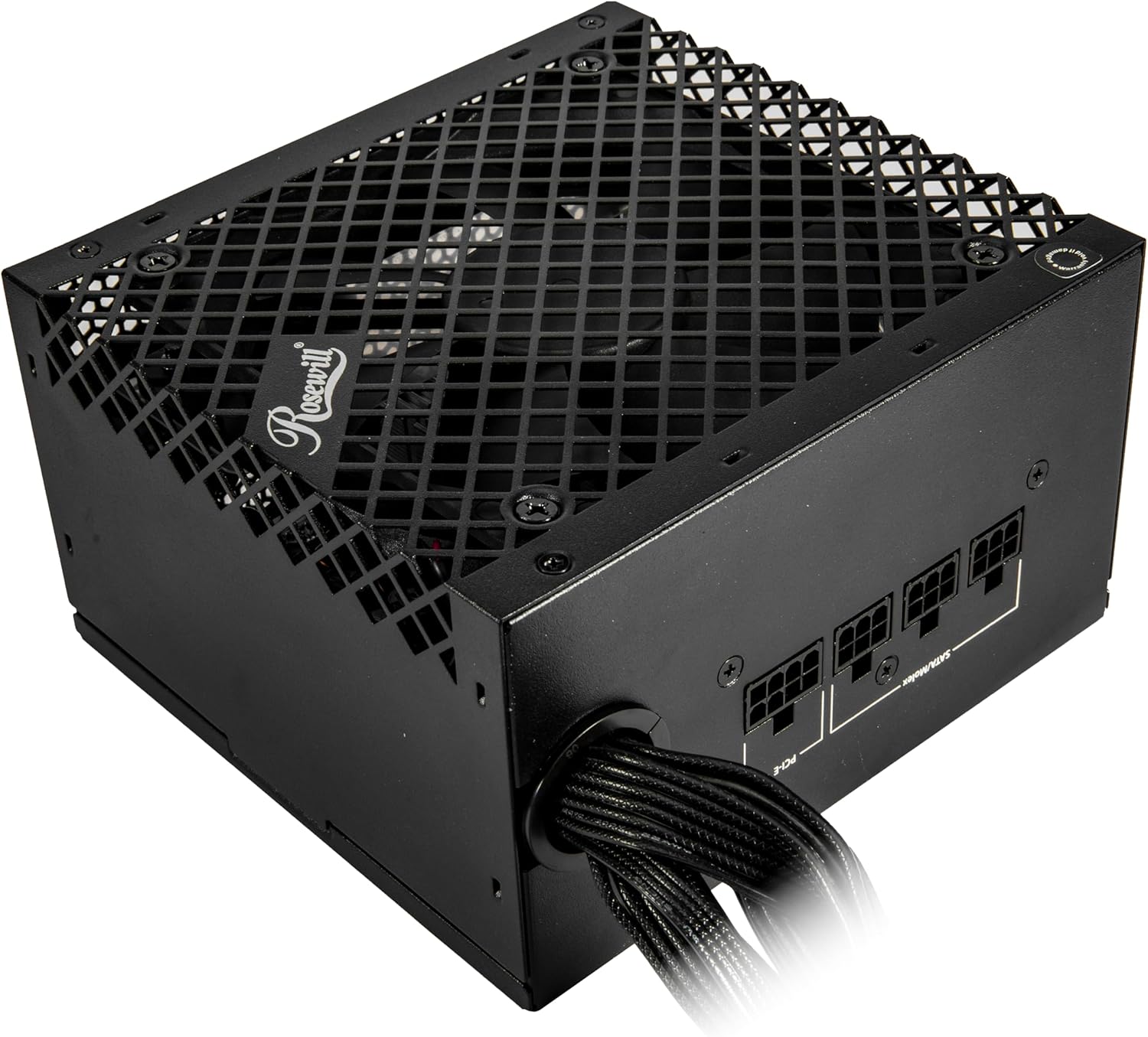
Figure 4: Modular cable connection ports on the power supply.
4. การเชื่อมต่อไฟฟ้า
Once all internal connections are secure, connect the AC power cord to the power supply and then to a wall outlet or surge protector. Ensure the power switch on the back of the PSU is in the "OFF" (0) position before connecting to AC power.
การดำเนินการ
After completing all connections, flip the power switch on the back of the power supply to the "ON" (I) position. You can then power on your computer using the case's power button.
The 120mm ICB silent fan operates to maintain optimal temperatures while minimizing noise.
This power supply is Intel ATX 3.0 & 3.1 Ready, supporting up to 235% power excursion and 300% GPU power excursion for stable performance under demanding loads.
การซ่อมบำรุง
To ensure the longevity and optimal performance of your power supply:
- การกำจัดฝุ่น: Periodically clean the exterior of the power supply and the fan grill to prevent dust buildup, which can impede airflow and cooling. Use compressed air or a soft brush. Ensure the power supply is disconnected from AC power before cleaning.
- การจัดการสายเคเบิล: Proper cable management helps maintain good airflow within your PC case, contributing to better cooling for all components, including the PSU.
- สภาพแวดล้อม : Operate the power supply within recommended temperature and humidity ranges. Avoid extreme heat or moisture.
การแก้ไขปัญหา
หากคุณพบปัญหาเกี่ยวกับแหล่งจ่ายไฟ โปรดดูปัญหาทั่วไปและวิธีแก้ไขต่อไปนี้:
- ไม่มีไฟฟ้า:
- ตรวจสอบว่าสายไฟ AC เชื่อมต่อกับแหล่งจ่ายไฟและเต้ารับที่ผนังอย่างแน่นหนาหรือไม่
- Ensure the power switch on the back of the PSU is in the "ON" (I) position.
- Verify all internal cables (24-pin ATX, CPU, PCIe) are correctly and securely connected.
- ทดสอบเต้ารับไฟที่ผนังด้วยอุปกรณ์อื่นเพื่อยืนยันว่ามีไฟอยู่
- ระบบไม่เสถียรหรือปิดเครื่องเองโดยไม่ทราบสาเหตุ:
- This could indicate an overloaded power supply or a component issue. Ensure your system's power requirements do not exceed the PSU's 750W capacity.
- The Rosewill VSB 750W features an advanced protection suite (OCP, OPP, OTP, OVP, SCP, UCP) designed to prevent damage from various electrical anomalies. If these protections are triggered, the PSU may shut down to protect your components.
- เสียงพัดลม:
- While designed for silent operation, excessive fan noise could indicate dust buildup. Refer to the Maintenance section for cleaning instructions.
- If the noise persists, ensure the PSU is securely mounted and not vibrating against the case.
If troubleshooting steps do not resolve the issue, contact Rosewill customer support.

Figure 5: The Advanced Protection Suite ensures system safety.
ข้อมูลจำเพาะ
The following table details the technical specifications of the Rosewill VSB 750W Power Supply.
| คุณสมบัติ | รายละเอียด |
|---|---|
| ชื่อรุ่น | วีเอสบี750 |
| ยี่ห้อ | โรสวิลล์ |
| เอาท์พุต วัดtage | 750 วัตต์ |
| ฟอร์มแฟกเตอร์ | เอทีเอ็กซ์ |
| การออกแบบแหล่งจ่ายไฟ | กึ่งโมดูลาร์ |
| การรับรองประสิทธิภาพ | 80PLUS บรอนซ์ |
| มาตรฐาน ATX | ATX 3.0 & 3.1 Compatible |
| ขั้วต่อ PCIe | Native PCIe 5.1 / Gen 5 12V-2x6 |
| วิธีการทำความเย็น | Air (120mm ICB Silent Fan) |
| ขนาด (กว้าง x ยาว x สูง) | 5.51 x 5.9 x 3.38 นิ้ว (140 x 150 x 86 มม.) |
| ปริมาณอินพุตสูงสุดtage | 240 โวลต์ (AC) |
| ปริมาณอินพุตขั้นต่ำtage | 110 โวลต์ (AC) |
| ตัวเก็บประจุ | 105°C/221°F Japanese Capacitor |
| Protection Suite | OCP, OPP, OTP, OVP, SCP, UCP |
| ยูพีซี | 840951136058 |
การรับประกัน
The Rosewill VSB 750W Power Supply comes with a 5-year manufacturer's warranty. For warranty claims or detailed terms and conditions, please refer to the official Rosewill webไซต์หรือติดต่อฝ่ายสนับสนุนลูกค้าของพวกเขา
สนับสนุน
For technical assistance, troubleshooting beyond this manual, or warranty inquiries, please visit the official Rosewill support website or contact their customer service department. Keep your purchase receipt and product serial number handy when contacting support.
คุณสามารถค้นหาข้อมูลเพิ่มเติมและทรัพยากรสนับสนุนได้ที่ Rosewill Store on Amazon.