1. บทนำ
ขอบคุณสำหรับการซื้อasing the SODLK T21 40W Portable Bluetooth Speaker. This manual provides essential information for setting up, operating, and maintaining your speaker. Please read it carefully before use to ensure optimal performance and longevity of the product.
2. คุณสมบัติของผลิตภัณฑ์
- 6D stereo surround sound for an immersive audio experience.
- Strengthened deep bass with 2pcs vibrating diaphragm.
- 4pcs built-in driver unit (2pcs bass driver unit + 2pcs Mids & Tweets) for balanced sound.
- 5Play model: Supports TF card slot, U disk, AUX input, Bluetooth, and TWS connection.
- 2pcs power amplifier for robust audio output.
- Integrated LED light for visual ambiance.
- Inbuilt 3600mAh battery for extended playtime.
- TWS (True Wireless Stereo) function to connect two speakers for ampเสียงสเตอริโอที่คมชัด
3. เนื้อหาบรรจุภัณฑ์
เมื่อแกะกล่องแล้ว โปรดตรวจสอบให้แน่ใจว่าสินค้าทั้งหมดที่ระบุไว้ด้านล่างนี้มีอยู่และอยู่ในสภาพดี:
- ลำโพงบลูทูธพกพา SODLK T21
- สายชาร์จแบบ USB Type-C
- คู่มือการใช้งาน

Image: The SODLK T21 Portable Bluetooth Speaker, highlighting its ultra-portable design and key features like IPX7 waterproof rating, BT 5.3, punchy bass, voice assistant, Type-C port, 18 hours playtime, stereo pairing, and hands-free calls.
4. การควบคุมและตัวชี้วัด
Familiarize yourself with the speaker's control panel for easy operation:
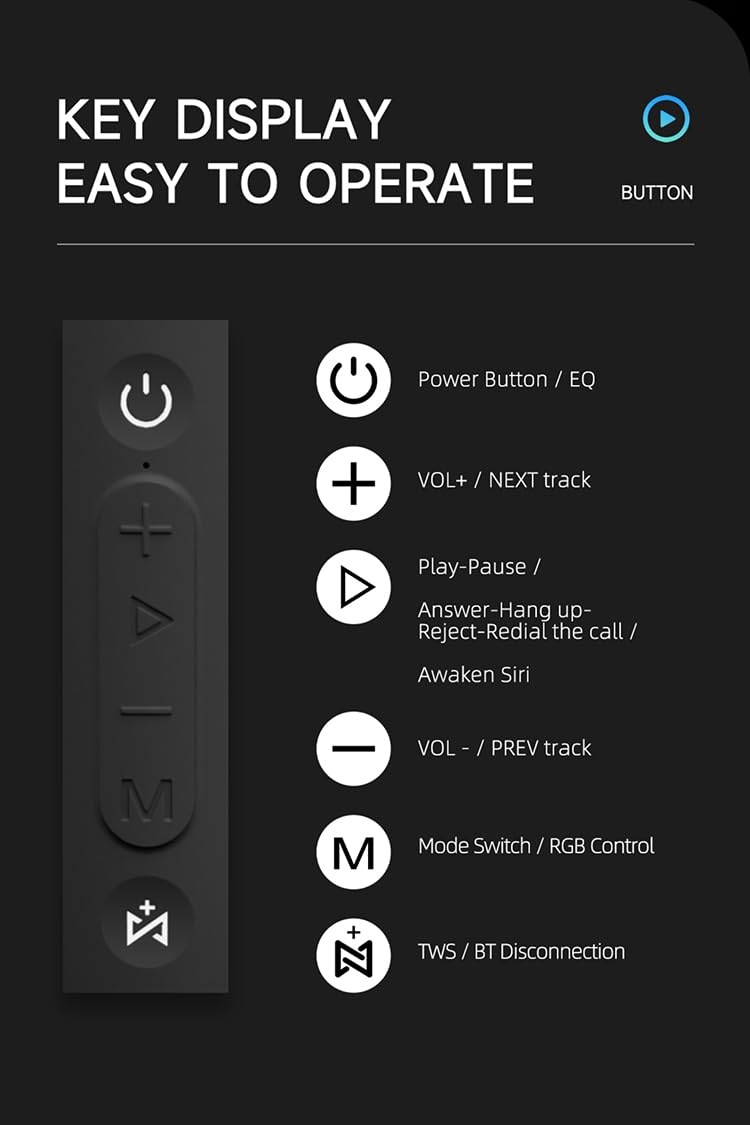
ภาพ: รายละเอียด view of the SODLK T21 speaker's control panel, showing buttons for Power/EQ, Volume Up/Next Track, Play/Pause/Answer/Hang Up/Reject/Redial/Awaken Siri, Volume Down/Previous Track, Mode Switch/RGB Control, and TWS/BT Disconnection.
- Power Button / EQ: Press and hold to power on/off. Short press to cycle through EQ modes.
- VOL+ / NEXT track: กดสั้นเพื่อเพิ่มระดับเสียง กดยาวเพื่อข้ามไปยังเพลงถัดไป
- Play-Pause / Answer-Hang up-Reject-Redial the call / Awaken Siri: Short press for play/pause. Short press to answer/hang up calls. Long press to reject calls. Double press to redial. Triple press to awaken Siri (or other voice assistant).
- VOL- / PREV track: กดสั้นเพื่อลดระดับเสียง กดยาวเพื่อไปยังเพลงก่อนหน้า
- Mode Switch / RGB Control: Short press to switch between input modes (Bluetooth, TF card, U disk, AUX). Long press to control RGB lighting effects.
- TWS / BT Disconnection: Short press to initiate TWS pairing. Long press to disconnect Bluetooth.
5. การตั้งค่าและการใช้งาน
5.1 การชาร์จลำโพง
Before first use, fully charge the speaker. Connect the provided USB Type-C cable to the speaker's charging port and the other end to a compatible USB power adapter (5V/1A recommended). The charging time is approximately 3-4 hours.
5.2 เปิด/ปิดเครื่อง
กดปุ่มค้างไว้ ปุ่มเปิดปิด for 2-3 seconds to turn the speaker on or off. An audible prompt will indicate the power status.
5.3 การจับคู่บลูทูธ
- เปิดลำโพง ลำโพงจะเข้าสู่โหมดจับคู่บลูทูธโดยอัตโนมัติ ซึ่งจะแสดงด้วยไฟ LED กระพริบ
- เปิดใช้งานบลูทูธบนอุปกรณ์ของคุณ (สมาร์ทโฟน แท็บเล็ต ฯลฯ)
- ค้นหา "SODLK T21" in the list of available Bluetooth devices and select it to connect.
- Once connected, the LED light will become solid, and you will hear a confirmation tone.
การจับคู่ 5.4 TWS (True Wireless Stereo)
To achieve stereo sound, you can connect two SODLK T21 speakers together:

Image: Two SODLK T21 speakers shown side-by-side with a TWS icon and dashed lines indicating a wireless connection, illustrating the stereo pairing feature.
- Ensure both SODLK T21 speakers are powered on and not connected to any other Bluetooth device.
- บนลำโพงตัวใดตัวหนึ่ง (ซึ่งจะเป็นลำโพงหลัก) ให้กดปุ่มสั้นๆ ปุ่ม TWSลำโพงจะเข้าสู่โหมดจับคู่ TWS
- ลำโพงทั้งสองตัวจะเชื่อมต่อกันโดยอัตโนมัติ จะมีเสียงยืนยันดังขึ้นเมื่อการจับคู่ TWS สำเร็จ
- ทีนี้ ให้เชื่อมต่ออุปกรณ์ของคุณกับลำโพงหลักผ่านบลูทูธตามที่อธิบายไว้ในหัวข้อ 5.3 ลำโพงทั้งสองตัวจะเล่นเสียงในระบบสเตอริโอ
5.5 การสลับโหมด
กดสั้น ๆ Mode Switch Button (M) to cycle through available input modes: Bluetooth, TF Card, U Disk, and AUX. The speaker will announce the current mode.
5.6 การควบคุมแสง RGB
กดค้างไว้ Mode Switch Button (M) to change or turn off the RGB lighting effects.

Image: The SODLK T21 speaker displaying a vibrant rainbow light show, illustrating its 16.8 million color RGB light effect feature.
6. การบำรุงรักษา
- ทำความสะอาดลำโพงด้วยผ้านุ่มและแห้ง ห้ามใช้น้ำยาทำความสะอาดหรือสารละลายที่มีฤทธิ์กัดกร่อน
- ควรเก็บลำโพงให้ห่างจากอุณหภูมิที่สูงจัด แสงแดดโดยตรง และความชื้น
- ห้ามถอดประกอบหรือซ่อมลำโพงด้วยตนเอง การกระทำดังกล่าวจะทำให้การรับประกันเป็นโมฆะ
- เก็บลำโพงไว้ในที่แห้งและเย็นเมื่อไม่ได้ใช้งานเป็นเวลานาน
7 การแก้ไขปัญหา
| ปัญหา | สาเหตุที่เป็นไปได้ | สารละลาย |
|---|---|---|
| ลําโพงไม่เปิดขึ้น | แบตเตอรี่อ่อน | ชาร์จลำโพงให้เต็ม |
| ไม่สามารถจับคู่ผ่านบลูทูธได้ | ลำโพงไม่ได้อยู่ในโหมดจับคู่หรือเชื่อมต่อกับอุปกรณ์อื่นแล้ว | Ensure the speaker is in pairing mode (flashing LED). Disconnect from other devices. Restart both speaker and device. |
| ไม่มีเสียง. | ระดับเสียงต่ำเกินไป โหมดอินพุตไม่ถูกต้อง หรืออุปกรณ์ไม่ได้กำลังเล่นอยู่ | Increase volume on both speaker and device. Check input mode. Ensure audio is playing on the connected device. |
| การจับคู่ TWS ล้มเหลว | ลำโพงอยู่ห่างกันมากเกินไปหรือเชื่อมต่อกับอุปกรณ์อื่นอยู่แล้ว | Ensure speakers are within close proximity. Disconnect both speakers from any other Bluetooth devices before initiating TWS pairing. |
8. ข้อมูลจำเพาะ

Image: The SODLK T21 speaker with its dimensions (232mm height, 100mm width) and a table of specifications including model number, color, BT version, output, waterproof rating, play time, charging time, working distance, input, speaker size, and speaker weight.
| คุณสมบัติ | รายละเอียด |
|---|---|
| หมายเลขรุ่น | T21 |
| สี | สีดำ |
| เวอร์ชั่น BT | BT5.3 |
| เอาท์พุต | 40วัตต์ |
| กันน้ำ | IPX7 |
| เวลาเล่น | นานถึง 18 ชั่วโมง |
| เวลาในการชาร์จ | 3-4 ชั่วโมง |
| ระยะการทำงาน | สูงถึง 18M |
| ป้อนข้อมูล | 5V/1A |
| ขนาดลำโพง | 232มม. * 100มม. |
| น้ำหนักลำโพง | 1.12กก. |
9. การรับประกันและการสนับสนุน
The SODLK T21 Portable Bluetooth Speaker comes with a standard manufacturer's warranty. Please refer to the warranty card included in your package for specific terms and conditions. For technical support or service inquiries, please contact your retailer or the SODLK customer service team.