
1. บทนำ
The RAPIQUE R306 Pro Wireless Mouse offers versatile connectivity and a comfortable, slim design. It supports connection to up to three devices via Bluetooth and 2.4G USB receiver, features silent clicks, and is conveniently rechargeable via USB-C. This manual provides essential information for setting up, operating, and maintaining your R306 Pro Wireless Mouse.

Image: RAPIQUE R306 Pro Wireless Mouse, showcasing its sleek design and white-to-black gradient.
2. อะไรอยู่ในกล่อง
- R306 PRO Bluetooth Mouse x1
- ตัวรับสัญญาณ USB x1
- USB-C Charge Cable x1
- คู่มือ x1
3. สินค้าหมดview
The RAPIQUE R306 Pro features a modern white-to-black gradient design, offering a balanced and professional aesthetic. Its slim, portable form factor makes it ideal for various environments, from office to travel. The mouse is designed for comfortable, long-term use with its symmetrical shape and lightweight construction.

Image: The RAPIQUE R306 Pro Wireless Mouse being used in different settings, highlighting its versatility.
คุณสมบัติหลัก:
- Triple-Device Connectivity: Connects up to three devices using Bluetooth 1, Bluetooth 2, and the included 2.4G USB receiver.
- USB-C ชาร์จใหม่ได้: Features an upgraded USB-C rechargeable battery for efficient daily use.
- Quiet & Smooth Operation: Silent left/right clicks and a refined scroll wheel for a distraction-free environment.
- Comfortable Symmetrical Shape: Designed for a natural feel and easy control during extended use.
- Portable Slim Design: ขนาดกะทัดรัดและประสิทธิภาพต่ำfile, easily fits into laptop bags and cases.
4. การตั้งค่า
Before initial use, fully charge the mouse for approximately 2 hours using the provided USB-C cable.
4.1. 2.4G USB Receiver Connection:
- Locate the USB receiver stored in the bottom compartment of the mouse. Push the 'PUSH' button to release the cover and retrieve the receiver.
- เสียบตัวรับสัญญาณ USB เข้ากับพอร์ต USB ที่ว่างอยู่บนคอมพิวเตอร์หรืออุปกรณ์ของคุณ
- Turn the mouse ON using the switch on the bottom.
- Slide the mode switch to the '2.4G' position. The indicator light will illuminate.
- Your device should automatically detect and connect to the mouse.

Image: Underside of the mouse with the ON/OFF switch, mode selector, and USB receiver compartment.
4.2. Bluetooth Connection (BT1/BT2):
- Turn the mouse ON using the switch on the bottom.
- Slide the mode switch to either 'BT1' or 'BT2' position.
- Press and hold the 'MODE' button for 3-5 seconds until the corresponding Bluetooth indicator light (BT1 or BT2) starts blinking rapidly. This indicates pairing mode.
- บนอุปกรณ์ของคุณ (แล็ปท็อป แท็บเล็ต ฯลฯ) ไปที่การตั้งค่าบลูทูธ แล้วค้นหาอุปกรณ์ใหม่
- Select 'RAPIQUE R306 Pro' from the list of available devices to pair.
- เมื่อเชื่อมต่อเสร็จแล้ว ไฟแสดงสถานะจะหยุดกะพริบและติดสว่างอยู่สองสามวินาทีก่อนจะดับลง
- To switch between paired Bluetooth devices, simply slide the mode switch to the desired BT1 or BT2 position.
Video: Demonstrates the unboxing and initial setup of the RAPIQUE R306 Pro Wireless Mouse, including locating the USB receiver and connecting.
5. คู่มือการใช้งาน
The R306 Pro Wireless Mouse is designed for intuitive and quiet operation.
- คลิกเงียบ: The left and right click buttons are engineered for silent operation, minimizing noise in quiet environments.
- การเลื่อนแบบราบรื่น: The refined scroll wheel provides precise and quiet scrolling.
- การสลับใช้งานหลายอุปกรณ์: Easily switch between up to three connected devices by moving the mode switch on the bottom of the mouse to the desired Bluetooth channel (BT1, BT2) or 2.4G mode.

Image: Close-up of the RAPIQUE R306 Pro Wireless Mouse highlighting its smooth scrolling capability.
6. การชาร์จไฟ
The RAPIQUE R306 Pro features a built-in rechargeable battery. Use the provided USB-C cable to charge the mouse.
- Connect the USB-C end of the cable to the charging port on the front of the mouse.
- เชื่อมต่อปลายสาย USB-A เข้ากับแหล่งจ่ายไฟ (เช่น พอร์ต USB ของคอมพิวเตอร์ อะแดปเตอร์ติดผนัง USB)
- A full charge takes approximately 1.5 hours and can provide up to 30 days of usage, depending on usage patterns.
- สามารถใช้เมาส์ขณะชาร์จไฟได้
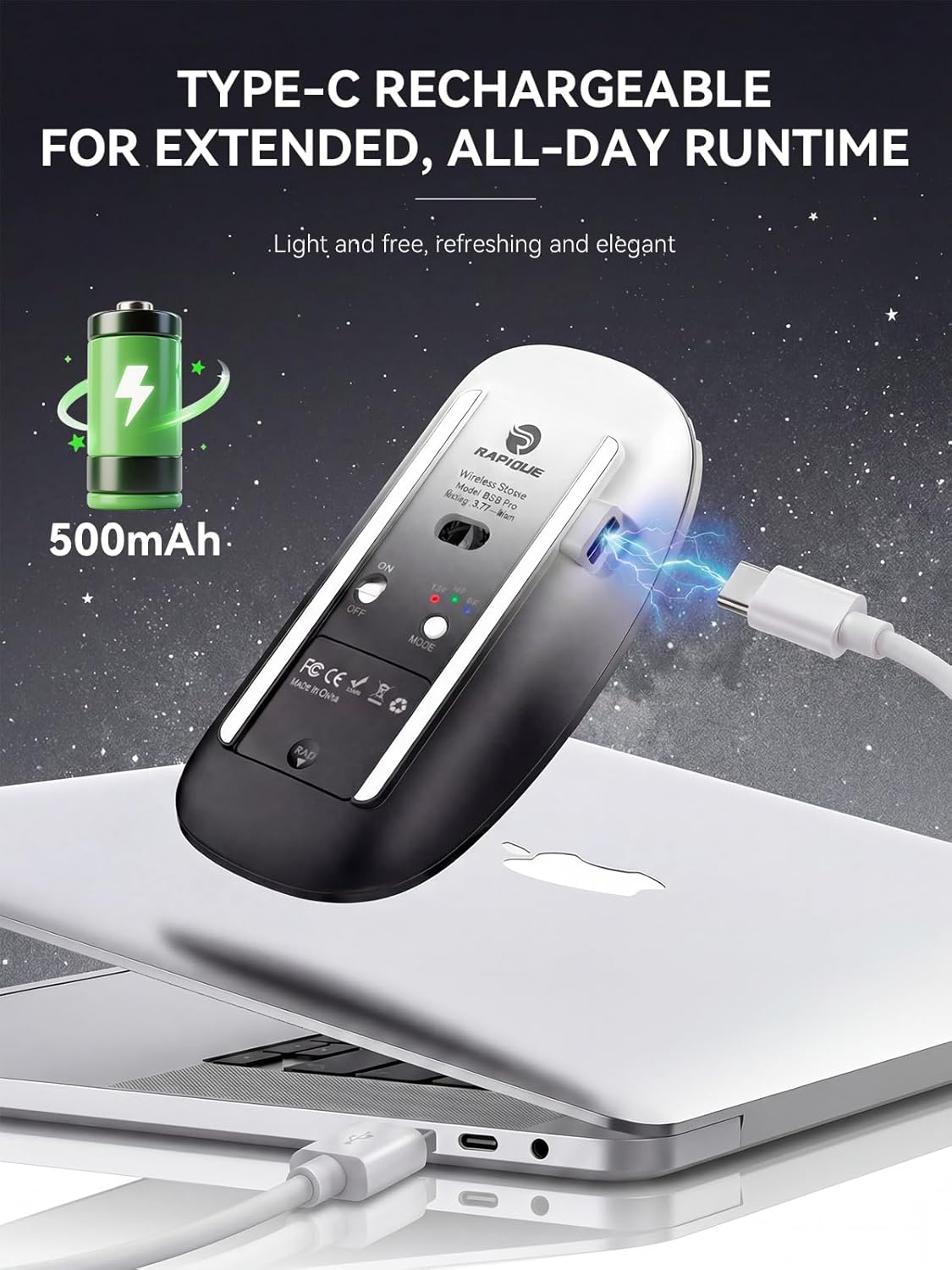
Image: The RAPIQUE R306 Pro Wireless Mouse connected to a laptop via its USB-C charging cable.
7. ความเข้ากันได้
The RAPIQUE R306 Pro Wireless Mouse offers broad compatibility with various operating systems and devices.
- โหมด 2.4G: Compatible with devices that have a standard USB-A port (e.g., laptops, desktop computers).
- โหมดบลูทู ธ : Compatible with Bluetooth-enabled devices running Windows, Mac OS, iOS (13.0 or later), Android (4.3 or later), and Chrome OS.

Image: The RAPIQUE R306 Pro Wireless Mouse demonstrating compatibility with Windows, Mac OS, Linux, iOS, Android, and Chrome OS.
8. การบำรุงรักษา
To ensure the longevity and optimal performance of your RAPIQUE R306 Pro Wireless Mouse, follow these maintenance guidelines:
- การทำความสะอาด: ใช้ผ้านุ่มและแห้งเช็ดทำความสะอาดเมาส์ หลีกเลี่ยงการใช้สารเคมีรุนแรงหรือวัสดุที่มีฤทธิ์กัดกร่อน
- พื้นที่จัดเก็บ: When not in use, store the mouse in a cool, dry place. If traveling, ensure the USB receiver is securely stored in its compartment.
- หลีกเลี่ยงเงื่อนไขที่รุนแรง: อย่าปล่อยให้เมาส์อยู่ในที่ที่มีอุณหภูมิสูงหรือต่ำเกินไป แสงแดดโดยตรง หรือความชื้นมากเกินไป
9 การแก้ไขปัญหา
If you encounter issues with your RAPIQUE R306 Pro Wireless Mouse, refer to the following common troubleshooting steps:
- เมาส์ไม่ตอบสนอง: Ensure the mouse is turned ON and fully charged. Check the mode switch is set correctly (2.4G, BT1, or BT2). For 2.4G, ensure the USB receiver is properly plugged in. For Bluetooth, verify the mouse is paired and connected in your device's Bluetooth settings.
- ปัญหาการเชื่อมต่อ: Try re-pairing the Bluetooth connection or re-inserting the 2.4G USB receiver. Ensure your device's Bluetooth is enabled.
- การเคลื่อนไหวล่าช้าหรือไม่สม่ำเสมอ: Ensure the mouse is used on a clean, flat surface. Avoid using it on reflective or transparent surfaces. Check for interference from other wireless devices.
- ปัญหาการชาร์จ: Verify the USB-C cable is securely connected to both the mouse and the power source. Try a different USB-C cable or power adapter.
10. ข้อมูลจำเพาะ
| คุณสมบัติ | รายละเอียด |
|---|---|
| หมายเลขรุ่น | R306 โปร |
| เทคโนโลยีการเชื่อมต่อ | บลูทูธ 5.1, ไร้สาย 2.4GHz |
| เทคโนโลยีตรวจจับการเคลื่อนไหว | ออฟติคอล |
| คุณสมบัติพิเศษ | Dual Bluetooth 5.1+2.4GHz Wireless, Ergonomic Design, Up to 3 devices, Lightweight, Rechargeable, Portable, Slim, Soundless |
| พอร์ตชาร์จ | ยูเอสบี-ซี |
| น้ำหนักสินค้า | 1.94 ออนซ์ (ประมาณ 55 กรัม) |
| ขนาดแพ็คเกจ | 4.69 x 3.03 x 1.34 นิ้ว |
| แบตเตอรี่ | แบตเตอรี่ที่ไม่ได้มาตรฐาน 1 ก้อน (รวมอยู่ด้วย) |
11. การรับประกันและการสนับสนุน
RAPIQUE products are designed and manufactured to the highest quality standards. For warranty information, technical support, or any inquiries regarding your R306 Pro Wireless Mouse, please refer to the contact information provided in the product packaging or visit the official RAPIQUE webเว็บไซต์.