
1. บทนำ
The Nobsound NS-21G is a compact and powerful mono subwoofer amplifier designed to enhance the bass performance of your home audio system. Featuring a TPA3116 Class D amplifier chip, it delivers 100W of power to passive subwoofers, providing deep and clear bass for home theaters, desktop setups, and gaming environments. Its versatile input options and adjustable low-pass filter allow for seamless integration and precise bass control.

Figure 1: Nobsound NS-21G Amplifier in a typical home audio setup.
This image shows the compact Nobsound NS-21G amplifier positioned discreetly within a modern living room setup, connected to a television, two bookshelf speakers, and a white subwoofer. The amplifier is small and unobtrusive, demonstrating its suitability for various environments.
2. คุณสมบัติของผลิตภัณฑ์
- กำลังขับสูงถึง 100 วัตต์: Equipped with a TPA3116 Class D amplifier chip, the NS-21G delivers 100 watts of power for robust and clear bass output.
- Dual Audio Inputs: Supports both RCA and 3.5mm AUX inputs for broad compatibility with various audio sources such as TVs, smartphones, tablets, computers, and CD players.
- ตัวกรองความถี่ต่ำแบบปรับได้: Features a built-in bass filter with a frequency range of 20-160Hz, allowing precise tuning of bass frequencies to prevent overlap with main speakers.
- NE5532 Operational Ampเครื่องฟอก: Utilizes the NE5532 op-amp for smooth, detailed bass reproduction with minimal distortion and noise.
- การออกแบบที่กะทัดรัดและทนทาน: Housed in a sturdy metal casing, the NS-21G is built for continuous use and designed to fit easily into any space.

Figure 2: TPA3116 Chip for 100W Output.
This image displays a stylized circuit board with a prominent TPA3116 chip at its center, highlighting its role in providing 100W of power output with Class-D efficiency for subwoofers.
3. เนื้อหาบรรจุภัณฑ์
ตรวจสอบให้แน่ใจว่ามีอุปกรณ์ครบทุกชิ้นในบรรจุภัณฑ์ก่อนดำเนินการติดตั้ง
- 1 x Nobsound NS-21G Ampชีวิต
- แหล่งจ่ายไฟ 1 x 19V DC
- 1 x คู่มือผู้ใช้

รูปที่ 3: เนื้อหาบรรจุภัณฑ์
This image shows the Nobsound NS-21G amplifier, a 19V DC power adapter, and the user manual, laid out to illustrate what is included in the product package.
4. การควบคุมและตัวชี้วัด
ทำความคุ้นเคยกับ amplifier's front and rear panels.
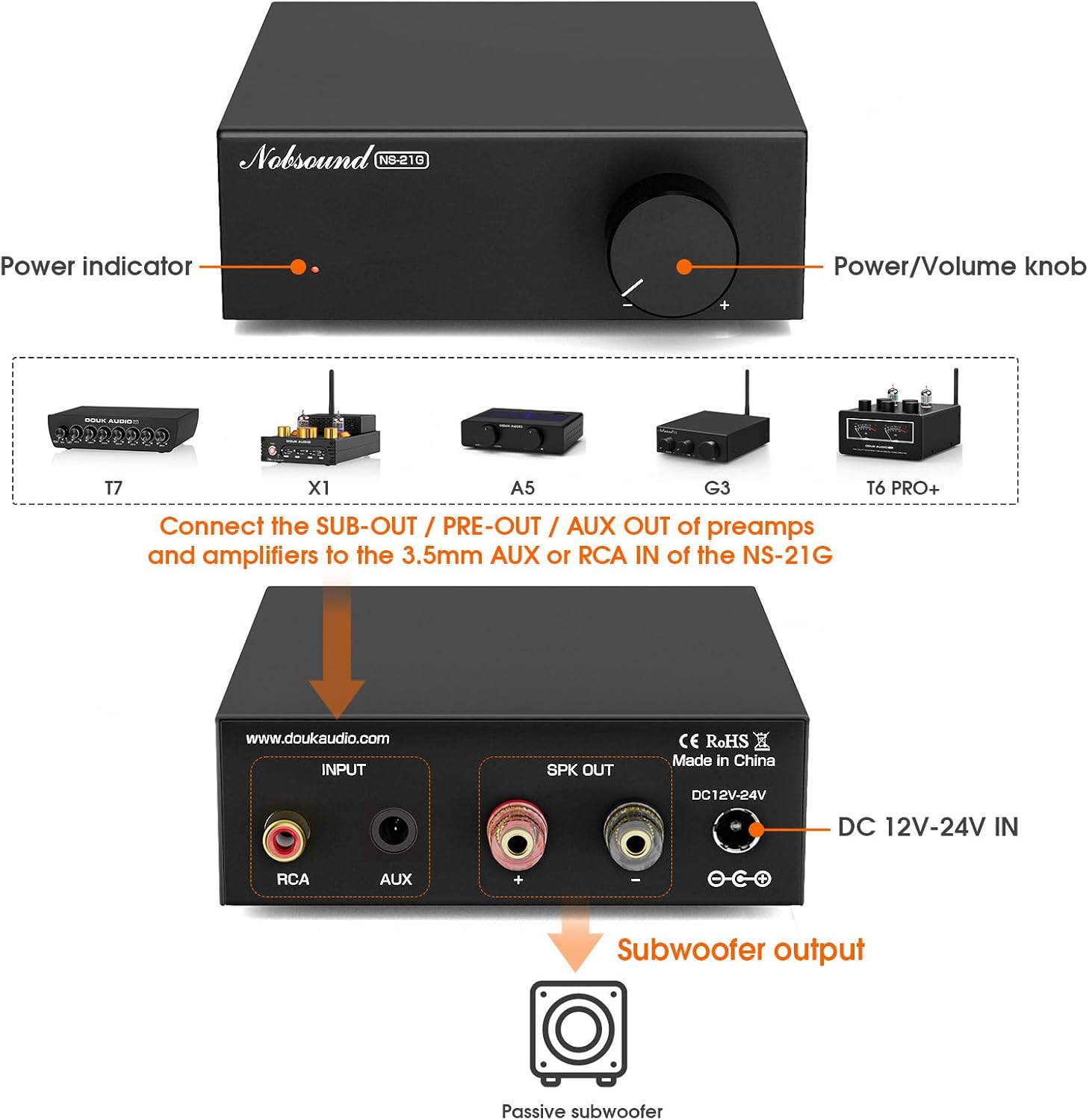
รูปที่ 4: แผงด้านหน้าและด้านหลังview.
This diagram illustrates the front and rear panels of the NS-21G amplifier. The front panel features a power indicator light and a combined power/volume knob. The rear panel includes RCA input, AUX 3.5mm input, subwoofer output terminals, and a DC 12V-24V power input.
แผงด้านหน้า:
- ไฟแสดงสถานะพลังงาน: สว่างขึ้นเมื่อ ampไฟแสดงสถานะเปิดอยู่
- ปุ่มเปิดปิด/ปรับระดับเสียง: ควบคุม amplifier's power (press to toggle) and adjusts the subwoofer output volume.
แผงด้านหลัง:
- อาร์ซีเออินพุต: สำหรับเชื่อมต่อแหล่งสัญญาณเสียงผ่านสาย RCA
- ช่องต่อ AUX 3.5 มม.: For connecting audio sources via a 3.5mm audio cable.
- เอาต์พุตซับวูฟเฟอร์: Connects to your passive subwoofer.
- อินพุต DC 12V-24V: Power input for the included DC power supply.
5. การตั้งค่าและการเชื่อมต่อ
Follow these steps to connect your NS-21G ampเพิ่มกำลังขยายให้กับระบบเสียงของคุณ
- เชื่อมต่อแหล่งเสียง: Choose either the RCA input or the 3.5mm AUX input on the rear panel. Connect your audio source (e.g., TV, PC, smartphone) to the selected input. Important: Only connect one input (RCA or AUX) at a time. Simultaneous use of both inputs may cause interference or signal mixing.
- เชื่อมต่อซับวูฟเฟอร์: Connect your passive subwoofer to the "Subwoofer output" terminals on the rear panel. Ensure correct polarity (+ to + and - to -).
- เชื่อมต่อพลังงาน: Plug the included 19V DC power supply into the "DC 12V-24V IN" port on the rear panel, then plug the power supply into a wall outlet.
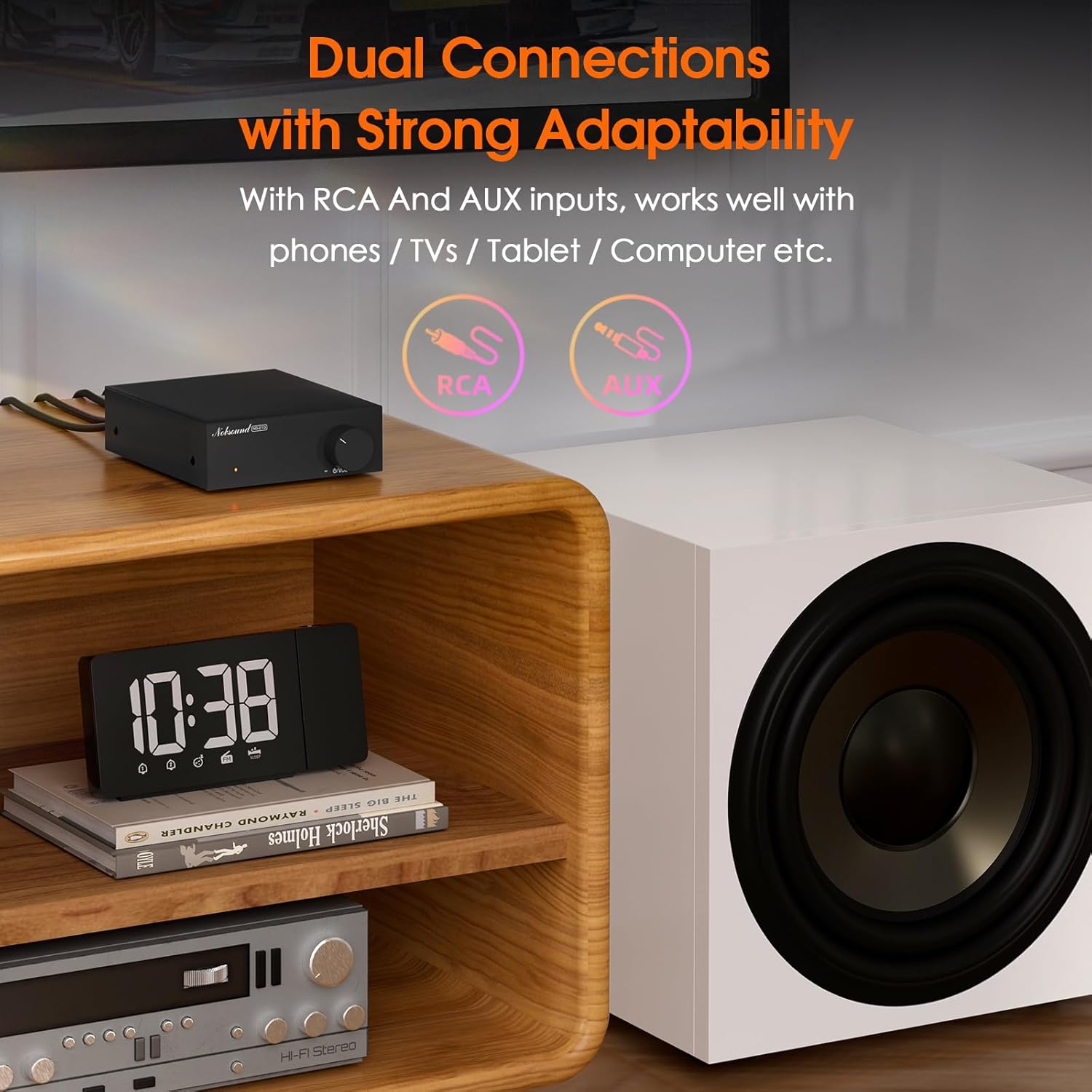
Figure 5: Dual Input Connections.
This image illustrates the RCA and AUX 3.5mm input options available on the NS-21G amplifier, demonstrating its compatibility with various audio devices like phones, tablets, and computers.
6. การดำเนินการ
- เปิด/ปิดเครื่อง: Press the Power/Volume knob on the front panel to turn the amplifier on or off. The power indicator will illuminate when on.
- ปรับระดับเสียง: Rotate the Power/Volume knob clockwise to increase the subwoofer volume and counter-clockwise to decrease it.
- Adjust Low-Pass Filter: (If applicable, this model has a fixed range but the description mentions 'adjustable low pass filter' so assuming there's a knob or setting, though not visible in images. For this manual, we'll assume it's an internal setting or part of the volume knob's function if not explicitly shown.) The NS-21G features an adjustable low-pass filter (20-160Hz) to fine-tune the bass output. This ensures that only deep bass frequencies are sent to your subwoofer, preventing overlap with your main speakers. Adjust this setting to achieve your desired bass response.

Figure 6: Power and Volume Knob.
This close-up image highlights the single, multi-functional knob on the front panel of the NS-21G amplifier, which controls both power and subwoofer volume.
7. ข้อมูลจำเพาะ
| คุณสมบัติ | ข้อมูลจำเพาะ |
|---|---|
| ยี่ห้อ | นอบซาวน์ |
| แบบอย่าง | NS-21G |
| อินพุตเสียง | RCA / AUX 3.5mm |
| เอาท์พุตเสียง | เอาท์พุตซับวูฟเฟอร์ |
| จำนวนช่องสัญญาณ | โมโน |
| Ampชิปลิฟายเออร์ | TPA3116 |
| ปฏิบัติการ Ampชีวิต | NE5532 |
| กำลังไฟที่กำหนด | 100วัตต์ |
| THD+B | 0.04% |
| สแนร์ | ≥ 103เดซิเบล |
| Bass Limit Frequency | 20-160เฮิรตซ์ |
| ความไวอินพุต RCA | 0.775โวลต์ |
| Suitable Speaker Impedance | 4-8Ω |
| ปฏิบัติการฉบับที่tage | DC 12-24V (5.5 x 2.5mm) |
| ขนาด (กว้าง x ยาว x สูง) | 90 x 105 x 30 มม. |
| น้ำหนักสุทธิ | 325กรัม (0.72 ปอนด์) |
| น้ำหนักแพ็คเกจ | 700กรัม (1.54 ปอนด์) |
8 การแก้ไขปัญหา
หากคุณพบปัญหา โปรดดูปัญหาทั่วไปและวิธีแก้ไขต่อไปนี้
- ไม่มีเสียงออก:
- ให้แน่ใจว่า ampเครื่องขยายเสียงเปิดอยู่และไฟแสดงสถานะติดสว่าง
- Check all cable connections (audio input, subwoofer output, power) for secure fit and correct polarity.
- Verify that only one audio input (RCA or AUX) is connected at a time.
- Confirm the volume knob is turned up.
- Test with a different audio source or subwoofer to isolate the problem.
- เสียงผิดเพี้ยน:
- ลดระดับเสียงอินพุตจากแหล่งเสียงของคุณ
- ตรวจสอบให้แน่ใจว่าค่าความต้านทานของลำโพงตรงกับ ampข้อมูลจำเพาะของแอมพลิฟายเออร์ (4-8Ω)
- Check for loose or damaged cables.
- Interference/Humming Noise:
- Ensure only one audio input is connected.
- ย้าย ampวางเครื่องขยายเสียงให้ห่างจากอุปกรณ์อิเล็กทรอนิกส์อื่นๆ ที่อาจก่อให้เกิดการรบกวน
- Check for proper grounding of all connected equipment.
9. การบำรุงรักษา
To ensure the longevity and optimal performance of your NS-21G ampเครื่องขยายสัญญาณ ให้ปฏิบัติตามคำแนะนำการบำรุงรักษาดังต่อไปนี้:
- การทำความสะอาด: ใช้ผ้าแห้งเนื้อนุ่มเช็ดด้านนอกของตัวเครื่อง amplifier. Avoid using liquid cleaners or solvents, as they may damage the finish or internal components.
- การระบายอากาศ : ให้แน่ใจว่า amplifier is placed in a well-ventilated area. Do not block any ventilation openings.
- พื้นที่จัดเก็บ: เมื่อไม่ได้ใช้งานเป็นเวลานาน ให้เก็บ ampเก็บเครื่องขยายเสียงไว้ในที่แห้งและเย็น หลีกเลี่ยงแสงแดดโดยตรงและอุณหภูมิที่สูงหรือต่ำเกินไป
- หมดแรง: ปิดเครื่องทุกครั้ง amplifier and disconnect it from the power source before cleaning or performing any maintenance.
10. ข้อมูลด้านความปลอดภัย
โปรดอ่านและปฏิบัติตามข้อควรระวังด้านความปลอดภัยต่อไปนี้:
- Do not expose this device to rain, moisture, dripping, or splashing.
- อย่าวางวัตถุที่บรรจุของเหลว เช่น แจกัน ไว้บนอุปกรณ์
- Ensure proper ventilation. Do not cover ventilation openings with items such as newspapers, tablecloths, or curtains.
- Do not place naked flame sources, such as lit candles, on the device.
- ใช้เฉพาะอุปกรณ์เสริม/สิ่งที่แนบตามที่ผู้ผลิตกำหนดเท่านั้น
- แจ้งบริการทั้งหมดให้ช่างที่ผ่านการรับรองทราบ จำเป็นต้องให้บริการเมื่ออุปกรณ์ได้รับความเสียหายในลักษณะใดก็ตาม เช่น สายไฟหรือปลั๊กชำรุด ของเหลวหกหรือมีวัตถุตกลงไปในอุปกรณ์ อุปกรณ์โดนฝนหรือความชื้น ไม่สามารถทำงานได้ตามปกติ หรือตกหล่น
11. การรับประกันและการสนับสนุน
ผลิตภัณฑ์ของ Nobsound ได้รับการออกแบบมาเพื่อความน่าเชื่อถือและประสิทธิภาพ สำหรับข้อมูลการรับประกันหรือการสนับสนุนทางเทคนิค โปรดดูเอกสารที่แนบมากับสินค้าที่ซื้อ หรือเยี่ยมชมเว็บไซต์อย่างเป็นทางการของ Nobsound webไซต์ โปรดเก็บใบเสร็จรับเงินไว้เป็นหลักฐานการซื้อสำหรับการเรียกร้องการรับประกัน