
RunStar FG2422
RunStar Smart Scale FG2422 User Manual
รุ่น : FG2422
การแนะนำ
Thank you for choosing the RunStar Smart Scale FG2422. This manual provides essential information for the safe and effective use of your new body composition monitor. Please read it thoroughly before first use and keep it for future reference.

Image: The RunStar Smart Scale FG2422, featuring its sleek black and gold design, integrated handle for full-body analysis, and a digital display showing body metrics. A smartphone displaying the companion app interface is also visible, highlighting the device's connectivity and comprehensive data tracking capabilities.
มีอะไรอยู่ในกล่อง
- RunStar Smart Scale FG2422
- แบตเตอรี่ AAA 4 ก้อน (มีมาให้แล้วหรือต้องซื้อแยกต่างหาก)
- คู่มือการใช้งาน
การตั้งค่า
- ติดตั้งแบตเตอรี่: If not already installed, open the battery compartment on the underside of the scale and insert the 4 AAA batteries, ensuring correct polarity. If a plastic pull-tab is present, remove it to activate the batteries.
- การจัดวาง: Place the scale on a hard, flat, and stable surface. Avoid carpets or uneven flooring for accurate measurements.
- Download the Starfit App: Scan the QR code on the scale's surface or search for "Starfit" in your device's app store (Apple App Store or Google Play Store) to download the free companion application.
- ลงทะเบียน: Complete the registration process within the Starfit app using your email, Apple ID, or Google account.
- เชื่อมต่ออุปกรณ์: Turn on Bluetooth on your smartphone. In the Starfit app, navigate to "Account" > "My Devices" and tap the "+" icon. Select "Bluetooth" and search for "Runstar-RX" to complete the connection. A connected logo will appear on the scale's screen once paired.

Image: The underside of the RunStar Smart Scale, showing the battery compartment for 4 AAA batteries and a button to switch measurement units (lbs/kg/st).
คำแนะนำการใช้งาน
- การเปิดใช้งานครั้งแรก: Step lightly on the scale and then step off. Wait for the screen to display "0.0" to activate the device.
- Standard Weight Measurement: Step onto the scale barefoot. Stand still until the display flashes, showing your final weight measurement.
- Full Body Composition Measurement: For a full body scan, step onto the scale barefoot and grasp the retractable handle. Ensure your thumbs and palms make full contact with the electrodes on the handle. Maintain a steady posture for approximately 20 seconds until the measurement is complete.
- การแปลงหน่วย: To switch between measurement units (pounds, kilograms, stones), press the 'UNIT' button located on the underside of the scale.
- การซิงโครไนซ์แอป: Measurements will automatically sync to the Starfit app when your phone is connected via Bluetooth. The app will display 28 body composition metrics and generate health reports.
- โหมดออฟไลน์: You can weigh yourself without your phone nearby. The scale will store measurements and sync them to the app later when a connection is established.
Image: The underside of the RunStar Smart Scale, showing the battery compartment for 4 AAA batteries and a button to switch measurement units (lbs/kg/st).
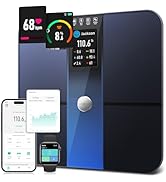
Image: A three-step diagram illustrating how to measure with the RunStar Smart Scale. Step 1 shows feet on the scale for weight. Step 2 shows hands on the handle for full body analysis. Step 3 shows a person standing on the scale holding the handle for a complete measurement.
Video: A demonstration of the RunStar Smart Scale's features, including its 8 electrodes for full-body analysis, clear LED display for weight, BMI, and body fat, and synchronization with popular fitness apps like Starfit, Apple Health, and Google Fit. The video highlights the scale's ability to track 28 body composition metrics and output detailed analysis reports.
คุณสมบัติหลัก
- Full-Body Scan: Utilizes 8 metal electrodes and a dual-frequency BIA system for precise upper and lower body impedance measurements, providing comprehensive insights into 28 body composition metrics.
- 28 ตัวชี้วัดองค์ประกอบของร่างกาย: Tracks Body Fat, BMI, Visceral Fat, Muscle Mass, Bone Mass, Protein Mass, Body Water, and more.
- ความแม่นยำสูง: Measures with 0.1 lb increments and supports up to 400 lb capacity.
- โครงสร้างทนทาน: Crafted with high-strength ABS material, featuring a 6mm tempered glass surface and non-slip feet for stability and safety.
- Ultra-Clear LED Display: Auto-rotating screen cycles through Weight, Body Fat, and BMI for quick and easy viewการไอเอ็นจี
- User-Friendly Starfit App: Connects seamlessly via Bluetooth to monitor trends, set goals, and generate detailed health reports.
- การรวมแอป: Syncs data with Apple Health, Fitbit, and Health Connect for convenient data sharing.
- สมาร์ทโปรfiles: รองรับผู้ใช้หลายคน profiles with auto-recognition, including family-friendly modes for Pregnancy, Child, and Baby.
- สายเคเบิลแบบยืดหดได้: The handle features a retractable cable for tidy storage.
Image: The RunStar Smart Scale displaying an Ultra-Clear LED screen with three core data points: Weight (136.9 lb), Body Fat (25.7%), and BMI (18.3). This highlights the scale's easy-to-read interface for essential body metrics.
Image: A graphic detailing the precision features of the RunStar Smart Scale, including a wide 300mm/12-inch platform, ultra-high accuracy sensors (up to 400 lbs), 8 electrodes (front and back), and a 10mm wide ABS crash edge for durability.
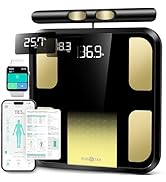
Image: A woman performing lunges, surrounded by icons and text representing the 28 body composition metrics tracked by the RunStar Smart Scale, such as Muscle Rate, Fat Mass, Weight, BMI, Visceral Fat, and Skeletal Muscle.
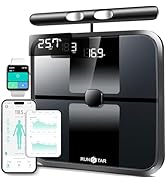
Image: A woman standing barefoot on the RunStar Smart Scale, holding its retractable handle for segmental fat and muscle analysis. The image also shows a smartphone displaying detailed body composition data and BMI trends, emphasizing the dual-frequency BIA measurement.
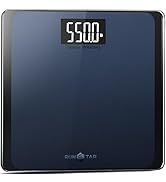
Image: A smartphone displaying the Starfit app interface, showcasing a detailed body composition analysis report with trends, goals, and printable reports. The image highlights the app's easy interconnection with Apple Health, Health Connect, iwatch, and Fitbit.
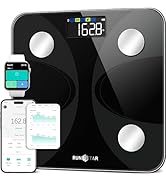
Image: A group of friends looking at a smartphone displaying the Starfit app, illustrating the Smart Profiles for the Whole Family feature. The app supports multi-user profiles with auto-recognition and includes modes for Pregnancy, Child, and Baby.
การซ่อมบำรุง
- การทำความสะอาด: เช็ดพื้นผิวของเกล็ดด้วยผ้าเนื้อนุ่มและแห้งamp ผ้า หลีกเลี่ยงน้ำยาทำความสะอาดที่มีฤทธิ์กัดกร่อนหรือสารเคมีรุนแรง
- พื้นที่จัดเก็บ: เก็บเครื่องชั่งไว้ในที่แห้งและเย็น หลีกเลี่ยงการวางของหนักทับเมื่อไม่ได้ใช้งาน
- การเปลี่ยนแบตเตอรี่: เปลี่ยนแบตเตอรี่เมื่อไฟแสดงสถานะแบตเตอรี่อ่อนปรากฏบนจอแสดงผล
- คำเตือน: Do not step on the scale with wet feet to prevent slipping.
การแก้ไขปัญหา
- ไม่แสดงผล/อ่านค่าไม่ถูกต้อง: Ensure batteries are correctly installed and have sufficient charge. Replace if necessary. Make sure the scale is placed on a hard, flat surface.
- ปัญหาการเชื่อมต่อแอพ: Verify Bluetooth is enabled on your smartphone and the Starfit app is open. Ensure the scale is within range of your device. Restarting both the app and the scale may resolve connection problems.
- Inaccurate Body Composition Data: Ensure you are standing barefoot on the scale and making full contact with all 8 electrodes (feet on the main platform, hands on the handle). Maintain a steady posture during measurement.
ข้อมูลจำเพาะ
- หมายเลขรุ่น: เอฟจี 2422
- น้ำหนักจำกัด: 400 ปอนด์
- ประเภทจอภาพ: นำ
- คุณสมบัติพิเศษ: Body Fat, BMI, Muscle Mass, 28 Metrics
- เนื้อหาแพลตฟอร์ม: กระจกนิรภัย
- แหล่งพลังงาน: แบตเตอรี่ AAA จำนวน 4 ก้อน (รวมอยู่ด้วย)
- ขนาดแพลตฟอร์ม: 300 x 300 mm (approximately 12 x 12 inches)
การรับประกันและการสนับสนุน
RunStar products are covered by a lifetime warranty. To activate your warranty, please visit runstar.com และลงทะเบียนผลิตภัณฑ์ของคุณภายใน 15 วันนับจากการซื้อ
For questions or concerns, please contact customer support at service@runstar.com.