
สินค้าเกินview
The TECKNET Rechargeable Bluetooth Mouse offers versatile connectivity and an ergonomic design for enhanced productivity. It supports dual Bluetooth modes (5.0/3.0) and a 2.4G USB-A connection, allowing seamless switching between up to three devices. Key features include a long-lasting 800mAh rechargeable battery, adjustable DPI settings for precise tracking, and silent click technology for a quiet working environment.

ภาพ: เหนือview of the TECKNET Tri-Mode Bluetooth Mouse highlighting its features: Bluetooth 5.0/3.0, 2.4G Wireless, 6-level DPI, Rechargeable, Silent Click, and LED Light.
เนื้อหาแพ็คเกจ
ตรวจสอบว่ามีรายการทั้งหมดอยู่ในแพ็คเกจ:
- TECKNET Rechargeable Bluetooth Mouse
- สายชาร์จ Type-C
- USB Receiver (located in the back of the mouse)
- คู่มือการใช้งาน (เอกสารนี้)
การตั้งค่าและการเชื่อมต่อ
กำลังชาร์จเมาส์
The mouse is equipped with an 800mAh rechargeable battery. Before first use, or when the battery indicator light signals low power, connect the mouse to a power source using the provided Type-C charging cable. A full charge takes approximately 1.5 hours and can provide up to 3 months of use (based on 2 hours/day usage).

Image: The TECKNET mouse connected via a USB-C cable for charging, illustrating its rechargeable battery feature.
การเชื่อมต่อผ่านระบบไร้สาย 2.4G (ตัวรับสัญญาณ USB)
- Locate the USB receiver in the compartment on the underside of the mouse.
- Slide the power switch on the bottom of the mouse to the "ON" position.
- Press the channel switch button on the bottom of the mouse until the indicator light for 2.4G (usually BT1 or BT2, depending on the model's default) is active.
- Plug the USB receiver into an available USB-A port on your computer. The mouse should connect automatically.
Connecting via Bluetooth (BT5.0 / BT3.0)
- Slide the power switch on the bottom of the mouse to the "ON" position.
- Press the channel switch button on the bottom of the mouse to select either BT1 or BT2. The corresponding Bluetooth indicator light will flash, indicating pairing mode.
- บนอุปกรณ์ของคุณ (พีซี แล็ปท็อป แท็บเล็ต) ไปที่การตั้งค่าบลูทูธ
- ค้นหา available devices and select "TK-MS026 5.X" or "TK-MS026 3.X" to connect.
- เมื่อเชื่อมต่อแล้ว ไฟแสดงสถานะจะหยุดกะพริบและยังคงนิ่ง
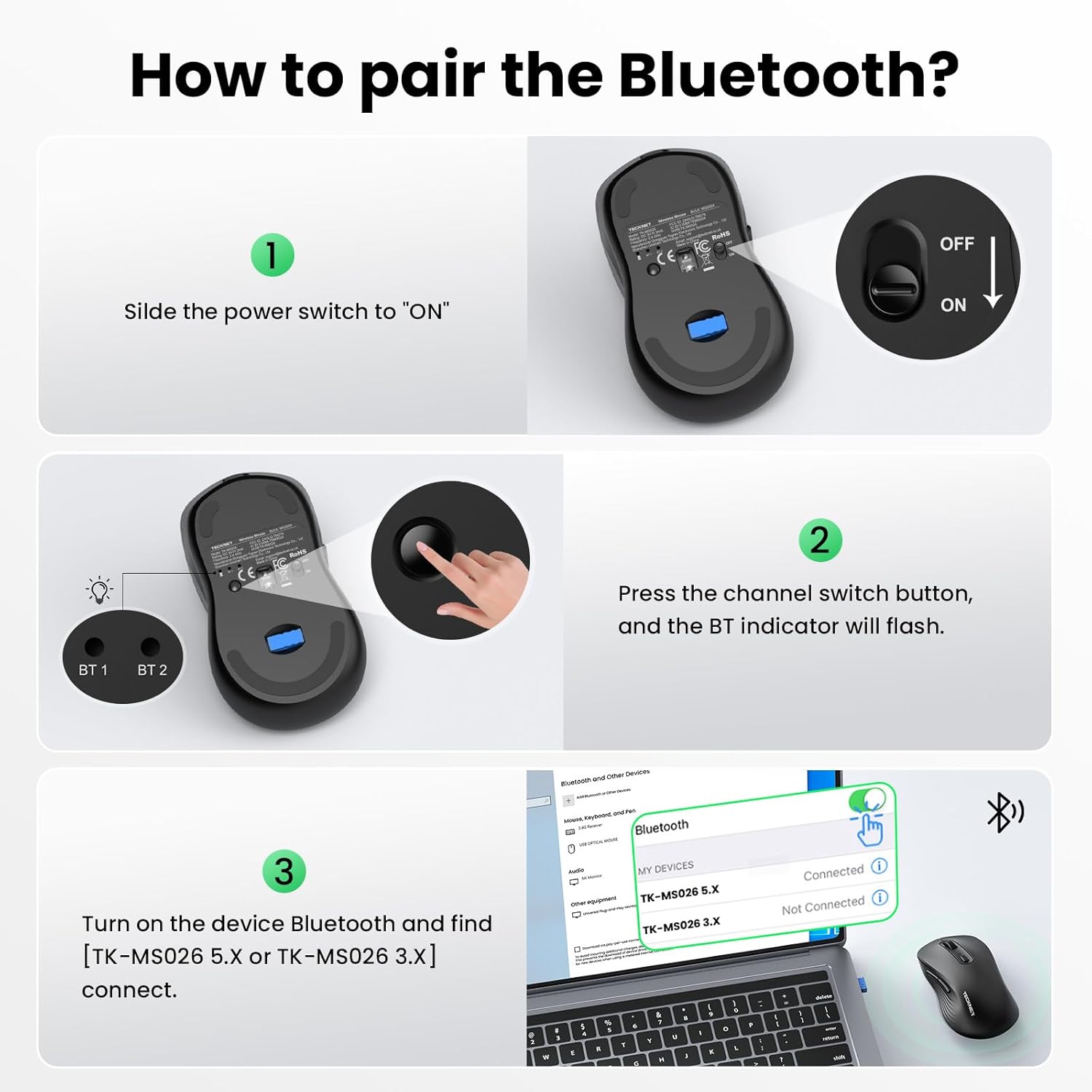
Image: Step-by-step guide on pairing the mouse via Bluetooth, showing the power switch, channel switch button, and device Bluetooth settings.
Video: Official TECKNET video demonstrating the Bluetooth mouse features and connectivity. This video shows the mouse's dual mode for 3 devices and one-click switching for multi-task efficiency.
คำแนะนำการใช้งาน
การสลับอุปกรณ์หลายตัว
The mouse supports connection to up to three devices simultaneously (one via 2.4G USB-A, two via Bluetooth). Use the channel switch button on the underside of the mouse to cycle between connected devices. The indicator lights (BT1, BT2, 2.4G) will show the active connection.

Image: The TECKNET mouse demonstrating its ability to connect to three devices (laptop, desktop, tablet) and switch between them.
การปรับความไว DPI
The mouse features 6 adjustable DPI settings (800/1200/1600/2400/3200/4800) to suit various tasks and preferences. Press the DPI switch button, located near the scroll wheel, to cycle through the sensitivity levels. A higher DPI setting results in faster cursor movement, ideal for gaming or large displays, while a lower DPI offers more precision for tasks like graphic design or spreadsheet editing.

Image: Visual representation of the mouse's 6 adjustable DPI levels, showing how different settings are suitable for web browsing, graphic design, and gaming.
คุณสมบัติการคลิกเงียบ
The mouse incorporates advanced click technology to reduce noise by 90%. This feature ensures a quiet working environment, making it suitable for shared workspaces, libraries, or late-night use without disturbing others.

Image: The TECKNET mouse on a desk, illustrating its silent click feature in a quiet setting, with a sleeping child in the background.
การออกแบบตามหลักสรีรศาสตร์
Designed for comfort, the mouse features a natural curved shape that supports the palm and fingers, reducing wrist strain by up to 35%. Its dimensions (4.6 × 2.7 × 1.6 inches) are suitable for medium to large hand sizes.
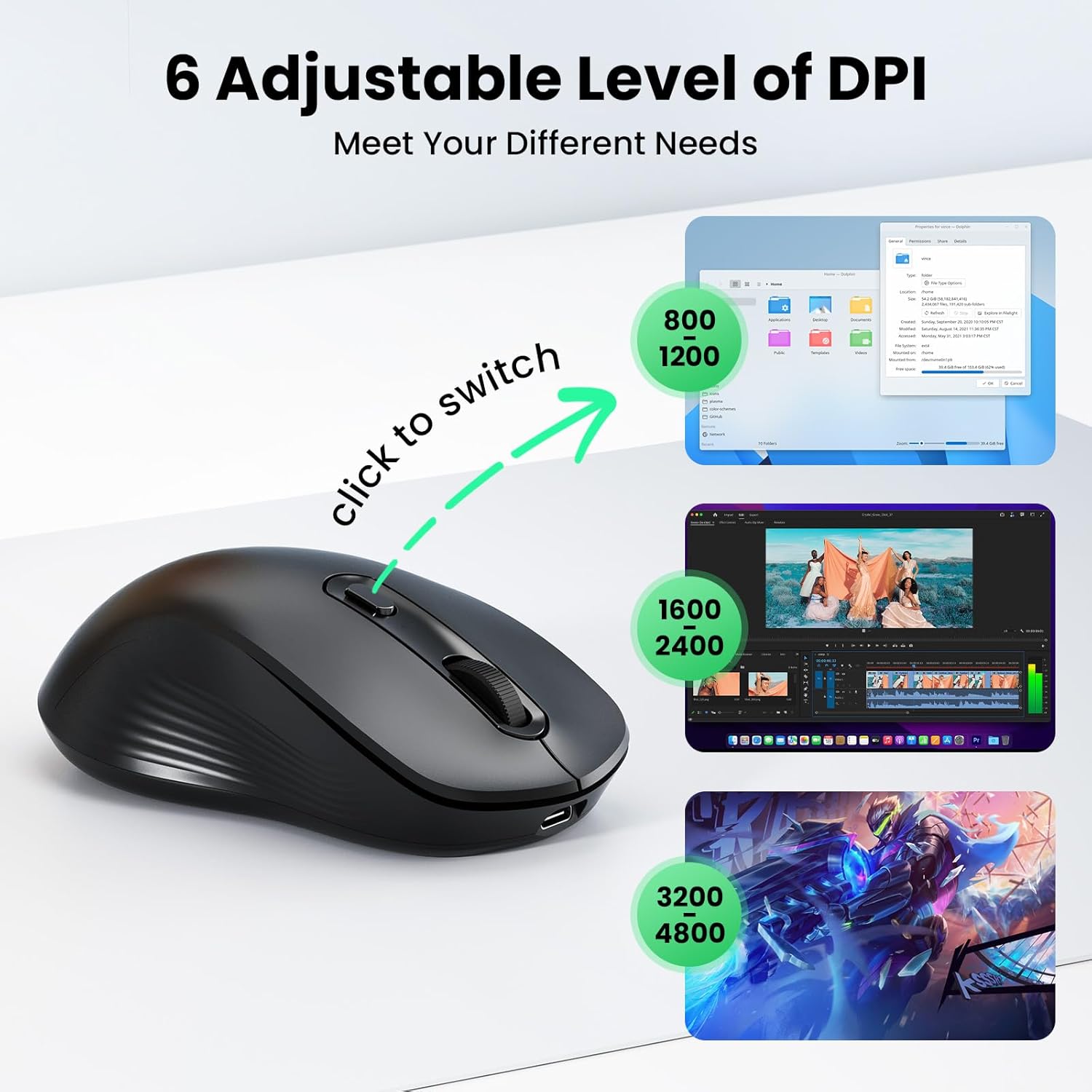
Image: An illustration demonstrating the ergonomic design of the mouse and a hand size guide (M/L) for optimal comfort.
การซ่อมบำรุง
- การทำความสะอาด: ใช้ผ้านุ่มและแห้งเช็ดทำความสะอาดเมาส์ สำหรับคราบฝังแน่น ให้เช็ดเบาๆamp สามารถใช้ผ้าได้เพื่อให้แน่ใจว่าไม่มีความชื้นเข้าไปในส่วนประกอบภายใน
- พื้นที่จัดเก็บ: เมื่อไม่ได้ใช้งานเป็นเวลานาน ให้ปิดเมาส์เพื่อประหยัดพลังงานแบตเตอรี่ เก็บในที่แห้งและเย็น หลีกเลี่ยงแสงแดดโดยตรงและอุณหภูมิที่สูงหรือต่ำเกินไป
- การดูแลแบตเตอรี่ To prolong battery life, avoid fully discharging the mouse frequently. Recharge when the low battery indicator appears.
การแก้ไขปัญหา
| ปัญหา | สาเหตุที่เป็นไปได้ | สารละลาย |
|---|---|---|
| เมาส์ไม่ตอบสนอง | Power switch is off; Low battery; Incorrect connection mode; USB receiver not plugged in (for 2.4G); Bluetooth not paired. | Ensure the mouse is turned ON. Charge the mouse. Verify the correct connection mode (2.4G, BT1, or BT2) is selected. For 2.4G, ensure the USB receiver is securely plugged in. For Bluetooth, re-pair the mouse via your device's Bluetooth settings. |
| การเคลื่อนที่ของเคอร์เซอร์ผิดปกติหรือช้า | Low battery; Dirty optical sensor; Mouse used on an unsuitable surface; DPI setting is too low. | Charge the mouse. Clean the optical sensor on the underside of the mouse. Use the mouse on a clean, non-reflective surface or a mouse pad. Adjust the DPI setting to a higher level using the DPI switch button. |
| ไม่สามารถสลับระหว่างอุปกรณ์ได้ | Devices not properly paired or connected to the selected channel. | Ensure each device is correctly paired to its designated channel (2.4G, BT1, or BT2). Press the channel switch button firmly to cycle through modes. |
ข้อมูลจำเพาะ
| คุณสมบัติ | รายละเอียด |
|---|---|
| ยี่ห้อ | TECKNET |
| แบบอย่าง | B0FF4XF8P3 |
| สี | สีดำ |
| เทคโนโลยีการเชื่อมต่อ | บลูทูธ (5.0/3.0), ไร้สาย 2.4G (USB-A) |
| เทคโนโลยีตรวจจับการเคลื่อนไหว | ออฟติคอล |
| การตั้งค่า DPI | 800, 1200, 1600, 2400, 3200, 4800 |
| จำนวนปุ่ม | 6 (Left, Right, Scroll Wheel, DPI Switch, Forward, Back) |
| การวางแนวมือ | ถนัดทั้งสองมือ |
| ความจุของแบตเตอรี่ | 800mAh ชาร์จใหม่ได้ |
| อายุการใช้งานแบตเตอรี่ | Up to 3 months (2h/day usage) |
| เวลาในการชาร์จ | ประมาณ 1.5 ชั่วโมง |
| อุปกรณ์ที่รองรับ | Personal Computer (PC, Mac, Linux) |
| การรองรับระบบปฏิบัติการ | Windows 10/11, macOS, Linux, Chrome OS, iPadOS, Android |
| ขนาดสินค้า (กว้าง x ยาว) | ขนาด 4.6 นิ้ว (ยาว) x 2.7 นิ้ว (กว้าง) (11.8 ซม. x 6.9 ซม.) |
| วัสดุ | ABS (Enclosure) |
การรับประกันและการสนับสนุน
Each TECKNET product comes with lifetime support. If you encounter any issues or are not satisfied with your product or service, please contact TECKNET customer support. Registration may be required to activate full lifetime support benefits.
For further assistance, please visit the official TECKNET webดูรายละเอียดเพิ่มเติมได้ที่เว็บไซต์ หรือดูข้อมูลติดต่อที่ให้ไว้พร้อมกับการสั่งซื้อของคุณ