
การแนะนำ
This manual provides detailed instructions for the installation, operation, and maintenance of your UNITOPSCI Single Din Car Stereo, Model 6886C. This unit features a 6.86-inch HD touchscreen, Apple CarPlay, Android Auto, Bluetooth 5.0, FM radio, USB connectivity, and support for a backup camera. Please read this manual thoroughly before use to ensure proper functionality and safety.
เนื้อหาแพ็คเกจ
ตรวจสอบว่ารายการทั้งหมดที่ระบุไว้ด้านล่างนี้รวมอยู่ในแพ็คเกจของคุณ:
- 1 x เครื่องเสียงรถยนต์
- 1 x กล้องสำรอง
- สายไฟ 1 เส้น
- สายลำโพง 1 เส้น
- 1 x Remote Control (Battery Not included)
- 1 x คู่มือผู้ใช้
- ไมโครโฟน 1 ตัว

Image: All components included in the UNITOPSCI car stereo package.
สินค้าเกินview
The UNITOPSCI 6886C is a single DIN car stereo featuring a 6.86-inch HD touchscreen. Its compact design allows for installation in standard single DIN openings.
ขนาดและการเชื่อมต่อ
The unit measures approximately 187mm (7.3 inches) in length and 52mm (2.0 inches) in height. The screen itself is 6.86 inches. The rear panel includes various ports for power, speakers, microphone, video output, camera input, and GPS antenna.

ภาพ: ด้านหน้าและด้านหลัง view with dimensions and connection ports labeled.
การติดตั้งและการตั้งค่า
ขอแนะนำให้ติดตั้งโดยผู้เชี่ยวชาญ โปรดตรวจสอบให้แน่ใจว่าได้ตัดการเชื่อมต่อไฟฟ้าของรถยนต์ก่อนเริ่มการติดตั้ง
ขั้นตอนการติดตั้ง:
- Prepare Dash Opening: Confirm your vehicle's dash opening is suitable for a single DIN unit (187mm x 52mm). A suitable dash kit may be required if the opening is not standard.
- การเชื่อมต่อสายไฟ: Connect the power cable and speaker cable to the corresponding ports on the car stereo and your vehicle's wiring harness. Refer to the wiring diagram in the included user manual for specific connections.
- กล้องสำรอง: Connect the backup camera cable to the 'CAMIN' port on the rear of the stereo. Ensure the camera's power is correctly wired to the vehicle's reverse light circuit for automatic activation.
- ไมโครโฟน: Connect the external microphone to the 'MIC' port for improved hands-free calling audio quality.
- เสาอากาศ GPS: If applicable, connect the GPS antenna to the 'GPS' port.
- หน่วยรักษาความปลอดภัย: Mount the car stereo securely into the dash opening.
- เชื่อมต่อพลังงานอีกครั้ง: เชื่อมต่อแบตเตอรี่รถยนต์กลับเข้าไป และทดสอบการทำงานทั้งหมด
คำแนะนำการใช้งาน
This section details the primary functions and features of your car stereo.
1. Apple CarPlay & Android Auto (Wired Connection)
Connect your iPhone or Android smartphone via a USB cable to access Apple CarPlay or Android Auto. This allows you to use navigation, make calls, send messages, and listen to music directly from your phone's interface displayed on the stereo screen. Voice control (Siri for CarPlay, Google Assistant for Android Auto) is supported for hands-free operation.

Image: Apple CarPlay, Android Auto, and Mirror Link functionality via wired USB connection.
2.บลูทูธ 5.0
Pair your mobile device with the stereo via Bluetooth 5.0 for hands-free calling and wireless audio streaming. Access your phonebook and dial directly from the stereo's touchscreen. The Bluetooth name for pairing is 'CAR BT'.
3. วิทยุ FM
Tune into FM radio stations (frequency range 87.5-108MHz). The unit supports 18 preset stations, allowing quick access to your favorite channels for news, music, and traffic updates.
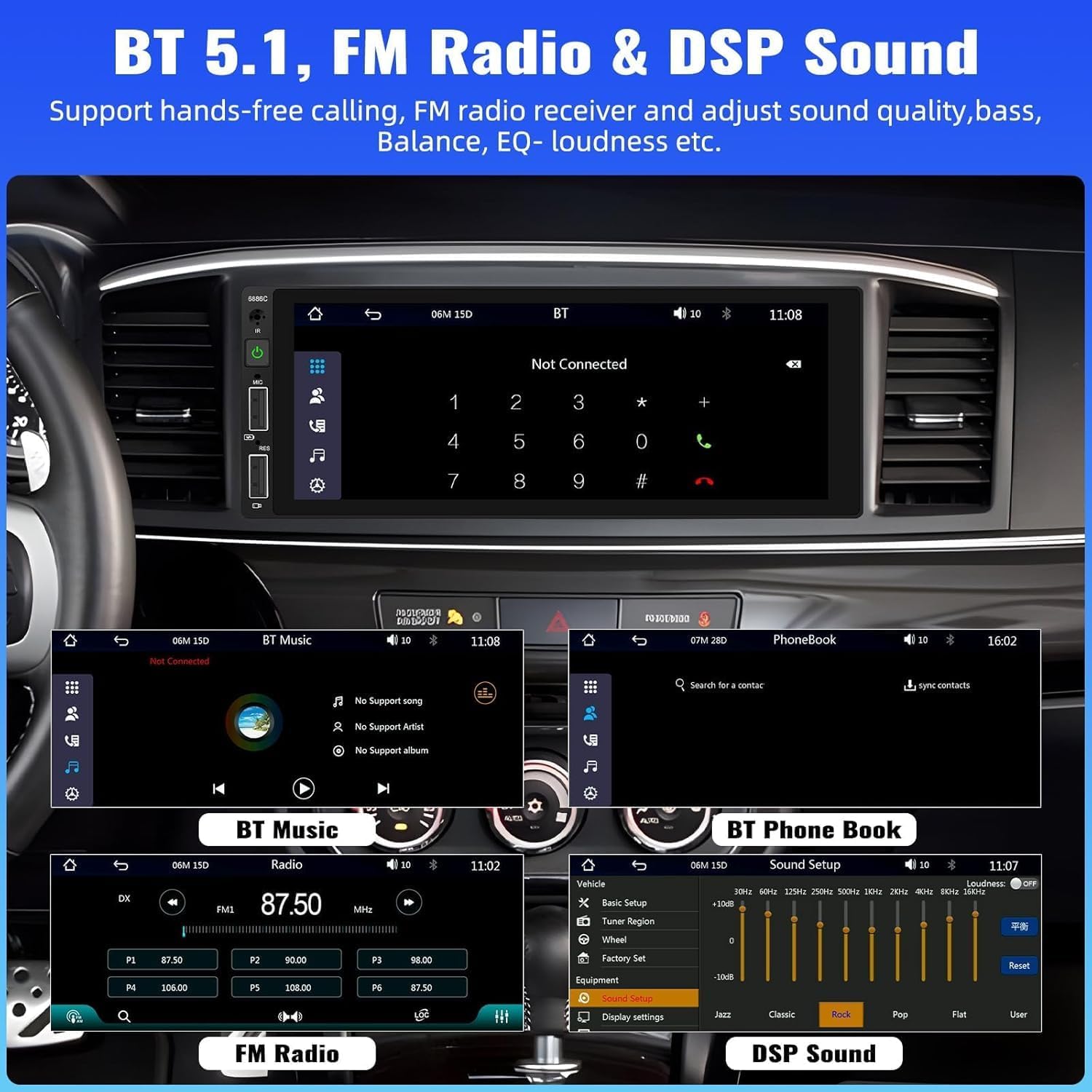
Image: Bluetooth, FM Radio, and Digital Sound Processing (DSP) settings interface.
4. ลิงก์มิเรอร์
Utilize the Mirror Link function to display your smartphone's screen directly on the car stereo. Connect your device using its original USB cable. This feature is useful for viewing maps or playing videos from your phone.
5. USB Playback & Charging
The stereo features dual USB slots. Use these ports for media playback from USB drives or for fast charging your mobile devices. The unit also supports DVR connection via USB (DVR not included).

Image: Multiple playback options including USB charging and DVR support.
6. EQ Sound Feature
Adjust the audio output to your preference using the built-in EQ sound feature. Customize settings for bass, balance, and loudness to optimize your listening experience.
7. ระบบควบคุมพวงมาลัย (SWC)
If your vehicle supports it, connect the steering wheel control wires to easily manage radio functions, adjust volume, and handle calls without taking your hands off the wheel. This enhances driving safety.
8. อินพุตกล้องสำรอง
When the vehicle is shifted into reverse gear, the stereo automatically displays the video feed from the connected backup camera. The included camera features 4 LED lights for clear night vision and parking lines to assist with safer parking maneuvers.

Image: Backup camera input and steering wheel control interface.
9. Seven Color Backlight
Customize the button backlight color to match your vehicle's interior or your personal preference. Choose from seven available colors.
10. ปิดหน่วยความจำ
The unit retains the last playing state (e.g., radio station, music track) when powered off and resumes from that point upon restart.
การซ่อมบำรุง
เพื่อให้เครื่องเสียงในรถยนต์ของคุณมีอายุการใช้งานยาวนานและมีประสิทธิภาพเหมาะสมที่สุด โปรดปฏิบัติตามคำแนะนำในการบำรุงรักษาดังต่อไปนี้:
- การทำความสะอาด: ใช้ผ้านุ่มและแห้งเช็ดทำความสะอาดหน้าจอและภายนอก หลีกเลี่ยงน้ำยาทำความสะอาดหรือตัวทำละลายที่มีฤทธิ์กัดกร่อน
- อุณหภูมิ: หลีกเลี่ยงการวางเครื่องไว้ในอุณหภูมิที่สูงเกินไป
- ความชื้น: ควรเก็บอุปกรณ์ให้แห้งและห่างจากความชื้น
- อัพเดตเฟิร์มแวร์: ตรวจสอบของผู้ผลิต webไซต์เป็นระยะสำหรับการอัปเดตเฟิร์มแวร์ที่มีอยู่เพื่อปรับปรุงประสิทธิภาพและเพิ่มคุณสมบัติ
การแก้ไขปัญหา
หากคุณประสบปัญหาเกี่ยวกับเครื่องเสียงในรถยนต์ โปรดดูปัญหาทั่วไปและวิธีแก้ไขต่อไปนี้:
| ปัญหา | สาเหตุที่เป็นไปได้ | สารละลาย |
|---|---|---|
| ไม่มีไฟฟ้า | สายไฟไม่ถูกต้อง ฟิวส์ขาด แบตเตอรี่รถยนต์อ่อน | Check power connections; Replace fuse; Check vehicle battery. |
| ไม่มีเสียง | สายลำโพงหลุดออก ระดับเสียงเบาเกินไป ฟังก์ชันปิดเสียงทำงานอยู่ | Verify speaker connections; Increase volume; Deactivate mute. |
| ไม่ได้เชื่อมต่อบลูทูธ | Bluetooth not enabled on device; Incorrect pairing process. | Ensure Bluetooth is on; Re-attempt pairing (Bluetooth name: CAR BT). |
| CarPlay/Android Auto ใช้งานไม่ได้ | สาย USB ชำรุด; โทรศัพท์ไม่รองรับ; ปัญหาซอฟต์แวร์ | Use original USB cable; Check phone compatibility; Restart phone and stereo. |
| กล้องมองหลังไม่แสดงผล | Camera not powered; Video cable disconnected; Incorrect trigger wire. | Check camera power supply; Verify video cable connection; Ensure reverse trigger wire is connected. |
ข้อมูลจำเพาะ
Detailed technical specifications for the UNITOPSCI 6886C car stereo:
- แบบอย่าง: 6886 องศาเซลเซียส
- เล่มที่tage: กระแสตรง12โวลต์
- ระบบ: วินซ์
- ชิปซีพียู: เอฟ133
- ขนาดหน้าจอ: 6.86 นิ้ว
- ความละเอียดหน้าจอ: 1280*480
- ลิงค์มิเรอร์: รองรับ
- วงวิทยุ: FM
- ชิปวิทยุ: คำถามที่ 8035
- กำลังขับ: 45W*4 (180 Watts total)
- อุณหภูมิการทำงาน: -10~60℃
- เวอร์ชันบลูทูธ: 5.0
- ชื่อบลูทูธ: รถยนต์ BT
- แสงไฟสีสันสดใส: รองรับ
- การย้อนกลับอินพุต: ซีวีบีเอส
- พลัง Ampชิปลิฟายเออร์: TDA7388
- ความถี่วิทยุ: 87.5-108เมกะเฮิรตซ์
- การสนับสนุนรูปแบบเสียง: MP3 / WMA / WAV / APE / FLAC
- การสนับสนุนรูปแบบวิดีโอ: RM/RMVB/AVI/MP4/MKV/3GP
- Picture Format Support: JPG BMP PNG
- ภาษาที่รองรับ: English, Chinese, Spanish, Portuguese, Russian, Italian, German, French, Turkish, Czech, Arabic, Polish, Hebrew
การรับประกันและการสนับสนุน
Your UNITOPSCI car stereo comes with a รับประกัน 2 ปี from the date of purchase, covering manufacturing defects. For technical assistance, troubleshooting, or warranty claims, please contact our support team.
การสนับสนุนทางออนไลน์: UNITOPSCI@126.com


