
การแนะนำ
This manual provides comprehensive instructions for the safe and efficient operation of your STF Allure Portable Speaker, model ST-S12629. Please read this manual thoroughly before using the device and retain it for future reference.
ข้อมูลด้านความปลอดภัย
- อย่าให้ลำโพงโดนน้ำหรือความชื้นมากเกินไป
- หลีกเลี่ยงอุณหภูมิที่สูงหรือต่ำเกินไป
- ห้ามถอดประกอบหรือพยายามซ่อมลำโพงด้วยตนเอง การกระทำดังกล่าวจะทำให้การรับประกันเป็นโมฆะ
- เก็บให้พ้นจากมือเด็ก
- ใช้เฉพาะสายชาร์จที่ให้มาเท่านั้น
เนื้อหาแพ็คเกจ
กรุณาตรวจสอบแพ็คเกจสำหรับรายการต่อไปนี้:
- STF Allure Portable Speaker (ST-S12629)
- สายชาร์จ USB
- คู่มือการใช้งาน (เอกสารนี้)
Note: No additional components are included beyond the speaker, charging cable, and manual.
สินค้าเกินview
The STF Allure Portable Speaker (ST-S12629) features powerful audio output, versatile connectivity, and dynamic RGB lighting. Below are key components and controls.
ด้านหน้า View

ภาพ: ด้านหน้า view of the STF Allure Portable Speaker, showcasing the dual 5-inch speakers with RGB lighting and the included USB charging cable.
แผงควบคุมด้านบน
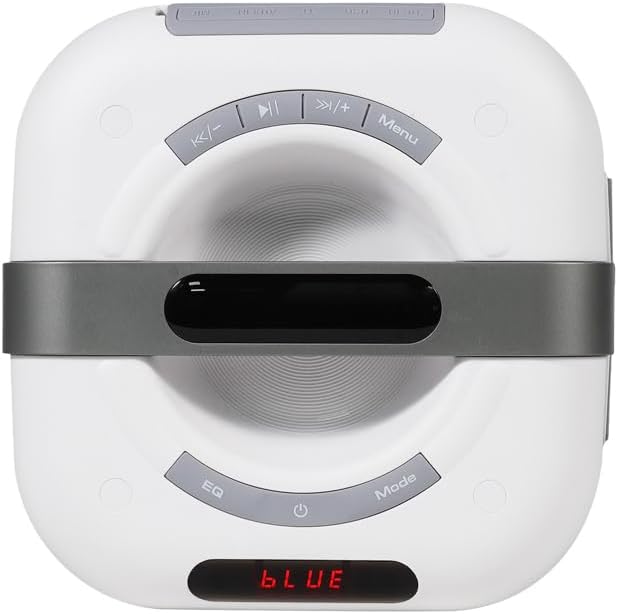
Image: Close-up of the top panel of the STF Allure Portable Speaker, showing control buttons for playback, volume, EQ, mode selection, and power.
- ปุ่มเปิด/ปิด: Press and hold to turn on/off. Short press to toggle LED lights.
- ปุ่มโหมด: กดสั้นๆ เพื่อสลับระหว่างโหมด Bluetooth, วิทยุ FM, USB, Micro SD และ AUX
- ปุ่ม EQ: Short press to cycle through equalizer presets.
- ปุ่มเล่น/หยุดชั่วคราว: เล่นหรือหยุดเสียงชั่วคราว ในโหมด FM ให้กดสั้นๆ เพื่อสแกนหาคลื่นอัตโนมัติ
- ปุ่มก่อนหน้า/ลดระดับเสียง: กดสั้นเพื่อเล่นเพลงก่อนหน้า กดยาวเพื่อลดระดับเสียง
- ปุ่มถัดไป/เพิ่มระดับเสียง: กดสั้นเพื่อเล่นเพลงถัดไป กดยาวเพื่อเพิ่มระดับเสียง
- ปุ่มเมนู: (Functionality may vary by mode, typically for settings or TWS pairing).
พอร์ตแผงด้านหลัง
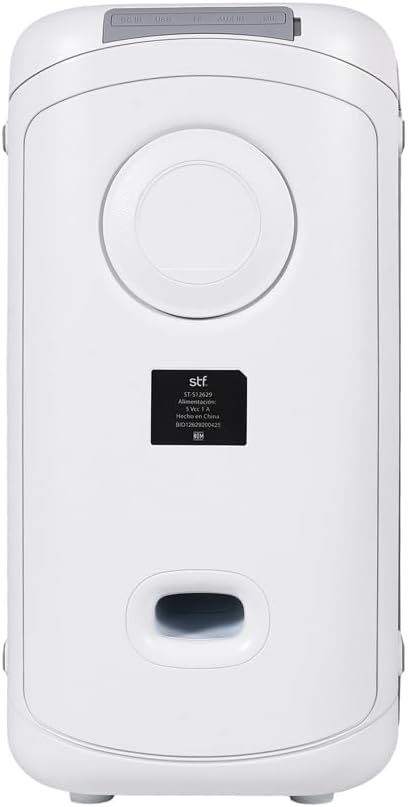
ภาพ: ด้านหลัง view of the STF Allure Portable Speaker, highlighting the various input ports including DC IN, USB, Micro SD, AUX, and Microphone.
- พอร์ต DC IN: สำหรับชาร์จลำโพงโดยใช้สาย USB ที่ให้มา
- พอร์ต USB: For playing audio from a USB flash drive (up to 32 GB).
- ช่องเสียบการ์ด Micro SD: For playing audio from a Micro SD card (up to 32 GB).
- ช่องต่อ AUX (3.5 มม.): For connecting external audio devices via an auxiliary cable.
- ช่องเสียบไมโครโฟน (6.3 มม.): สำหรับการเชื่อมต่อไมโครโฟน
การตั้งค่า
- การชาร์จลำโพง:
Before first use, fully charge the speaker. Connect the provided USB charging cable to the DC IN port on the speaker and the other end to a USB power adapter (not included) or a computer's USB port. The charging indicator will illuminate. A full charge takes approximately 3 hours.
- การเปิด/ปิดเครื่อง:
Press and hold the Power button on the top panel for a few seconds to turn the speaker on or off.
คำแนะนำการใช้งาน
โหมดบลูทู ธ
- Turn on the speaker. It will automatically enter Bluetooth pairing mode, indicated by a flashing "BLUE" on the display and an audible prompt.
- เปิดใช้งานบลูทูธบนอุปกรณ์ของคุณ (สมาร์ทโฟน แท็บเล็ต ฯลฯ)
- ค้นหา "STF Allure" in your device's Bluetooth list and select it to pair.
- Once paired, the speaker will emit an audible confirmation, and "BLUE" will stop flashing. You can now play audio from your device.
- Use the Play/Pause, Previous/Volume Down, and Next/Volume Up buttons on the speaker or your device to control playback.
ฟังก์ชัน True Wireless Stereo (TWS)
The TWS function allows you to connect two STF Allure speakers for a stereo sound experience.
- Ensure both STF Allure speakers are turned on and in Bluetooth mode, but not connected to any device.
- On one of the speakers (this will be the primary speaker), press and hold the "Menu" button (or the designated TWS button if available, refer to specific model markings) until you hear a pairing tone.
- ลำโพงทั้งสองตัวจะเชื่อมต่อกันโดยอัตโนมัติ เมื่อเชื่อมต่อเสร็จแล้ว คุณจะได้ยินเสียงยืนยัน
- Now, connect your Bluetooth device to the primary speaker as described in the "Bluetooth Mode" section. Both speakers will play audio in stereo.
โหมดวิทยุ FM
- Press the "Mode" button repeatedly until "FM" appears on the display.
- Press the "Play/Pause" button once to start an automatic scan for available FM stations. The speaker will save the found stations.
- Use the "Previous/Volume Down" and "Next/Volume Up" buttons to navigate between saved stations.
USB / Micro SD Card Mode
- Insert a USB flash drive or a Micro SD card (up to 32 GB, formatted to FAT32) containing MP3 audio fileเสียบเข้ากับพอร์ตที่เกี่ยวข้องบนแผงด้านหลัง
- The speaker will automatically switch to USB or Micro SD mode and begin playing audio. If not, press the "Mode" button until the correct mode is selected.
- Use the Play/Pause, Previous/Volume Down, and Next/Volume Up buttons to control playback.
โหมดอินพุต AUX
- Connect one end of a 3.5mm auxiliary cable (not included) to the AUX input port on the speaker.
- Connect the other end of the auxiliary cable to the audio output jack of your external device.
- กดปุ่ม "Mode" ซ้ำๆ จนกระทั่ง "AUX" ปรากฏบนหน้าจอ
- ควบคุมการเล่นเสียงได้โดยตรงจากอุปกรณ์ภายนอกที่เชื่อมต่ออยู่
อินพุตไมโครโฟน
- Connect a 6.3mm microphone (not included) to the Microphone input port on the rear panel.
- ปรับระดับเสียงไมโครโฟนโดยใช้ปุ่มควบคุมบนตัวไมโครโฟนเองหรือปุ่มควบคุมระดับเสียงหลักของลำโพง
ไฟ LED RGB
The speaker features dynamic RGB lighting. Short press the Power button to cycle through different lighting modes or turn the lights off.
การซ่อมบำรุง
- ทำความสะอาดลำโพงด้วยผ้านุ่มและแห้ง ห้ามใช้น้ำยาทำความสะอาดหรือสารละลายที่มีฤทธิ์กัดกร่อน
- เก็บลำโพงไว้ในที่เย็นและแห้งเมื่อไม่ได้ใช้งาน
- ควรหลีกเลี่ยงการทำลำโพงตกหรือการกระแทกอย่างแรง
- หากไม่ได้ใช้งานลำโพงเป็นเวลานาน ควรชาร์จแบตเตอรี่เป็นระยะเพื่อรักษาอายุการใช้งานของแบตเตอรี่
การแก้ไขปัญหา
| ปัญหา | สาเหตุที่เป็นไปได้ | สารละลาย |
|---|---|---|
| ลําโพงไม่เปิดขึ้น | แบตเตอรี่อ่อน | ชาร์จลำโพงให้เต็ม |
| ไม่มีเสียง. | Volume too low; incorrect mode selected; device not paired. | Increase volume; press "Mode" button to select correct input; re-pair Bluetooth device. |
| การจับคู่บลูทูธล้มเหลว | Speaker too far from device; other devices connected; speaker not in pairing mode. | Ensure speaker and device are within 10 meters; disconnect from other devices; ensure speaker is flashing "BLUE". |
| การจับคู่ TWS ล้มเหลว | Speakers not in Bluetooth mode; one speaker already paired to a device. | ตรวจสอบให้แน่ใจว่าลำโพงทั้งสองอยู่ในโหมด Bluetooth และไม่ได้เชื่อมต่อกับอุปกรณ์ใดๆ ก่อนเริ่มการจับคู่ TWS |
| ไม่สามารถเล่นไฟล์จาก USB/Micro SD ได้ | ไม่ถูกต้อง file format; card/drive not formatted correctly; card/drive capacity too large. | ทำให้มั่นใจ files are MP3; format to FAT32; use cards/drives up to 32 GB. |
ข้อมูลจำเพาะ
| คุณสมบัติ | รายละเอียด |
|---|---|
| ชื่อรุ่น | ST-S12629 |
| ประเภทลำโพง | Portable with Bluetooth |
| ขนาดลำโพง | ลำโพงคู่ขนาด 5 นิ้ว |
| กำลังขับ | 20วัตต์ |
| แรงดันเสียง | 86 เดซิเบล |
| เวอร์ชันบลูทูธ | 5.3 |
| ช่วงสาย | สูงถึง 10 เมตร (33 ฟุต) |
| ความจุของแบตเตอรี่ | 3000 มิลลิแอมป์ |
| เวลาการเล่น | นานถึง 3 ชั่วโมง |
| เวลาในการชาร์จ | ประมาณ 3 ชั่วโมง |
| ตัวเลือกการเชื่อมต่อ | Bluetooth 5.3, USB, Micro SD, FM Radio, Aux 3.5mm, Microphone 6.3mm |
| Max USB/Micro SD Capacity | 32GB |
| วิธีการควบคุม | ปุ่มสัมผัส |
| สี | สีขาว |
การรับประกันและการสนับสนุน
The STF Allure Portable Speaker (ST-S12629) comes with a 5-year warranty. For warranty claims or technical support, please contact STF customer service.
For further assistance, please visit the official STF website or contact their support channels. Keep your purchase receipt as proof of purchase for warranty purposes.
Note: Warranty terms and conditions may vary by region. Please refer to the official STF warranty policy for detailed information.