
1. บทนำ
Thank you for choosing the Masmssm Smart Scale. This device is designed to provide comprehensive body composition analysis, helping you track your health and fitness journey. It measures various metrics including weight, BMI, body fat, and heart rate, and syncs with compatible mobile applications for detailed progress monitoring.
2. ข้อควรระวังเพื่อความปลอดภัย
- Place the scale on a hard, flat surface during use. Avoid carpets or uneven surfaces to ensure accurate readings.
- Do not use the scale if you are pregnant or have a pacemaker or other internal medical device. Consult a healthcare professional before use.
- The scale surface is made of tempered glass. Exercise caution, as it can be slippery when wet.
- Do not jump on the scale. Handle with care to avoid damage.
- Keep the scale clean and dry. Avoid using abrasive cleaners or harsh chemicals.
3. อะไรอยู่ในกล่อง
- 1 x Masmssm Smart Weight Scale
- 1 x คู่มือการใช้งาน
- แบตเตอรี่ AAA 4 ก้อน
4. คู่มือการติดตั้ง
4.1. การติดตั้งแบตเตอรี่
Open the battery compartment on the underside of the scale. Insert the 4 AAA batteries provided, ensuring correct polarity. Close the battery compartment securely.
Video: Demonstrates unboxing and battery installation for the Masmssm Smart Scale.
4.2. ดาวน์โหลดแอปและการจับคู่
- Download the 'Fitdays' app from the Apple App Store or Google Play Store.
- เปิดใช้งานบลูทูธบนสมาร์ทโฟนของคุณ
- Open the 'Fitdays' app and register your personal ID.
- Step onto the scale to activate it. The app should automatically detect and pair with the scale. Confirm pairing within the app.

Image: The Masmssm Smart Scale is compatible with various fitness applications, including Apple Health, Samsung Health, Fitbit, Health Connect, and Apple Watch, allowing for seamless data synchronization.
5. คู่มือการใช้งาน
5.1. การวัดผล
- วางเครื่องชั่งบนพื้นผิวที่มั่นคงและเรียบ
- ตรวจสอบให้แน่ใจว่าเท้าของคุณสะอาดและแห้ง
- Step onto the scale barefoot, placing your feet on the four electrode pads. Stand still until the display shows your weight.
- If the 'Fitdays' app is open and connected via Bluetooth, your measurements will automatically sync to your profile.

Image: The large VA display on the Masmssm Smart Scale instantly shows 8 essential body metrics, including weight, body fat, body water, heart rate, BMI, muscle mass, bone mass, and body type, providing a clear overview เกี่ยวกับข้อมูลสุขภาพของคุณ
5.2. Understanding Display Metrics
The scale's display provides instant readings for 8 key metrics. For a more detailed analysis of 22 health insights, refer to the 'Fitdays' app.
- 8 Key Metrics (on display): Weight, Body Fat, Body Water, BMI, Muscle Mass, Bone Mass, Body Age, Body Type.
- 22 Health Insights (via app): Includes all 8 key metrics plus Fat Mass, Fat-free Body Weight, BMR, Cardiac Index, Muscle Rate, Skeletal Muscle, Ideal Body Weight, Obesity Level, Subcutaneous Fat, Visceral Fat, Protein, Protein Mass, and Heart Rate.

Image: The Masmssm Smart Scale provides 22 precision metrics for comprehensive health tracking, offering detailed insights into various body composition aspects beyond just weight.
5.3. Using the 'Fitdays' App
The 'Fitdays' app allows you to view detailed data, track trends over time, set goals, and manage multiple user profiles.
- ติดตามความคืบหน้า: Monitor changes in weight, BMI, body fat, and other metrics over recent days, weeks, months, or years.
- Set Targets: Establish personal weight goals and track your progress towards them within the app.
- ผู้ใช้หลายคน: The scale supports up to 24 users, making it suitable for families or teams. Each user can have their own profile to track individual progress.
- โหมดการวัด: Select from various modes including Baby, Toddler, Child, Teen, Standard, and Athlete to ensure accurate measurements tailored to different body types and stagใช่

Image: The Fitdays app allows users to track their progress and set targets for various health metrics, displaying historical data in clear graphs for easy monitoring of changes over time.
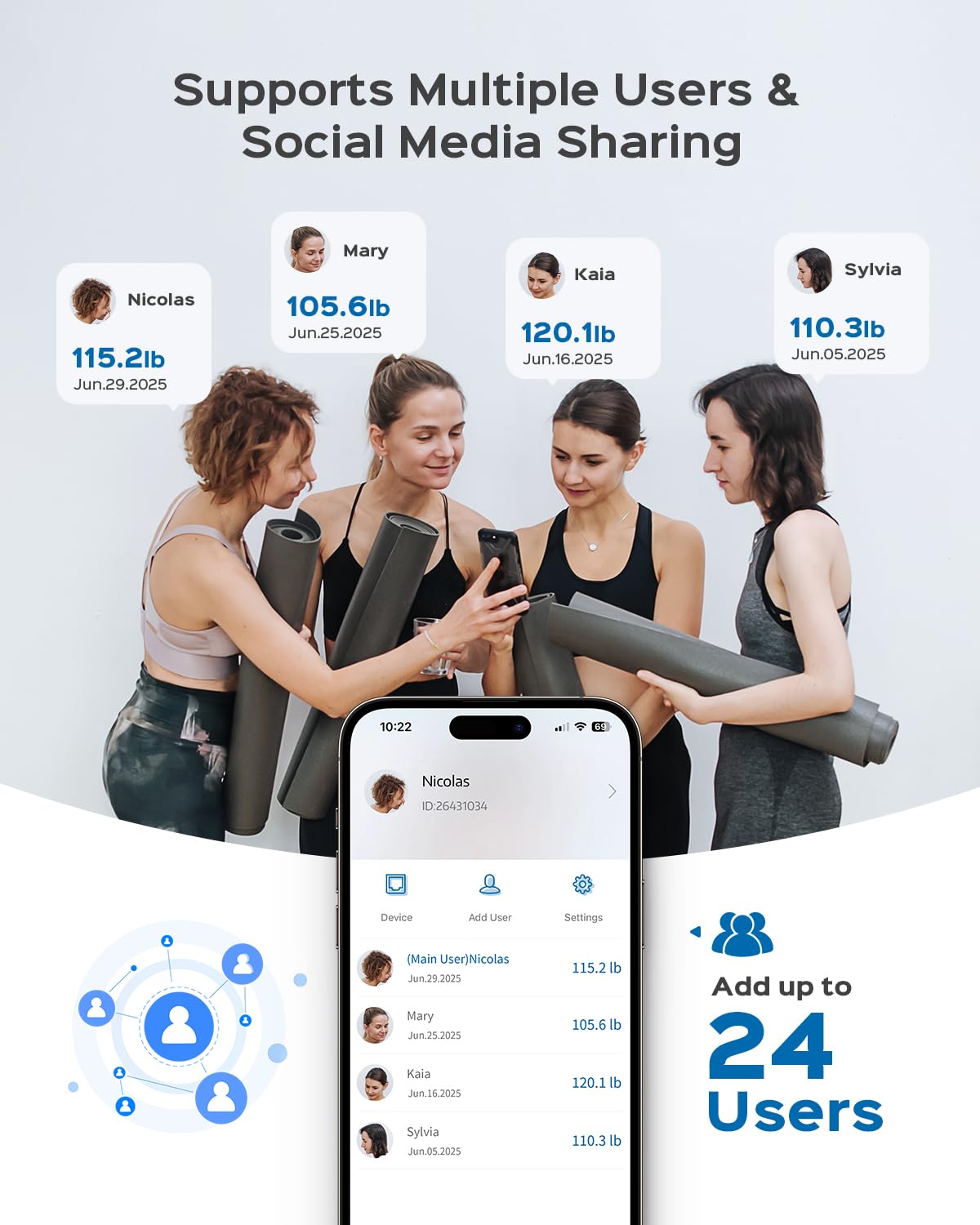
Image: The Masmssm Smart Scale supports up to 24 users, allowing families or groups to track individual health metrics and progress through the Fitdays app, with options for social media sharing.

Image: The Masmssm Smart Scale offers multiple measurement modes, including Baby, Toddler, Child, Teen, Standard, and Athlete, catering to diverse user needs and ensuring accurate readings for every stagอีแห่งชีวิต
6. การบำรุงรักษา
- การทำความสะอาด: เช็ดพื้นผิวขนาดด้วยโฆษณาamp ใช้ผ้าและผงซักฟอกอ่อนๆ เช็ดทำความสะอาด ห้ามใช้สารทำความสะอาดที่มีฤทธิ์กัดกร่อน หรือแช่คราบตะกรันในน้ำ
- การเปลี่ยนแบตเตอรี่: When the low battery indicator appears on the display, replace all four AAA batteries with new ones.
- พื้นที่จัดเก็บ: เก็บเครื่องชั่งไว้ในที่แห้งและเย็น หลีกเลี่ยงแสงแดดโดยตรงและอุณหภูมิที่สูงหรือต่ำเกินไป
7 การแก้ไขปัญหา
| ปัญหา | สาเหตุที่เป็นไปได้ | สารละลาย |
|---|---|---|
| แสดง "โล" | แบตเตอรี่ต่ำ | เปลี่ยนแบตเตอรี่ AAA ทั้ง 4 ก้อน |
| แสดงคำว่า "เอ่อ" | Overload (weight exceeds 400lb/180kg) | ลดน้ำหนักบนตาชั่ง |
| "C" displayed | จำเป็นต้องมีการสอบเทียบ | Step off the scale, wait for it to turn off, then step on again to re-calibrate. |
| การอ่านที่ไม่ถูกต้อง | Scale on uneven surface or carpet | วางเครื่องชั่งบนพื้นผิวที่แข็งและเรียบ |
| ไม่มีการเชื่อมต่อแอป | Bluetooth off or app not open | Ensure Bluetooth is enabled and the 'Fitdays' app is open. |
8. ข้อมูลจำเพาะ
- ยี่ห้อ: masmssm
- แบบอย่าง: FG2319WB-D
- น้ำหนักจำกัด: 400 ปอนด์ / 180 กก.
- ความแม่นยำในการอ่านข้อมูล: 0.1 ปอนด์ / 0.05 กก.
- ประเภทจอภาพ: LCD, Digital
- วัสดุ: Tempered Glass, Acrylonitrile Butadiene Styrene
- คุณสมบัติพิเศษ: Body Fat, Bone Mass, Heart Rate, Large Display, Precision Balanced
- การเชื่อมต่อ: Bluetooth (compatible with iOS & Android)
- แหล่งพลังงาน: ถ่าน AAA 4 ก้อน
- ขนาด : 11 x 11 x 0.98 นิ้ว (28 x 28 x 2.5 ซม.)
- น้ำหนักสินค้า: 4.02 ปอนด์

Image: The Masmssm Smart Scale is equipped with 4 high-precision sensors, ensuring accurate measurements up to 400 lbs (180 kg) with 0.1 lb (0.05 kg) accuracy.

Image: The design of the Masmssm Smart Scale prioritizes safety and durability, featuring 5mm tempered glass, anti-slip pads, and rounded corners for secure daily use.
9. การรับประกันและการสนับสนุน
For warranty information, technical support, or any inquiries regarding your Masmssm Smart Scale, please contact the manufacturer directly. Refer to the contact details provided in the product packaging or on the official Masmssm webเว็บไซต์.