
1. บทนำ
This manual provides comprehensive instructions for the safe and effective use of the AMPBANK H128 Handheld Thermal Camera. The H128 is designed for precise temperature measurement and thermal imaging, suitable for various applications including electrical inspections, HVAC diagnostics, building energy audits, and automotive maintenance. Please read this manual thoroughly before operating the device and retain it for future reference.

รูปที่ 1.1: AMPBANK H128 Handheld Thermal Camera, showcasinด้วยการออกแบบตามหลักสรีรศาสตร์และจอแสดงผลแบบบูรณาการ
2. ข้อมูลด้านความปลอดภัย
ปฏิบัติตามข้อควรระวังด้านความปลอดภัยต่อไปนี้เสมอเพื่อป้องกันการบาดเจ็บและความเสียหายต่ออุปกรณ์
- Do not point the camera directly at extremely high-intensity energy sources, such as the sun or lasers, as this may damage the infrared detector.
- Avoid dropping the device or subjecting it to severe impact, despite its robust design.
- Do not immerse the device in water or other liquids. While it has an IP65 rating for dust and water jet protection, it is not designed for submersion.
- Use only the specified charging cable (USB-C) and power adapter to charge the device.
- ห้ามถอดประกอบหรือดัดแปลงกล้องด้วยตนเอง การซ่อมแซมควรดำเนินการโดยช่างผู้ชำนาญการที่ได้รับอนุญาตเท่านั้น
- Keep the lens clean and free from dust and debris. Use a soft, lint-free cloth for cleaning.
- Operate the device within the specified environmental conditions (temperature and humidity).
3. สินค้าหมดview
3.1 ส่วนประกอบ
การ AMPBANK H128 thermal camera includes the following main components:
- เลนส์อินฟราเรด: ดักจับรังสีความร้อน
- หน้าจอแสดงผล: Shows thermal images, temperature readings, and menu options.
- ปุ่มควบคุม: For navigation and selection (OK, Up, Down, Return/Power).
- ปุ่มทริกเกอร์: To capture images.
- พอร์ต USB-C: สำหรับการชาร์จและถ่ายโอนข้อมูล
- ขาตั้งกล้อง: Standard 1/4-inch thread for stable positioning.
3.2. คุณสมบัติหลัก
The H128 thermal camera offers a range of advanced features for efficient and accurate thermal inspections:
- Enhanced Clarity with TISR Resolution: The camera utilizes TISR (Thermal Image Super Resolution) technology to achieve an effective display resolution of 240x240 pixels from a 128x128 infrared sensor, providing clearer thermal images.
- อายุการใช้งานแบตเตอรี่ยาวนานขึ้น 24 ชั่วโมง: Equipped with a built-in 2900mAh rechargeable battery, the H128 provides up to 24 hours of continuous operation, minimizing downtime during extended inspections.
- Precise Temperature Measurement: The device offers high accuracy with a temperature resolution of 0.1°C and readings within ±3%, covering a wide temperature range from -4°F to 842°F (-20°C to 450°C). Users can adjust emissivity for various materials to improve accuracy.
- Temperature Alarm for Anomaly Detection: A built-in alarm system quickly identifies abnormal heat sources, automatically tracking and displaying maximum, minimum, and center temperatures on the screen.
- Durable and Robust Design: The H128 is built to withstand demanding environments, featuring a 6.56-foot (2-meter) drop protection and an IP65 ingress protection rating against dust and water jets.
- อัตราเฟรมสูง: A 25Hz frame rate ensures smooth, real-time thermal imagery, crucial for dynamic inspections.
- Multiple Thermal Palettes: Choose from 5 different color palettes (Iron Red, Black Hot, Rainbow, White Hot, Red Hot) to best visualize temperature differences for specific applications.

Figure 3.1: Comparison of thermal image clarity with and without TISR technology, demonstrating the enhanced 240x240 resolution.

Figure 3.2: Illustration of the H128's long-lasting 24-hour battery life and Type-C charging port.

Figure 3.3: The H128 in use, demonstrating its capability for accurate temperature measurement in an electrical panel.

Figure 3.4: The H128 display highlighting hot, center, and cold spots with an integrated high/low temperature alarm.
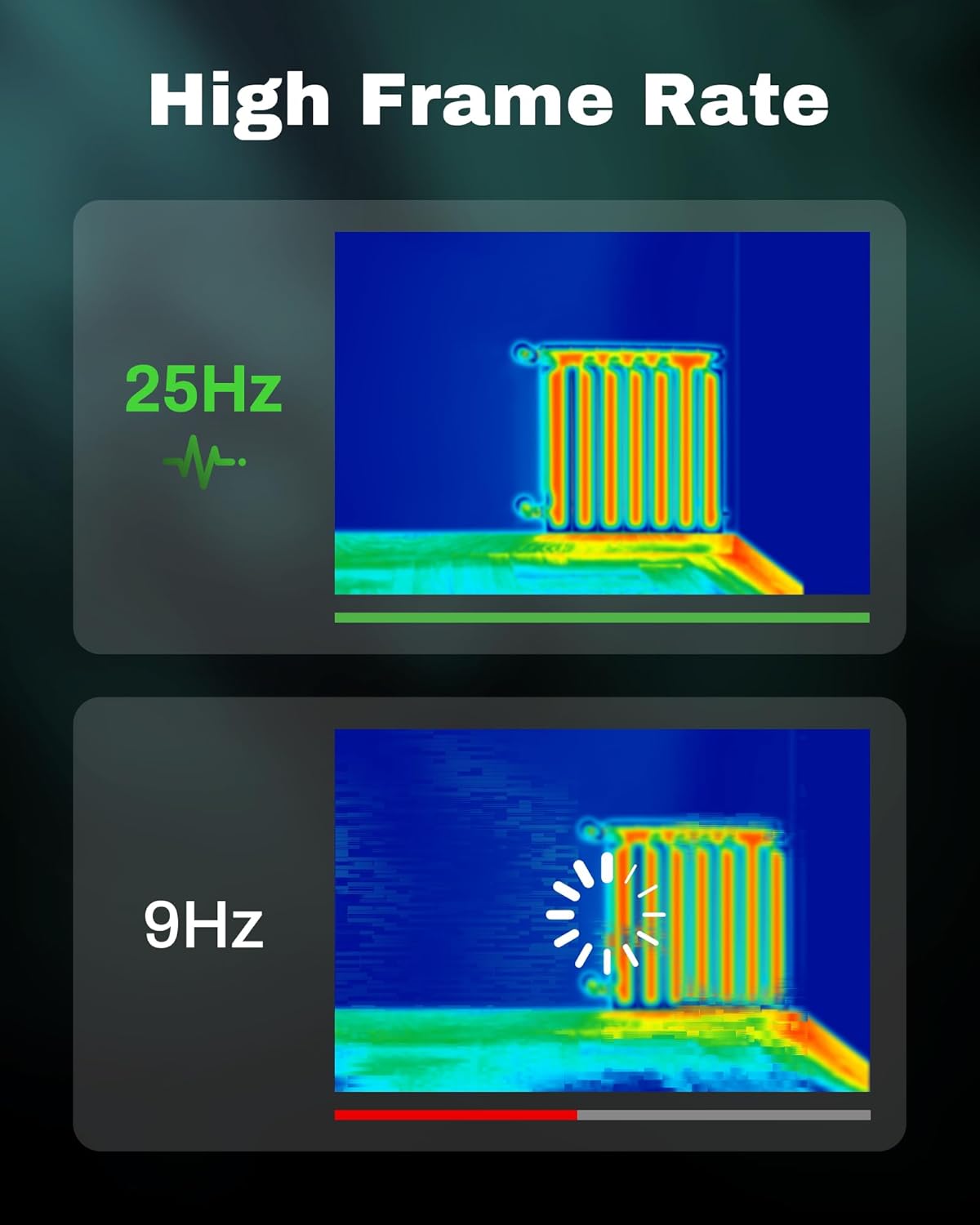
Figure 3.5: Visual comparison of thermal image fluidity at 25Hz versus 9Hz frame rates.

Figure 3.6: Display of the five available thermal color palettes for varied visualization of heat signatures.
4. การตั้งค่า
4.1. การแกะกล่อง
Carefully remove all items from the packaging. The box should contain:
- AMPBANK H128 Thermal Imaging Camera
- สาย USB-C
Inspect the camera for any signs of damage. If any components are missing or damaged, contact customer support immediately.
4.2. การชาร์จแบตเตอรี่
Before first use, fully charge the camera's built-in battery.
- Connect the supplied USB-C cable to the USB-C port on the top of the camera.
- ต่อปลายอีกด้านของสาย USB-C เข้ากับอะแดปเตอร์แปลงไฟ USB ที่ใช้งานร่วมกันได้ (ไม่ได้รวมอยู่ในชุด) หรือพอร์ต USB ของคอมพิวเตอร์
- The charging indicator on the screen will show the charging status. A full charge typically takes several hours.
- เมื่อชาร์จเต็มแล้ว ให้ถอดสายเคเบิลออก
4.3. การเปิดเครื่องครั้งแรกและการตั้งค่าพื้นฐาน
- เปิดเครื่อง: Press and hold the power button (often integrated with the Return button) for approximately 8 seconds until the screen illuminates.
- เลือกภาษา: Upon first power-on, you may be prompted to select your preferred language. Use the Up/Down buttons to navigate and the OK button to confirm.
- วันที่และเวลา: ตั้งวันที่และเวลาที่ถูกต้องเพื่อให้ได้เวลาที่แม่นยำamping of captured images. Navigate to the settings menu using the OK button, then find the Date/Time option.
5. การดำเนินการ
5.1. การทำงานพื้นฐาน
- เปิด/ปิดเครื่อง: Press and hold the power button for 8 seconds to turn on. Press and release the power button to turn off or enter sleep mode.
- เมนูการนำทาง: ใช้ OK ปุ่มเพื่อเข้าสู่เมนู ใช้ Up และ ลง ปุ่มลูกศรใช้สำหรับเลื่อนดูตัวเลือกต่างๆ กด OK to select an option. Press the กลับ button to exit a menu or go back.
- จับภาพ: Aim the camera at the target. Press the trigger button (located on the handle) to capture a thermal image. Images are saved internally.
5.2. Measurement Modes and Settings
- Temperature Spot Measurement: The H128 automatically displays the maximum, minimum, and center temperatures on the screen.
- การปรับค่าการปล่อยก๊าซเรือนกระจก: For accurate temperature readings, adjust the emissivity setting based on the material being inspected. Access this setting through the menu. Common emissivity values can be found in reference tables.
- การตั้งค่าระยะทาง: Inputting the approximate distance to the target can further refine temperature accuracy.
- Thermal Palettes: Change the color scheme of the thermal image to highlight temperature differences more effectively. Navigate to the palette settings in the menu and choose from Iron Red, Black Hot, Rainbow, White Hot, or Red Hot.
5.3. การจัดการข้อมูล
The H128 can store over 8000 images internally. To transfer images to a computer:
- Connect the camera to your computer using the supplied USB-C cable.
- The camera will appear as a removable storage device.
- Browse to the image folder and copy the desired fileไปที่คอมพิวเตอร์ของคุณ

Figure 5.1: Connecting the H128 thermal camera to a laptop via USB-C for image transfer.
6. การบำรุงรักษา
6.1. การทำความสะอาด
- ตัวกล้อง: เช็ดตัวกล้องด้วยผ้านุ่มๆamp ผ้า ห้ามใช้สารทำความสะอาดที่มีฤทธิ์กัดกร่อนหรือตัวทำละลาย
- เลนส์อินฟราเรด: The infrared lens is a delicate optical component. Use a lens cleaning cloth or a soft, lint-free cloth specifically designed for optics. Gently wipe the lens to remove dust or smudges. Do not apply excessive pressure or use harsh chemicals.
6.2. การจัดเก็บ
When not in use, store the H128 in a cool, dry place, away from direct sunlight and extreme temperatures. Ensure the battery is partially charged (around 50%) before long-term storage to preserve battery health.
6.3. การดูแลแบตเตอรี่
เพื่อยืดอายุการใช้งานแบตเตอรี่ให้สูงสุด:
- หลีกเลี่ยงการปล่อยแบตเตอรี่จนหมดบ่อยครั้ง
- หลีกเลี่ยงการปล่อยให้แบตเตอรี่ชาร์จเต็มเป็นเวลานาน
- ชาร์จแบตเตอรี่ที่อุณหภูมิห้อง
7 การแก้ไขปัญหา
| ปัญหา | สาเหตุที่เป็นไปได้ | สารละลาย |
|---|---|---|
| กล้องไม่สามารถเปิดได้ | แบตเตอรี่หมด | ชาร์จแบตเตอรี่โดยใช้สาย USB-C |
| ภาพไม่ชัดหรือไม่คมชัด | Lens is dirty. / Incorrect focus (if applicable). | Clean the infrared lens with a soft, lint-free cloth. The H128 has fixed focus, ensure you are within the optimal measurement distance. |
| การอ่านอุณหภูมิดูเหมือนจะไม่แม่นยำ | Incorrect emissivity setting. / Distance to target is too far. | Adjust the emissivity setting in the menu to match the material being measured. Ensure you are within the recommended measurement distance. |
| ไม่สามารถโอนภาพไปยังคอมพิวเตอร์ได้ | Loose USB-C connection. / Driver issue. | Ensure the USB-C cable is securely connected to both the camera and the computer. Try a different USB port or cable. Restart both devices. |
| อายุการใช้งานแบตเตอรี่สั้นกว่าที่คาดไว้ | Frequent use of high-brightness settings. / Battery degradation over time. | Reduce screen brightness if possible. Ensure proper charging and storage practices. If battery life significantly degrades, contact support. |
If the problem persists after attempting these solutions, please contact AMPBANK customer support.
8. ข้อมูลจำเพาะ
| พารามิเตอร์ | ค่า |
|---|---|
| แบบอย่าง | H128 |
| ความละเอียดอินฟราเรด | 128x128 พิกเซล |
| TISR Display Resolution | 240x240 พิกเซล |
| ช่วงอุณหภูมิ | -4°F ถึง 842°F (-20°C ถึง 450°C) |
| ความแม่นยำ | ±3% หรือ ±3°C (แล้วแต่ว่าค่าใดมากกว่า) |
| ความไวต่อความร้อน (NETD) | 40มก. |
| อัตราเฟรม | 25เฮิรตซ์ |
| ประเภทแบตเตอรี่ | แบตเตอรี่ลิเธียมไอออนแบบชาร์จไฟได้ในตัว (2900mAh) |
| อายุการใช้งานแบตเตอรี่ | ใช้งานต่อเนื่องได้สูงสุด 24 ชั่วโมง |
| พอร์ตชาร์จ | ยูเอสบี-ซี |
| การป้องกันการตกหล่น | 6.56 ฟุต (2 เมตร) |
| ระดับการป้องกันน้ำและฝุ่น (IP) | IP65 |
| ความจุในการเก็บข้อมูล | 8000+ images |
| ขนาด | ขนาด 9.33 x 4.76 x 3.86 นิ้ว (โดยประมาณ) |
| น้ำหนัก | 1.06 ปอนด์ (โดยประมาณ) |
9. การรับประกันและการสนับสนุน
สำหรับข้อมูลการรับประกันโดยละเอียด โปรดดูบัตรรับประกันที่แนบมากับผลิตภัณฑ์ของคุณ หรือเยี่ยมชมเว็บไซต์อย่างเป็นทางการ AMPธนาคาร webไซต์ เงื่อนไขการรับประกันอาจแตกต่างกันไปตามภูมิภาคและผลิตภัณฑ์
If you require technical assistance, have questions about your product, or need to initiate a warranty claim, please contact AMPBANK customer support through their official channels:
- ผู้ผลิต: AMPธนาคาร
- ร้านค้าออนไลน์: เยี่ยมชม AMPBANK Store on Amazon
- โปรดอ้างอิงถึงเจ้าหน้าที่ AMPธนาคาร website or product packaging for the most current contact information (email, phone, service centers).