
การแนะนำ
The COLMI R12 Smart Ring is a wearable device designed to monitor various health metrics and provide convenient smart features. This manual provides instructions for setting up, operating, and maintaining your smart ring.

Image: The COLMI R12 Smart Ring, available in different finishes, showcasinด้วยดีไซน์ที่เรียบหรูและจอแสดงผลในตัว
1. การตั้งค่า
1.1 การเลือกขนาดที่เหมาะสม
ก่อนการซื้อasing or using your COLMI R12 Smart Ring, it is recommended to determine your correct ring size for optimal comfort and accurate data collection. A sizing kit can assist in this process.
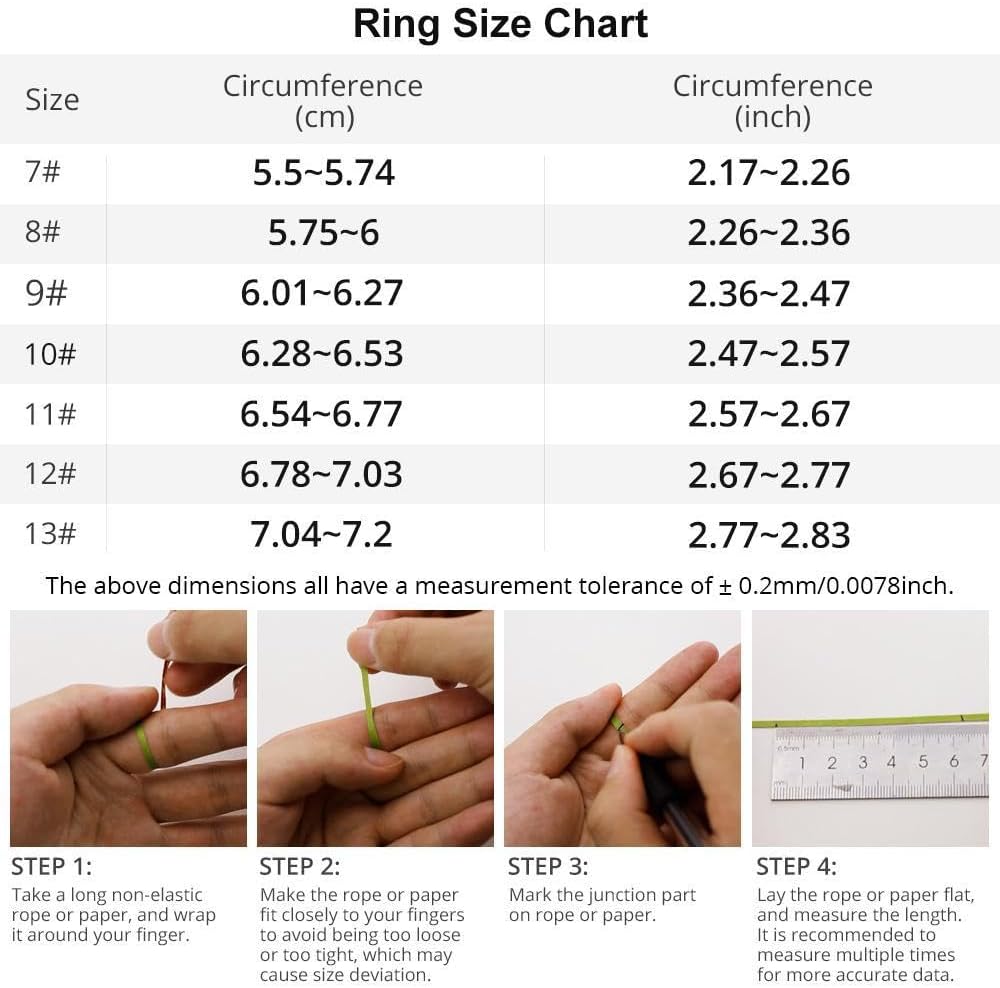
Image: A ring size chart displaying circumference measurements in centimeters and inches, along with a four-step guide on how to measure your finger using a rope or paper.
1.2 การดาวน์โหลดและการจับคู่แอป
To utilize all features of the COLMI R12 Smart Ring, download the companion application, typically referred to as the "Q Ring" app, from your smartphone's app store (compatible with Android and iOS). Follow the in-app instructions to pair your smart ring with your mobile device via Bluetooth.

ภาพ: คู่มือภาพประกอบที่แสดงขั้นตอนทั้งสี่ในการติดตั้ง COLMI R12 Smart Ring รวมถึงขั้นตอนการซื้อasing a sizing kit, selecting the ring, downloading the 'Q Ring' app, and pairing the device.
2. คู่มือการใช้งาน
2.1 Multi-functional Display
The COLMI R12 Smart Ring features a touch-sensitive display that allows you to quickly check essential information without needing your phone or watch. You can view the current time, daily steps, and battery level directly on the ring.

Image: The COLMI R12 Smart Ring displaying various metrics such as steps, power, and time on its integrated screen.
2.2 การตรวจติดตามสุขภาพ
The smart ring supports continuous health monitoring through its integrated sensors. Data is recorded and can be viewอธิบายรายละเอียดเพิ่มเติมได้ในแอปพลิเคชันที่ใช้งานร่วมกัน
- อัตราการเต้นของหัวใจ: Monitors your heart rate throughout the day. You can manually check your heart rate at any time via the app.
- ออกซิเจนในเลือด: วัดระดับความอิ่มตัวของออกซิเจนในเลือดของคุณ
- การติดตามการนอนหลับ: Analyzes your sleep patterns, including awake time, light sleep, and deep sleep duration, to help you understand and improve your sleep quality.

Image: Visual representations of health data, including heart rate trends, sleep stages (wake up, REM, light, deep sleep), and blood oxygen levels, as displayed in the companion app.

Image: A screenshot of the app's heart rate monitoring feature, showing real-time heart rate data and historical trends.

Image: The sleep monitoring screen within the app, displaying total awake time, light sleep duration, and deep sleep duration.
โหมดกีฬา 2.3 โหมด
When connected to the app, the COLMI R12 Smart Ring supports multiple sports modes. It can record various exercise data, including exercise time, steps, distance, and calories burned, providing a comprehensive overview of your physical activity.

Image: The app's activity statistics interface, visualizing daily, weekly, and monthly data for total steps, distance, and calories consumed.
2.4 การควบคุมกล้องจากระยะไกล
When the smart ring is connected to your mobile phone, you can use a hand gesture to remotely control your phone's camera, allowing you to capture photos conveniently.

Image: A person demonstrating the smart fingertip control feature, using the ring to remotely trigger a smartphone camera.
3. การบำรุงรักษา
3.1 การชาร์จ
The COLMI R12 Smart Ring is equipped with wireless charging capabilities. Use the dedicated charging stand and charging cable provided to power your device. Ensure the ring is correctly placed on the stand for efficient charging.

Image: The COLMI R12 Smart Ring placed on its dedicated wireless charging stand, indicating the charging process.
3.2 ความต้านทานต่อน้ำ
The COLMI R12 Smart Ring features 1ATM water resistance. While it can withstand splashes and brief exposure to water, it is not recommended to expose the product to water for extended periods or during activities like swimming or showering. If the device comes into contact with water, dry it immediately.
4 การแก้ไขปัญหา
- อายุการใช้งานแบตเตอรี่สั้น: If the ring's battery drains quickly (e.g., within one day), ensure it is fully charged using the provided charging stand. Minimize continuous background app usage if not needed.
- Inaccurate Readings or Malfunctions: If the ring provides inconsistent data or stops functioning correctly after a period, try restarting the device by placing it on the charger. Ensure the app is updated to the latest version. If issues persist, contact customer support.
- ปัญหาการเชื่อมต่อ: Ensure Bluetooth is enabled on your smartphone and the ring is within range. Try unpairing and re-pairing the device if connection problems occur.
5. ข้อมูลจำเพาะ
| คุณสมบัติ | รายละเอียด |
|---|---|
| หมายเลขรุ่น | คอลมี่ อาร์12 |
| น้ำหนักสินค้า | 100 กรัม (3.53 ออนซ์) |
| ความจุของแบตเตอรี่ | 18 มิลลิวินาทีamp ชั่วโมง |
| ประเภทแบตเตอรี่ | Lithium Polymer (Nonstandard Battery) |
| เทคโนโลยีการเชื่อมต่อ | บลูทูธ |
| มาตรฐานการสื่อสารไร้สาย | บลูทูธ |
| ความเข้ากันได้ของระบบปฏิบัติการ | แอนดรอยด์, ไอโอเอส |
| ความจุของหน่วยความจำ | 1MB |
| คุณสมบัติพิเศษ | Control photography, Multiple sports modes, Record exercise data |
| จีพีเอส | ไม่มีจีพีเอส |
| รูปร่าง | กลม |
6. การรับประกันและการสนับสนุน
6.1 ข้อมูลการรับประกัน
The COLMI R12 Smart Ring comes with a manufacturer's warranty. Please refer to the packaging or the official COLMI webเว็บไซต์สำหรับข้อกำหนดและเงื่อนไขการรับประกันโดยเฉพาะ
6.2 การสนับสนุนลูกค้า
For any usage questions, quality problems, or technical assistance, please contact COLMI's professional after-sales service. Contact details can typically be found on the product packaging, the official COLMI webไซต์หรือผ่านผู้ค้าปลีกของคุณ
รายการอุปกรณ์เสริม:
- 1 x COLMI R12 Smart Ring
- 1 x Portable Charging Stand
- 1 x สายชาร์จ
- 1 x คู่มือการใช้งาน