
1. บทนำ
Thank you for choosing the MAXDONE Trail Camera. This manual provides detailed instructions for setting up, operating, and maintaining your camera. Please read this manual thoroughly before use to ensure optimal performance and longevity of your device. This camera is designed for wildlife monitoring, outdoor scouting, and home security applications, featuring 4K video, 64MP photos, solar charging, and app control.
2. เนื้อหาบรรจุภัณฑ์
ตรวจสอบว่ารายการทั้งหมดที่ระบุไว้ด้านล่างนี้รวมอยู่ในแพ็คเกจของคุณ:
- MAXDONE Trail Camera (Model CHD527)
- Detachable Solar Panel
- สายชาร์จแบบ USB Type-C
- สายรัดสำหรับติดตั้ง
- ขาตั้งกล้องแบบมีเกลียว
- การ์ด Micro SD 32GB
- อุปกรณ์สกรู
- คู่มือการใช้งาน (เอกสารนี้)

Image: Contents of the MAXDONE Trail Camera package, including the camera, solar panel, cables, mounting accessories, SD card, and manual.
3. สินค้าหมดview
The MAXDONE Trail Camera is equipped with advanced features for reliable outdoor monitoring:
- ความละเอียดสูง: Captures 4K Ultra HD videos and 64MP still images.
- พลังงานแสงอาทิตย์: Features a detachable solar panel and a 6000mAh rechargeable lithium battery for extended operation.
- การมองเห็นตอนกลางคืน: Infrared technology provides clear footage up to 65 feet in low-light conditions without disturbing wildlife.
- ความเร็วทริกเกอร์ที่รวดเร็ว: Responds to motion in 0.1 seconds.
- การตรวจจับมุมกว้าง: 130° detection angle for comprehensive coverage.
- การควบคุมแอพ: Connects via WiFi and Bluetooth to the 'TrailCamGO' app for remote settings adjustment and footagดาวน์โหลด
- การออกแบบที่ทนทาน: IP66 waterproof rating ensures reliable performance in various weather conditions.

ภาพ: ด้านหน้า view of the MAXDONE Trail Camera with its detachable solar panel, a micro SD card, and a USB-C charging cable, alongside a smartphone displaying the camera's app interface.
4. การตั้งค่า
4.1 การติดตั้งแบตเตอรี่และการ์ด SD
- ชาร์จแบตเตอรี่: The camera is equipped with a 6000mAh rechargeable lithium battery. Before first use, fully charge the camera using the provided USB Type-C cable connected to a power source, or by exposing the solar panel to direct sunlight.
- ใส่การ์ด SD: Open the camera's protective cover. Locate the Micro SD card slot. Insert the included 32GB Micro SD card (or another compatible card up to 256GB, Class 10 or higher recommended) with the gold contacts facing the correct direction until it clicks into place.
- ปิดฝาครอบ: Ensure the protective cover is securely closed to maintain the IP66 waterproof rating.
4.2 การดาวน์โหลดแอปและการเชื่อมต่อครั้งแรก
- ดาวน์โหลดแอพ: ค้นหา 'TrailCamGO' in your smartphone's app store (iOS or Android) and install it.
- เปิดกล้อง: เปิดกล้องโดยใช้สวิตช์เปิด/ปิด
- เชื่อมต่อผ่านแอป: Open the 'TrailCamGO' app. Follow the in-app instructions to connect to your camera via WiFi and Bluetooth. The camera creates its own hotspot for connection. The maximum connection range is 55 feet, with a recommended distance of within 10 feet for stable connection.

Image: A smartphone displaying the 'TrailCamGO' app interface, showing a detection area customization screen with a leopard image, illustrating the camera's app control capabilities.
5. คู่มือการใช้งาน
5.1 การทำงานพื้นฐาน
- เปิด/ปิดเครื่อง: Use the physical power switch on the camera to turn it on or off.
- การเลือกโหมด: The camera supports various shooting modes, configurable via the 'TrailCamGO' app.
5.2 โหมดการถ่ายภาพ
Configure these modes through the 'TrailCamGO' app:
- การตรวจจับการเคลื่อนไหว: Captures photos or videos when motion is detected. Features a 0.1-second trigger speed.
- การจับภาพตามกำหนดเวลา: Takes photos or videos at set intervals, regardless of motion.
- การถ่ายภาพแบบไทม์แลปส์: Captures a series of images over a long period to create a time-lapse video.
- 5-Shot Burst Mode: Captures multiple photos in quick succession when triggered.

Image: Diagram illustrating the three primary shooting modes: Motion Detection (triggered by movement), Timed Capture (scheduled intervals), and Time-Lapse Photography (sequential images over time).
5.3 Customizing Settings via App
The 'TrailCamGO' app allows for comprehensive customization:
- โซนการตรวจจับ: Customize specific areas within the camera's field of view เพื่อลดทริกเกอร์เท็จ
- Video Length & Resolution: Adjust video duration and quality (4K, 2K, 1080P, 720P).
- ความละเอียดภาพ: Select desired photo quality (up to 64MP).
- การบันทึกเสียง: Enable or disable audio capture for videos.
- เวลาamps: Add customizable timestamps to images and videos.
- ความไวในการเคลื่อนไหว: ปรับความไวของเซ็นเซอร์ตรวจจับความเคลื่อนไหว
- เวลาทำการ : ตั้งเวลาเฉพาะสำหรับการเปิดใช้งานกล้อง
5.4 Viewing และดาวน์โหลด Footage
You can access your captured media through three methods:
- Via 'TrailCamGO' App: Connect your phone to the camera's WiFi/Bluetooth hotspot. Browse the gallery and download photos/videos directly to your phone without removing the SD card.
- การเชื่อมต่อ USB: Connect the camera to a computer using the provided USB Type-C cable. The camera will appear as a removable drive, allowing you to transfer files.
- เครื่องอ่านการ์ด SD: Remove the Micro SD card from the camera and insert it into a compatible card reader connected to a computer or other device.

Image: Diagram illustrating three methods for downloading photos and videos from the trail camera: directly to a phone via WiFi/Bluetooth, to a computer via USB cable, or by using an SD card reader.
6. การชาร์จและการจัดการแบตเตอรี่
The MAXDONE Trail Camera is designed for extended operation with its 6000mAh rechargeable lithium battery and versatile charging options:
- การชาร์จพลังงานแสงอาทิตย์: The detachable solar panel efficiently charges the internal battery when exposed to sunlight. Adjust the panel's angle to maximize sun exposure, especially considering seasonal changes.
- การชาร์จ Type-C: Use the provided USB Type-C cable to charge the camera from a wall adapter, power bank, or computer.
- พลังงานแบตเตอรี่: The high-capacity internal battery provides long-term continuous use, reducing the need for frequent battery replacements.
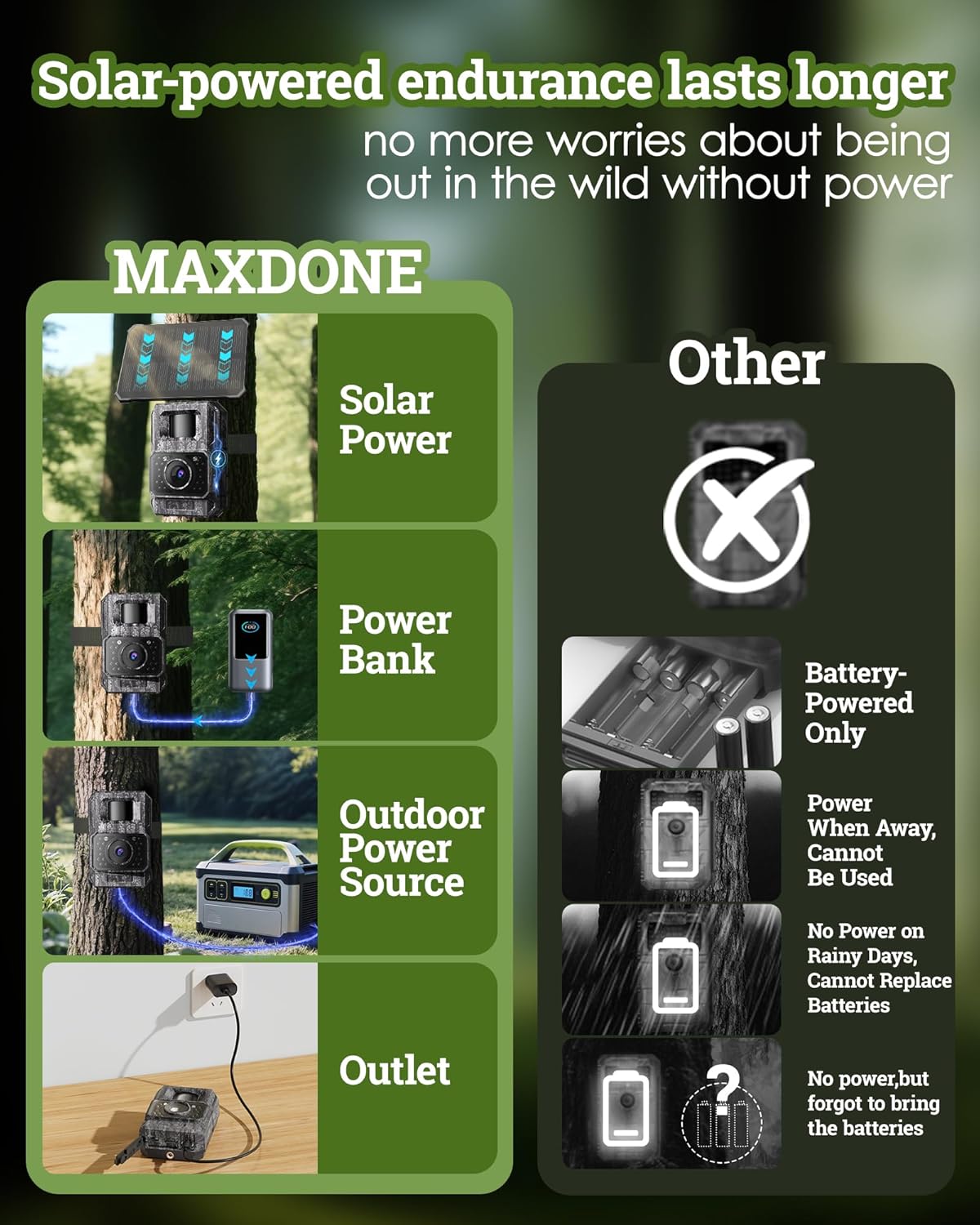
Image: Comparison of MAXDONE's solar-powered endurance with traditional battery-only cameras, showing MAXDONE charging via solar, power bank, outdoor power source, and outlet.
7. การติดตั้ง
Proper mounting ensures optimal camera performance and solar charging efficiency.
- เลือกสถานที่: เลือกสถานที่ที่มองเห็นได้ชัดเจน view of the desired monitoring area and allows the solar panel to receive ampได้รับแสงแดดโดยตรงตลอดทั้งวัน
- ติดกล้อง: Use the included mounting strap to secure the camera to a tree or post. Alternatively, use the threaded tripod for flexible positioning.
- ปรับแผงโซล่าเซลล์: The solar panel is detachable and adjustable. Position it to face the sun directly, minimizing any potential blockage from foliage or structures.
- การครอบคลุมการทดสอบ: After mounting, use the 'TrailCamGO' app to check the camera's field of view and adjust detection zones as needed.

Image: The MAXDONE Trail Camera mounted on a tree with its adjustable solar panel positioned to receive sufficient sunlight. Examples show mounting on eaves, trees, and walls, emphasizing sun exposure.
8. การบำรุงรักษา
Regular maintenance helps ensure the longevity and optimal performance of your trail camera.
- Clean Lens and Solar Panel: Periodically wipe the camera lens and solar panel with a soft, clean cloth to remove dirt, dust, or debris that could affect image quality or charging efficiency.
- ตรวจสอบซีล: Ensure all rubber seals and the protective cover are properly closed and free from damage to maintain the IP66 waterproof rating.
- ตรวจสอบแบตเตอรี่: Check the battery level regularly via the app, especially during periods of low sunlight or high activity.
- การจัดการการ์ด SD: Format the SD card periodically to prevent data corruption and ensure sufficient storage space. Back up important footage ก่อนการจัดรูปแบบ

Image: The MAXDONE Trail Camera mounted on a tree in a rainy environment, highlighting its IP66 waterproof rating and silicone plug for port protection. The image also indicates an available temperature range of -4°F to 140°F.
9 การแก้ไขปัญหา
If you encounter issues with your MAXDONE Trail Camera, refer to the following common problems and solutions:
| ปัญหา | สาเหตุที่เป็นไปได้ | สารละลาย |
|---|---|---|
| กล้องไม่เปิดเครื่อง | แบตเตอรี่อ่อน; ติดตั้งแบตเตอรี่ไม่ถูกต้อง | Charge the battery fully; ensure battery is correctly inserted. |
| คุณภาพรูปภาพ/วิดีโอไม่ดี | Dirty lens; low light conditions; incorrect settings | Clean the lens; adjust camera placement for better light; check app settings for resolution. |
| ปัญหาการเชื่อมต่อแอพ | Too far from camera; camera WiFi/Bluetooth off; app not updated | Move closer to the camera (within 10ft recommended); ensure camera is on; update 'TrailCamGO' app. |
| ไม่มีการตรวจจับการเคลื่อนไหว | PIR sensor blocked; sensitivity too low; detection zone not set | Clear sensor area; increase motion sensitivity in app; configure detection zones. |
| ข้อผิดพลาดการ์ด SD | การ์ดเต็ม; การ์ดเสียหาย; การ์ดไม่เข้ากัน | Format SD card (backup data first); try a different compatible SD card. |
If the problem persists, please contact MAXDONE customer support for further assistance.
10. ข้อมูลจำเพาะ
Detailed technical specifications for the MAXDONE Trail Camera Model CHD527:
| คุณสมบัติ | ข้อมูลจำเพาะ |
|---|---|
| ชื่อรุ่น | 527CHDXNUMX |
| สูงสุด Webความละเอียดของภาพลูกเบี้ยว | 64 MP |
| ความละเอียดในการจับภาพวิดีโอ | 4K |
| รูปแบบการจับภาพวิดีโอ | MP4 (การเข้ารหัส H.264) |
| เทคโนโลยีการเชื่อมต่อ | ไวไฟ, บลูทูธ |
| วิธีการควบคุม | App (TrailCamGO) |
| แหล่งพลังงาน | Battery Powered (6000mAh rechargeable lithium battery), Solar Charging, Type-C Charging |
| ขนาดหน่วยความจำแฟลชที่รองรับสูงสุด | 256 GB (32GB included) |
| การให้คะแนนการคุ้มครองระหว่างประเทศ | IP66 (กันน้ำ) |
| เทคโนโลยีแสงน้อย | Night Color (Infrared Night Vision up to 65FT) |
| ประเภทการแจ้งเตือน | เปิดใช้งานการเคลื่อนไหว |
| ความเร็วในการเรียก | 0.1 วินาที |
| มุมกว้าง | 130° |
| ขนาดสินค้า กว้าง x ยาว x สูง | 3.94 x 1.7 x 2.64 นิ้ว |
| น้ำหนักสินค้า | 1.12 ปอนด์ |
| ช่วงอุณหภูมิในการทำงาน | -4°F ถึง 140°F |
11. การรับประกันและการสนับสนุน
The MAXDONE Trail Camera Model CHD527 comes with a รับประกันจำกัด 1 ปี นับจากวันที่ซื้อ การรับประกันนี้ครอบคลุมข้อบกพร่องในการผลิตและฝีมือการผลิตภายใต้การใช้งานปกติ
For warranty claims, technical support, or any questions regarding your product, please contact MAXDONE customer service through the retailer's platform or visit the official MAXDONE website for contact information. Please have your purchase receipt and product model number (CHD527) ready when contacting support.