
การแนะนำ
Thank you for choosing the Fisher Pro Active Noise Cancelling Headphones. This manual provides essential information for setting up, operating, and maintaining your headphones. Please read it thoroughly to ensure optimal performance and longevity of your device.
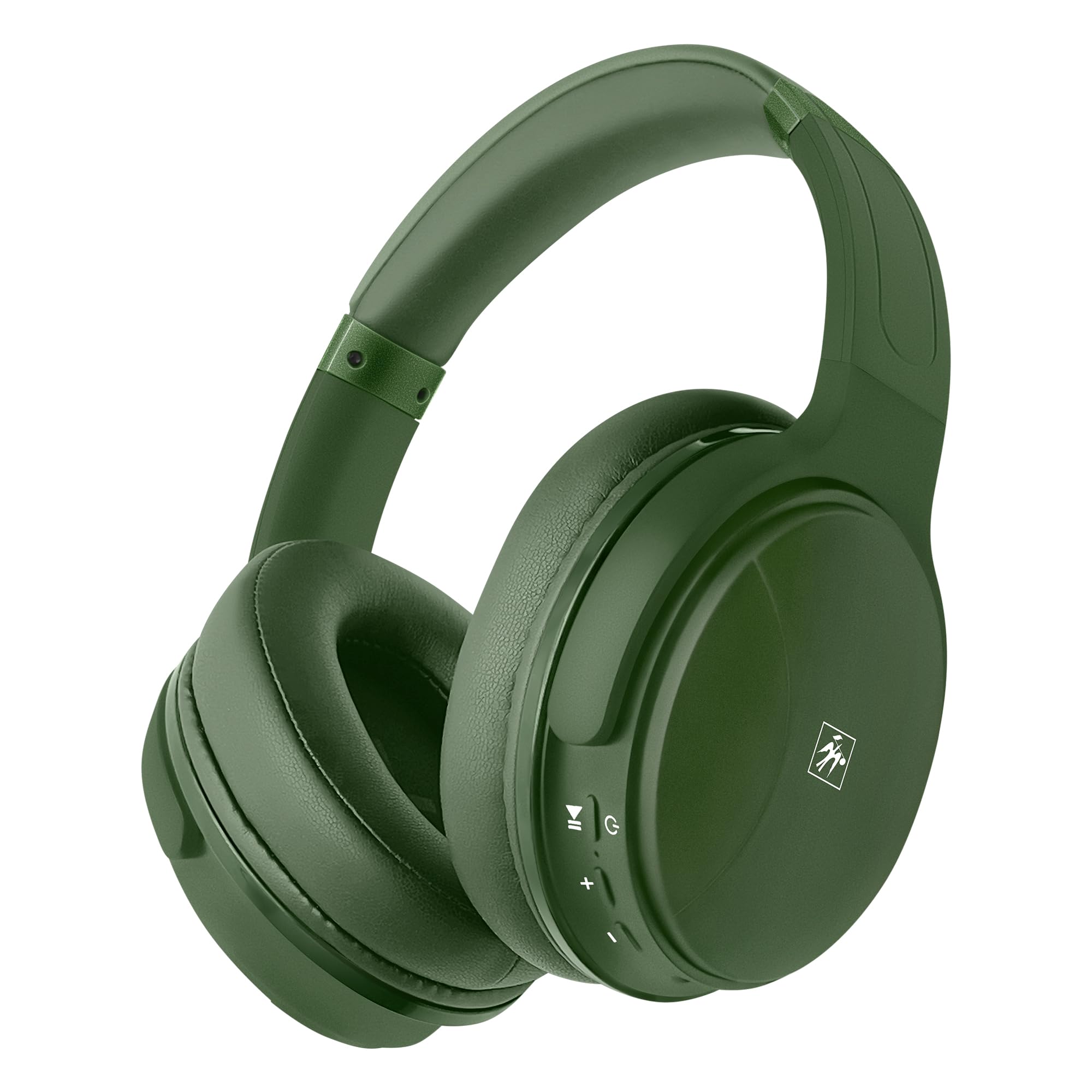
ภาพ: ด้านหน้า view of the Fisher Pro Active Noise Cancelling Headphones in dark green.
เนื้อหาแพ็คเกจ
ตรวจสอบให้แน่ใจว่ามีรายการทั้งหมดอยู่ในบรรจุภัณฑ์:
- Fisher Pro Active Noise Cancelling Headphones
- สายชาร์จ USB-C
- 3.5mm Stereo AUX Cable
- คู่มือการใช้งาน (เอกสารนี้)
- บัตรรับประกัน
การควบคุมและคุณสมบัติ
Familiarize yourself with the headphone controls and key features:

Image: Right earcup showing control buttons for power, volume, and ANC.
- ปุ่มเปิด/ปิด: กดค้างไว้เพื่อเปิด/ปิด
- เพิ่มระดับเสียง/เพลงถัดไป: กดสั้นเพื่อเพิ่มระดับเสียง กดยาวเพื่อเล่นเพลงถัดไป
- ลดระดับเสียง/เพลงก่อนหน้า: กดสั้นเพื่อลดระดับเสียง กดยาวเพื่อเล่นเพลงก่อนหน้า
- ปุ่มมัลติฟังก์ชัน (MFB): เล่น/หยุดเพลง รับ/วางสาย เปิดใช้งานผู้ช่วยเสียง
- ปุ่ม ANC: สลับเปิด/ปิดระบบตัดเสียงรบกวนแบบแอคทีฟ
- พอร์ต USB-C: สำหรับการชาร์จหูฟัง
- แจ็คเสียงขนาด 3.5 มม.: สำหรับการเชื่อมต่อแบบมีสาย
- ไมโครโฟน: สำหรับการโทรแบบแฮนด์ฟรี

ภาพ: เหนือview of headphone features including Active Noise Cancellation, 16-hour battery life, voice assistant support, premium sound, device compatibility, foldable design, adjustable headband, easy-access buttons, hands-free microphone, and comfort cushions.
การตั้งค่า
1. การชาร์จหูฟัง
ก่อนใช้งานครั้งแรก โปรดชาร์จหูฟังให้เต็มก่อน
- Connect the provided USB-C charging cable to the headphone's USB-C port.
- เชื่อมต่อปลายสายอีกด้านหนึ่งเข้ากับแหล่งพลังงาน USB (เช่น อะแดปเตอร์ติดผนัง พอร์ต USB ของคอมพิวเตอร์)
- ไฟ LED จะแสดงสถานะการชาร์จ (เช่น สีแดงเมื่อกำลังชาร์จ สีน้ำเงินเมื่อชาร์จเต็มแล้ว)
A full charge provides up to 16 hours of playback. Quick charging is supported.

Image: Visual representation of the 16-hour battery life feature.
2. เปิด/ปิดเครื่อง
- การเปิดเครื่อง: กดปุ่มเปิด/ปิดค้างไว้ประมาณ 3 วินาที จนกว่าไฟ LED จะกะพริบเป็นสีน้ำเงิน
- วิธีปิดเครื่อง: กดปุ่มเปิด/ปิดค้างไว้ประมาณ 3 วินาที จนกระทั่งไฟแสดงสถานะ LED ดับลง
3. การจับคู่บลูทู ธ
Pair your headphones with a Bluetooth-enabled device:
- ตรวจสอบให้แน่ใจว่าหูฟังปิดอยู่
- กดปุ่มเปิด/ปิดค้างไว้ 5-7 วินาที จนกว่าไฟ LED จะกะพริบสลับสีแดงและสีน้ำเงิน ซึ่งแสดงว่าเข้าสู่โหมดจับคู่แล้ว
- บนอุปกรณ์ของคุณ (สมาร์ทโฟน แล็ปท็อป แท็บเล็ต) เปิดใช้งานบลูทูธและค้นหาอุปกรณ์ที่ใช้งานได้
- Select "Fisher Pro" from the list of devices.
- เมื่อเชื่อมต่อแล้ว ไฟ LED จะกะพริบเป็นสีน้ำเงินช้าๆ
หูฟังจะพยายามเชื่อมต่อกับอุปกรณ์ที่จับคู่ไว้ครั้งสุดท้ายโดยอัตโนมัติเมื่อเปิดเครื่อง

Image: Illustration showing the headphones' compatibility with various devices via Bluetooth 5.3.
4. การเชื่อมต่อแบบมีสาย (โหมด AUX)
Use the included 3.5mm AUX cable for a wired connection:
- Plug one end of the 3.5mm AUX cable into the headphone's audio jack.
- Plug the other end into your audio source's 3.5mm audio output.
- The headphones will automatically switch to AUX mode. Bluetooth functionality is disabled in this mode.
คำแนะนำการใช้งาน
1. ระบบตัดเสียงรบกวนแบบแอคทีฟ (ANC)
The Fisher Pro headphones feature Active Noise Cancellation to reduce ambient sounds.
- วิธีเปิด/ปิดระบบตัดเสียงรบกวน (ANC): Press the dedicated ANC button. The LED indicator for ANC will illuminate when active.

Image: Diagram illustrating how Active Noise Cancellation works by generating anti-phase sound waves to cancel ambient noise.
2. การเล่นเพลง
- เล่น/หยุดชั่วคราว: กด MFB หนึ่งครั้ง
- เพลงถัดไป: กดปุ่มเพิ่มระดับเสียงค้างไว้
- แทร็กก่อนหน้า: กดปุ่มลดระดับเสียงค้างไว้
- ปรับระดับเสียงขึ้น: กดปุ่มเพิ่มระดับเสียงสั้นๆ
- ลดเสียงลง: กดปุ่มลดระดับเสียงสั้นๆ
3. การจัดการการโทร
- รับ/วางสาย: กด MFB หนึ่งครั้ง
- ปฏิเสธสาย: กดปุ่ม MFB ค้างไว้ 2 วินาที
- โทรซ้ำหมายเลขล่าสุด: กด MFB สองครั้ง

Image: Icon indicating the presence of a hands-free microphone for calls.
4. ผู้ช่วยเสียง
เปิดใช้งานผู้ช่วยเสียงของอุปกรณ์ของคุณ (Siri, Google Assistant ฯลฯ):
- เปิดใช้งาน Voice Assistant: Triple-press the MFB.
การซ่อมบำรุง
เพื่อให้หูฟังของคุณมีอายุการใช้งานยาวนานและมีประสิทธิภาพสูงสุด โปรดปฏิบัติตามคำแนะนำในการบำรุงรักษาดังต่อไปนี้:
- การทำความสะอาด: ใช้ผ้านุ่มและแห้งเช็ดทำความสะอาดหูฟัง ห้ามใช้น้ำยาทำความสะอาดหรือสารละลายที่มีฤทธิ์กัดกร่อน
- พื้นที่จัดเก็บ: เมื่อไม่ใช้งาน ให้เก็บหูฟังไว้ในที่แห้งและเย็น หลีกเลี่ยงแสงแดดโดยตรงและอุณหภูมิที่สูงหรือต่ำเกินไป ดีไซน์แบบพับได้ช่วยให้จัดเก็บได้อย่างกะทัดรัด
- หลีกเลี่ยงความชื้น: อย่าให้หูฟังโดนน้ำหรือความชื้นมากเกินไป
- จัดการด้วยความระมัดระวัง: หลีกเลี่ยงการทำหูฟังตกหรือได้รับแรงกระแทกรุนแรง

Image: Detail of the earcup, showing the comfortable memory foam cushions and foldable design for easy storage.
การแก้ไขปัญหา
หากคุณพบปัญหาเกี่ยวกับหูฟังของคุณ โปรดดูวิธีแก้ไขทั่วไปต่อไปนี้:
| ปัญหา | วิธีแก้ปัญหาที่เป็นไปได้ |
|---|---|
| หูฟังไม่สามารถเปิดเครื่องได้ | ตรวจสอบให้แน่ใจว่าหูฟังชาร์จเต็มแล้ว เชื่อมต่อกับแหล่งจ่ายไฟโดยใช้สาย USB-C |
| ไม่สามารถจับคู่ผ่านบลูทูธได้ | Ensure headphones are in pairing mode (flashing red/blue). Turn off and on Bluetooth on your device. Move closer to the device. |
| ไม่มีเสียงหรือเสียงเบา | Check volume levels on both headphones and connected device. Ensure headphones are properly paired or AUX cable is fully inserted. |
| ANC ไม่ทำงานอย่างมีประสิทธิภาพ | Ensure ANC is activated via the ANC button. Adjust headphone fit to ensure a good seal around your ears. |
| ไมโครโฟนไม่ทำงาน | Ensure headphones are connected via Bluetooth (microphone functionality is not available in AUX mode). Check device settings for microphone input. |
ข้อมูลจำเพาะ
| คุณสมบัติ | รายละเอียด |
|---|---|
| ชื่อรุ่น | SBHP550ADG |
| เทคโนโลยีการเชื่อมต่อ | ไร้สาย (บลูทูธ 5.3), แบบมีสาย (ช่องต่อ AUX 3.5 มม.) |
| เวอร์ชันบลูทูธ | 5.3 |
| การควบคุมเสียงรบกวน | การตัดเสียงรบกวนแบบแอคทีฟ (ANC) |
| ประเภทไดร์เวอร์เสียง | ไดร์เวอร์แบบไดนามิก ขนาด 40 มม. |
| การตอบสนองความถี่ | 15เฮิรตซ์ – 20กิโลเฮิรตซ์ |
| อิมพีแดนซ์ | 32 โอห์ม |
| อายุการใช้งานแบตเตอรี่ | นานถึง 16 ชั่วโมง |
| พอร์ตชาร์จ | ยูเอสบี-ซี |
| ไมโครโฟน | ในตัวสำหรับการโทรแบบแฮนด์ฟรี |
| วิธีการควบคุม | สัมผัส/ปุ่ม |
| รูปทรงของหูฟัง | ครอบหู |
| ขนาด | 8.1 x 7.5 x 3.15 นิ้ว |
| น้ำหนักสินค้า | 6.6 ออนซ์ |
| วัสดุ | พลาสติก |

ภาพ: รายละเอียด view of the 40mm Hi-Res Audio driver, responsible for clear and immersive sound.
การรับประกันและการสนับสนุน
ข้อมูลการรับประกัน
Your Fisher Pro Active Noise Cancelling Headphones come with a limited warranty. Please refer to the included Warranty Card for detailed terms and conditions, including coverage period and how to make a claim.
การสนับสนุนลูกค้า
For technical assistance, troubleshooting beyond this manual, or warranty inquiries, please contact Fisher customer support. Contact details can be found on the Warranty Card or the official Fisher webเว็บไซต์.