
bemi KIX-M
bemi Smartwatch Fitness Tracker User Manual
Model: KIX-M (B0FCYD6VV2)
การแนะนำ
This manual provides detailed instructions for the setup, operation, and maintenance of your bemi Smartwatch Fitness Tracker. Please read this manual thoroughly before using the device to ensure proper functionality and to maximize your user experience.
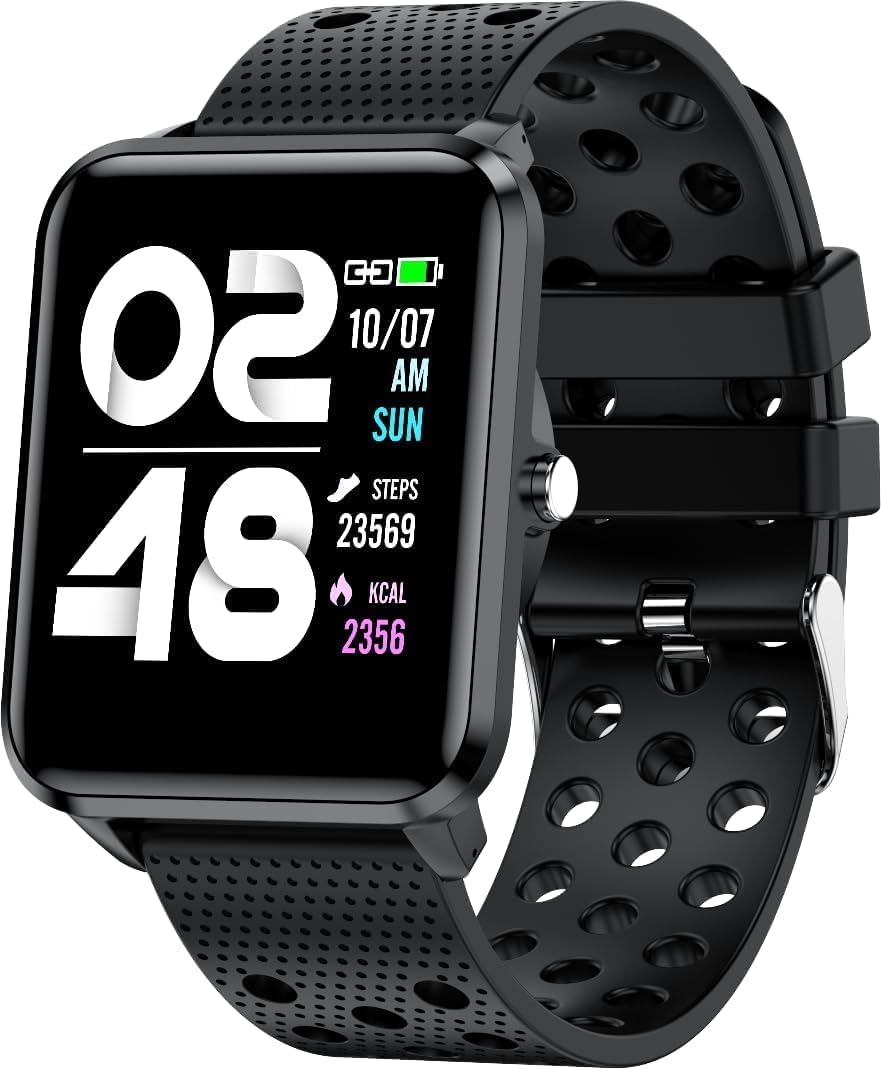
ภาพ: ด้านหน้า view of the bemi Smartwatch, showing the digital display with time, date, steps, and calories burned. The watch has a black perforated silicone band.
มีอะไรอยู่ในกล่อง
- Kix-m Smartwatch
- USB Cable (Charging Cable)
- คู่มือการใช้งาน
- กล่องของขวัญ
การตั้งค่า
1. การชาร์จสมาร์ทวอทช์
Before first use, fully charge your smartwatch. Connect the provided USB charging cable to the magnetic charging points on the back of the watch and to a USB power source. The watch display will indicate charging status.

ภาพ: ด้านหลัง view of the bemi Smartwatch, highlighting the magnetic charging contacts and the optical heart rate sensor.
2. การติดตั้งแอปพลิเคชัน Companion
The smartwatch operates with the "H Band" application. Download the app from the App Store (for iOS devices) or Google Play Store (for Android devices).
- ค้นหา "H Band" in your device's app store.
- ดาวน์โหลดและติดตั้งแอปพลิเคชัน
- ตรวจสอบให้แน่ใจว่าได้เปิดใช้งานบลูทูธของสมาร์ทโฟนของคุณแล้ว
3. Pairing the Smartwatch with Your Phone
- เปิดแอป "H Band" บนสมาร์ทโฟนของคุณ
- ทำตามคำแนะนำบนหน้าจอเพื่อสร้างบัญชีหรือเข้าสู่ระบบ
- เข้าไปที่ส่วนการจับคู่อุปกรณ์ภายในแอป
- Select your bemi Smartwatch from the list of available devices. The app will guide you through the pairing process.
- หากระบบแจ้งให้ยืนยันการจับคู่ โปรดยืนยันคำขอจับคู่ทั้งบนโทรศัพท์และสมาร์ทวอทช์ของคุณ
Note: The smartwatch is compatible with Android (4.4 or newer) and iOS (8.0 or newer) operating systems.
คำแนะนำการใช้งาน
การนำทางพื้นฐาน
- หน้าจอสัมผัส: ปัดไปทางซ้าย/ขวา และขึ้น/ลง เพื่อเลื่อนดูเมนูและฟีเจอร์ต่างๆ แตะเพื่อเลือก
- ปุ่มด้านข้าง: Press to wake the screen, return to the home screen, or confirm selections.
คุณสมบัติและฟังก์ชั่นหลัก
หน้าปัดนาฬิกาที่ปรับแต่งได้
Choose from 24 clock faces available in the "H Band" application. You can also set a photo from your phone as the watch face.

Image: The smartwatch screen showing different digital and analog watch face designs, indicating customization options available through the app.
การติดตามกิจกรรม
The smartwatch monitors your steps, distance, and calories burned. All activity data is recorded and can be viewed in the "H Band" app.

Image: A person running outdoors with the bemi Smartwatch visible on their wrist, showing the step tracking interface with current steps, distance, and calories.
การตรวจวัดอัตราการเต้นของหัวใจและออกซิเจนในเลือด
The watch provides 24-hour monitoring of pulse and blood oxygen levels. View ข้อมูลแบบเรียลไทม์บนนาฬิกา หรือข้อมูลประวัติโดยละเอียดในแอป

Image: A close-up of the smartwatch screen showing heart rate (BPM) and blood pressure (mmHg) readings with a graph of historical data.
การตรวจสอบการนอนหลับ
Track your sleep patterns, including deep sleep, light sleep, and awake times. The app provides detailed analysis of your sleep quality.

Image: The "H Band" app interface displaying sleep quality data, including total sleep duration, deep sleep, light sleep, and awake times, with a corresponding graph.
การเล่นเพลง
The KIX-M features a built-in audio player with 512MB of internal memory. You can store music directly on the watch and connect Bluetooth headphones or speakers for wireless listening.

Image: The bemi Smartwatch showing its music player interface with play/pause and skip controls, alongside a pair of wireless earbuds, demonstrating its audio capabilities.
การแจ้งเตือน
Receive notifications for calls, messages, and various applications directly on your smartwatch. Configure notification settings within the "H Band" app.

Image: The smartwatch screen showing an incoming message notification, with icons for various social media and communication apps like SMS, Twitter, WeChat, Skype, YouTube, Facebook, Google+, Instagแรม และ LinkedIn
คุณสมบัติอัจฉริยะอื่น ๆ
- โหมดสปอร์ต 10 โหมด: Track specific workouts like running, cycling, and more.
- การแจ้งเตือนการเคลื่อนไหว: Get alerts to move if you've been sedentary for too long.
- Special Mode for Women: Track menstrual cycles and ovulation.
- การควบคุมกล้อง: ควบคุมกล้องโทรศัพท์ของคุณจากระยะไกล
- เตือน: ตั้งนาฬิกาปลุกได้โดยตรงจากนาฬิกาหรือแอปพลิเคชัน
- นาฬิกาจับเวลา: ฟังก์ชันการบอกเวลาพื้นฐาน
- ค้นหาหมายเลขโทรศัพท์: ค้นหาสมาร์ทโฟนที่เชื่อมต่ออยู่กับคุณ
- GPS Position Tracking: Requires carrying your phone with you for GPS data.

Image: The "H Band" app interface displaying the female health tracking calendar, allowing users to log menstrual periods and predict ovulation.
การซ่อมบำรุง
การทำความสะอาดสมาร์ทวอทช์ของคุณ
Regularly clean your smartwatch and band to prevent skin irritation and maintain device performance.
- เช็ดหน้าจอและตัวเรือนนาฬิกาด้วยผ้าที่ไม่เป็นขุยและนุ่ม
- สำหรับคราบฝังแน่น dampชุบผ้าให้เปียกหมาดๆ หลีกเลี่ยงการใช้สารเคมีรุนแรงหรือวัสดุที่มีฤทธิ์กัดกร่อน
- ควรทำความสะอาดจุดเชื่อมต่อการชาร์จเป็นระยะ เพื่อให้แน่ใจว่ามีการเชื่อมต่อที่ดี
ความต้านทานต่อน้ำ (IP68)
The smartwatch is IP68 waterproof, meaning it is resistant to dust and can withstand immersion in water up to 1.5 meters for up to 30 minutes. It is suitable for daily use, hand washing, and light rain. Avoid hot water, steam, or prolonged immersion in water, especially saltwater.

Image: The bemi Smartwatch with water splashing over its screen and band, illustrating its IP68 water resistance rating.
การดูแลแบตเตอรี่
- ชาร์จแบตเตอรี่ให้เต็มก่อนใช้งานครั้งแรก
- หลีกเลี่ยงการระบายแบตเตอรี่จนหมดบ่อยครั้ง
- ควรเก็บอุปกรณ์ไว้ในที่แห้งและเย็นหากไม่ได้ใช้งานเป็นเวลานาน
การแก้ไขปัญหา
| ปัญหา | สาเหตุที่เป็นไปได้ | สารละลาย |
|---|---|---|
| นาฬิกาเปิดไม่ติด | แบตเตอรี่ต่ำ | ชาร์จนาฬิกาเป็นเวลาอย่างน้อย 30 นาที |
| ไม่สามารถจับคู่กับโทรศัพท์ได้ | Bluetooth off, app not open, watch not discoverable, phone OS not compatible | Ensure Bluetooth is on. Open "H Band" app. Restart watch and phone. Check OS compatibility (Android 4.4+/iOS 8.0+). |
| Inaccurate health data (HR, SpO2) | Improper fit, sensor obstruction, movement during measurement | Ensure watch is snug but comfortable on wrist. Clean sensor. Remain still during measurement. |
| ไม่ได้รับการแจ้งเตือน | App permissions, notification settings, Bluetooth disconnected | Check app permissions for notifications. Verify notification settings in "H Band" app. Ensure watch is connected via Bluetooth. |
| หน้าจอไม่ตอบสนอง | Software glitch, low battery | Restart the watch (if possible). Charge the watch. |
ข้อมูลจำเพาะ
| คุณสมบัติ | รายละเอียด |
|---|---|
| แบบอย่าง | KIX-M |
| ขนาดหน้าจอ | 1.5 นิ้ว |
| ประเภทจอภาพ | หน้าจอสัมผัส |
| ความต้านทานต่อน้ำ | IP68 |
| การเชื่อมต่อ | Bluetooth (Dual Bluetooth module) |
| หน่วยความจำภายใน | 512 MB (for music storage) |
| ความจุของแบตเตอรี่ | 200 มิลลิวินาทีamp ชั่วโมง (มิลลิแอมป์) |
| ระบบปฏิบัติการ | ROTS |
| ระบบปฏิบัติการที่รองรับ | แอนดรอยด์ 4.4+ / iOS 8.0+ |
| เซ็นเซอร์ | เครื่องวัดอัตราการเต้นของหัวใจ, เซ็นเซอร์วัดระดับออกซิเจนในเลือด, เครื่องวัดความเร่ง |
| คุณสมบัติ | Activity Tracker, Sleep Tracking, Pedometer, Calorie Tracker, Music Player, Notifications, Gesture Control, 10 Sport Modes, Female Health Tracking, Camera Control, Alarm, Stopwatch, Timer, Find Phone, GPS via Smartphone |
| น้ำหนักสินค้า | 4.4 ออนซ์ |
| ขนาด | 5.35 x 2.64 x 2.44 นิ้ว (ขนาดบรรจุภัณฑ์) |
การรับประกันและการสนับสนุน
For warranty information and technical support, please refer to the contact details provided with your purchase or visit the official bemi webไซต์ เก็บหลักฐานการซื้อของคุณไว้เพื่อใช้ในกรณีเรียกร้องการรับประกัน
Note: The manufacturer is Minrek.
Ask a question about this manual
Ask about setup, troubleshooting, compatibility, parts, safety, or missing instructions. Manuals+ will review the question and use this page’s manual context to help answer it.