
1. บทนำ
This manual provides essential instructions for setting up, operating, maintaining, and troubleshooting your HONOR 400 5G smartphone. Please read this guide thoroughly to ensure proper use and to maximize the performance of your device.
The HONOR 400 is a powerful 5G smartphone featuring a 6.55-inch AMOLED display, a Qualcomm Snapdragon 7 Gen 3 processor, 12GB of RAM, and 512GB of internal storage. It operates on Android 15 and is equipped with a 5300mAh battery, a 200MP main camera, and dual-SIM capabilities.
2. อะไรอยู่ในกล่อง
Upon unboxing your HONOR 400 smartphone, verify that all items are present:
- สมาร์ทโฟน HONOR 400 5G
- สาย USB
- (Other accessories such as a charger, SIM ejector tool, or protective case may vary by region and package contents.)
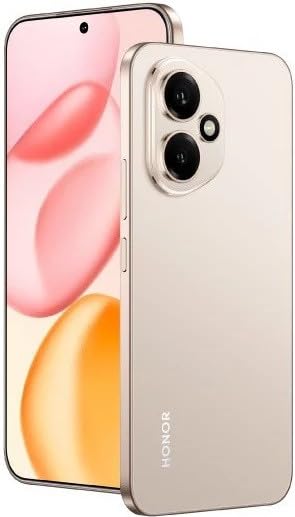
รูปที่ 2.1: The HONOR 400 5G Smartphone. This image displays the device's sleek design and the main screen.
3. อุปกรณ์โอเวอร์view
ทำความคุ้นเคยกับส่วนประกอบทางกายภาพของสมาร์ทโฟน HONOR 400 ของคุณ
3.1 ด้านหน้า View
- แสดง: 6.55-inch AMOLED screen with 1264 x 2736 pixels resolution.
- กล้องหน้า: กล้อง 50 MP, รูรับแสง f/2.0 (มุมกว้าง) สำหรับถ่ายเซลฟี่และวิดีโอคอล
- หูฟัง: ตั้งอยู่บริเวณขอบด้านบนของจอแสดงผล
An illustration of the front view would typically show the display, front camera, and earpiece.
3.2 ด้านหลัง View
- ระบบกล้องหลัก:
- 200 MP, f/1.9 (wide), 1/1.4", PDAF, OIS
- 12 MP, f/2.2, 112° (ultrawide), AF
- แฟลช: แฟลช LED สำหรับถ่ายภาพในที่แสงน้อย
- HONOR Logo: การระบุแบรนด์
An illustration of the rear view would typically highlight the camera module and brand logo.
3.3 ด้านข้าง Viewสและพอร์ต
- ปุ่มเปิด/ปิด: โดยทั่วไปจะอยู่ทางด้านขวา ใช้สำหรับเปิด/ปิด และปลุก/พักเครื่อง
- ปุ่มปรับระดับเสียง: Typically on the right side, above the power button, for adjusting volume.
- พอร์ต USB Type-C: อยู่ด้านล่าง ใช้สำหรับชาร์จไฟและถ่ายโอนข้อมูล
- ถาดใส่ซิมการ์ด: Location varies, typically on the side or bottom, for inserting Nano-SIM cards.
- Microphones & Speakers: Strategically placed for calls and audio output.
Illustrations of the device's sides would show the placement of buttons, ports, and the SIM tray.
4. การตั้งค่า
4.1 การใส่ซิมการ์ด
- ค้นหาถาดซิมการ์ดบนอุปกรณ์ของคุณ
- ใส่เครื่องมือถอดซิม (ถ้ามีให้) เข้าไปในรูเล็ก ๆ ข้างถาดแล้วกดเบา ๆ จนกว่าถาดจะดีดออกมา
- Place your Nano-SIM card(s) into the designated slots on the tray. The HONOR 400 supports Dual-SIM (Nano-SIM + ESIM OR Nano-SIM + Nano-SIM). Ensure the gold contacts face downwards.
- ใส่ถาดกลับเข้าไปในโทรศัพท์อย่างระมัดระวัง
An image demonstrating SIM card insertion would be helpful here.
สำคัญ: ก่อนการซื้อasing, verify network compatibility with your service provider. This device supports GSM networks (2G, 3G, 4G LTE, and 5G SA/NSA) but does not support CDMA networks.
4.2 ตัวช่วยเปิดเครื่องและการตั้งค่าเบื้องต้น
- กดปุ่มเปิด/ปิดค้างไว้จนกว่าโลโก้ HONOR จะปรากฏขึ้น
- ทำตามคำแนะนำบนหน้าจอเพื่อทำการตั้งค่าเริ่มต้นให้เสร็จสมบูรณ์ ซึ่งรวมถึงการเลือกภาษา การเชื่อมต่อ Wi-Fi การตั้งค่าบัญชี Google และการกำหนดค่าคุณสมบัติความปลอดภัย
5. การใช้งานอุปกรณ์ของคุณ
ระบบปฏิบัติการ Android 15 5.1
Your HONOR 400 runs on Android 15, offering a user-friendly interface and access to a vast ecosystem of applications via the Google Play Store. Navigate using gestures or on-screen buttons, customize your home screen, and manage notifications.
5.2 ฟังก์ชั่นพื้นฐาน
- โทรออก: แตะไอคอนโทรศัพท์ ป้อนหมายเลข และแตะปุ่มโทร
- การส่งข้อความ: Use the Messaging app to send SMS/MMS.
- ท่องอินเทอร์เน็ต: เปิด web browser (e.g., Chrome) to access the internet via Wi-Fi or mobile data.
- การจัดการแอพ: Download, install, and uninstall apps from the Google Play Store.
5.3 การใช้งานกล้อง
The HONOR 400 features a versatile camera system:
- กล้องหลัง: Utilize the 200 MP main sensor for high-resolution photos and the 12 MP ultrawide lens for expansive shots. Features include PDAF and Optical Image Stabilization (OIS).
- กล้องหน้า: The 50 MP wide-angle front camera is ideal for selfies and video conferencing.
- การบันทึกวิดีโอ: Capture videos in up to 4K resolution at various frame rates (30, 60, 120 fps).
A diagram of the camera interface or tips for photography modes could be included here.
5.4 การเชื่อมต่อ
อุปกรณ์ของคุณรองรับตัวเลือกการเชื่อมต่อหลายแบบ:
- 5G/4G LTE: การเชื่อมต่อข้อมูลมือถือความเร็วสูง
- ไวไฟ : เชื่อมต่อกับเครือข่ายไร้สายเพื่อการเข้าถึงอินเทอร์เน็ต
- บลูทูธ: จับคู่กับหูฟังไร้สาย ลำโพง และอุปกรณ์อื่นๆ
- USB Type-C: For charging and connecting to a computer for data transfer.
6. การบำรุงรักษา
6.1 การดูแลแบตเตอรี่
- The HONOR 400 is equipped with a 5300mAh non-removable battery.
- เพื่อยืดอายุการใช้งานแบตเตอรี่ ควรหลีกเลี่ยงอุณหภูมิที่สูงหรือต่ำเกินไป และไม่ควรปล่อยให้แบตเตอรี่หมดจนเกลี้ยงบ่อยๆ
- Use the provided USB cable and a compatible charger for optimal charging.
6.2 การอัปเดตซอฟต์แวร์
Regularly check for and install software updates to ensure your device has the latest features, security patches, and performance improvements. You can usually find this option in your phone's Settings menu under "System & updates" or "About phone."
6.3 การทำความสะอาดอุปกรณ์ของคุณ
ใช้ผ้านุ่มไม่เป็นขุยทำความสะอาดหน้าจอและตัวเครื่องโทรศัพท์ หลีกเลี่ยงการใช้สารเคมีรุนแรงหรือวัสดุที่มีฤทธิ์กัดกร่อน
7 การแก้ไขปัญหา
This section addresses common issues you might encounter with your HONOR 400 smartphone.
7.1 อุปกรณ์ไม่เปิดเครื่อง
- ตรวจสอบให้แน่ใจว่าแบตเตอรี่ชาร์จเต็มแล้ว เสียบโทรศัพท์เข้ากับที่ชาร์จอย่างน้อย 15 นาที ก่อนที่จะลองเปิดเครื่องอีกครั้ง
- Try a forced restart by holding the Power button for an extended period (e.g., 10-15 seconds).
7.2 ปัญหาการเชื่อมต่อเครือข่าย
- ตรวจสอบว่าคุณได้ใส่ซิมการ์ดอย่างถูกต้องหรือไม่
- ตรวจสอบให้แน่ใจว่าได้เปิดใช้งานข้อมูลมือถือในการตั้งค่าโทรศัพท์ของคุณแล้ว
- รีสตาร์ทอุปกรณ์ของคุณ
- Confirm with your service provider that your plan is active and there are no network outagอยู่ในพื้นที่ของคุณ
- Ensure your device is compatible with your network's frequencies (GSM only, no CDMA).
7.3 แอปขัดข้องหรือหยุดทำงาน
- ปิดและเปิดแอปใหม่อีกครั้ง
- ล้างแคชและข้อมูลของแอปใน การตั้งค่า > แอป
- ตรวจสอบให้แน่ใจว่าแอปได้รับการอัปเดตเป็นเวอร์ชันล่าสุด
- รีสตาร์ทโทรศัพท์ของคุณ
7.4 ประสิทธิภาพช้า
- ปิดแอปพื้นหลังที่ไม่จำเป็น
- ล้างแคชและชั่วคราว files.
- Ensure you have sufficient free storage space (512GB internal storage).
- รีสตาร์ทอุปกรณ์ของคุณเป็นประจำ
8. ข้อมูลจำเพาะ
| คุณสมบัติ | รายละเอียด |
|---|---|
| ชื่อรุ่น | ออเนอร์ 400 |
| ระบบปฏิบัติการ | แอนดรอยด์ 15.0 |
| โปรเซสเซอร์ | Qualcomm SM7550-AB Snapdragon 7 Gen 3 (4 นาโนเมตร) Octa-core (1x2.63 GHz Cortex-A715 & 3x2.4 GHz Cortex-A715 & 4x1.8 GHz Cortex-A510) |
| แรม | 12GB |
| การจัดเก็บข้อมูลภายใน | 512 GB (ไม่สามารถขยายได้) |
| แสดง | 6.55 Inches AMOLED, 1B colors, 1264 x 2736 pixels |
| กล้องหลัง | 200 MP (wide, OIS) + 12 MP (ultrawide) |
| กล้องหน้า | 50 MP (กว้าง) |
| ความละเอียดในการจับภาพวิดีโอ | 4K (30, 60, 120 fps) |
| ความจุของแบตเตอรี่ | 5300 มิลลิวินาทีamp Hours (non-removable) |
| ซิมการ์ด | Dual-SIM (Nano-SIM + ESIM หรือ Nano-SIM + Nano-SIM) |
| การเชื่อมต่อ | 5G, GSM, LTE, Wi-Fi, Bluetooth, USB Type-C |
| ขนาด | 156.5 x 74.6 x 7.3 มม. (6.16 x 2.94 x 0.29 นิ้ว) |
| น้ำหนัก | 202 กรัม (6.49 ออนซ์) |
| สี | Desert Gold (as per product listing, actual color may vary by variant) |
9. การรับประกันและการสนับสนุน
9.1 การรับประกันของผู้ผลิต
The HONOR 400 smartphone comes with a การรับประกันจากผู้ผลิต 1 ปีการรับประกันนี้ครอบคลุมข้อบกพร่องด้านวัสดุและฝีมือการผลิตภายใต้การใช้งานปกติ โปรดเก็บหลักฐานการซื้อไว้เพื่อขอรับสิทธิ์การรับประกัน
For specific terms and conditions of the warranty, please refer to the warranty card included with your product or visit the official HONOR support webเว็บไซต์.
9.2 การสนับสนุนลูกค้า
For further assistance, technical support, or service inquiries, please contact HONOR customer support through their official webไซต์หรือข้อมูลการติดต่อที่ให้ไว้ในบรรจุภัณฑ์ผลิตภัณฑ์ของคุณ
You can typically find support resources, FAQs, and contact details on the official HONOR webเว็บไซต์: www.hihonor.com