
การแนะนำ
This manual provides essential information for setting up, operating, maintaining, and troubleshooting your NIMO 15.6-inch FHD Gaming Laptop, model Nimo N153. Please read this manual thoroughly before using your device to ensure proper function and longevity.

Image: The NIMO 15.6-inch FHD Gaming Laptop, showcasing การออกแบบที่เพรียวบาง
มีอะไรอยู่ในกล่อง
เมื่อแกะกล่อง โปรดตรวจสอบว่ามีสิ่งของครบถ้วนตามรายการด้านล่าง:
- แล็ปท็อป Nimo N153 จำนวน 1 เครื่อง
- 1 x ที่ชาร์จเร็ว Type-C 100W PD
- 1 x คู่มือผู้ใช้ (เอกสารนี้)
- ระบบปฏิบัติการ Windows 11 Home (ติดตั้งมาแล้ว)
- ข้อมูลการรับประกันและการคืนสินค้า
การตั้งค่า
1. การเปิดเครื่องครั้งแรกและการชาร์จ
Before first use, connect the laptop to the power adapter and a wall outlet. The Type-C 100W PD Fast Charger is designed for efficient charging. Allow the battery to charge sufficiently before disconnecting.

Image: The compact Type-C 100W PD Fast Charger included with the laptop.
2. Operating System Setup (Windows 11)
Upon first boot, follow the on-screen instructions to complete the Windows 11 Home setup. This includes selecting your region, language, connecting to a Wi-Fi network, and creating a user account.
3. การตั้งค่าเครื่องอ่านลายนิ้วมือ
For enhanced security, set up the integrated fingerprint reader. Navigate to Windows Settings > Accounts > Sign-in options and follow the prompts to register your fingerprint.

Image: Close-up of the laptop's keyboard, highlighting the fingerprint reader and backlit keys.
4. การเชื่อมต่ออุปกรณ์ต่อพ่วง
แล็ปท็อปมีพอร์ตต่างๆ สำหรับเชื่อมต่ออุปกรณ์ภายนอก:
- พอร์ต USB: Connect USB devices such as mice, keyboards, and external storage.
- พอร์ต HDMI: เชื่อมต่อกับจอภาพภายนอกหรือทีวีเพื่อการแสดงผลที่กว้างขึ้น
- พอร์ต Type-C: For data transfer, charging, and connecting compatible Type-C accessories.
- ช่องเสียบการ์ด Micro SD: Insert Micro SD cards for additional storage or data transfer.
- แจ็คหูฟัง: เชื่อมต่อหูฟังหรือลำโพงภายนอก
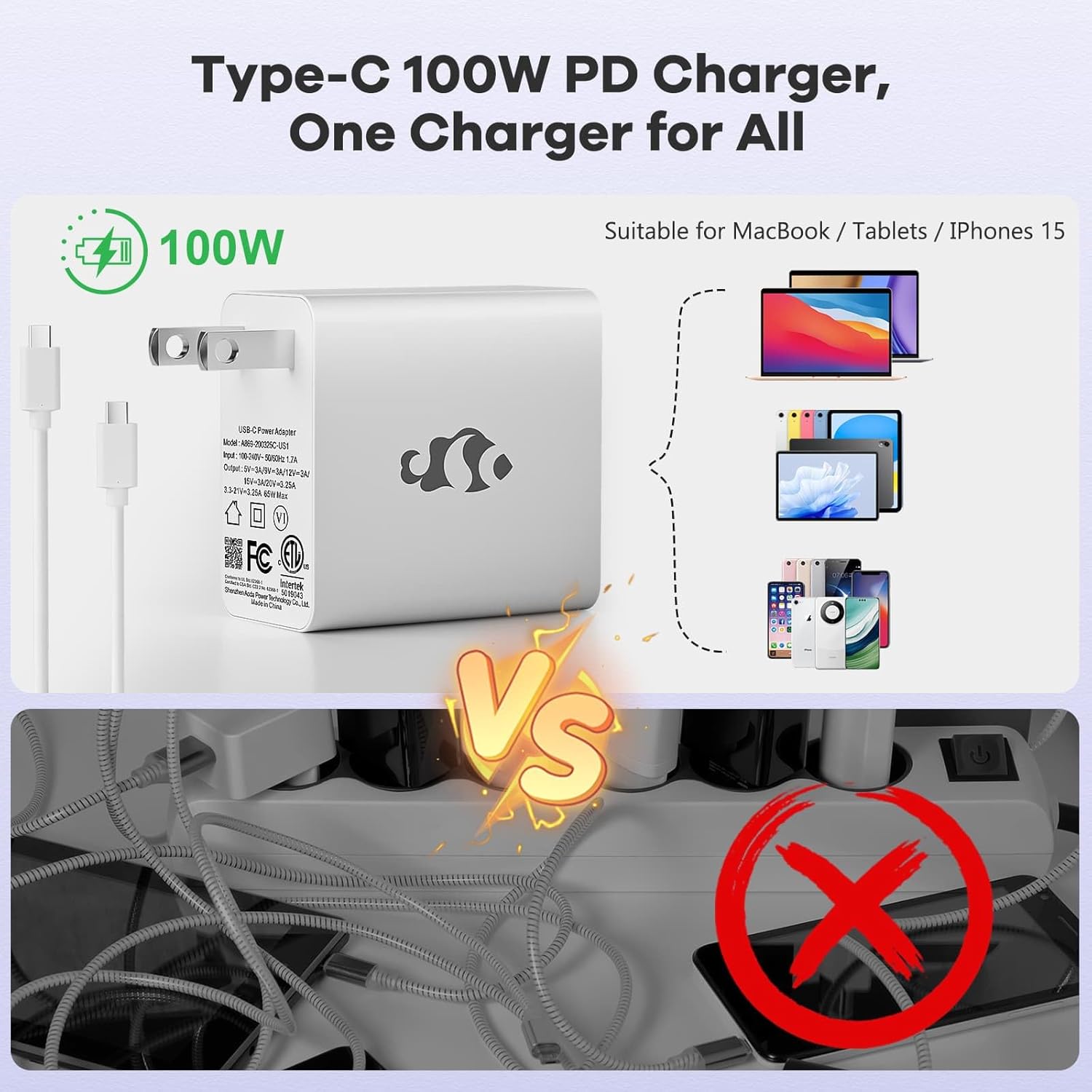
Image: Diagram illustrating the various ports available on the NIMO laptop, including USB, HDMI, Type-C, Micro SD, and headphone jack.
คำแนะนำการใช้งาน
1. การเปิด/ปิดเครื่อง และโหมดพักเครื่อง
- เปิดเครื่อง: กดปุ่มเปิด/ปิดที่อยู่บนแป้นพิมพ์
- หมดแรง: คลิกปุ่มเริ่มใน Windows จากนั้นเลือกเปิด/ปิดเครื่อง > ปิดเครื่อง
- โหมดสลีป: Close the laptop lid or click the Start button, then select Power > Sleep.
2. Keyboard and Touchpad Functions
- แป้นพิมพ์พร้อมไฟแบ็คไลท์: The keyboard features backlighting for use in low-light conditions. Use the dedicated function key (Fn + F key combination, typically) to adjust brightness or toggle it on/off.
- ปุ่มกดตัวเลข: The full-size keyboard includes a numeric keypad for convenient data entry.
- ทัชแพดแบบมัลติทัช: Supports various gestures for navigation and control within Windows. Refer to Windows settings for touchpad gesture customization.
3. การเชื่อมต่อไร้สาย
- ไวไฟ : ในการเชื่อมต่อกับเครือข่ายไร้สาย ให้คลิกไอคอน Wi-Fi ในแถบงาน เลือกเครือข่ายที่ต้องการ และป้อนรหัสผ่านหากจำเป็น
- บลูทูธ: To pair Bluetooth devices, go to Windows Settings > Bluetooth & devices, and follow the instructions to add a new device.
4. Webcam Shield
The laptop is equipped with a physical webcam shield for privacy. Slide the shield to cover or uncover the webกล้องตามต้องการ
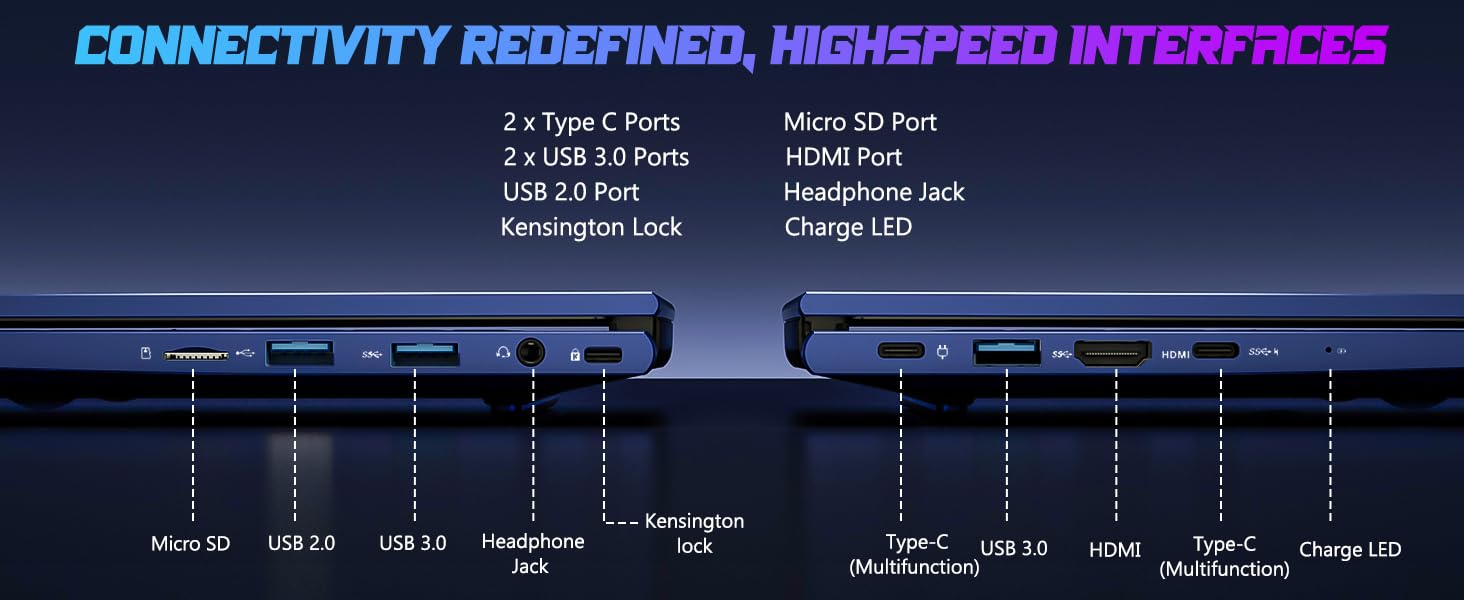
Image: Illustration of the laptop's webcam with a privacy shield feature.
5. คุณสมบัติการแสดงผล
The 15.6-inch FHD IPS anti-glare display (1920x1080 resolution) provides clear visuals. Adjust display settings such as brightness and resolution through Windows Display Settings.

Image: The NIMO laptop displaying a vibrant image on its 15.6-inch FHD IPS screen.
การซ่อมบำรุง
1. การทำความสะอาดแล็ปท็อป
- หน้าจอ: ใช้ผ้านุ่มไม่เป็นขุยค่อยๆ งampล้างออกด้วยน้ำหรือน้ำยาทำความสะอาดหน้าจอ ห้ามฉีดน้ำยาลงบนหน้าจอโดยตรง
- แป้นพิมพ์และตัวเครื่อง: ใช้ผ้านุ่มและแห้ง สำหรับคราบฝังแน่น ให้เช็ดเบาๆamp สามารถใช้ผ้าได้เพื่อให้แน่ใจว่าไม่มีของเหลวเข้าไปในช่องเปิด
- พอร์ต: รักษาพอร์ตให้ปราศจากฝุ่นและเศษขยะ ใช้ลมอัดหากจำเป็น โดยถือกระป๋องให้ตั้งตรง
2. การอัปเดตซอฟต์แวร์
Regularly check for and install Windows updates to ensure system stability, security, and optimal performance. Go to Windows Settings > Windows Update.
3. ความสามารถในการอัปเกรด
The Nimo N153 laptop supports upgradable dual-channel memory and detachable RAM/SSD. If you plan to upgrade components, it is recommended to consult a qualified technician or refer to NIMO's official support resources to avoid voiding your warranty or damaging the device.
การแก้ไขปัญหา
If you encounter issues with your NIMO laptop, try the following basic troubleshooting steps:
- ไม่มีไฟฟ้า: Ensure the charger is securely connected to both the laptop and a working power outlet. Check the charge LED indicator.
- ปัญหาการแสดงผล: If the screen is blank, try connecting an external monitor via HDMI to check if the issue is with the laptop's internal display. Ensure display drivers are up to date.
- ปัญหาการเชื่อมต่อ (Wi-Fi/Bluetooth): Restart the laptop and your router/Bluetooth device. Check Windows network settings to ensure Wi-Fi and Bluetooth are enabled.
- ประสิทธิภาพการทำงานช้า: Close unnecessary applications, check for malware, and ensure sufficient free storage space on the SSD.
- ระบบค้าง: กดปุ่มเปิด/ปิดค้างไว้ 10-15 วินาทีเพื่อบังคับปิดเครื่อง จากนั้นรีสตาร์ทแล็ปท็อป
For more complex issues or if the problem persists, please contact NIMO customer support.
ข้อมูลจำเพาะ
| คุณสมบัติ | รายละเอียด |
|---|---|
| ยี่ห้อ | นีโม |
| ชื่อรุ่น | นิโม N153 |
| ขนาดหน้าจอ | 15.6 นิ้ว |
| ปณิธาน | 1920x1080 Pixels (FHD IPS Anti-glare) |
| รุ่นซีพียู | AMD Ryzen 5 6600H (6 Cores, 12 Threads, up to 4.5 GHz) |
| โคโปรเซสเซอร์กราฟิก | AMD Radeon 660M (Integrated GPU) |
| ขนาดหน่วยความจำ RAM ที่ติดตั้ง | 16GB DDR5 (4800 เมกะเฮิรตซ์) |
| ขนาดฮาร์ดดิสก์ | SSD ขนาด 1 TB (PCIe 4.0) |
| ระบบปฏิบัติการ | วินโดวส์ 11 โฮม |
| คุณสมบัติพิเศษ | Backlit Keyboard, Fingerprint Reader, HD Audio, Numeric Keypad, Webcam Shield |
| เทคโนโลยีการเชื่อมต่อ | Wi-Fi (802.11a/b/g/n/ac), บลูทูธ |
| พอร์ต | 2x Type-C, 2x USB 3.0, 1x USB 2.0, 1x HDMI, 1x Micro SD, 1x Headphone Jack, Kensington Lock |
| อายุการใช้งานแบตเตอรี่ | Up to 5 Hours (Usage), Up to 7 Hours (Standby) |
| ความจุของแบตเตอรี่ | 53.58 วัตต์ชั่วโมง |
| เครื่องชาร์จ | 100W GaN Type-C PD Fast Charger |
| น้ำหนักสินค้า | 3.8 ปอนด์ |
| ขนาด (ยาว x กว้าง x หนา) | 14.07" x 8.98" x 0.76" |
หมายเหตุ: ข้อมูลจำเพาะอาจมีการเปลี่ยนแปลงได้โดยไม่ต้องแจ้งให้ทราบล่วงหน้า
การรับประกันและการสนับสนุน
1. การรับประกันของผู้ผลิต
Your NIMO N153 laptop is covered by a การรับประกันจากผู้ผลิต 2 ปี from Nimo Direct Inc. This warranty covers defects in materials and workmanship under normal use. Please retain your proof of purchase for warranty claims.
2. นโยบายการคืนสินค้า
NIMO offers a นโยบายการคืนสินค้าแบบไม่ยุ่งยากภายใน 90 วัน. If you are not satisfied with your purchase, you may return the product within 90 days of purchase. Refer to your purchase documentation for specific return procedures.
3. การสนับสนุนลูกค้า
For technical assistance, warranty claims, or any product-related inquiries, please contact NIMO customer support:
- อีเมล: service@nimopc.com
- ออนไลน์: เยี่ยมชมเว็บไซต์อย่างเป็นทางการของ NIMO webไซต์สำหรับทรัพยากรการสนับสนุนและตัวเลือกการติดต่อ
ทีมงานฝ่ายสนับสนุนของเราพร้อมให้ความช่วยเหลือคุณ

Image: NIMO customer service representatives ready to assist.