
1. บทนำ
This manual provides comprehensive instructions for the installation, operation, and maintenance of your UNITOPSCI 10.1-inch Android Car Stereo. This unit is specifically designed for Honda Accord 9th Generation 2.0L models manufactured between 2013 and 2017. Please read this manual thoroughly before using the product to ensure proper functionality and safety.
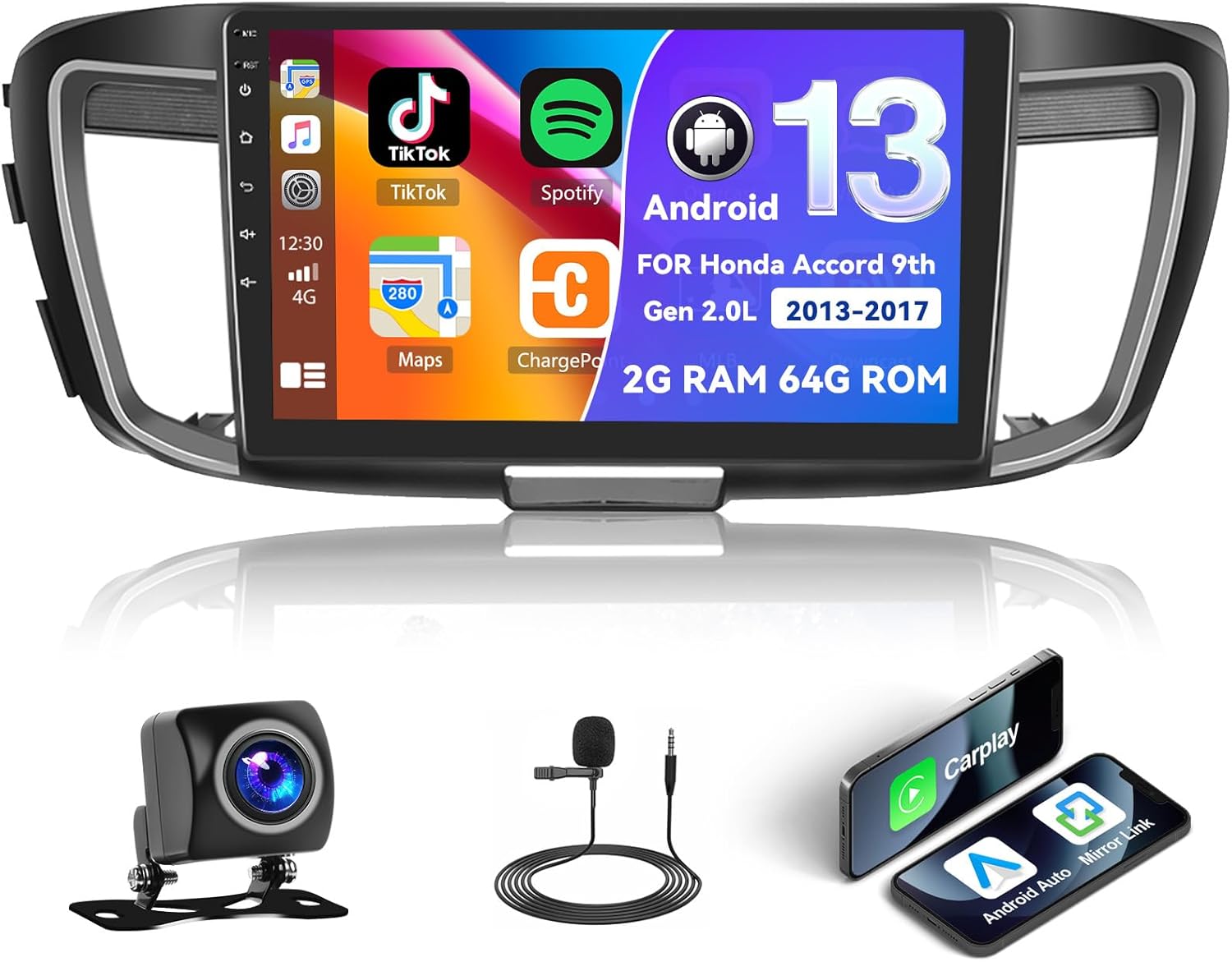
Figure 1.1: UNITOPSCI Android Car Stereo with backup camera, microphone, and smartphone mirroring icons.
2. ข้อมูลด้านความปลอดภัย
- อย่าใช้งานระบบในลักษณะที่ทำให้คุณเสียสมาธิจากการขับขี่อย่างปลอดภัย ให้ความสำคัญกับความปลอดภัยบนท้องถนนเสมอ
- ตรวจสอบให้แน่ใจว่าสายไฟทั้งหมดเชื่อมต่ออย่างถูกต้องเพื่อป้องกันไฟฟ้าลัดวงจรหรือความเสียหาย
- หลีกเลี่ยงการให้เครื่องสัมผัสกับอุณหภูมิที่สูงหรือต่ำเกินไป แสงแดดโดยตรงเป็นเวลานาน หรือความชื้นที่มากเกินไป
- แนะนำให้ติดตั้งโดยช่างผู้เชี่ยวชาญเพื่อให้มั่นใจได้ว่าการเดินสายไฟและการทำงานเป็นไปอย่างถูกต้อง
- ปรับระดับเสียงให้อยู่ในระดับที่ทำให้คุณได้ยินเสียงการจราจรภายนอก
3. สินค้าหมดview
3.1 คุณสมบัติหลัก
- 10.1-inch Touchscreen Display (1024*600 resolution)
- ระบบปฏิบัติการแอนดรอยด์ (RAM 2GB + ROM 64GB)
- Apple CarPlay และ Android Auto แบบไร้สาย/มีสาย
- Dual Mirror Link for Android/iOS phones
- Built-in GPS Navigation with offline map support (HERE WE GO preloaded)
- การเชื่อมต่อ WiFi
- Bluetooth with A2DP/Hands-Free/Phone Book functions
- วิทยุ FM/RDS พร้อมสถานีที่ตั้งค่าล่วงหน้าได้ 18 สถานี
- Backup Camera Input with automatic display switching
- รองรับระบบควบคุมพวงมาลัย (SWC)
- ฟังก์ชั่นแยกหน้าจอ
- Built-in Equalizer System
- Multiple UI Themes (26 options)
3.2 เนื้อหาบรรจุภัณฑ์
- UNITOPSCI Android Car Stereo Unit
- ชุดสายไฟ
- เสาอากาศ GPS
- สาย USB (แบบมีพอร์ต USB สองหัว)
- ไมโครโฟนภายนอก
- กล้องสำรอง
- คู่มือการใช้งาน (เอกสารนี้)
4. การตั้งค่าและการติดตั้ง
4.1 การตรวจสอบความเข้ากันได้
This car stereo is compatible with Honda Accord 9th Generation 2.0L models from 2013 to 2017 (basic version). It is not compatible with high-end versions that include a large OEM screen or navigation system. Please verify your vehicle's center console and compare it with the provided installation frame images to ensure compatibility.

Figure 4.1: Dashboard compatibility for Honda Accord 9th Gen (2013-2017) 2.0L low-end version. Note: Not suitable for models with existing OEM Navi Screen.
4.2 ขั้นตอนการติดตั้ง
- การตระเตรียม: ถอดขั้วแบตเตอรี่รถยนต์ออกเพื่อป้องกันความเสียหายทางไฟฟ้า
- Remove OEM Unit: ถอดวิทยุติดรถยนต์และแผงหน้าปัดออกอย่างระมัดระวัง โปรดดูคำแนะนำโดยละเอียดในคู่มือการซ่อมบำรุงรถยนต์ของคุณ
- การเชื่อมต่อสายไฟ: Connect the provided wiring harness to the car stereo and the vehicle's existing wiring. Ensure all connections are secure. Connect the GPS antenna, external microphone, and backup camera cables.
- ทดสอบฟังก์ชันการทำงาน: Before fully reassembling the dashboard, temporarily connect the battery and power on the unit to test basic functions like power, audio, and display.
- หน่วยรักษาความปลอดภัย: Mount the new car stereo into the dashboard opening and secure it with screws.
- ประกอบกลับเข้าที่: ติดตั้งชิ้นส่วนตกแต่งแผงหน้าปัดทั้งหมดกลับเข้าไปใหม่
- การเชื่อมต่อขั้นสุดท้าย: เชื่อมต่อแบตเตอรี่รถยนต์อีกครั้ง
บันทึก: If your vehicle has an OEM Radio with a Center Navi Screen, additional wiring kits may be required. Contact customer support for assistance.
5. คู่มือการใช้งาน
5.1 เปิด/ปิดเครื่อง
The unit will typically power on automatically when the vehicle's ignition is turned on. To manually power off or restart, press and hold the power button on the unit or use the software controls.
5.2 CarPlay ไร้สายและ Android Auto
This unit supports both wireless and wired Apple CarPlay and Android Auto. Connect your smartphone via Bluetooth/WiFi for wireless functionality or use a USB cable for a wired connection. Once connected, you can access phone calls, navigation, music, and other compatible apps directly from the stereo's touchscreen.

Figure 5.1: Wireless CarPlay, Android Auto, and Mirror Link interfaces.
5.3 ระบบนำทาง GPS
The stereo has built-in GPS and supports both online and offline navigation. The HERE WE GO map application is preloaded. To use offline maps, download the necessary map data via a WiFi connection. For online navigation, ensure the unit is connected to WiFi or a mobile hotspot.

Figure 5.2: GPS Navigation interface and WiFi connection options.
5.4 บลูทูธ และวิทยุ FM/RDS
บลูทูธ: Pair your smartphone via Bluetooth for hands-free calling, music streaming (A2DP), and automatic phone book download. This enhances safety by allowing you to manage calls without holding your phone.
วิทยุ FM/RDS: Access FM radio stations with 18 preset options. The RDS (Radio Data System) feature displays station information where available. Use the tuner to find news, music, and sports broadcasts.

Figure 5.3: FM/RDS Radio, Bluetooth interface, and Equalizer settings.
5.5 การเชื่อมโยงมิเรอร์
The Mirror Link function allows you to display your Android or iOS phone's screen directly onto the 10.1-inch head unit. This can be achieved via a wired or wireless connection, enabling you to view videos or maps from your phone on the larger screen.
5.6 ระบบควบคุมพวงมาลัย (SWC)
The unit supports your vehicle's existing steering wheel controls. This allows you to adjust volume, change tracks, answer calls, and switch modes without taking your hands off the steering wheel, improving driving safety and convenience. The system includes a learning function for SWC configuration.
5.7 อินพุตกล้องสำรอง
When the vehicle is shifted into reverse gear, the stereo automatically displays the view from the connected AHD backup camera on the 10.1-inch screen. This assists with safe parking and maneuvering.

Figure 5.4: Steering Wheel Control interface and backup camera view พร้อมแนวทางปฏิบัติ
5.8 การแบ่งหน้าจอและธีม UI
หน้าจอแยก: The split-screen feature allows you to run two applications side-by-side on the display, for exampเช่น การนำทางอยู่ด้านหนึ่ง และการเล่นเพลงอยู่ด้านอีกด้านหนึ่ง
ธีม UI: The Android radio offers 26 different user interface themes. You can customize the look of your desktop by long-pressing the main interface and selecting your preferred theme.

รูปที่ 5.5: การแบ่งหน้าจอ view และอดีตamples of different UI desktop themes.
6. การบำรุงรักษา
- การทำความสะอาด: ใช้ผ้านุ่มและแห้งเช็ดหน้าจอและตัวเครื่อง หลีกเลี่ยงน้ำยาทำความสะอาดหรือตัวทำละลายที่มีฤทธิ์กัดกร่อน
- การอัปเดตซอฟต์แวร์: Periodically check for available software updates to ensure optimal performance and access to new features.
- อุณหภูมิ: Do not leave the unit in direct sunlight for extended periods, especially in hot weather, as this can affect its lifespan.
7 การแก้ไขปัญหา
| ปัญหา | สาเหตุที่เป็นไปได้ | สารละลาย |
|---|---|---|
| เครื่องไม่เปิด | สายไฟไม่ถูกต้อง ฟิวส์ขาด ปัญหาแบตเตอรี่รถยนต์ | ตรวจสอบการเชื่อมต่อสายไฟ ตรวจสอบฟิวส์รถยนต์ และตรวจสอบให้แน่ใจว่าแบตเตอรี่ชาร์จเต็มแล้ว |
| ไม่มีเสียง | Volume too low, incorrect audio settings, speaker wiring issue | Increase volume, check audio output settings, verify speaker connections. |
| สัญญาณ GPS สูญหายหรือไม่แม่นยำ | GPS antenna obstructed or disconnected, poor satellite coverage | ตรวจสอบให้แน่ใจว่าติดตั้งเสาอากาศ GPS อย่างถูกต้องและมีความชัดเจน view ของท้องฟ้า ตรวจสอบการเชื่อมต่อเสาอากาศ |
| ปัญหาการเชื่อมต่อบลูทูธ | Device not paired, Bluetooth off on phone or stereo | ตรวจสอบให้แน่ใจว่าได้เปิดใช้งานบลูทูธบนอุปกรณ์ทั้งสองแล้ว จากนั้นทำการจับคู่อุปกรณ์อีกครั้ง |
| หน้าจอสัมผัสไม่ตอบสนอง | ข้อผิดพลาดซอฟต์แวร์ชั่วคราว | Restart the unit. If issue persists, perform a factory reset (Factory setting keyword: 000000). |
If you encounter issues not listed here or if troubleshooting steps do not resolve the problem, please contact UNITOPSCI customer support.
8. ข้อมูลจำเพาะ
| คุณสมบัติ | ข้อมูลจำเพาะ |
|---|---|
| ระบบ | แอนดรอยด์ |
| ชิปเซ็ต | 8227L-สาธิต |
| ขนาดหน้าจอ | 10.1 นิ้ว |
| หน่วยความจำ (RAM+ROM) | แรม 2GB + รอม 64GB |
| ความละเอียดหน้าจอ | 1024*600 |
| ชิปวิทยุ | MT6625 |
| กำลังขับ | 4*45วัตต์ |
| อุณหภูมิในการทำงาน | -20℃ ถึง 75℃ (-4°F ถึง 167°F) |
| พลัง Ampชิปลิฟายเออร์ | TDA7388 |
| วงวิทยุ | เอฟเอ็ม/RDS |
| เอาท์พุตวิดีโอ | สนับสนุน |
| ไมโครโฟนภายนอก | สนับสนุน |
| หน้าจอแยก | สนับสนุน |
| แผนที่ | แผนที่ออฟไลน์ในตัว (ต้องใช้อินเทอร์เน็ตในการดาวน์โหลดข้อมูล) |
| ไวไฟ | สนับสนุน |
| ยูเอสบี | อินเทอร์เฟซ USB คู่ |
| รองรับรูปแบบเสียง | APE/FLAC/WAV/MP3/WMA ฯลฯ |
| รองรับรูปแบบวิดีโอ | MKV/RMVB/AVI/MP4/MDV ฯลฯ |
| รองรับรูปแบบภาพ | PNG/JPEG/JPG/GIF/WBMP/BNP ฯลฯ |
| คีย์เวิร์ดการตั้งค่าโรงงาน | 000000 |
| ภาษา | จีน/อังกฤษ/ฝรั่งเศส/อิตาลี/เกาหลี/ญี่ปุ่น/อาหรับ/สเปน/โปรตุเกส/รัสเซีย/ตุรกี/เวียดนาม/ฮิบรู/โปแลนด์/เยอรมัน |
| น้ำหนักสินค้า | 3.08 ปอนด์ |
| ขนาดแพ็คเกจ | 17.13 x 7.8 x 4.06 นิ้ว |
9. การรับประกันและการสนับสนุน
Your UNITOPSCI Android Car Stereo comes with a 12-month warranty. Replacement is available within 24 months for qualifying issues. We offer lifetime after-sales consultation and technical support.
For any inquiries, technical assistance, or warranty claims, please contact us:
- อีเมล: UNITOPSCI@126.com

Figure 9.1: UNITOPSCI Customer Support Contact Information.